Description:
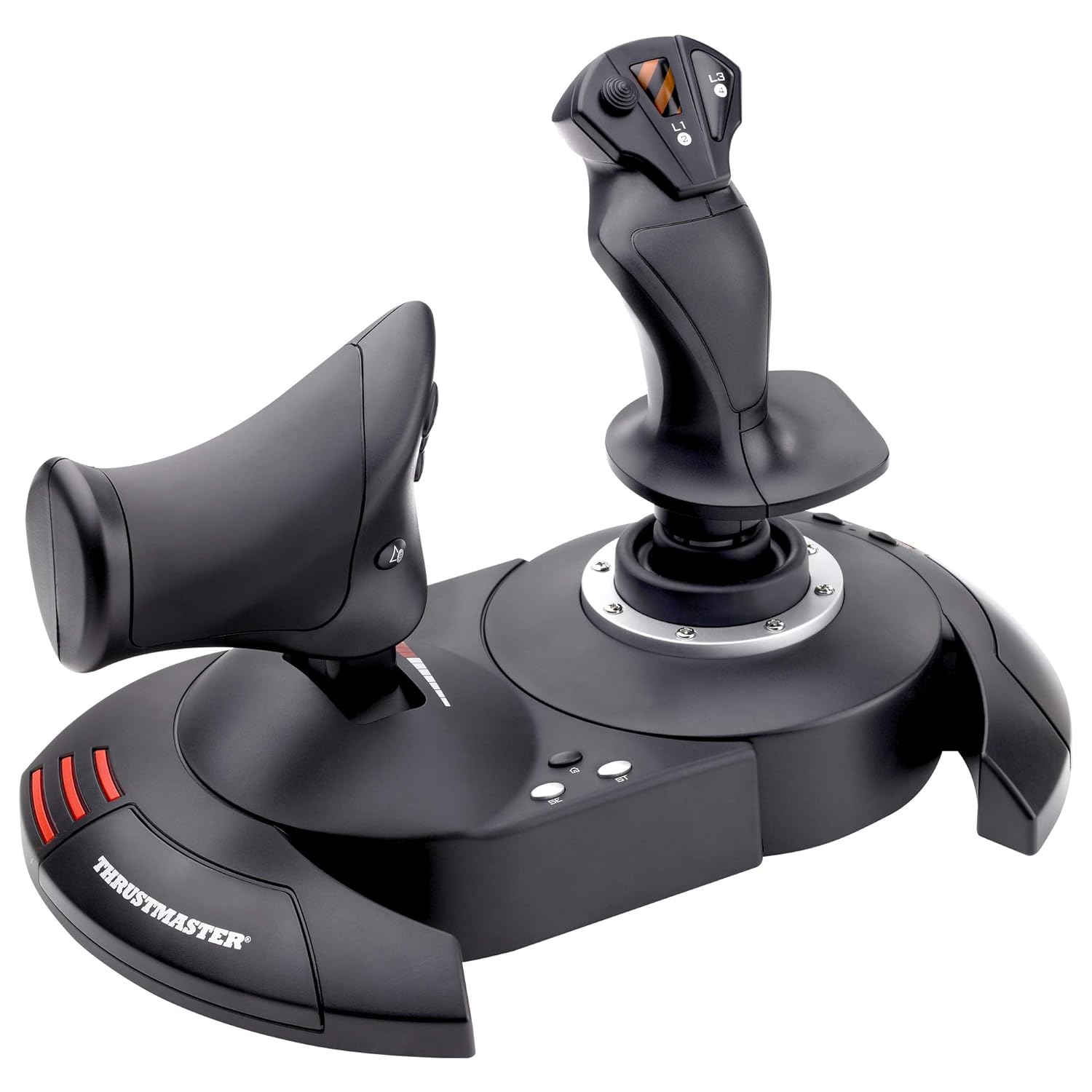
Take full advantage of the HOTAS’ capabilities with the 12 programmable action buttons and 5 axes and the separate throttle.
Reviews:
5.0 out of 5 stars Excellent Joystick, Good Price
My last good joystick, a Logitech WingMan Force Feedback, still works after about 12 years, but it's slowly wearing out. I've looked at several possible replacements and came across this Thrustmaster T.Flight Hotas X. The most helpful review to date is by gump92139 and, along with other reviews, convinced me to try the Thrustmaster. Gump's review has a good description and is well worth reading.I'm very impressed and pleased so far. I have used it in FSX, mostly with the Carenado Cessna 340, but also with DodoSim's Bell Jet Ranger using the helicopter's most difficult and realistic settings. The Thrustmaster provided very stable control, and the DodoSim helicopter is one of the most difficult to fly. The stick has a very solid, positive feel.From the photo, I was concerned about the ergonomics of the throttle – it looked like it might be uncomfortable to use. It might be a bit uncomfortable for some at first, but being able to separate it from the stick by about 18 inches in any direction allows for many different placements, at different levels from the stick, etc. I was surprised at how user friendly and comfortable it is.And regarding user friendliness, as gump92139 described, I simply plugged it into a USB port and ready to go. The manual says to access the control panel to configure and test the joystick, but I didn't need to do that – it was ready to go simply by plugging it in. (I'm using Windows 7, 32 bit.)However, during the first test “flight,” I accessed the settings in FlightSim X and made some changes in the button assignments, as well as adding a few assignments for the unused buttons: flaps, trim, views, etc. It's very easy and quick to do without exiting the simulator.One minor complaint is that buttons 3 and 4 are placed on the stick opposite each other, 4 on the back right towards the operator, and 3 on the front right. I found myself pressing both buttons at the same time with the thumb and index finger. Since the trim wheels in many airplanes are on the pilot's right, I had assigned these buttons on the right for trim up and trim down – not good to press both together, but the placement and right hand grip seems to encourage pressing both buttons at once. Might have to reassign them, or just get used to the placements.All in all, it's a fine HOTAS system at a very reasonable price.
5.0 out of 5 stars Will 100% fill your needs in Elite: Dangerous & other simulators -- **IF you download the community-made profiles**!
first off, let me say that I wasn't sure if a good flight stick setup could be had for anything less than a fortune; look at some of the $400 setups and you'll know what I mean.However, I really miss the 'glory days' of flight / space sims -- they were one of my favorite genres. Especially when it came to PC games, titles like Wing Commander, Tie Fighter, Falcon 3, US Navy Fighters -- those were some wonderful games. I always had a flight stick, and even at one point had a very expensive Thrustmaster F-16 Falcon flight stick that cost well over $100 at the time.Thankfully, with the re-emergence of hard-core flight / space sims like Star Citizen & Elite: Dangerous, it seems like simulators are making a comeback. And while they are playable with an Xbox 360 controller, etc -- it's just not the same...and having a keyboard along for the ride becomes a necessity.Without breaking the bank, I really was wanting to jump back into a control setup that felt more "context genuine", and that also might liberate me from keyboard reliance!Let me say that, yes -- this has completely filled all my needs! In Elite: Dangerous, I no longer need the keyboard at all while playing. I keep it close by just in case, but I haven't needed it at all. This is, however, due to a COMMUNITY MADE CONTROLLER PROFILE for the game. I hate typing in caps, but this is key to this unit receiving all 5 stars, since the default control scheme in Elite: Dangerous doesn't map the buttons in an efficient enough way to cover all the main usages. It's easy to do you -- you just drop it into the folder that is mentioned, and it will show up in the game. Otherwise I do not feel this setup would have had enough buttons to map everything to.I'd type in the site where I downloaded the profile, but I think that Bolo typically takes out the links. Just google the name of this stick + Elite: Dangerous and you will likely run into a forum post really quick mentioning it with a download link and a button reference photo. Basically what it does is assign three button on the throttle to 'modifier' keys (shift, ctrl, etc) to where you hold one down, and all the others buttons perform 'flight-based' operations. Hold down another & it will fulfill all 'combat' based functions, etc. This essentially triples the buttons on the system -- though you do have to get used to using the modifiers. Again, I couldn't be happier with the setup.At the end of the day, this will likely fulfill your needs: it can be used as one or two pieces (I use it as one due to how I am situated), is highly flexible with profiles, and is solidly enough built to feel fully functional. It's not the most robust system out there, but you get an incredible amount of value for the money. If this hadn't fulfilled my hopes, I would have returned it -- but that has never crossed my mind. :)
Gran calidad de joystick a buen precio
Una gran compra de este joystick. Yo lo utilizo para Microsoft Flight Simulator y Xplane 12, ambos en PC, y la verdad es que me ha sorprendido la facilidad de configuración que tiene. El tacto, a la hora de volar, es muy bueno, se puede ajustar la sensibilidad a tu gusto. Otro punto a favor es el poder separar ambos joysticks ya que te facilita el poner en medio el teclado para poder manejar mejor.Recomiendo la compra ya que es uno de lo mas baratos pero muy buena calidad.
Brilliant! and smooth controls
I love it. Smooth faultless operation, comfortable to handle, strong construction and most importantly works exceptionally well. I use it primarily with Flight Sim X Gold edition on Windows 10. Tip for those having problems using FS X on Windows 10 with registration problems is: To over-come the registration problem run FS X in "Administration" mode and registration confirmation is obtained.
ottimo per simulatore e prezzo incredibile
Eccoci qua a descrivere cosa è questo "hotas" di fascia economica della Thrustmaster, almeno per quello che mi è stato possibile provare.Personalmente trovo che sia costruito in modo eccellente, le plastiche, i potenziometri, i comandi e i tasti sono tutti solidi e funzionano in modo perfetto.Non mi sono mai seduto nel cockpit di un caccia ma sinceramente mentre giocavo e utilizzavo questi comandi la sensazione era di estrema reattività, senza momenti morti e altre cose strane o spiacevoli.Non sono un esperto di simulatori e quindi non posso fare paragoni ma se questo funziona così bene, non so davvero cosa possa dare in più un controller che costa 5 volte tanto... ok d'accordo ci sono magari tasti aggiuntivi e altre chicche, ma restando appunto nel discorso "economico" per chi come me non deve fare il brevetto di volo, ma solo giocarci un paio d'ore su qualche simulatore, penso sia davvero un prodotto eccellente.Devo però dare una nota negativa, nel senso che, almeno con Star Citizen, mi trovo ad essere molto più efficacie con mouse e tastiera e non sono riuscito in nessun modo o combinazione ad ottenere quella immediatezza che si ha con il mouse. Certo che nella realtà pilotare un qualsiasi velivolo con mouse e tastiera fa abbastanza da ridere ma siccome questa non è la realtà ci passo sopra...Nota negativa solo ed esclusivamente al mio utilizzo e su un titolo molto particolare, che per altro non riguarda la bontà in se del prodotto. In effetti ho provato ad usarlo semplicemente come se fossero i comandi della nave ed il tutto risulta molto più "realistico" ed immersivo. La barra comanda molto bene e in modo progressivo, rende bene la sensazione di rotazione e permette di correggere con delicatezza. La manetta è ottima anche se forse sarebbe stato meglio metterci una frizione per poter scegliere la resistenza, perchè di base non ne ha proprio infatti è l'unica cosa che stona nell'insieme, ma anche in questo caso forse basta solo un po' d'abitudine..In fine la possibilità di dividere i due pezzi per usarli ad esempio su due bracioli di un sedile è davvero una genialata, viste alcune postazioni da gioco fatte a quel modo sarebbe uno sposalizio perfetto, tenete solo presente che il cavo che li unisce è limitato in lunghezza quindi vi rimarrebbe in mezzo e dovreste pensare a un modo per "uscire" dalla postazione, tutte cose facilmente superabili con un po' di senso pratico e manualità.Quindi tirando le somme: materiali ottimi, elettroniche precise, adattabilità strutturale, possibilità di rimappare tutti i tasti e gli assi e immediatamente riconosciuto da windows (win 10 nel mio caso) senza necessità di driver esterni e ancora procedura semplice per resettare gli assi e i potenziometri ad essi collegati... Secondo me 10 e lode e se li merita tutti (nonostante si possa migliorare, come sempre nella vita) l'unica vera mancanza ad essere pignoli è che nasce destrorso e basta, senza possibilità di adattamento per i mancini. Immagino che non esistano aeroplani con comandi per mancini e credo che questo sia il motivo per il quale queste periferiche non vengono pensate in tal senso.Ma a parte questa osservazione il prodotto merita 5 stelle sia per la qualità e sia per il prezzo abbordabile
A kalite
Çok iyi
facile
super a utiliser
Visit the Thrustmaster Store
Thrustmaster T-Flight Hotas X (Compatible with PC)
AED53004
Quantity:
Order today to get by 7-14 business days
This item qualifies for free delivery
Imported From: United States
At BOLO, we work hard to ensure the products you receive are new, genuine, and sourced from reputable suppliers.
BOLO is not an authorized or official retailer for most brands, nor are we affiliated with manufacturers unless specifically stated on a product page. Instead, we source verified sellers, authorized distributors or directly from the manufacturer.
Each product undergoes thorough inspection and verification at our consolidation and fulfilment centers to ensure it meets our strict authenticity and quality standards before being shipped and delivered to you.
If you ever have concerns regarding the authenticity of a product purchased from us, please contact Bolo Support. We will review your inquiry promptly and, if necessary, provide documentation verifying authenticity or offer a suitable resolution.
Your trust is our top priority, and we are committed to maintaining transparency and integrity in every transaction.
All product information, images, descriptions, and reviews originate from the manufacturer or from trusted sellers overseas. BOLO is not affiliated with, endorsed by, or an authorized retailer for most brands listed on our website unless stated otherwise.
While we strive to display accurate information, variations in packaging, labeling, instructions, or formulation may occasionally occur due to regional differences or supplier updates. For detailed or manufacturer-specific information, please contact the brand directly or reach out to BOLO Support for assistance.
Unless otherwise stated, all prices displayed on the product page include applicable taxes and import duties.
BOLO operates in accordance with the laws and regulations of United Arab Emirates. Any items found to be restricted or prohibited for sale within the UAE will be cancelled prior to shipment. We take proactive measures to ensure that only products permitted for sale in United Arab Emirates are listed on our website.
All items are shipped by air, and any products classified as “Dangerous Goods (DG)” under IATA regulations will be removed from the order and cancelled.
All orders are processed manually, and we make every effort to process them promptly once confirmed. Products cancelled due to the above reasons will be permanently removed from listings across the website.
Similar suggestions by Bolo
More from this brand
Similar items from “Flight Controls”
Share with
Or share with link
https://www.bolo.ae/products/UO001PKLZSF
Visit the Thrustmaster Store
Thrustmaster T-Flight Hotas X (Compatible with PC)

AED53004
Quantity:
Order today to get by 7-14 business days
This item qualifies for free delivery
Imported From: United States
At BOLO, we work hard to ensure the products you receive are new, genuine, and sourced from reputable suppliers.
BOLO is not an authorized or official retailer for most brands, nor are we affiliated with manufacturers unless specifically stated on a product page. Instead, we source verified sellers, authorized distributors or directly from the manufacturer.
Each product undergoes thorough inspection and verification at our consolidation and fulfilment centers to ensure it meets our strict authenticity and quality standards before being shipped and delivered to you.
If you ever have concerns regarding the authenticity of a product purchased from us, please contact Bolo Support. We will review your inquiry promptly and, if necessary, provide documentation verifying authenticity or offer a suitable resolution.
Your trust is our top priority, and we are committed to maintaining transparency and integrity in every transaction.
All product information, images, descriptions, and reviews originate from the manufacturer or from trusted sellers overseas. BOLO is not affiliated with, endorsed by, or an authorized retailer for most brands listed on our website unless stated otherwise.
While we strive to display accurate information, variations in packaging, labeling, instructions, or formulation may occasionally occur due to regional differences or supplier updates. For detailed or manufacturer-specific information, please contact the brand directly or reach out to BOLO Support for assistance.
Unless otherwise stated, all prices displayed on the product page include applicable taxes and import duties.
BOLO operates in accordance with the laws and regulations of United Arab Emirates. Any items found to be restricted or prohibited for sale within the UAE will be cancelled prior to shipment. We take proactive measures to ensure that only products permitted for sale in United Arab Emirates are listed on our website.
All items are shipped by air, and any products classified as “Dangerous Goods (DG)” under IATA regulations will be removed from the order and cancelled.
All orders are processed manually, and we make every effort to process them promptly once confirmed. Products cancelled due to the above reasons will be permanently removed from listings across the website.
Description:
Take full advantage of the HOTAS’ capabilities with the 12 programmable action buttons and 5 axes and the separate throttle.
Reviews:
5.0 out of 5 stars Excellent Joystick, Good Price
My last good joystick, a Logitech WingMan Force Feedback, still works after about 12 years, but it's slowly wearing out. I've looked at several possible replacements and came across this Thrustmaster T.Flight Hotas X. The most helpful review to date is by gump92139 and, along with other reviews, convinced me to try the Thrustmaster. Gump's review has a good description and is well worth reading.I'm very impressed and pleased so far. I have used it in FSX, mostly with the Carenado Cessna 340, but also with DodoSim's Bell Jet Ranger using the helicopter's most difficult and realistic settings. The Thrustmaster provided very stable control, and the DodoSim helicopter is one of the most difficult to fly. The stick has a very solid, positive feel.From the photo, I was concerned about the ergonomics of the throttle – it looked like it might be uncomfortable to use. It might be a bit uncomfortable for some at first, but being able to separate it from the stick by about 18 inches in any direction allows for many different placements, at different levels from the stick, etc. I was surprised at how user friendly and comfortable it is.And regarding user friendliness, as gump92139 described, I simply plugged it into a USB port and ready to go. The manual says to access the control panel to configure and test the joystick, but I didn't need to do that – it was ready to go simply by plugging it in. (I'm using Windows 7, 32 bit.)However, during the first test “flight,” I accessed the settings in FlightSim X and made some changes in the button assignments, as well as adding a few assignments for the unused buttons: flaps, trim, views, etc. It's very easy and quick to do without exiting the simulator.One minor complaint is that buttons 3 and 4 are placed on the stick opposite each other, 4 on the back right towards the operator, and 3 on the front right. I found myself pressing both buttons at the same time with the thumb and index finger. Since the trim wheels in many airplanes are on the pilot's right, I had assigned these buttons on the right for trim up and trim down – not good to press both together, but the placement and right hand grip seems to encourage pressing both buttons at once. Might have to reassign them, or just get used to the placements.All in all, it's a fine HOTAS system at a very reasonable price.
5.0 out of 5 stars Will 100% fill your needs in Elite: Dangerous & other simulators -- **IF you download the community-made profiles**!
first off, let me say that I wasn't sure if a good flight stick setup could be had for anything less than a fortune; look at some of the $400 setups and you'll know what I mean.However, I really miss the 'glory days' of flight / space sims -- they were one of my favorite genres. Especially when it came to PC games, titles like Wing Commander, Tie Fighter, Falcon 3, US Navy Fighters -- those were some wonderful games. I always had a flight stick, and even at one point had a very expensive Thrustmaster F-16 Falcon flight stick that cost well over $100 at the time.Thankfully, with the re-emergence of hard-core flight / space sims like Star Citizen & Elite: Dangerous, it seems like simulators are making a comeback. And while they are playable with an Xbox 360 controller, etc -- it's just not the same...and having a keyboard along for the ride becomes a necessity.Without breaking the bank, I really was wanting to jump back into a control setup that felt more "context genuine", and that also might liberate me from keyboard reliance!Let me say that, yes -- this has completely filled all my needs! In Elite: Dangerous, I no longer need the keyboard at all while playing. I keep it close by just in case, but I haven't needed it at all. This is, however, due to a COMMUNITY MADE CONTROLLER PROFILE for the game. I hate typing in caps, but this is key to this unit receiving all 5 stars, since the default control scheme in Elite: Dangerous doesn't map the buttons in an efficient enough way to cover all the main usages. It's easy to do you -- you just drop it into the folder that is mentioned, and it will show up in the game. Otherwise I do not feel this setup would have had enough buttons to map everything to.I'd type in the site where I downloaded the profile, but I think that Bolo typically takes out the links. Just google the name of this stick + Elite: Dangerous and you will likely run into a forum post really quick mentioning it with a download link and a button reference photo. Basically what it does is assign three button on the throttle to 'modifier' keys (shift, ctrl, etc) to where you hold one down, and all the others buttons perform 'flight-based' operations. Hold down another & it will fulfill all 'combat' based functions, etc. This essentially triples the buttons on the system -- though you do have to get used to using the modifiers. Again, I couldn't be happier with the setup.At the end of the day, this will likely fulfill your needs: it can be used as one or two pieces (I use it as one due to how I am situated), is highly flexible with profiles, and is solidly enough built to feel fully functional. It's not the most robust system out there, but you get an incredible amount of value for the money. If this hadn't fulfilled my hopes, I would have returned it -- but that has never crossed my mind. :)
Gran calidad de joystick a buen precio
Una gran compra de este joystick. Yo lo utilizo para Microsoft Flight Simulator y Xplane 12, ambos en PC, y la verdad es que me ha sorprendido la facilidad de configuración que tiene. El tacto, a la hora de volar, es muy bueno, se puede ajustar la sensibilidad a tu gusto. Otro punto a favor es el poder separar ambos joysticks ya que te facilita el poner en medio el teclado para poder manejar mejor.Recomiendo la compra ya que es uno de lo mas baratos pero muy buena calidad.
Brilliant! and smooth controls
I love it. Smooth faultless operation, comfortable to handle, strong construction and most importantly works exceptionally well. I use it primarily with Flight Sim X Gold edition on Windows 10. Tip for those having problems using FS X on Windows 10 with registration problems is: To over-come the registration problem run FS X in "Administration" mode and registration confirmation is obtained.
ottimo per simulatore e prezzo incredibile
Eccoci qua a descrivere cosa è questo "hotas" di fascia economica della Thrustmaster, almeno per quello che mi è stato possibile provare.Personalmente trovo che sia costruito in modo eccellente, le plastiche, i potenziometri, i comandi e i tasti sono tutti solidi e funzionano in modo perfetto.Non mi sono mai seduto nel cockpit di un caccia ma sinceramente mentre giocavo e utilizzavo questi comandi la sensazione era di estrema reattività, senza momenti morti e altre cose strane o spiacevoli.Non sono un esperto di simulatori e quindi non posso fare paragoni ma se questo funziona così bene, non so davvero cosa possa dare in più un controller che costa 5 volte tanto... ok d'accordo ci sono magari tasti aggiuntivi e altre chicche, ma restando appunto nel discorso "economico" per chi come me non deve fare il brevetto di volo, ma solo giocarci un paio d'ore su qualche simulatore, penso sia davvero un prodotto eccellente.Devo però dare una nota negativa, nel senso che, almeno con Star Citizen, mi trovo ad essere molto più efficacie con mouse e tastiera e non sono riuscito in nessun modo o combinazione ad ottenere quella immediatezza che si ha con il mouse. Certo che nella realtà pilotare un qualsiasi velivolo con mouse e tastiera fa abbastanza da ridere ma siccome questa non è la realtà ci passo sopra...Nota negativa solo ed esclusivamente al mio utilizzo e su un titolo molto particolare, che per altro non riguarda la bontà in se del prodotto. In effetti ho provato ad usarlo semplicemente come se fossero i comandi della nave ed il tutto risulta molto più "realistico" ed immersivo. La barra comanda molto bene e in modo progressivo, rende bene la sensazione di rotazione e permette di correggere con delicatezza. La manetta è ottima anche se forse sarebbe stato meglio metterci una frizione per poter scegliere la resistenza, perchè di base non ne ha proprio infatti è l'unica cosa che stona nell'insieme, ma anche in questo caso forse basta solo un po' d'abitudine..In fine la possibilità di dividere i due pezzi per usarli ad esempio su due bracioli di un sedile è davvero una genialata, viste alcune postazioni da gioco fatte a quel modo sarebbe uno sposalizio perfetto, tenete solo presente che il cavo che li unisce è limitato in lunghezza quindi vi rimarrebbe in mezzo e dovreste pensare a un modo per "uscire" dalla postazione, tutte cose facilmente superabili con un po' di senso pratico e manualità.Quindi tirando le somme: materiali ottimi, elettroniche precise, adattabilità strutturale, possibilità di rimappare tutti i tasti e gli assi e immediatamente riconosciuto da windows (win 10 nel mio caso) senza necessità di driver esterni e ancora procedura semplice per resettare gli assi e i potenziometri ad essi collegati... Secondo me 10 e lode e se li merita tutti (nonostante si possa migliorare, come sempre nella vita) l'unica vera mancanza ad essere pignoli è che nasce destrorso e basta, senza possibilità di adattamento per i mancini. Immagino che non esistano aeroplani con comandi per mancini e credo che questo sia il motivo per il quale queste periferiche non vengono pensate in tal senso.Ma a parte questa osservazione il prodotto merita 5 stelle sia per la qualità e sia per il prezzo abbordabile
A kalite
Çok iyi
facile
super a utiliser
Similar suggestions by Bolo
More from this brand
Similar items from “Flight Controls”
Share with
Or share with link
https://www.bolo.ae/products/UO001PKLZSF