Description:
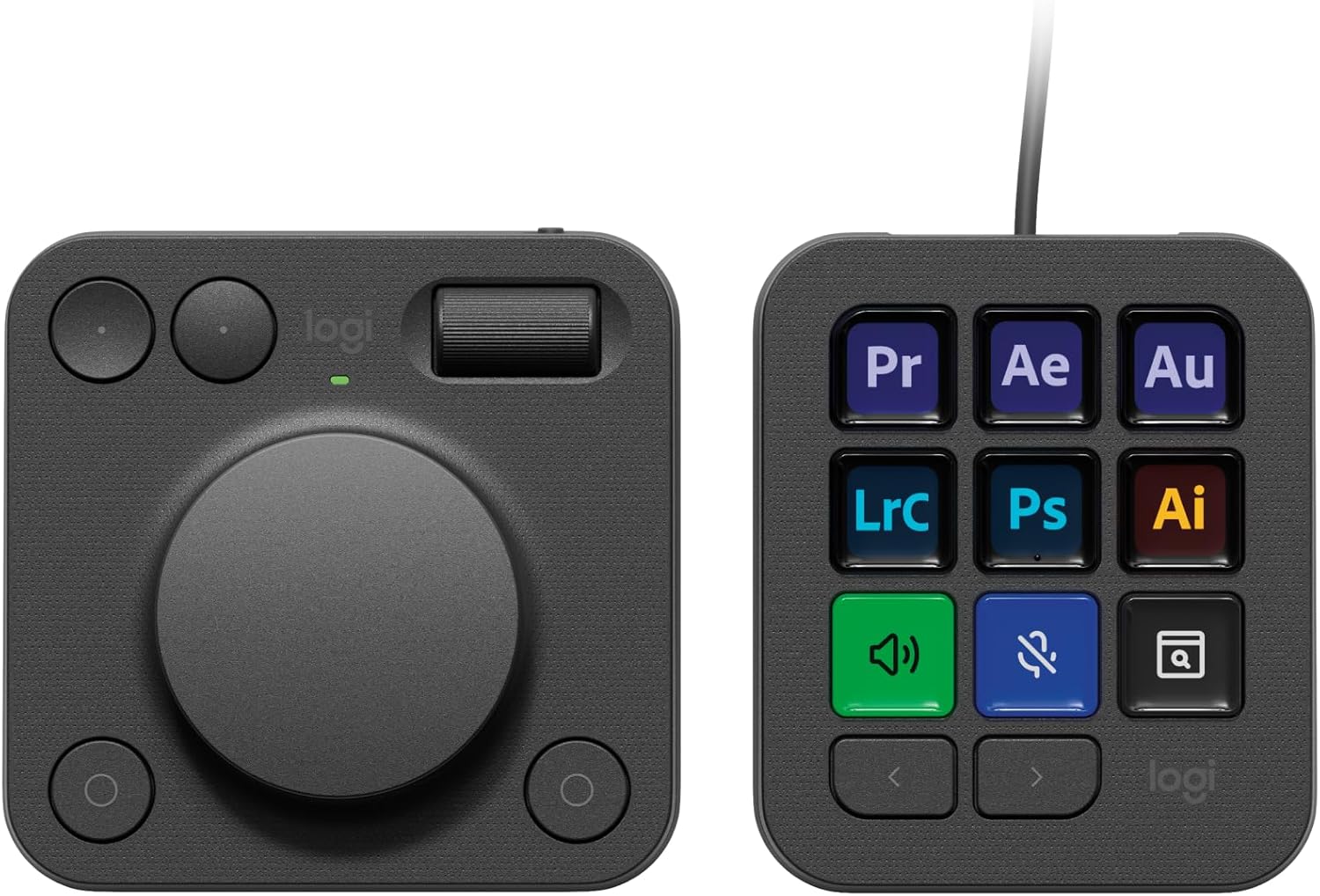
Streamline your creative workflow with the Logitech MX Creative Console, featuring a programmable keypad with 9 customisable LCD display keys and a contextual dial with tactile controls for precise adjustments. Quickly access all your favourite tools with visual feedback in full-colour keys and recommended profile configurations with the most relevant actions for each application so that you can get started right away. Experience native integration with Adobe Photoshop, Adobe Premiere Pro, Adobe Illustrator, Adobe Photoshop Lightroom Classic, Spotify, Zoom, and more (1). Assign actions and tools to up to 15 keypad pages by profile, dial, and roller. Create shortcuts and Smart Actions, and customise the console to your style by uploading your own icons. Premium tactile analog controls let you make precise adjustments with an aluminium low-friction dial, navigate with a smooth roller, and access shortcuts with customisable display keys. Find a growing library of free actions, plugins, profile templates, icon packs, and more through the marketplace in the Logi Options+ App (2). Plastic parts in the MX Creative Console include certified post-consumer recycled plastic (Graphite: 72%, Pale Grey: 55%) (4). (1)The purchase of an MX Creative Console includes 3 months Adobe Creative Cloud All Apps membership (2) Requires Logi Options+ app, available for recent versions of Windows and macOS (3) Battery life may vary based on user and computing conditions (4) Excludes printed wiring assembly (PWA), cables, membrane, LCD, EMI Gasket, and packaging.
Reviews:
5.0 out of 5 stars An extremely useful work in progress
(function() { P.when('cr-A', 'ready').execute(function(A) { if(typeof A.toggleExpanderAriaLabel === 'function') { A.toggleExpanderAriaLabel('review_text_read_more', 'Read more of this review', 'Read less of this review'); } }); })(); .review-text-read-more-expander:focus-visible { outline: 2px solid #2162a1; outline-offset: 2px; border-radius: 5px; } There is massive buzz about this device on YouTube which I'm sure Logitech paid a high price for but after using this device for the last few days I am starting to love it, currently there are no profiles for alot of the software I use (C4D, Resolve) however make your own is not hard. I've only scratched the surface of what it can do and its bring a nice satisfaction to my work. I think its definitely worth the price.
1.0 out of 5 stars Buggy and or Faulty
I think Logitech has rushed this product out given the lack of support for a lot of common software packages people in the creative industries might use in addition to Adobe Creative Suite.I spent a good bit of time setting up three pages on my button unit with the 1st being most common used stuff like play, mute, vol down, vol up, etc and then created custom icons for each button and it seemed to work ok for a few minutes with the other two pages being one for application launching and the other for web shortcuts. The first page just started acting up doing weird stuff such as only illuminating one button at a time and if I pressed on a unilluminated button it would then turn on but if I switched pages and came back to the first one again the fault / bug reappeared again.I tried setting up new profiles and re-doing my setup but the 1st page still remained super buggy (2nd and 3rd pages operated perfectly). The firmware and software are all up to date as it everything software wise on the computer it's connected to.In regards to the dial I found it way too sensitive and not precise at all and Logitech missed a trick by not having it "click" in degrees instead of what it's like now. I use Photoshop everyday and I found the dial honestly to be a waste of time and no faster than my usual workflow... perhaps overtime I could get used to it but honestly I can never see it being faster than using keyboard shortcuts and the mouse especially with my MX Master mouse scroll wheel. In combination of the dial and keypad the keypad was also a bit buggy by not always being that repsonsive if at all at opening the right button set for whatever application was open or holding open Photoshop button set sometimes when I was flicking over to Illustrator or back to Windows etc.Don't like the stand / angle the buttons sit at.I am a massive Logitech fan and I am onto my 4th MX Master mouse for example but I feel they really dropped the ball on this product and it's with disapointment as I was excited about this product that it's going back to Bolo tomorrow for a refund.
4.0 out of 5 stars Does a great job, software needs polishing :)
Really useful for web editor, great programming buttons and makes processes so quick! The software just needs updating and polishing off , but it's already been updated once so I'm sure it will be!
5.0 out of 5 stars Excellent product
Excellent time saving console, just with a few buttons, your well in on your work. Settings for Lightroom classic & Photoshop are a great help & save time with a fine control with the dial making it much easier to fine adjust your edits.
1.0 out of 5 stars Feels cheap and poor support for Lightroom Desktop
Build quality feels cheap, bluetooth connection is glitchy and it does not support Lightroom Desktop as comprehensively as Lightroom Classic which is a dealbreaker for me. Not worth £199. Very disappointing as I have the MX Keyboard and Mouse and they are great, but this is a half baked product from Logitech. Have instigated a return.
1.0 out of 5 stars Software glitches and terrible tech support
Let me start by saying I have 3 other mx products and they are excellent. This purchase was to improve workflow and complement my existing set up. However, from the outset, whilst the hardware is great, the software driving it is completely flawed. There are numerous issues/bugs for which there are presently no fixes. Tech support were not able to remedy these because of that. The issues are…..1. Plug ins for adobe products are not available. Ps was the only one available from Adobe. The others would not install and generated error messages. Other plug ins are promised but are on horizon still.2. The software also prevented the PC from shutting down completely and when left plugged in to Laptop, it drained the battery overnight.I have now returned the product after 5 days of trying to get it to function, and 5 days of tech support that just wasn’t up to scratch. Maybe in the future if they sort software out, I might revisit. Would not suggest purchasing yet…..
2.0 out of 5 stars Frankly weird design with poor software
The concept is good, but it's been very poorly executed. Why 2 different pads? One is runs off AA batteries, the other one is wired. And you get one dodgy little stand thing for one of them. Why not one single console, and make it wireless?But my main beef is that the software is dreadful. The main thing I wanted to do with it was adjust exposures in Lightroom Classic. After spending an hour or so setting it all up I was surprised to find that my exposure control was actually adjusting other sliders, seemingly at random. It's supposed to work with Spotify, but I couldn't adjust the volume. So I tried to programme the dial with the macOS shortcut keys as I have done with other devices. Nope, that wouldn't work either.At this point I was done with it, and sent it back for refund
1.0 out of 5 stars A Very Expensive Paperweight
Completly useless - purchased on it's release to use with Adobe Creative and it doesn't work with Lightroom at all... as a photographer, 90% of my workflow is in lightroom so this for me is a really expensive paperweight. I've spoken to Logitech Support who admit it doesn't work with lightroom and aren't able or willing to offer a resolution or refund. I should have stuck with my gut and bought Elgato instead!
LE game changer
(function() { P.when('cr-A', 'ready').execute(function(A) { if(typeof A.toggleExpanderAriaLabel === 'function') { A.toggleExpanderAriaLabel('review_text_read_more', 'Read more of this review', 'Read less of this review'); } }); })(); .review-text-read-more-expander:focus-visible { outline: 2px solid #2162a1; outline-offset: 2px; border-radius: 5px; } je me demande comment j'ai pu faire sans. OK l'eco système évolue sans cesse et des fois on peut être frustré que la priorité soit mise sur la gamme créative, mais nous laisser libre la possibilité de réer notre propre set§up (FCP X, resolve etc) est un vrai plus. un outil indispensable donc je me demande maintenant commment j'ai pu faire sans.
Geweldige tol en extensie for creators
Wat een super handige toevoeging voor iedere creator! Er zijn zoveel mogelijkheden dat ik soms door de boom het bos niet meer zie. Niet dat dit nou echt een minpunt is per se. Een enig "issue" is wel (mogelijk omdat het product vrij nieuw is) dat het console af en toe uitroeptekens aangeeft en daarbij niet goed werkt met sommige programma’s waarbij die daarvoor wel werkte, maar dat kan een softwarematig dingetje zijn waarbij simpelweg een update nodig is..
It is not new
Unfortunately, my piece is not new. It was unsealed and definitely used. It probably comes from consumer return
Must-have se siete utenti Adobe
Abbiamo preso la MX Creative principalmente per l’editing video in studio, vista la piena compatibilità con Premiere Pro (oltre che le altre app Adobe più popolari).Qualitativamente è un ottimo prodotto, tasti non rumorosi e manopola fluida. Avere anche qualche feedback aptico sarebbe stato perfetto ma va bene anche così.Le possibilità di personalizzazione con le app Adobe sono tantissime, con la possibilità di utilizzare profili predefiniti, personalizzarli con gli shortcut che si preferisce oppure crearne di nuovi da zero. Sul marketplace Logitech sono presenti anche profili con shortcut per operazioni base dell’OS (luminosità schermo, screenshot, volume, ecc…) oltre che per Spotify premium, Philips Hue e Capture One.Mi aspettavo un qualche tipo di compatibilità con Davinci Resolve ma attualmente non è presente. Spero in un futuro aggiornamento perché sarebbe molto interessante.
100 von 10
mich haben Streaming Decks schon immer fasziniert, doch waren mir alle bisher bekannten Produkte zu unproduktiv. Ich habe mir dieses Produkt NICHT für Foto Shop, sondern zur Steigerung meiner Produktivität. Sei es Excel, PowerPoint, Word, 3D Druck oder technische Zeichnungen. Sprich ich habe das GEN 1 Produkt abseits seines Hauptzwecks gekauft und ich wurde absolut nicht enttäuscht. Es hat allein jetzt kurz nach Release mehr Funktionen und Möglichkeiten, als ich vermutet habe.Das Produkt hat auch seine negativen Seiten, welche ich nicht außer Acht lassen möchte. Nachdem es ein Logitech untypisches Produkt und dann noch in der ersten Generation ist abzusehen, dass viele Funktionen nicht oder nur eingeschränkt funktionieren (So wie es bei fast allen GEN 1 Produkten im aktuellen Zeitalter der Fall ist).MX Creative Keypad:Pro:- Displays sind schärfer als angenommen- aktuelle Werte wie Lautstärke, Uhrzeit, Kalenderwoche sind sichtbar- Farben (Hintergrund, Text, Symbole) und Abbildungen sind frei wählbarEinstellung und Hinterlegung der Befehle:Es gibt weit aus mehr Einstellungen als gedacht. von Mediasteuerung bis hin zur Eingabe vorgefertigte Texte. Alle Grundeinstellungen habe ich euch in die Abbildungen eingefügt. Es sind so viele, dass ich die nicht alle abtippe 😂.Was mich am meisten überrascht hat, war die unnormal einfache Einstellung und die fast Intuitive Einfügung meines Philips Hue Zuhauses.Negatives:- Die meisten meiner Abbildungen habe ich selber machen müssen, da diese meist grafisch in unterirdischer Qualität erstellt worden sind. Dennoch erstellt Logitech die Abbildungen der Programme, was ein unglaublich hilfreicher Schritt sein kann. Ich wollte dennoch eine scharfe Abbildung und habe daher aus Google Abbildungen heruntergeladen oder diese selber erstellt und auf die Tasten gelegt. Wolla, geile Taste.- Zeitaufwand ist super hoch. Für meinen Prusa Slicer habe ich 2 Seiten a 9 Tasten belegt. Die Shortcuts zu erstellen dauerte nicht lange, dafür habe ich die Abbildungen der Tasten alle selber erstellt und daher 3-4 Stunden gebraucht um alle 18 Tasten so einzustellen wie ich es haben möchte.MX Creative Dialpad:ich habe mich Stunden / Tage / wochenlang über dieses Produkt informiert und empfand das Dialpad als weniger interessant. Doch weiiiiiiit gefehlt. Das Ding ist unnormal praktisch.Pro:- zwei Drehregler, die super steuerbar sind.- konvexe und konkave Tasten sind super bedienbar.- jede der Tasten ( auch die unten Rechts) sind frei wählbar- egal wo ich mich befinde, ich habe Zugriff auf den Action Ring und kann alles damit regeln.Con:- Technisch wäre der große Drehregler auch als Drehknopf möglich. Damit könnte man den Action Ring ( in der Theorie) öffnen, mit dem Drehregler auswählen und auch bestätigen. Solch eine Funktion würde ich mir bei einer GEN 2 wünschenMeine Meinung:Ich finde das Produkt für diesen Preis unglaublich gerechtfertigt. Ich würde es auch für mehr kaufen, da es meine Produktivität erheblich steigert. Ich liebe es mich damit zu beschäftigen.In Zukunft werde ich meine Tastatur nur noch zum Tippen nutzen. Kein copy and paste mehr, keine Duplizierung. Ab sofort nur noch mit der MX Creative weil es einfach schneller und flüssiger in den Flow passt. Zoom, scrolle werde ich nur noch mit dem Dialpad machen und habe dazu noch viel mehr Regelungen, welche unglaublich schnell und einfach zur Verfügung stehen.Es ist das beste Produkt in meinem Homeoffice!!!!Hier noch ein paar Einfügungen:- GRÖßTES CON: bei der Keypad ist es nicht möglich einzelne Tasten auf andere Seiten zu Projektieren.- Beide Geräte sind frei einstellbar, ob Funktionen in einer Applikation oder überall anders gleich sein sollen- Man kann, wie andere das Gegenteil behaupten, schrittweise Zoomen. Hierfür muss man sich nur reinfuchsen und die passenden Einstellungen finden 😉 OS > Mausscrollen > Control horizontal and vertical mouse > auf und ab > haken bei: Beim Scrollen Modifikator hinzufügen > CTRL > Speichern. Anderenfalls kann man ihn auch als teuren Briefbeschwerer nutzen 😉- Es ist und bleibt ein GEN 1 Produkt. Daher gibt es nicht viele Einbindungen für Standardprogramme wie Excel, word, Pptx und co. Aber diese währen eh auf den Workflow anderer angesetzt. Daher macht die Einstellungen selber. Investiert ein Wochenende damit, somit habt ihr es perfekt auf euch zugeschnitten.- Bitte Keine Beschwerden über 2024 und Kabelbindung und Batterien. Logitech hat euch damit einen super großen Gefallen getan. Schaut euch doch mal die Technik an. Das Keypad hat 9 helle Tasten. Mit einem Akku würde es jeden dritten Tag geladen werden müssen und das würde mich persönlich super Stören, auch wenn sonst auch alles in meinem Homeoffice kabellos ist. Was ist nun der Unterschied vom einem Akku und Batterien? - Ich bin kein Fachmann, aber ich weiß, dass Akkus bei Produkten, welche Sleep Modes haben deutlich länger halten. Daher müssen wir diesen ebenfalls nicht all zu oft welchseln.NACHTRAG: ich wollte heute eine Arbeitsumgebung für Fusion 360 erstellen. Doch die Mx Creative erkennt das Programm nicht. Meine Vermutung: wenn das Programm geöffnet ist, steht im Menü unten (Maus liegt auf dem Programm und drückt nicht auf das Programm) und da steht nicht der Programmname. Dennoch arbeite ich viel mit Fusion und muss eine Lösung finden. Dennoch ist das Gerät super
Visit the Logitech Store
Logitech MX Creative Console, Programmable Keypad With 9 Customisable LCD Keys and Control Dial for Graphic Design, Video Editing, Photography, use with Adobe, Zoom, Spotify and more - Graphite
AED1,64458


Quantity:
Order today to get by 7-14 business days
This item qualifies for free delivery
Imported From: United Kingdom
At BOLO, we work hard to ensure the products you receive are new, genuine, and sourced from reputable suppliers.
BOLO is not an authorized or official retailer for most brands, nor are we affiliated with manufacturers unless specifically stated on a product page. Instead, we source verified sellers, authorized distributors or directly from the manufacturer.
Each product undergoes thorough inspection and verification at our consolidation and fulfilment centers to ensure it meets our strict authenticity and quality standards before being shipped and delivered to you.
If you ever have concerns regarding the authenticity of a product purchased from us, please contact Bolo Support. We will review your inquiry promptly and, if necessary, provide documentation verifying authenticity or offer a suitable resolution.
Your trust is our top priority, and we are committed to maintaining transparency and integrity in every transaction.
All product information, images, descriptions, and reviews originate from the manufacturer or from trusted sellers overseas. BOLO is not affiliated with, endorsed by, or an authorized retailer for most brands listed on our website unless stated otherwise.
While we strive to display accurate information, variations in packaging, labeling, instructions, or formulation may occasionally occur due to regional differences or supplier updates. For detailed or manufacturer-specific information, please contact the brand directly or reach out to BOLO Support for assistance.
Unless otherwise stated, all prices displayed on the product page include applicable taxes and import duties.
BOLO operates in accordance with the laws and regulations of United Arab Emirates. Any items found to be restricted or prohibited for sale within the UAE will be cancelled prior to shipment. We take proactive measures to ensure that only products permitted for sale in United Arab Emirates are listed on our website.
All items are shipped by air, and any products classified as “Dangerous Goods (DG)” under IATA regulations will be removed from the order and cancelled.
All orders are processed manually, and we make every effort to process them promptly once confirmed. Products cancelled due to the above reasons will be permanently removed from listings across the website.
Similar suggestions by Bolo
More from this brand
Similar items from “Accessories”
Share with
Or share with link
https://www.bolo.ae/products/KO0QQCMX8FI
Visit the Logitech Store
Logitech MX Creative Console, Programmable Keypad With 9 Customisable LCD Keys and Control Dial for Graphic Design, Video Editing, Photography, use with Adobe, Zoom, Spotify and more - Graphite


AED1,64458
Quantity:
Order today to get by 7-14 business days
This item qualifies for free delivery
Imported From: United Kingdom
At BOLO, we work hard to ensure the products you receive are new, genuine, and sourced from reputable suppliers.
BOLO is not an authorized or official retailer for most brands, nor are we affiliated with manufacturers unless specifically stated on a product page. Instead, we source verified sellers, authorized distributors or directly from the manufacturer.
Each product undergoes thorough inspection and verification at our consolidation and fulfilment centers to ensure it meets our strict authenticity and quality standards before being shipped and delivered to you.
If you ever have concerns regarding the authenticity of a product purchased from us, please contact Bolo Support. We will review your inquiry promptly and, if necessary, provide documentation verifying authenticity or offer a suitable resolution.
Your trust is our top priority, and we are committed to maintaining transparency and integrity in every transaction.
All product information, images, descriptions, and reviews originate from the manufacturer or from trusted sellers overseas. BOLO is not affiliated with, endorsed by, or an authorized retailer for most brands listed on our website unless stated otherwise.
While we strive to display accurate information, variations in packaging, labeling, instructions, or formulation may occasionally occur due to regional differences or supplier updates. For detailed or manufacturer-specific information, please contact the brand directly or reach out to BOLO Support for assistance.
Unless otherwise stated, all prices displayed on the product page include applicable taxes and import duties.
BOLO operates in accordance with the laws and regulations of United Arab Emirates. Any items found to be restricted or prohibited for sale within the UAE will be cancelled prior to shipment. We take proactive measures to ensure that only products permitted for sale in United Arab Emirates are listed on our website.
All items are shipped by air, and any products classified as “Dangerous Goods (DG)” under IATA regulations will be removed from the order and cancelled.
All orders are processed manually, and we make every effort to process them promptly once confirmed. Products cancelled due to the above reasons will be permanently removed from listings across the website.
Description:
Streamline your creative workflow with the Logitech MX Creative Console, featuring a programmable keypad with 9 customisable LCD display keys and a contextual dial with tactile controls for precise adjustments. Quickly access all your favourite tools with visual feedback in full-colour keys and recommended profile configurations with the most relevant actions for each application so that you can get started right away. Experience native integration with Adobe Photoshop, Adobe Premiere Pro, Adobe Illustrator, Adobe Photoshop Lightroom Classic, Spotify, Zoom, and more (1). Assign actions and tools to up to 15 keypad pages by profile, dial, and roller. Create shortcuts and Smart Actions, and customise the console to your style by uploading your own icons. Premium tactile analog controls let you make precise adjustments with an aluminium low-friction dial, navigate with a smooth roller, and access shortcuts with customisable display keys. Find a growing library of free actions, plugins, profile templates, icon packs, and more through the marketplace in the Logi Options+ App (2). Plastic parts in the MX Creative Console include certified post-consumer recycled plastic (Graphite: 72%, Pale Grey: 55%) (4). (1)The purchase of an MX Creative Console includes 3 months Adobe Creative Cloud All Apps membership (2) Requires Logi Options+ app, available for recent versions of Windows and macOS (3) Battery life may vary based on user and computing conditions (4) Excludes printed wiring assembly (PWA), cables, membrane, LCD, EMI Gasket, and packaging.
Reviews:
5.0 out of 5 stars An extremely useful work in progress
(function() { P.when('cr-A', 'ready').execute(function(A) { if(typeof A.toggleExpanderAriaLabel === 'function') { A.toggleExpanderAriaLabel('review_text_read_more', 'Read more of this review', 'Read less of this review'); } }); })(); .review-text-read-more-expander:focus-visible { outline: 2px solid #2162a1; outline-offset: 2px; border-radius: 5px; } There is massive buzz about this device on YouTube which I'm sure Logitech paid a high price for but after using this device for the last few days I am starting to love it, currently there are no profiles for alot of the software I use (C4D, Resolve) however make your own is not hard. I've only scratched the surface of what it can do and its bring a nice satisfaction to my work. I think its definitely worth the price.
1.0 out of 5 stars Buggy and or Faulty
I think Logitech has rushed this product out given the lack of support for a lot of common software packages people in the creative industries might use in addition to Adobe Creative Suite.I spent a good bit of time setting up three pages on my button unit with the 1st being most common used stuff like play, mute, vol down, vol up, etc and then created custom icons for each button and it seemed to work ok for a few minutes with the other two pages being one for application launching and the other for web shortcuts. The first page just started acting up doing weird stuff such as only illuminating one button at a time and if I pressed on a unilluminated button it would then turn on but if I switched pages and came back to the first one again the fault / bug reappeared again.I tried setting up new profiles and re-doing my setup but the 1st page still remained super buggy (2nd and 3rd pages operated perfectly). The firmware and software are all up to date as it everything software wise on the computer it's connected to.In regards to the dial I found it way too sensitive and not precise at all and Logitech missed a trick by not having it "click" in degrees instead of what it's like now. I use Photoshop everyday and I found the dial honestly to be a waste of time and no faster than my usual workflow... perhaps overtime I could get used to it but honestly I can never see it being faster than using keyboard shortcuts and the mouse especially with my MX Master mouse scroll wheel. In combination of the dial and keypad the keypad was also a bit buggy by not always being that repsonsive if at all at opening the right button set for whatever application was open or holding open Photoshop button set sometimes when I was flicking over to Illustrator or back to Windows etc.Don't like the stand / angle the buttons sit at.I am a massive Logitech fan and I am onto my 4th MX Master mouse for example but I feel they really dropped the ball on this product and it's with disapointment as I was excited about this product that it's going back to Bolo tomorrow for a refund.
4.0 out of 5 stars Does a great job, software needs polishing :)
Really useful for web editor, great programming buttons and makes processes so quick! The software just needs updating and polishing off , but it's already been updated once so I'm sure it will be!
5.0 out of 5 stars Excellent product
Excellent time saving console, just with a few buttons, your well in on your work. Settings for Lightroom classic & Photoshop are a great help & save time with a fine control with the dial making it much easier to fine adjust your edits.
1.0 out of 5 stars Feels cheap and poor support for Lightroom Desktop
Build quality feels cheap, bluetooth connection is glitchy and it does not support Lightroom Desktop as comprehensively as Lightroom Classic which is a dealbreaker for me. Not worth £199. Very disappointing as I have the MX Keyboard and Mouse and they are great, but this is a half baked product from Logitech. Have instigated a return.
1.0 out of 5 stars Software glitches and terrible tech support
Let me start by saying I have 3 other mx products and they are excellent. This purchase was to improve workflow and complement my existing set up. However, from the outset, whilst the hardware is great, the software driving it is completely flawed. There are numerous issues/bugs for which there are presently no fixes. Tech support were not able to remedy these because of that. The issues are…..1. Plug ins for adobe products are not available. Ps was the only one available from Adobe. The others would not install and generated error messages. Other plug ins are promised but are on horizon still.2. The software also prevented the PC from shutting down completely and when left plugged in to Laptop, it drained the battery overnight.I have now returned the product after 5 days of trying to get it to function, and 5 days of tech support that just wasn’t up to scratch. Maybe in the future if they sort software out, I might revisit. Would not suggest purchasing yet…..
2.0 out of 5 stars Frankly weird design with poor software
The concept is good, but it's been very poorly executed. Why 2 different pads? One is runs off AA batteries, the other one is wired. And you get one dodgy little stand thing for one of them. Why not one single console, and make it wireless?But my main beef is that the software is dreadful. The main thing I wanted to do with it was adjust exposures in Lightroom Classic. After spending an hour or so setting it all up I was surprised to find that my exposure control was actually adjusting other sliders, seemingly at random. It's supposed to work with Spotify, but I couldn't adjust the volume. So I tried to programme the dial with the macOS shortcut keys as I have done with other devices. Nope, that wouldn't work either.At this point I was done with it, and sent it back for refund
1.0 out of 5 stars A Very Expensive Paperweight
Completly useless - purchased on it's release to use with Adobe Creative and it doesn't work with Lightroom at all... as a photographer, 90% of my workflow is in lightroom so this for me is a really expensive paperweight. I've spoken to Logitech Support who admit it doesn't work with lightroom and aren't able or willing to offer a resolution or refund. I should have stuck with my gut and bought Elgato instead!
LE game changer
(function() { P.when('cr-A', 'ready').execute(function(A) { if(typeof A.toggleExpanderAriaLabel === 'function') { A.toggleExpanderAriaLabel('review_text_read_more', 'Read more of this review', 'Read less of this review'); } }); })(); .review-text-read-more-expander:focus-visible { outline: 2px solid #2162a1; outline-offset: 2px; border-radius: 5px; } je me demande comment j'ai pu faire sans. OK l'eco système évolue sans cesse et des fois on peut être frustré que la priorité soit mise sur la gamme créative, mais nous laisser libre la possibilité de réer notre propre set§up (FCP X, resolve etc) est un vrai plus. un outil indispensable donc je me demande maintenant commment j'ai pu faire sans.
Geweldige tol en extensie for creators
Wat een super handige toevoeging voor iedere creator! Er zijn zoveel mogelijkheden dat ik soms door de boom het bos niet meer zie. Niet dat dit nou echt een minpunt is per se. Een enig "issue" is wel (mogelijk omdat het product vrij nieuw is) dat het console af en toe uitroeptekens aangeeft en daarbij niet goed werkt met sommige programma’s waarbij die daarvoor wel werkte, maar dat kan een softwarematig dingetje zijn waarbij simpelweg een update nodig is..
It is not new
Unfortunately, my piece is not new. It was unsealed and definitely used. It probably comes from consumer return
Must-have se siete utenti Adobe
Abbiamo preso la MX Creative principalmente per l’editing video in studio, vista la piena compatibilità con Premiere Pro (oltre che le altre app Adobe più popolari).Qualitativamente è un ottimo prodotto, tasti non rumorosi e manopola fluida. Avere anche qualche feedback aptico sarebbe stato perfetto ma va bene anche così.Le possibilità di personalizzazione con le app Adobe sono tantissime, con la possibilità di utilizzare profili predefiniti, personalizzarli con gli shortcut che si preferisce oppure crearne di nuovi da zero. Sul marketplace Logitech sono presenti anche profili con shortcut per operazioni base dell’OS (luminosità schermo, screenshot, volume, ecc…) oltre che per Spotify premium, Philips Hue e Capture One.Mi aspettavo un qualche tipo di compatibilità con Davinci Resolve ma attualmente non è presente. Spero in un futuro aggiornamento perché sarebbe molto interessante.
100 von 10
mich haben Streaming Decks schon immer fasziniert, doch waren mir alle bisher bekannten Produkte zu unproduktiv. Ich habe mir dieses Produkt NICHT für Foto Shop, sondern zur Steigerung meiner Produktivität. Sei es Excel, PowerPoint, Word, 3D Druck oder technische Zeichnungen. Sprich ich habe das GEN 1 Produkt abseits seines Hauptzwecks gekauft und ich wurde absolut nicht enttäuscht. Es hat allein jetzt kurz nach Release mehr Funktionen und Möglichkeiten, als ich vermutet habe.Das Produkt hat auch seine negativen Seiten, welche ich nicht außer Acht lassen möchte. Nachdem es ein Logitech untypisches Produkt und dann noch in der ersten Generation ist abzusehen, dass viele Funktionen nicht oder nur eingeschränkt funktionieren (So wie es bei fast allen GEN 1 Produkten im aktuellen Zeitalter der Fall ist).MX Creative Keypad:Pro:- Displays sind schärfer als angenommen- aktuelle Werte wie Lautstärke, Uhrzeit, Kalenderwoche sind sichtbar- Farben (Hintergrund, Text, Symbole) und Abbildungen sind frei wählbarEinstellung und Hinterlegung der Befehle:Es gibt weit aus mehr Einstellungen als gedacht. von Mediasteuerung bis hin zur Eingabe vorgefertigte Texte. Alle Grundeinstellungen habe ich euch in die Abbildungen eingefügt. Es sind so viele, dass ich die nicht alle abtippe 😂.Was mich am meisten überrascht hat, war die unnormal einfache Einstellung und die fast Intuitive Einfügung meines Philips Hue Zuhauses.Negatives:- Die meisten meiner Abbildungen habe ich selber machen müssen, da diese meist grafisch in unterirdischer Qualität erstellt worden sind. Dennoch erstellt Logitech die Abbildungen der Programme, was ein unglaublich hilfreicher Schritt sein kann. Ich wollte dennoch eine scharfe Abbildung und habe daher aus Google Abbildungen heruntergeladen oder diese selber erstellt und auf die Tasten gelegt. Wolla, geile Taste.- Zeitaufwand ist super hoch. Für meinen Prusa Slicer habe ich 2 Seiten a 9 Tasten belegt. Die Shortcuts zu erstellen dauerte nicht lange, dafür habe ich die Abbildungen der Tasten alle selber erstellt und daher 3-4 Stunden gebraucht um alle 18 Tasten so einzustellen wie ich es haben möchte.MX Creative Dialpad:ich habe mich Stunden / Tage / wochenlang über dieses Produkt informiert und empfand das Dialpad als weniger interessant. Doch weiiiiiiit gefehlt. Das Ding ist unnormal praktisch.Pro:- zwei Drehregler, die super steuerbar sind.- konvexe und konkave Tasten sind super bedienbar.- jede der Tasten ( auch die unten Rechts) sind frei wählbar- egal wo ich mich befinde, ich habe Zugriff auf den Action Ring und kann alles damit regeln.Con:- Technisch wäre der große Drehregler auch als Drehknopf möglich. Damit könnte man den Action Ring ( in der Theorie) öffnen, mit dem Drehregler auswählen und auch bestätigen. Solch eine Funktion würde ich mir bei einer GEN 2 wünschenMeine Meinung:Ich finde das Produkt für diesen Preis unglaublich gerechtfertigt. Ich würde es auch für mehr kaufen, da es meine Produktivität erheblich steigert. Ich liebe es mich damit zu beschäftigen.In Zukunft werde ich meine Tastatur nur noch zum Tippen nutzen. Kein copy and paste mehr, keine Duplizierung. Ab sofort nur noch mit der MX Creative weil es einfach schneller und flüssiger in den Flow passt. Zoom, scrolle werde ich nur noch mit dem Dialpad machen und habe dazu noch viel mehr Regelungen, welche unglaublich schnell und einfach zur Verfügung stehen.Es ist das beste Produkt in meinem Homeoffice!!!!Hier noch ein paar Einfügungen:- GRÖßTES CON: bei der Keypad ist es nicht möglich einzelne Tasten auf andere Seiten zu Projektieren.- Beide Geräte sind frei einstellbar, ob Funktionen in einer Applikation oder überall anders gleich sein sollen- Man kann, wie andere das Gegenteil behaupten, schrittweise Zoomen. Hierfür muss man sich nur reinfuchsen und die passenden Einstellungen finden 😉 OS > Mausscrollen > Control horizontal and vertical mouse > auf und ab > haken bei: Beim Scrollen Modifikator hinzufügen > CTRL > Speichern. Anderenfalls kann man ihn auch als teuren Briefbeschwerer nutzen 😉- Es ist und bleibt ein GEN 1 Produkt. Daher gibt es nicht viele Einbindungen für Standardprogramme wie Excel, word, Pptx und co. Aber diese währen eh auf den Workflow anderer angesetzt. Daher macht die Einstellungen selber. Investiert ein Wochenende damit, somit habt ihr es perfekt auf euch zugeschnitten.- Bitte Keine Beschwerden über 2024 und Kabelbindung und Batterien. Logitech hat euch damit einen super großen Gefallen getan. Schaut euch doch mal die Technik an. Das Keypad hat 9 helle Tasten. Mit einem Akku würde es jeden dritten Tag geladen werden müssen und das würde mich persönlich super Stören, auch wenn sonst auch alles in meinem Homeoffice kabellos ist. Was ist nun der Unterschied vom einem Akku und Batterien? - Ich bin kein Fachmann, aber ich weiß, dass Akkus bei Produkten, welche Sleep Modes haben deutlich länger halten. Daher müssen wir diesen ebenfalls nicht all zu oft welchseln.NACHTRAG: ich wollte heute eine Arbeitsumgebung für Fusion 360 erstellen. Doch die Mx Creative erkennt das Programm nicht. Meine Vermutung: wenn das Programm geöffnet ist, steht im Menü unten (Maus liegt auf dem Programm und drückt nicht auf das Programm) und da steht nicht der Programmname. Dennoch arbeite ich viel mit Fusion und muss eine Lösung finden. Dennoch ist das Gerät super
Similar suggestions by Bolo
More from this brand
Similar items from “Accessories”
Share with
Or share with link
https://www.bolo.ae/products/KO0QQCMX8FI