Deliver toUnited Arab Emirates
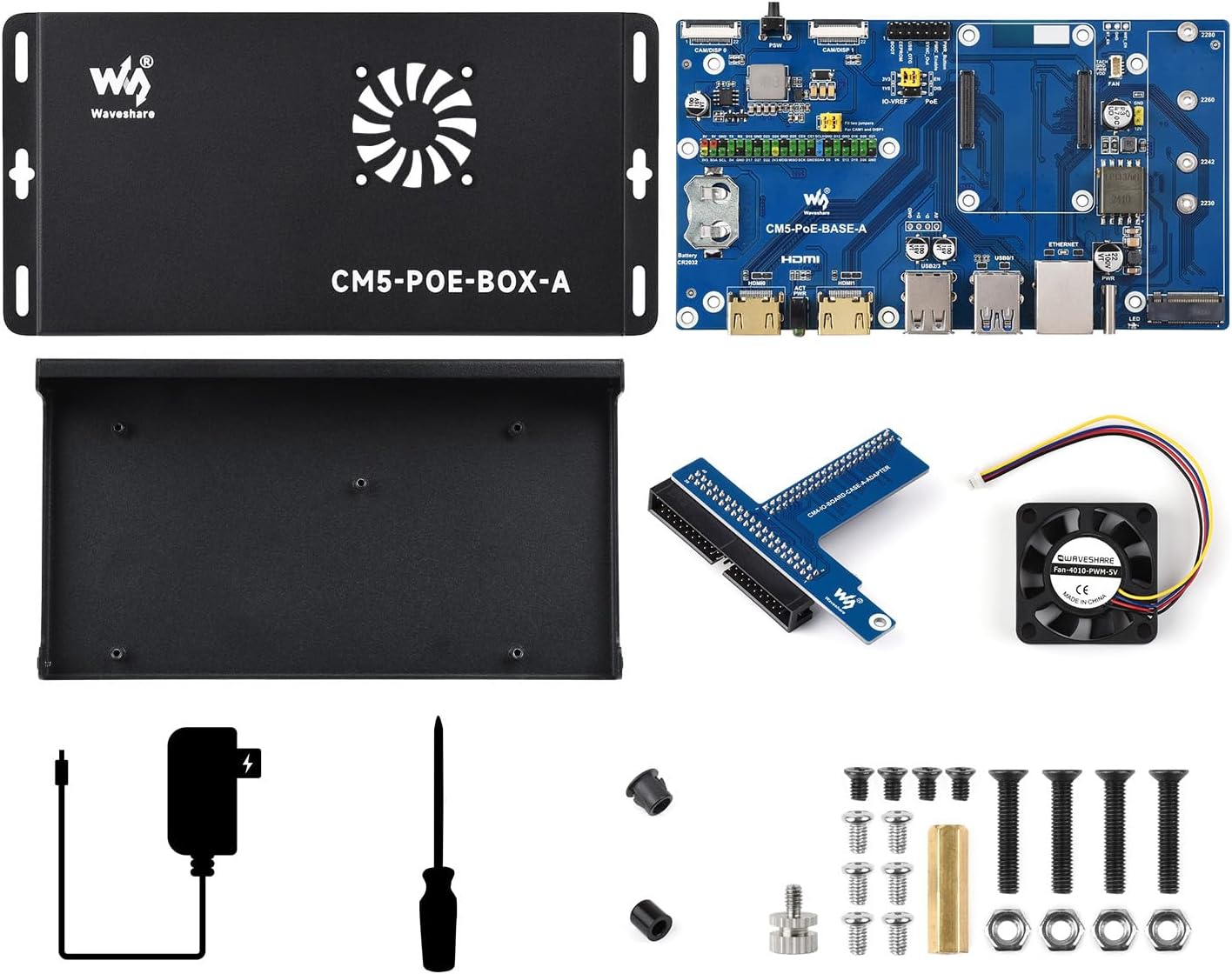
Waveshare Compute Module 5 IO Board, Compatible with All Variants of Raspberry Pi CM5, with PoE Feature, Bundle with PoE Base Board + Case + Power Supply Adapter

Description:

  • Standard CM5 socket and Raspberry Pi 40PIN GPIO header suitable for all variants of Compute Module 5
  • Providing both network connection and power supply for your Raspberry Pi in one cable
  • Faster reading/writing speed compared to the TF card slot of Raspberry Pi, greatly improving reading/writing efficiency of the system or files, support booting Raspberry Pi from NVMe Solid State Drive
  • ONboard Connectors Including MIPI / M.2 / HDMI / USB / ETH / TF Card Slot.each cut-out is completely aligned with the connector
  • Rich WiKi Resources: We provide official Wiki resources, please contact us for more information.

  • Reviews:

    Great functionality - AWFUL cooling. Disappointing misstep for Waveshare - but can be fixed.

    U.v.B. · 21 June 2025

    The board is great - better specs than the original Raspberry Pi board and POE to boot. And I like Waveshare - I've given very positive reviews to several of their products.But while the board is good, the case is a mess. They've set it up so that there's no heatsink, just a fan blowing on the bare chips. That's a poor design - there's a reason that nobody does that in industry. The correct approach is passive heatsink, or heatsink plus fan.You don't have the option of fitting a heatsink, because the case is so low-profile that there's not enough space between the CM5 and the bottom of the fan for a heatsink to fit.I did quite a bit of research and found that the cooling effect with a CM5 is very nearly the SAME whether it's a fan only, or a passive heatsink only. So why would you use a fan - a moving part with noise and a high failure rate instead of just a plain old passive heatsink? It's nuts.It's actually worse than this, because there's an air OUTLET for the fan, but no air INLET! The poor old fan will have a hard time sucking air out of a case with no inlet ports. Also, the air outlet isn't a hole, it's a fancy design with nice swooping metal fins. Looks lovely but blocks about 40% of the air outlet! There's a reason that everyone uses those wire cage grills - they're ugly but they don't block the airflow.So now we've got an air exhaust that's 40% blocked, no heatsink, and no air inlet!Result? The fan spins LOUD because it's working its hardest to try and get some cooling within an insane thermal design.Also, the fans are cheap and nasty - the central hub is huge (a sign of cheap fans) and mine had a VERY prominent sqeaking sound whenever it was spinning (which was often because the poor thing can't do its job because of the poor airflow so it seldom gets down to below 60C where the fan can turn off).The final piece of poor design here is that they've placed two components SO CLOSE to the CM5 that you can't fit most aftermarket passive or passive / active coolers - there's not enough space.So... how I got around this and got a great result...For the less hard working units I threw away the GPIO extender board to create some airflow into the case, threw the fan away, and added the Raspberry Pi official CM5 cooler which fits (only just) between the components on the board. With this setup the CM5 reports a steady 38-48 degrees C at low CPU utilisation which is pretty good!For the box that needs to work hard from time to time I added active and passive cooling:1. Remove the GPIO extender board and throw it away - leaving a nice big inlet port for the fan.2. Drill three 15mm holes in the other side of the case (beside the RAM) - more inlet ports for the fan.3. Use a hole saw to remove the fancy design and make an actual hole for the fan.4. Use the official CM5 heatsink (it's small enough to fit beside the badly laid out components).5. Buy a Noctua proper high quality fan (and either a fan re-cabling kit from Bolo, the proper stripping and crimping tools and connectors, or if you're less of a perfectionist you could just cut the old cable and splice it to the new).6. Fit the Noctua fan OUTSIDE the case and route the cable inside (prettier) or outside (easier).This was altogether too much mucking about for such a simple problem as cooling a few chips. However, to be fair to Waveshare, this is a fairly new product category, there's not much on the market, and although it cost me money and time per unit to modify them, I am extremely happy with the end result - the great Waveshare board and capabilities with a cooling solution that's perfectly silent most of the time (the heatsink keeps everything cool on its own) and when I start taxing the CPU, the Noctua fan kicks in and because it has proper airflow and is a great fan, I never hear it.Got there in the end!

    Really cool for little projects

    ⭐.H.V.⭐. · 2 May 2025

    I liked how this item came all packed together, and everything felt strong and well-made. The case feels solid, and it looks neat on my desk. I haven’t added the computer part yet, but I’m excited to use it once it shows up.One thing I noticed is the metal edges can feel a little sharp if you’re not careful. It’s not a big deal, just something to watch for. Overall, it’s a fun piece to build around and seems great for small tech setups or messing around with projects at home.

    Nice IO board for a Compute Module.

    C. · 26 July 2025

    I wanted to take my time reviewing this Compute Module 5 IO board as I have never used one before. This is an IO interface, designed to be used with a Compute Module 5 "Raspberry Pi" processing module (not included). Since I had not used one before, I had to look online to understand how I can use it. What I found is that this is the standard IO board design by Raspberry Pi. I simply read and following the instructions found on the Raspberry Pi "Compute Module hardware" documentation, and it worked perfectly to get a Compute Module 5 up and running. This is a solid and very well built IO board and case which follows the Raspberry Pi specification, so you won't run into anything unusual in getting it up and running.Some other reviews have noted that the cooling fan isn't working well, and/or it does not work in conjunction with a heat sink on your Compute Module. This is true, and I agree with that, but I didn't take off any stars because it actually is built just like the official Raspberry Pi documentation says it should be built (right or wrong). Also, I would point out that a heat sink alone is probably sufficient cooling for most people, so just remove the fan and use a heat sink. This will also be a silent way of running your Compute Module. Second, if you do want to use a fan AND a heat sink at the same time there is a pretty easy work around: move the fan up to the top of the case and drill some holes on the side of the case to let some air in. Sure, that is a little bit of work, but as I mention, you probably don't need to use both a heatsink and fan together. The reason for drilling holes on the side is there is no other ventilation to the case, and if you want to blow air "out" you will need to let air "in" somewhere. I actually tried this with my case and in my application, it proved to be unnecessary. If you don't want to drill holes, you can also remove the Tee Port bus access which just unplugs.The board also has a battery holder in case you want to take advantage of the Real Time Clock of the Compute Module 5. You will find plenty of information on the internet on how to get this working. With a Real Time Clock, I am able to do such fun things as schedule a wake-up time for my CM5, etc. I also tested the external antenna option on my CM5. If you want to do this yourself, note that there is some configuration you must do to switch over to an external antenna - the CM5 will not automatically switch over to it just because you plugged in an external antenna. The internet is your friend here, you can look up exactly how to change the configuration for an external antenna.

    Top

    P. · 2 February 2025

    Top

    it perfectly fits the compute module

    M.Y.S. · 30 July 2025

    It was as described

    Waveshare Compute Module 5 IO Board, Compatible with All Variants of Raspberry Pi CM5, with PoE Feature, Bundle with PoE Base Board + Case + Power Supply Adapter

    Product ID: KO0QD87WKWX
    Condition: New

    4.5

    AED45373

    Price includes VAT & Import Duties
    Availability: In Stock

    Quantity:

    |

    Order today to get by 7-14 business days

    This item qualifies for free delivery

    Returns & Warranty policies

    Imported From: United Kingdom

    At BOLO, we work hard to ensure the products you receive are new, genuine, and sourced from reputable suppliers.

    BOLO is not an authorized or official retailer for most brands, nor are we affiliated with manufacturers unless specifically stated on a product page. Instead, we source verified sellers, authorized distributors or directly from the manufacturer.

    Each product undergoes thorough inspection and verification at our consolidation and fulfilment centers to ensure it meets our strict authenticity and quality standards before being shipped and delivered to you.

    If you ever have concerns regarding the authenticity of a product purchased from us, please contact Bolo Support. We will review your inquiry promptly and, if necessary, provide documentation verifying authenticity or offer a suitable resolution.

    Your trust is our top priority, and we are committed to maintaining transparency and integrity in every transaction.

    All product information, images, descriptions, and reviews originate from the manufacturer or from trusted sellers overseas. BOLO is not affiliated with, endorsed by, or an authorized retailer for most brands listed on our website unless stated otherwise.

    While we strive to display accurate information, variations in packaging, labeling, instructions, or formulation may occasionally occur due to regional differences or supplier updates. For detailed or manufacturer-specific information, please contact the brand directly or reach out to BOLO Support for assistance.

    Unless otherwise stated, all prices displayed on the product page include applicable taxes and import duties.

    BOLO operates in accordance with the laws and regulations of United Arab Emirates. Any items found to be restricted or prohibited for sale within the UAE will be cancelled prior to shipment. We take proactive measures to ensure that only products permitted for sale in United Arab Emirates are listed on our website.

    All items are shipped by air, and any products classified as “Dangerous Goods (DG)” under IATA regulations will be removed from the order and cancelled.

    All orders are processed manually, and we make every effort to process them promptly once confirmed. Products cancelled due to the above reasons will be permanently removed from listings across the website.

    Similar suggestions by Bolo

    More from this brand

    Similar items from “Motherboards”

    Waveshare Compute Module 5 IO Board, Compatible with All Variants of Raspberry Pi CM5, with PoE Feature, Bundle with PoE Base Board + Case + Power Supply Adapter

    Product ID: KO0QD87WKWX
    Condition: New

    4.5

    Waveshare Compute Module 5 IO Board, Compatible with All Variants of Raspberry Pi CM5, with PoE Feature, Bundle with PoE Base Board + Case + Power Supply Adapter-0

    AED45373

    Price includes VAT & Import Duties
    Availability: In Stock

    Quantity:

    |

    Order today to get by 7-14 business days

    This item qualifies for free delivery

    Returns & Warranty policies

    Imported From: United Kingdom

    At BOLO, we work hard to ensure the products you receive are new, genuine, and sourced from reputable suppliers.

    BOLO is not an authorized or official retailer for most brands, nor are we affiliated with manufacturers unless specifically stated on a product page. Instead, we source verified sellers, authorized distributors or directly from the manufacturer.

    Each product undergoes thorough inspection and verification at our consolidation and fulfilment centers to ensure it meets our strict authenticity and quality standards before being shipped and delivered to you.

    If you ever have concerns regarding the authenticity of a product purchased from us, please contact Bolo Support. We will review your inquiry promptly and, if necessary, provide documentation verifying authenticity or offer a suitable resolution.

    Your trust is our top priority, and we are committed to maintaining transparency and integrity in every transaction.

    All product information, images, descriptions, and reviews originate from the manufacturer or from trusted sellers overseas. BOLO is not affiliated with, endorsed by, or an authorized retailer for most brands listed on our website unless stated otherwise.

    While we strive to display accurate information, variations in packaging, labeling, instructions, or formulation may occasionally occur due to regional differences or supplier updates. For detailed or manufacturer-specific information, please contact the brand directly or reach out to BOLO Support for assistance.

    Unless otherwise stated, all prices displayed on the product page include applicable taxes and import duties.

    BOLO operates in accordance with the laws and regulations of United Arab Emirates. Any items found to be restricted or prohibited for sale within the UAE will be cancelled prior to shipment. We take proactive measures to ensure that only products permitted for sale in United Arab Emirates are listed on our website.

    All items are shipped by air, and any products classified as “Dangerous Goods (DG)” under IATA regulations will be removed from the order and cancelled.

    All orders are processed manually, and we make every effort to process them promptly once confirmed. Products cancelled due to the above reasons will be permanently removed from listings across the website.

    Description:

  • Standard CM5 socket and Raspberry Pi 40PIN GPIO header suitable for all variants of Compute Module 5
  • Providing both network connection and power supply for your Raspberry Pi in one cable
  • Faster reading/writing speed compared to the TF card slot of Raspberry Pi, greatly improving reading/writing efficiency of the system or files, support booting Raspberry Pi from NVMe Solid State Drive
  • ONboard Connectors Including MIPI / M.2 / HDMI / USB / ETH / TF Card Slot.each cut-out is completely aligned with the connector
  • Rich WiKi Resources: We provide official Wiki resources, please contact us for more information.

  • Reviews:

    Great functionality - AWFUL cooling. Disappointing misstep for Waveshare - but can be fixed.

    U.v.B. · 21 June 2025

    The board is great - better specs than the original Raspberry Pi board and POE to boot. And I like Waveshare - I've given very positive reviews to several of their products.But while the board is good, the case is a mess. They've set it up so that there's no heatsink, just a fan blowing on the bare chips. That's a poor design - there's a reason that nobody does that in industry. The correct approach is passive heatsink, or heatsink plus fan.You don't have the option of fitting a heatsink, because the case is so low-profile that there's not enough space between the CM5 and the bottom of the fan for a heatsink to fit.I did quite a bit of research and found that the cooling effect with a CM5 is very nearly the SAME whether it's a fan only, or a passive heatsink only. So why would you use a fan - a moving part with noise and a high failure rate instead of just a plain old passive heatsink? It's nuts.It's actually worse than this, because there's an air OUTLET for the fan, but no air INLET! The poor old fan will have a hard time sucking air out of a case with no inlet ports. Also, the air outlet isn't a hole, it's a fancy design with nice swooping metal fins. Looks lovely but blocks about 40% of the air outlet! There's a reason that everyone uses those wire cage grills - they're ugly but they don't block the airflow.So now we've got an air exhaust that's 40% blocked, no heatsink, and no air inlet!Result? The fan spins LOUD because it's working its hardest to try and get some cooling within an insane thermal design.Also, the fans are cheap and nasty - the central hub is huge (a sign of cheap fans) and mine had a VERY prominent sqeaking sound whenever it was spinning (which was often because the poor thing can't do its job because of the poor airflow so it seldom gets down to below 60C where the fan can turn off).The final piece of poor design here is that they've placed two components SO CLOSE to the CM5 that you can't fit most aftermarket passive or passive / active coolers - there's not enough space.So... how I got around this and got a great result...For the less hard working units I threw away the GPIO extender board to create some airflow into the case, threw the fan away, and added the Raspberry Pi official CM5 cooler which fits (only just) between the components on the board. With this setup the CM5 reports a steady 38-48 degrees C at low CPU utilisation which is pretty good!For the box that needs to work hard from time to time I added active and passive cooling:1. Remove the GPIO extender board and throw it away - leaving a nice big inlet port for the fan.2. Drill three 15mm holes in the other side of the case (beside the RAM) - more inlet ports for the fan.3. Use a hole saw to remove the fancy design and make an actual hole for the fan.4. Use the official CM5 heatsink (it's small enough to fit beside the badly laid out components).5. Buy a Noctua proper high quality fan (and either a fan re-cabling kit from Bolo, the proper stripping and crimping tools and connectors, or if you're less of a perfectionist you could just cut the old cable and splice it to the new).6. Fit the Noctua fan OUTSIDE the case and route the cable inside (prettier) or outside (easier).This was altogether too much mucking about for such a simple problem as cooling a few chips. However, to be fair to Waveshare, this is a fairly new product category, there's not much on the market, and although it cost me money and time per unit to modify them, I am extremely happy with the end result - the great Waveshare board and capabilities with a cooling solution that's perfectly silent most of the time (the heatsink keeps everything cool on its own) and when I start taxing the CPU, the Noctua fan kicks in and because it has proper airflow and is a great fan, I never hear it.Got there in the end!

    Really cool for little projects

    ⭐.H.V.⭐. · 2 May 2025

    I liked how this item came all packed together, and everything felt strong and well-made. The case feels solid, and it looks neat on my desk. I haven’t added the computer part yet, but I’m excited to use it once it shows up.One thing I noticed is the metal edges can feel a little sharp if you’re not careful. It’s not a big deal, just something to watch for. Overall, it’s a fun piece to build around and seems great for small tech setups or messing around with projects at home.

    Nice IO board for a Compute Module.

    C. · 26 July 2025

    I wanted to take my time reviewing this Compute Module 5 IO board as I have never used one before. This is an IO interface, designed to be used with a Compute Module 5 "Raspberry Pi" processing module (not included). Since I had not used one before, I had to look online to understand how I can use it. What I found is that this is the standard IO board design by Raspberry Pi. I simply read and following the instructions found on the Raspberry Pi "Compute Module hardware" documentation, and it worked perfectly to get a Compute Module 5 up and running. This is a solid and very well built IO board and case which follows the Raspberry Pi specification, so you won't run into anything unusual in getting it up and running.Some other reviews have noted that the cooling fan isn't working well, and/or it does not work in conjunction with a heat sink on your Compute Module. This is true, and I agree with that, but I didn't take off any stars because it actually is built just like the official Raspberry Pi documentation says it should be built (right or wrong). Also, I would point out that a heat sink alone is probably sufficient cooling for most people, so just remove the fan and use a heat sink. This will also be a silent way of running your Compute Module. Second, if you do want to use a fan AND a heat sink at the same time there is a pretty easy work around: move the fan up to the top of the case and drill some holes on the side of the case to let some air in. Sure, that is a little bit of work, but as I mention, you probably don't need to use both a heatsink and fan together. The reason for drilling holes on the side is there is no other ventilation to the case, and if you want to blow air "out" you will need to let air "in" somewhere. I actually tried this with my case and in my application, it proved to be unnecessary. If you don't want to drill holes, you can also remove the Tee Port bus access which just unplugs.The board also has a battery holder in case you want to take advantage of the Real Time Clock of the Compute Module 5. You will find plenty of information on the internet on how to get this working. With a Real Time Clock, I am able to do such fun things as schedule a wake-up time for my CM5, etc. I also tested the external antenna option on my CM5. If you want to do this yourself, note that there is some configuration you must do to switch over to an external antenna - the CM5 will not automatically switch over to it just because you plugged in an external antenna. The internet is your friend here, you can look up exactly how to change the configuration for an external antenna.

    Top

    P. · 2 February 2025

    Top

    it perfectly fits the compute module

    M.Y.S. · 30 July 2025

    It was as described

    Similar suggestions by Bolo

    More from this brand

    Similar items from “Motherboards”