Description:
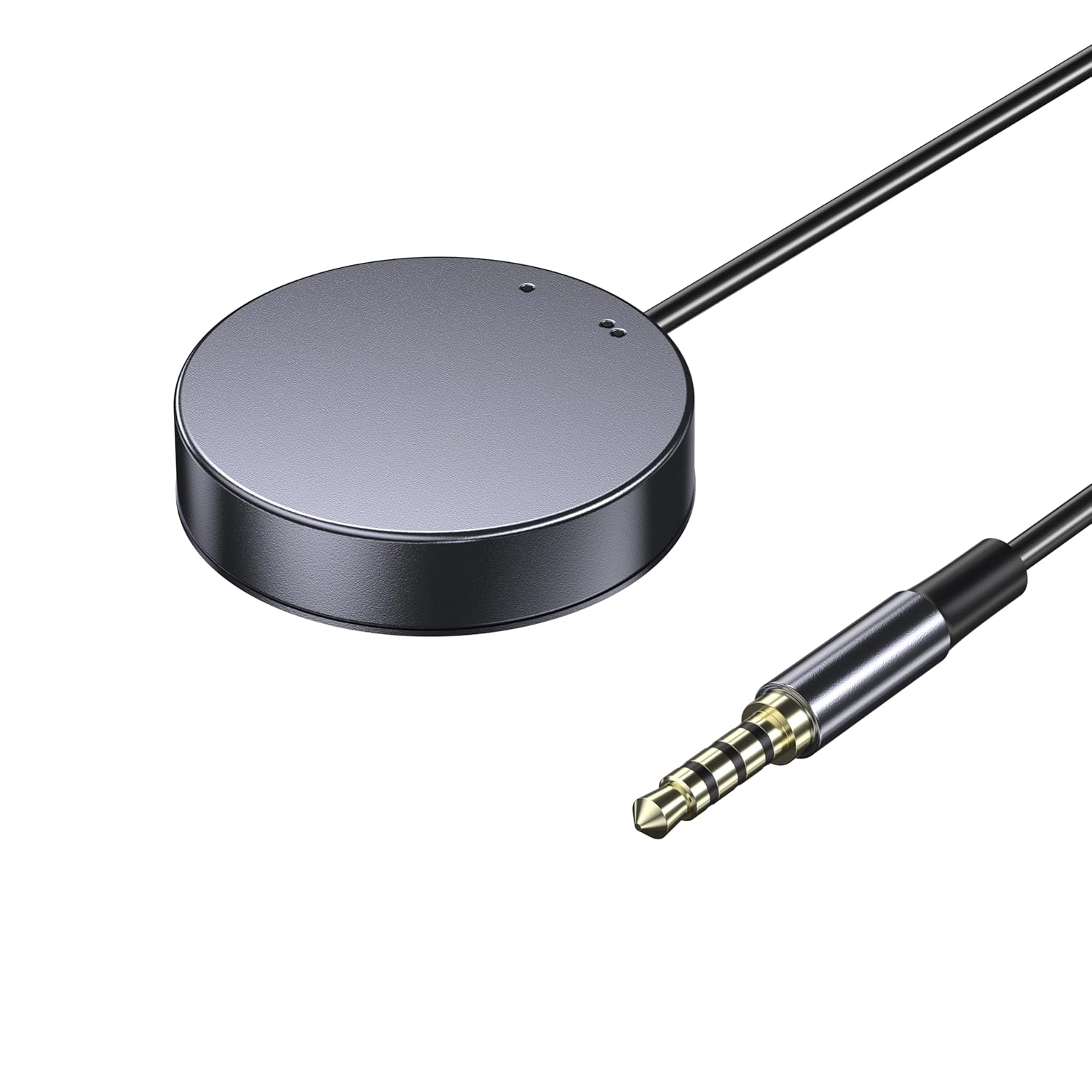
AV ACCESS Remote Switch Button for iDock C20/D23 with LED Indicators & Long Cable, 1.2m/3.94ft Extension for Effortless Device Switching-EXB01
Reviews:
5.0 out of 5 stars Great solution, and adaptable to non-standard setups.
I needed a KVM switch to drive x3 monitors from both a work laptop and a Mac Studio. The product info says that the D23 only works with desktops and DP connections, so I was a little reticent to purchase, but took the chance. On arrival it didn't work - only two monitors and many peripherals not connecting. I emailed the AV Access team who came back to me within 24 hours with solutions. (For those with similar setups: 1/ connecting the D23's USB-B inputs to the computers (cable supplied) in addition to the DP inputs solved the peripherals issue, and 2/ to resolve the issue with the monitor connected through HDMI, I replaced my passive DP>HMDI cable, with a £25 Startech active DP>HDMI adaptor). Now everything works - and it's amazing! Being able to switch at a click of a button all three monitors (+audio adaptor/mic +webcam +Stream deck +prompter) is game-changing. The device itself has a high build quality, and looks nice on my desk. I may still invest in the clicker button. The service from AV Access was quick and friendly (thanks Johnny and James). I got the feeling that they genuinely cared to solve my issue, and was left in no doubt that if not resolved there would be no problem returning the item.
5.0 out of 5 stars A formidable KVM. Great buy.
Iām happy I didnāt cheap out on this and go for something of a poorer quality. This is a formidable device, a high build quality and brilliant signal quality. It happily powers my smaller work laptop from the USB-C (not my gaming laptop though, but I knew this)I also bought the wired button switch which makes a huge difference.Overall, excellent. No regrets at all about the purchase.
1.0 out of 5 stars Apple Monitor vs AV Access KVM switch
I'm interfacing with Apple monitors via USB-C (Thunderbolt) connections. Despite testing multiple certified cables and a range of compatible adapters across both devices, Iāve been unable to establish a functional display connection.If you have a similar issue and found a solution, I would be happy to discuss further with you.
5.0 out of 5 stars Supports ultra wide monitors
Just arrived yesterday and Iām already very impressed. It does everything it says it would, plus one or two things it didnāt say it could!The switching is seamless, the elimination of window resizing, sharing of peripherals - including a bluetooth mouse that is now shared across all devices (connected to the unifying receiver plugged into the Dock).One thing the product description doesnāt tell you is that it will support an ultra wide monitor at 3440 x 1440.I was forced into buying a new hub after my old one died, and now I wish Iād had a 2 laptop hub a long time ago.Well done AV Access š
4.0 out of 5 stars Good VRR compatible KVM with a weird quirk
Pros:* Works well with 165Hz 1440p variable refresh rate displays.* Connected USB devices seem to be working well.* Comes with all the cables required to set it up, all decent quality.* The optional remote looks great, and has status LEDs to show which host is active for setups where the KVM itself is hidden from sight.Cons:* The USB side is a mess. It somes up as a composite device with a bunch of virtual peripherials, but it keeps randomly disconnecting and reconnecting. Luckily it seems this does not affect the connected USB keyboard and mouse.* Their forum contains a thread with the same issue, but there's no resolution there.* Contacted the customer support via email a week ago, but haven't heard back from them.Update: received a reply from the customer support, they are working on a resolution
5.0 out of 5 stars A near perfect device to switch multiple screens and USB devices
Since covid, I must have tried every permutation to get a convenient home working setup that easily switches between a work PC and home mac. Every solution to date has had compromises that niggle on a daily basis.Finally I have a working setup with 3 * 24" IPS screens, webcam, wireless headset, wireless keyboard and wireless mouse that switch between a mac mini and work laptop with a single button.All inputs and outputs are to the back of the switch box and I've got multiple devices connecting in via an unpowered USB hub so this keeps the desk environment uncluttered and cable free.To make the user experience even better, switching is possible via keyboard shortcuts. I could move the switch box out of sight but it's handy to have USB sockets on the desk for occasional keyboard/phone charging.The only thing that would make this better is if all video connections were HDMI. If you don't have displayport connectors on your source device (or in the case of the mac mini, the third output device needs to be USB), most converter cables are directional and in the wrong way.Whether you're looking to get a mac or work laptop connected to 3 displays, a USBC hub with 3 displayport connectors appears to be a good solution. Have found HDMI to displayport cables (both powered and unpowered) to be unreliable.
2.0 out of 5 stars Not Really Mac OS Compatible
Seems like a decent bit of kit of the face of it but I don't think it is made clear enough that it does not work properly with a MacBook Pro in that if you plug in the USB C it will only mirror the two displays not show them as two separate displays. The only way to do this I think will be with an additional HDMI splitter which is not ideal. If you are wanting to use with apple then you may be better waiting until they release a product they are developing that does work with Mac OS.
Caro, mas bom
Funciona perfeitamente. à bastante sólido e tem um click satisfatório.
Great KVM if you deal with laptops at work.
Received my package quickly from Bolo. I do have another AV Access device called the iDockB30 but it's good for two desktops and a laptop and I wanted the one that can connect to two laptops to have as my work keyboard-video-mouse (KVM).It's easy to set up. Just two USB-C cables that go to the corresponding ports on the back of the iDockC20 and power. The other ends of the USB-C cables will go to the respective laptops. I'm a big Lenovo ThinkPad fan so I have a ThinkPad T14 Gen 5 AMD from my work and a ThinkPad P14s Gen 5 AMD as my personal daily driver. Turned on the unit and works well. Though the T14 had a little issue connecting but once I rebooted it worked fine. I'm able to press the switch on the docking unit to switch between the two with no issue.Looking over the build it looks solid, and the ports are labeled clearly so you know what device to plug into what.There are a decent number of ports in the back and the SD card reader is convenient to have since at my work place, I sometimes need to use the cards to read any external data. I tested out the network connectivity between the two by switching and it doesn't seem to lose the connection which is nice.Since the power distribution is 60W I would only recommend the KVM for use on business class laptops like the Lenovo ThinkPads. It would be advisable that if you are going to be connecting a gaming laptop on it like a Asus Strix G16 or a Lenovo Legion i7 having USB-C ports it will provide enough power if you plan to game on it. I would only use it for productivity work. I hope the next iteration of the USB-C ports on the docking unit will be like USB 4 or Thunderbolt 4/5 but for right now it suits to what I need to it do at my workplace.I do have dual monitors, and they worked great on them. No issue whatsoever since the monitors I have are 27-inch 1080P and a 32-inch 1440P.I have used it for quite a number of days, and I personally like the device. It is working great so far for me and does what I need it to do. Since I do IT work, I like the fact that I can plug in a second laptop and run through items without having to plug in a monitor etc.
Exactly what it claims
This button works flawlessly. It does exactly what it needs to do. Hiding the main unit to switch with this, makes things so much cleaner.
Unsure at this point still testing
Donāt know yet. Havenāt got the switch to work with tbd usbc connection
Received Product
Item was received in a timely manner and product works fine.
Visit the v AV Access Store
AV ACCESS Remote Switch Button for iDock C20/D23 with LED Indicators & Long Cable, 1.2m/3.94ft Extension for Effortless Device Switching-EXB01
AED8609


Quantity:
Order today to get by 7-14 business days
Delivery fee of AED 20. Free for orders above AED 200.
Imported From: United Kingdom
At BOLO, we work hard to ensure the products you receive are new, genuine, and sourced from reputable suppliers.
BOLO is not an authorized or official retailer for most brands, nor are we affiliated with manufacturers unless specifically stated on a product page. Instead, we source verified sellers, authorized distributors or directly from the manufacturer.
Each product undergoes thorough inspection and verification at our consolidation and fulfilment centers to ensure it meets our strict authenticity and quality standards before being shipped and delivered to you.
If you ever have concerns regarding the authenticity of a product purchased from us, please contact Bolo Support. We will review your inquiry promptly and, if necessary, provide documentation verifying authenticity or offer a suitable resolution.
Your trust is our top priority, and we are committed to maintaining transparency and integrity in every transaction.
All product information, images, descriptions, and reviews originate from the manufacturer or from trusted sellers overseas. BOLO is not affiliated with, endorsed by, or an authorized retailer for most brands listed on our website unless stated otherwise.
While we strive to display accurate information, variations in packaging, labeling, instructions, or formulation may occasionally occur due to regional differences or supplier updates. For detailed or manufacturer-specific information, please contact the brand directly or reach out to BOLO Support for assistance.
Unless otherwise stated, all prices displayed on the product page include applicable taxes and import duties.
BOLO operates in accordance with the laws and regulations of United Arab Emirates. Any items found to be restricted or prohibited for sale within the UAE will be cancelled prior to shipment. We take proactive measures to ensure that only products permitted for sale in United Arab Emirates are listed on our website.
All items are shipped by air, and any products classified as āDangerous Goods (DG)ā under IATA regulations will be removed from the order and cancelled.
All orders are processed manually, and we make every effort to process them promptly once confirmed. Products cancelled due to the above reasons will be permanently removed from listings across the website.
Similar suggestions by Bolo
More from this brand
Similar items from āKVM Switchesā
Share with
Or share with link
https://www.bolo.ae/products/KO0Q8AZ73SF
Visit the v AV Access Store
AV ACCESS Remote Switch Button for iDock C20/D23 with LED Indicators & Long Cable, 1.2m/3.94ft Extension for Effortless Device Switching-EXB01


AED8609
Quantity:
Order today to get by 7-14 business days
Delivery fee of AED 20. Free for orders above AED 200.
Imported From: United Kingdom
At BOLO, we work hard to ensure the products you receive are new, genuine, and sourced from reputable suppliers.
BOLO is not an authorized or official retailer for most brands, nor are we affiliated with manufacturers unless specifically stated on a product page. Instead, we source verified sellers, authorized distributors or directly from the manufacturer.
Each product undergoes thorough inspection and verification at our consolidation and fulfilment centers to ensure it meets our strict authenticity and quality standards before being shipped and delivered to you.
If you ever have concerns regarding the authenticity of a product purchased from us, please contact Bolo Support. We will review your inquiry promptly and, if necessary, provide documentation verifying authenticity or offer a suitable resolution.
Your trust is our top priority, and we are committed to maintaining transparency and integrity in every transaction.
All product information, images, descriptions, and reviews originate from the manufacturer or from trusted sellers overseas. BOLO is not affiliated with, endorsed by, or an authorized retailer for most brands listed on our website unless stated otherwise.
While we strive to display accurate information, variations in packaging, labeling, instructions, or formulation may occasionally occur due to regional differences or supplier updates. For detailed or manufacturer-specific information, please contact the brand directly or reach out to BOLO Support for assistance.
Unless otherwise stated, all prices displayed on the product page include applicable taxes and import duties.
BOLO operates in accordance with the laws and regulations of United Arab Emirates. Any items found to be restricted or prohibited for sale within the UAE will be cancelled prior to shipment. We take proactive measures to ensure that only products permitted for sale in United Arab Emirates are listed on our website.
All items are shipped by air, and any products classified as āDangerous Goods (DG)ā under IATA regulations will be removed from the order and cancelled.
All orders are processed manually, and we make every effort to process them promptly once confirmed. Products cancelled due to the above reasons will be permanently removed from listings across the website.
Description:
AV ACCESS Remote Switch Button for iDock C20/D23 with LED Indicators & Long Cable, 1.2m/3.94ft Extension for Effortless Device Switching-EXB01
Reviews:
5.0 out of 5 stars Great solution, and adaptable to non-standard setups.
I needed a KVM switch to drive x3 monitors from both a work laptop and a Mac Studio. The product info says that the D23 only works with desktops and DP connections, so I was a little reticent to purchase, but took the chance. On arrival it didn't work - only two monitors and many peripherals not connecting. I emailed the AV Access team who came back to me within 24 hours with solutions. (For those with similar setups: 1/ connecting the D23's USB-B inputs to the computers (cable supplied) in addition to the DP inputs solved the peripherals issue, and 2/ to resolve the issue with the monitor connected through HDMI, I replaced my passive DP>HMDI cable, with a £25 Startech active DP>HDMI adaptor). Now everything works - and it's amazing! Being able to switch at a click of a button all three monitors (+audio adaptor/mic +webcam +Stream deck +prompter) is game-changing. The device itself has a high build quality, and looks nice on my desk. I may still invest in the clicker button. The service from AV Access was quick and friendly (thanks Johnny and James). I got the feeling that they genuinely cared to solve my issue, and was left in no doubt that if not resolved there would be no problem returning the item.
5.0 out of 5 stars A formidable KVM. Great buy.
Iām happy I didnāt cheap out on this and go for something of a poorer quality. This is a formidable device, a high build quality and brilliant signal quality. It happily powers my smaller work laptop from the USB-C (not my gaming laptop though, but I knew this)I also bought the wired button switch which makes a huge difference.Overall, excellent. No regrets at all about the purchase.
1.0 out of 5 stars Apple Monitor vs AV Access KVM switch
I'm interfacing with Apple monitors via USB-C (Thunderbolt) connections. Despite testing multiple certified cables and a range of compatible adapters across both devices, Iāve been unable to establish a functional display connection.If you have a similar issue and found a solution, I would be happy to discuss further with you.
5.0 out of 5 stars Supports ultra wide monitors
Just arrived yesterday and Iām already very impressed. It does everything it says it would, plus one or two things it didnāt say it could!The switching is seamless, the elimination of window resizing, sharing of peripherals - including a bluetooth mouse that is now shared across all devices (connected to the unifying receiver plugged into the Dock).One thing the product description doesnāt tell you is that it will support an ultra wide monitor at 3440 x 1440.I was forced into buying a new hub after my old one died, and now I wish Iād had a 2 laptop hub a long time ago.Well done AV Access š
4.0 out of 5 stars Good VRR compatible KVM with a weird quirk
Pros:* Works well with 165Hz 1440p variable refresh rate displays.* Connected USB devices seem to be working well.* Comes with all the cables required to set it up, all decent quality.* The optional remote looks great, and has status LEDs to show which host is active for setups where the KVM itself is hidden from sight.Cons:* The USB side is a mess. It somes up as a composite device with a bunch of virtual peripherials, but it keeps randomly disconnecting and reconnecting. Luckily it seems this does not affect the connected USB keyboard and mouse.* Their forum contains a thread with the same issue, but there's no resolution there.* Contacted the customer support via email a week ago, but haven't heard back from them.Update: received a reply from the customer support, they are working on a resolution
5.0 out of 5 stars A near perfect device to switch multiple screens and USB devices
Since covid, I must have tried every permutation to get a convenient home working setup that easily switches between a work PC and home mac. Every solution to date has had compromises that niggle on a daily basis.Finally I have a working setup with 3 * 24" IPS screens, webcam, wireless headset, wireless keyboard and wireless mouse that switch between a mac mini and work laptop with a single button.All inputs and outputs are to the back of the switch box and I've got multiple devices connecting in via an unpowered USB hub so this keeps the desk environment uncluttered and cable free.To make the user experience even better, switching is possible via keyboard shortcuts. I could move the switch box out of sight but it's handy to have USB sockets on the desk for occasional keyboard/phone charging.The only thing that would make this better is if all video connections were HDMI. If you don't have displayport connectors on your source device (or in the case of the mac mini, the third output device needs to be USB), most converter cables are directional and in the wrong way.Whether you're looking to get a mac or work laptop connected to 3 displays, a USBC hub with 3 displayport connectors appears to be a good solution. Have found HDMI to displayport cables (both powered and unpowered) to be unreliable.
2.0 out of 5 stars Not Really Mac OS Compatible
Seems like a decent bit of kit of the face of it but I don't think it is made clear enough that it does not work properly with a MacBook Pro in that if you plug in the USB C it will only mirror the two displays not show them as two separate displays. The only way to do this I think will be with an additional HDMI splitter which is not ideal. If you are wanting to use with apple then you may be better waiting until they release a product they are developing that does work with Mac OS.
Caro, mas bom
Funciona perfeitamente. à bastante sólido e tem um click satisfatório.
Great KVM if you deal with laptops at work.
Received my package quickly from Bolo. I do have another AV Access device called the iDockB30 but it's good for two desktops and a laptop and I wanted the one that can connect to two laptops to have as my work keyboard-video-mouse (KVM).It's easy to set up. Just two USB-C cables that go to the corresponding ports on the back of the iDockC20 and power. The other ends of the USB-C cables will go to the respective laptops. I'm a big Lenovo ThinkPad fan so I have a ThinkPad T14 Gen 5 AMD from my work and a ThinkPad P14s Gen 5 AMD as my personal daily driver. Turned on the unit and works well. Though the T14 had a little issue connecting but once I rebooted it worked fine. I'm able to press the switch on the docking unit to switch between the two with no issue.Looking over the build it looks solid, and the ports are labeled clearly so you know what device to plug into what.There are a decent number of ports in the back and the SD card reader is convenient to have since at my work place, I sometimes need to use the cards to read any external data. I tested out the network connectivity between the two by switching and it doesn't seem to lose the connection which is nice.Since the power distribution is 60W I would only recommend the KVM for use on business class laptops like the Lenovo ThinkPads. It would be advisable that if you are going to be connecting a gaming laptop on it like a Asus Strix G16 or a Lenovo Legion i7 having USB-C ports it will provide enough power if you plan to game on it. I would only use it for productivity work. I hope the next iteration of the USB-C ports on the docking unit will be like USB 4 or Thunderbolt 4/5 but for right now it suits to what I need to it do at my workplace.I do have dual monitors, and they worked great on them. No issue whatsoever since the monitors I have are 27-inch 1080P and a 32-inch 1440P.I have used it for quite a number of days, and I personally like the device. It is working great so far for me and does what I need it to do. Since I do IT work, I like the fact that I can plug in a second laptop and run through items without having to plug in a monitor etc.
Exactly what it claims
This button works flawlessly. It does exactly what it needs to do. Hiding the main unit to switch with this, makes things so much cleaner.
Unsure at this point still testing
Donāt know yet. Havenāt got the switch to work with tbd usbc connection
Received Product
Item was received in a timely manner and product works fine.
Similar suggestions by Bolo
More from this brand
Similar items from āKVM Switchesā
Share with
Or share with link
https://www.bolo.ae/products/KO0Q8AZ73SF