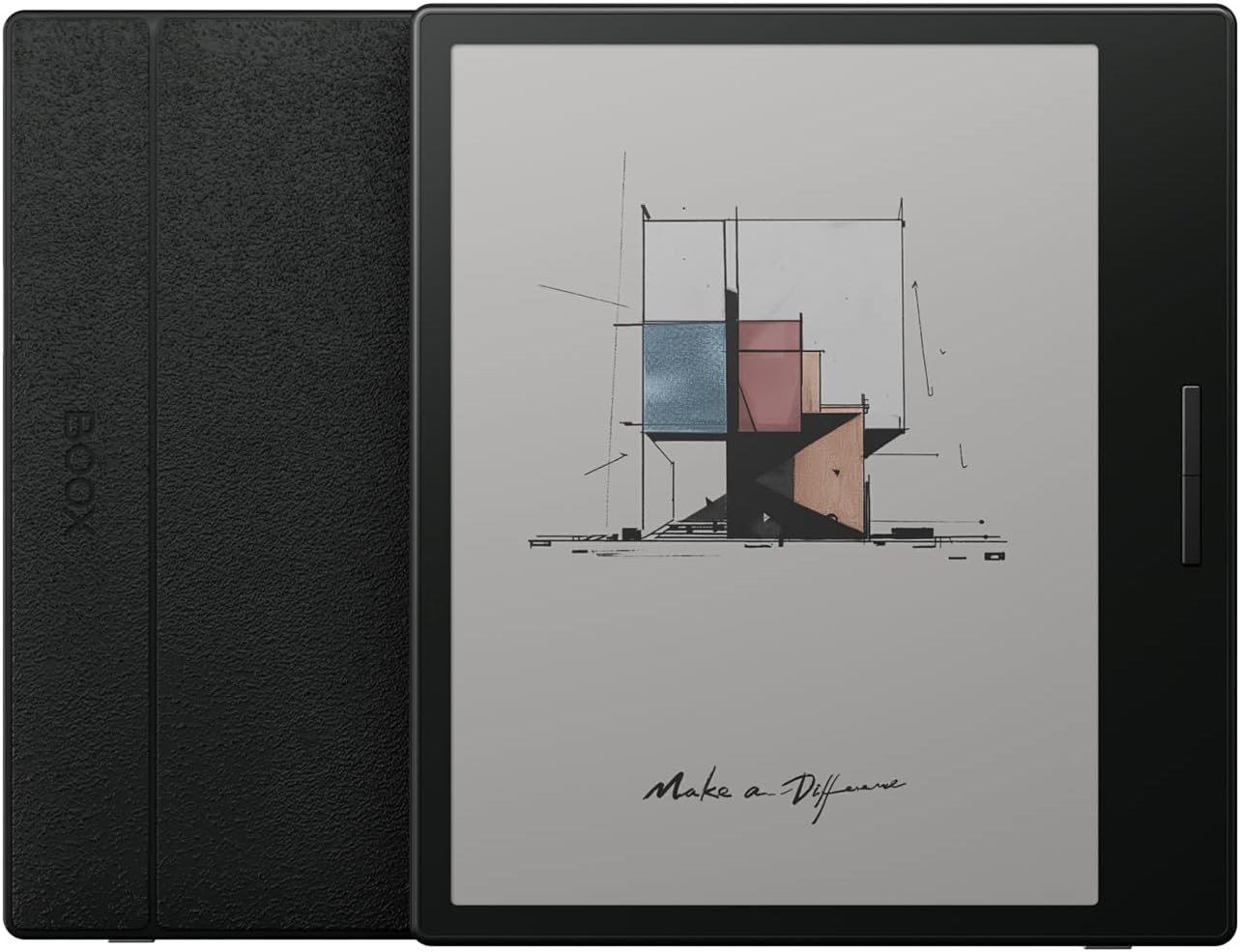
Description:
Reviews:
5.0 out of 5 stars Great product
Great product with flexibility. Took me a day to get used to the setting. Variety of setting to prevent ghosting and fully customizable for each app. Not the typical tablet, but if you need a small and portable device with beautiful colour eink for reading (not writing) this might be for you.
4.0 out of 5 stars Do you really need colours?
I purchased the BOOX Tablet Go Color 7 to enhance my e-book experience and use it as a general tablet, appreciating the e-ink technology. However, I'm uncertain if the color feature is truly necessary.Test Conditions: UK, overcast day, natural daylight at 10am.Brightness and Light Settings: In the second picture, I adjusted the BOOX tablet to emulate the Oasis display, setting brightness at approximately 75% and a cooler color temperature. Without the built-in light, the BOOX appears dim—an inherent aspect of its technology, but worth noting for prospective buyers.Comparison with Other Devices: The third picture includes my Kindle Paperwhite, which offers superior readability compared to the BOOX in daylight conditions. The BOOX Tablet Go Color 7 is about the same size as the Kindle Oasis but is thinner. While the battery life may not be as good, the device is more flexible in terms of app usage. If you're comfortable using the screen's light, it can offer a similar experience to the Oasis.Android Experience: The Play Store functions well, allowing me to download apps like the Guardian for newspaper reading. However, the colors appear dull and washed out. While I can distinguish the blue sky, the overall experience feels lackluster.Conclusion: I’m on the fence about keeping it. I appreciate the size and the Android OS, but I’m not sure if I'm satisfied with the screen quality. Considering a second, 10.3-inch black and white Android device for a better newspaper reading experience. I hope these insights and photos help you understand the differences in technologies between these devices.
3.0 out of 5 stars Not there yet
Having android is great, but color ink screens have still got a ways to go. The screen is quite dark and the brightness doesn't go high enough. I find the rainbow effect from the color pixels rather distracting.The form factor and build quality is perfect and I really want to love the device, but it's going to get returned unfortunately.
1.0 out of 5 stars Faulty pixels!
Black smudge/faulty pixels, straight out of the box. Really disappointed. Returning ASAP for a refund. It seems there is no colour e-ink device that actually works flawlessly.
2.0 out of 5 stars Color isn't ready for primetime.
This is a nice device to use - solidly built, page turn buttons, light, good size. Sadly, after trying a few devices with kaleido screens now, I've come to the conclusion that they are just not very good. The screens are dark, contrast is poor, ghosting is worse.Stick with B&W unless you really need color.
1.0 out of 5 stars Disappointed with quality control – received with a dead pixel
I ordered the BOOX Tablet Go Color 7 ePaper E Ink Tablet (Black) brand new, but unfortunately, it arrived with a pinhole light on the screen (dead pixel). For a device costing £250, I find this completely unacceptable. After some research, I discovered that Kaleido e-readers are notorious for this issue, and it seems Onyx’s quality control is subpar.While the device itself is great in terms of functionality, the poor build quality really lets it down. I understand that industry standards permit up to 5 dead pixels as “acceptable,” but try explaining that to someone who’s just spent hundreds of pounds. This isn’t a cheap product, and this level of quality wouldn’t be tolerated for an LCD TV or iPad.I returned the black version and opted for the white one instead. Fingers crossed that it doesn’t have the same issue, but it’s disappointing that I have to worry about this in the first place. For the price, Onyx needs to step up their quality control.
3.0 out of 5 stars I really wanted to like this device
however I don’t think the technology is there yet…..The device is a great size and feels good in one hand, just the right weight too. It has some neat features and I like the fact that it runs android .The biggest issues I found was the ghosting and the brightness of the screen.When browsing content with mixed text and images, whenever I turned a page previous imagery or text could often be seen in a ghost effect. I found this very distracting. This then meant that I was constantly manually refreshing the page to get a crisp clear image or text. I tried changing all the setting's but it didn't seem to help much. I could only read the text comfortably when the screen light was on. Without the light I found the screen way too dark to read compared to my kindle.
2.0 out of 5 stars Difficult user interface and disappointing book store content
I bought this device because of its promising color screen and considered purchasing the Air 3C eventually as well. However, I frequently had to adjust the brightness and refresh settings to avoid ghosting effects. The color screen was disappointing due to its extremely low resolution, making it difficult to read on the small display. The user interface was challenging, requiring different settings adjustments for each application.Additionally, the bookstore offered limited content, featuring only very old classics and free books. You can’t remove the store from the bottom menu, which was frustrating. Ultimately, I returned the device and ordered a basic Kindle, which offers a much better reading experience at a fraction of the cost.
Good device.
Only one thing is bad. No protection case in the box.
Best Ebook reader for power user
Pros:Android - Almost anything can be doneErgonomic DesignCons:Bit glare on screenBattery not as good as kindle (Android is the reason)Lack of stylusIn India price is too high than That of foreign countries.
high tech ereader
I own many Boox, many kindles, some Nook, and a pocketbook. I would have to say, Bolo kindle has always been my number one choice due to its whitest whites and darkest blacks, it is nice on the eyes. On top of that, it runs my preferred reading system. I’ve wanted a color ereader for the purpose of seeing my library in color. Boox being an open source and android at that, means you can use whichever reading app you prefer. There are limitations with google play, one being Bolo shopping and NewsBreak, which is strange being that it is a “tablet”. Not a deal breaker personally, I just don’t understand why some apps won’t work. Fortunately all apps I wanted with this, does work.Being that it is android means it requires updates to the system and eventually will become obsolete within some years. I love that with my kindle, it lasts forever. While kindle device will require updates it doesn’t become obsolete all together. I’ve had my kindle keyboard for 10+ years now and it works lovely. With an outdate android tablet, it will start to have obvious slow downs. My favorite kindle which was made in 2017 is still my fastest kindle I have. I don't even think the kindle keyboard has, just become outdate within its home layout but still fully capable and usable when reading my Bolo books!Overall go color 7, is a great ereader and I love the speaker to listen to audiobooks, the page turn buttons are perfect, and the oasis like form factor is everything I needed… for now. I have had a onyx leaf 1 which had become outdated and slow to use, a poke5s which is only 2 years old and completely died on me. I still have the tab c and poke 4 which work without defect. I'm sure it is a matter of good batch and bad batch because not all of my onyx boox devices are faulted. Since Bolo seems to be getting rid of the Oasis model, this is the next best thing. I will forever be a kindle girly but this checks off all my needs!
A device that's a fun departure from the Amazon ecosystem
I got a Go Color 7 at the same time as a Kobo Libre Color 2. I wanted to see which one made the most sense to expand my reading ecosystem but MOST importantly to add physical buttons to my reading device. I had become convinced that my Kindle Paperwhite was terrific EXCEPT that it lacked physical page turning buttons. I probably would have bought an Oasis but Bolo has puzzingly abandoned that line. But I couldn't be more happy with the Go Color 7, which I found far superior in use to the Kobo.It's not perfect - the color is faded and ghosting can be an issue, but depending on how you like to read your books that may or may not be a big issue. For me, the ability to add magazines, newspapers, Omnivore, etc. to my device was really a game-changer. I haven't missed a beat with my use of Kindle or Libby, since both are available on the Boox device, since it runs Android, and I really enjoyed the expansion of my choices in reading apps. If you primarily stick to Kindle and Libby-through-Kindle it may not sound that interesting but I've been surprised by how much more I can pull my favorite reading material in now and off my phone - which is critical.I'd also say that the other really important factor is how amazingly light it is, which, when coupled with the physical buttons, has greatly increased the ease of reading. I always got tired of flicking my finger back and forth to tap the screen and I realize now part of that was just how heavy my Kindle was, with or without the cover. In addition, the Boox has a really pleasant back - it feels like paper - and a magnetic cover which is easy to slip on and off. I keep it in the cover and slip it off and hold it in one hand, with a thumb on the page turning button - it's very easy to hold it in one hand for a long time.The color I could take or leave, but it's pleasant, especially when reading a magazine or newspaper. I don't read much in the way of comics but I imagine that would be nice, as well. The ghosting is a little bit more noticeable than with a Kindle, but you can tinker with the settings app by app, and eventually it's not much of an issue. You still have access to the Kindle app, and the physical form of the device makes it very, very pleasant to read for long periods of time.I guess I could sum it up by saying I'm a LONG time Kindle owner and I have been shocked by this purchase - I bought it mostly just out of curiosity and it has completely replaced my Paperwhite. I did mention the Kobo at the beginning, but I returned it - it just felt like a really nice little device but the fact that I'd be locked into another ecosystem (Kobo's) just paled in comparison to the Boox GC7. I know both devices can utilize Calibre, so there's no real advantage to the Kobo (except maybe the ability to use a pen with it, but in my case I had no need for note taking or doodling capabilities on a device I mainly plan to use as an e-reader). So the Boox Go Color 7 is now my everyday reader (and I've skipped over it, but I have Audible, PocketCast and Spotify on it too!). I could see Bolo coming out with a color Kindle with physical buttons that might lure me back, but even there I would hate to leave my other apps. I've thoroughly enjoyed it and would highly recommend it!
The TLDR of it all: I’d buy it again and recommend it
The TLDR of it all: I’d buy it again and recommend it. However, make sure you have realistic expectations and you're ready to customize the device to your liking.I was hesitant to get this due to the numerous comments about the color being too dull, and other complaints regarding ghosting and the UI. I’ve owned various models of kindles for the past 13 years, but I don’t like that I’m limited to the Kindle store or that I can’t read comics due to the Kindles only being black and white. I don’t care for reading on a computer/laptop and don’t own a tablet. I didn’t want to get a tablet because I like the way ereaders are lit for my eyes, but wanted color so I could read comics on it. The Boox seemed like my best option. There seem to be fewer reviews which made it harder for me to figure out if I wanted to buy it. So, I’ve written a fairly long one that will hopefully help some of y’all out.The review will talk about the UI, battery life, ghosting, and color.User Interface:The UI on this definitely takes some getting used to. Because the device runs on android software, there’s a lot that it can do which means there’s a lot to learn about the way it works. The UI is like a combination of a kindle, tablet, and drawing tablet. I reference a drawing tablet because of how customizable the gestures are. Assigning a role function to each gesture is a bit confusing at first, but once you do it the first time it becomes fairly instinctive. My main issue with the gestures is the gestures assigned to the sides of the tablet can be a bit difficult to use while in an app. I think that will go away over time as I learn where the screen ends.I do like that the brightness/saturation/controls can be adjusted by app as opposed to having to change them every time you use a different app. For example, when I use Hoopla it’s programmed to up the brightness and saturation so that the comics are better quality, but those settings change when I open the kindle.I dislike that I can’t uninstall certain apps that come with it like the music function. However, that’s something that pretty much every device has.If you struggle learning new interfaces, I wouldn’t really recommend this unless you’re dedicated to figuring out how it works. The user manual is easy to navigate and easy to understand.Battery Life:The battery life is definitely not as long as my kindle oasis, but this one is programmed to power off after a certain amount of time. I generally prefer my devices to turn off when not using them as opposed to sleeping, so this is really great for me. The power off function also helps prolong the battery life.The battery will run out quicker if you have brightness up or have intense refresh settings, which is to be expected of any device. I have no trouble plugging the device in before going to bed, the same with all my other electronics, so the battery lasting more than a day isn’t an issue for me. I can’t attest to how long the battery lasts without charging because I don’t leave the device on for several days without charging it.The start up speed is slower than my kindle, but I wouldn’t say it’s a significant time difference since the device is turning back on, not coming out of sleep mode. The device does have a sleep mode, and it wakes up very quickly then.Customizing:I like that the Boox lets me customize pretty much everything. I hate that I can’t really put a screensaver on my kindle and that unless I pay to remove them there will be ads. With this device I’m able to put whatever screensaver I want.The gesture customizing is also really helpful just because it makes the device more intuitive for me. You can also organize apps into folders like it’s a phone. The app range is significantly larger and I’ve been able to download Hoopla, Libby, Kindle, and Goodreads. They all work well and I haven’t had any issues so far.Ghosting:I don’t think the ghosting is as bad as others are making it out to be. You can increase the refresh rate in each app to help with it.The only time ghosting is particularly bad is if you were on a page that didn’t have only text. For example, when going to the next page of a comic there’s significant ghosting of the previous panels. However, I have mine set up to manually refresh if I swipe from the bottom of the screen. So I turn the page then swipe up. I don’t mind the extra step since it’s kind of all one motion for me.The ghosting isn’t very bad if I’m using Libby or Kindle for books, but it does automatically refresh every few pages/clicks depending on your settings.Overall, yes there is ghosting, but there’s a lot you can do to minimize it. It just depends on if you’re willing to manually refresh every once in a while and how annoying that’ll be for you.Color:Color is what I was most concerned about since the whole reason I bought the thing was to read comics.Obviously the color isn’t as bright. The device doesn’t have an LED screen so I was never under the impression that the color would be super vibrant. I messed with the settings in Hoopla a lot to get the brightness and saturation to a place I was satisfied with. So, you’ll definitely have to put in the time to get the settings right for you.I feel like the comics look like the Silver-Copper age comics. They’re not as shiny as today’s comics, but they look like they were printed on paper like they used to be. I’ve attached some photos for comparison. I’ve also attached a photo of the comic panel the Boox is displaying for a better look at the color difference.The screenshots on Boox come across in the full color I would get on any LED device once transferred to my phone/computer. The provided panel was taken as a screenshot with Boox.My main complaint with color is when you click to the next page/panel it briefly looks like the device is glitching. Once I realized the device was okay and not going to crash, I just made my peace with it and now it doesn't really bother me.Overall, I think people are placing unfair expectations on color vibrancy, and that this is a good option for reading comics as long as you’re okay with the older look and not the bright and shiny look we have today.Conclusion:I really like the Boox, and I would recommend it to others. However, you have to go in knowing you’ll have to put in the effort to learn the device and how to customize it to best suit you. I think the effort to do so is really worth it for how the device works once customized. I give it a solid 4 out of 5 stars!
Visit the BOOX Store
BOOX Tablet Go Color 7 ePaper E Ink Tablet 4G 64G Front Light (Black)
AED2,09022
Quantity:
Order today to get by 7-14 business days
This item qualifies for free delivery
Imported From: United Kingdom
At BOLO, we work hard to ensure the products you receive are new, genuine, and sourced from reputable suppliers.
BOLO is not an authorized or official retailer for most brands, nor are we affiliated with manufacturers unless specifically stated on a product page. Instead, we source verified sellers, authorized distributors or directly from the manufacturer.
Each product undergoes thorough inspection and verification at our consolidation and fulfilment centers to ensure it meets our strict authenticity and quality standards before being shipped and delivered to you.
If you ever have concerns regarding the authenticity of a product purchased from us, please contact Bolo Support. We will review your inquiry promptly and, if necessary, provide documentation verifying authenticity or offer a suitable resolution.
Your trust is our top priority, and we are committed to maintaining transparency and integrity in every transaction.
All product information, images, descriptions, and reviews originate from the manufacturer or from trusted sellers overseas. BOLO is not affiliated with, endorsed by, or an authorized retailer for most brands listed on our website unless stated otherwise.
While we strive to display accurate information, variations in packaging, labeling, instructions, or formulation may occasionally occur due to regional differences or supplier updates. For detailed or manufacturer-specific information, please contact the brand directly or reach out to BOLO Support for assistance.
Unless otherwise stated, all prices displayed on the product page include applicable taxes and import duties.
BOLO operates in accordance with the laws and regulations of United Arab Emirates. Any items found to be restricted or prohibited for sale within the UAE will be cancelled prior to shipment. We take proactive measures to ensure that only products permitted for sale in United Arab Emirates are listed on our website.
All items are shipped by air, and any products classified as “Dangerous Goods (DG)” under IATA regulations will be removed from the order and cancelled.
All orders are processed manually, and we make every effort to process them promptly once confirmed. Products cancelled due to the above reasons will be permanently removed from listings across the website.
More from this brand
Similar items from “Tablets”
Share with
Or share with link
https://www.bolo.ae/products/KO0Q4QA8A8J
Visit the BOOX Store
BOOX Tablet Go Color 7 ePaper E Ink Tablet 4G 64G Front Light (Black)

AED2,09022
Quantity:
Order today to get by 7-14 business days
This item qualifies for free delivery
Imported From: United Kingdom
At BOLO, we work hard to ensure the products you receive are new, genuine, and sourced from reputable suppliers.
BOLO is not an authorized or official retailer for most brands, nor are we affiliated with manufacturers unless specifically stated on a product page. Instead, we source verified sellers, authorized distributors or directly from the manufacturer.
Each product undergoes thorough inspection and verification at our consolidation and fulfilment centers to ensure it meets our strict authenticity and quality standards before being shipped and delivered to you.
If you ever have concerns regarding the authenticity of a product purchased from us, please contact Bolo Support. We will review your inquiry promptly and, if necessary, provide documentation verifying authenticity or offer a suitable resolution.
Your trust is our top priority, and we are committed to maintaining transparency and integrity in every transaction.
All product information, images, descriptions, and reviews originate from the manufacturer or from trusted sellers overseas. BOLO is not affiliated with, endorsed by, or an authorized retailer for most brands listed on our website unless stated otherwise.
While we strive to display accurate information, variations in packaging, labeling, instructions, or formulation may occasionally occur due to regional differences or supplier updates. For detailed or manufacturer-specific information, please contact the brand directly or reach out to BOLO Support for assistance.
Unless otherwise stated, all prices displayed on the product page include applicable taxes and import duties.
BOLO operates in accordance with the laws and regulations of United Arab Emirates. Any items found to be restricted or prohibited for sale within the UAE will be cancelled prior to shipment. We take proactive measures to ensure that only products permitted for sale in United Arab Emirates are listed on our website.
All items are shipped by air, and any products classified as “Dangerous Goods (DG)” under IATA regulations will be removed from the order and cancelled.
All orders are processed manually, and we make every effort to process them promptly once confirmed. Products cancelled due to the above reasons will be permanently removed from listings across the website.
Description:
Reviews:
5.0 out of 5 stars Great product
Great product with flexibility. Took me a day to get used to the setting. Variety of setting to prevent ghosting and fully customizable for each app. Not the typical tablet, but if you need a small and portable device with beautiful colour eink for reading (not writing) this might be for you.
4.0 out of 5 stars Do you really need colours?
I purchased the BOOX Tablet Go Color 7 to enhance my e-book experience and use it as a general tablet, appreciating the e-ink technology. However, I'm uncertain if the color feature is truly necessary.Test Conditions: UK, overcast day, natural daylight at 10am.Brightness and Light Settings: In the second picture, I adjusted the BOOX tablet to emulate the Oasis display, setting brightness at approximately 75% and a cooler color temperature. Without the built-in light, the BOOX appears dim—an inherent aspect of its technology, but worth noting for prospective buyers.Comparison with Other Devices: The third picture includes my Kindle Paperwhite, which offers superior readability compared to the BOOX in daylight conditions. The BOOX Tablet Go Color 7 is about the same size as the Kindle Oasis but is thinner. While the battery life may not be as good, the device is more flexible in terms of app usage. If you're comfortable using the screen's light, it can offer a similar experience to the Oasis.Android Experience: The Play Store functions well, allowing me to download apps like the Guardian for newspaper reading. However, the colors appear dull and washed out. While I can distinguish the blue sky, the overall experience feels lackluster.Conclusion: I’m on the fence about keeping it. I appreciate the size and the Android OS, but I’m not sure if I'm satisfied with the screen quality. Considering a second, 10.3-inch black and white Android device for a better newspaper reading experience. I hope these insights and photos help you understand the differences in technologies between these devices.
3.0 out of 5 stars Not there yet
Having android is great, but color ink screens have still got a ways to go. The screen is quite dark and the brightness doesn't go high enough. I find the rainbow effect from the color pixels rather distracting.The form factor and build quality is perfect and I really want to love the device, but it's going to get returned unfortunately.
1.0 out of 5 stars Faulty pixels!
Black smudge/faulty pixels, straight out of the box. Really disappointed. Returning ASAP for a refund. It seems there is no colour e-ink device that actually works flawlessly.
2.0 out of 5 stars Color isn't ready for primetime.
This is a nice device to use - solidly built, page turn buttons, light, good size. Sadly, after trying a few devices with kaleido screens now, I've come to the conclusion that they are just not very good. The screens are dark, contrast is poor, ghosting is worse.Stick with B&W unless you really need color.
1.0 out of 5 stars Disappointed with quality control – received with a dead pixel
I ordered the BOOX Tablet Go Color 7 ePaper E Ink Tablet (Black) brand new, but unfortunately, it arrived with a pinhole light on the screen (dead pixel). For a device costing £250, I find this completely unacceptable. After some research, I discovered that Kaleido e-readers are notorious for this issue, and it seems Onyx’s quality control is subpar.While the device itself is great in terms of functionality, the poor build quality really lets it down. I understand that industry standards permit up to 5 dead pixels as “acceptable,” but try explaining that to someone who’s just spent hundreds of pounds. This isn’t a cheap product, and this level of quality wouldn’t be tolerated for an LCD TV or iPad.I returned the black version and opted for the white one instead. Fingers crossed that it doesn’t have the same issue, but it’s disappointing that I have to worry about this in the first place. For the price, Onyx needs to step up their quality control.
3.0 out of 5 stars I really wanted to like this device
however I don’t think the technology is there yet…..The device is a great size and feels good in one hand, just the right weight too. It has some neat features and I like the fact that it runs android .The biggest issues I found was the ghosting and the brightness of the screen.When browsing content with mixed text and images, whenever I turned a page previous imagery or text could often be seen in a ghost effect. I found this very distracting. This then meant that I was constantly manually refreshing the page to get a crisp clear image or text. I tried changing all the setting's but it didn't seem to help much. I could only read the text comfortably when the screen light was on. Without the light I found the screen way too dark to read compared to my kindle.
2.0 out of 5 stars Difficult user interface and disappointing book store content
I bought this device because of its promising color screen and considered purchasing the Air 3C eventually as well. However, I frequently had to adjust the brightness and refresh settings to avoid ghosting effects. The color screen was disappointing due to its extremely low resolution, making it difficult to read on the small display. The user interface was challenging, requiring different settings adjustments for each application.Additionally, the bookstore offered limited content, featuring only very old classics and free books. You can’t remove the store from the bottom menu, which was frustrating. Ultimately, I returned the device and ordered a basic Kindle, which offers a much better reading experience at a fraction of the cost.
Good device.
Only one thing is bad. No protection case in the box.
Best Ebook reader for power user
Pros:Android - Almost anything can be doneErgonomic DesignCons:Bit glare on screenBattery not as good as kindle (Android is the reason)Lack of stylusIn India price is too high than That of foreign countries.
high tech ereader
I own many Boox, many kindles, some Nook, and a pocketbook. I would have to say, Bolo kindle has always been my number one choice due to its whitest whites and darkest blacks, it is nice on the eyes. On top of that, it runs my preferred reading system. I’ve wanted a color ereader for the purpose of seeing my library in color. Boox being an open source and android at that, means you can use whichever reading app you prefer. There are limitations with google play, one being Bolo shopping and NewsBreak, which is strange being that it is a “tablet”. Not a deal breaker personally, I just don’t understand why some apps won’t work. Fortunately all apps I wanted with this, does work.Being that it is android means it requires updates to the system and eventually will become obsolete within some years. I love that with my kindle, it lasts forever. While kindle device will require updates it doesn’t become obsolete all together. I’ve had my kindle keyboard for 10+ years now and it works lovely. With an outdate android tablet, it will start to have obvious slow downs. My favorite kindle which was made in 2017 is still my fastest kindle I have. I don't even think the kindle keyboard has, just become outdate within its home layout but still fully capable and usable when reading my Bolo books!Overall go color 7, is a great ereader and I love the speaker to listen to audiobooks, the page turn buttons are perfect, and the oasis like form factor is everything I needed… for now. I have had a onyx leaf 1 which had become outdated and slow to use, a poke5s which is only 2 years old and completely died on me. I still have the tab c and poke 4 which work without defect. I'm sure it is a matter of good batch and bad batch because not all of my onyx boox devices are faulted. Since Bolo seems to be getting rid of the Oasis model, this is the next best thing. I will forever be a kindle girly but this checks off all my needs!
A device that's a fun departure from the Amazon ecosystem
I got a Go Color 7 at the same time as a Kobo Libre Color 2. I wanted to see which one made the most sense to expand my reading ecosystem but MOST importantly to add physical buttons to my reading device. I had become convinced that my Kindle Paperwhite was terrific EXCEPT that it lacked physical page turning buttons. I probably would have bought an Oasis but Bolo has puzzingly abandoned that line. But I couldn't be more happy with the Go Color 7, which I found far superior in use to the Kobo.It's not perfect - the color is faded and ghosting can be an issue, but depending on how you like to read your books that may or may not be a big issue. For me, the ability to add magazines, newspapers, Omnivore, etc. to my device was really a game-changer. I haven't missed a beat with my use of Kindle or Libby, since both are available on the Boox device, since it runs Android, and I really enjoyed the expansion of my choices in reading apps. If you primarily stick to Kindle and Libby-through-Kindle it may not sound that interesting but I've been surprised by how much more I can pull my favorite reading material in now and off my phone - which is critical.I'd also say that the other really important factor is how amazingly light it is, which, when coupled with the physical buttons, has greatly increased the ease of reading. I always got tired of flicking my finger back and forth to tap the screen and I realize now part of that was just how heavy my Kindle was, with or without the cover. In addition, the Boox has a really pleasant back - it feels like paper - and a magnetic cover which is easy to slip on and off. I keep it in the cover and slip it off and hold it in one hand, with a thumb on the page turning button - it's very easy to hold it in one hand for a long time.The color I could take or leave, but it's pleasant, especially when reading a magazine or newspaper. I don't read much in the way of comics but I imagine that would be nice, as well. The ghosting is a little bit more noticeable than with a Kindle, but you can tinker with the settings app by app, and eventually it's not much of an issue. You still have access to the Kindle app, and the physical form of the device makes it very, very pleasant to read for long periods of time.I guess I could sum it up by saying I'm a LONG time Kindle owner and I have been shocked by this purchase - I bought it mostly just out of curiosity and it has completely replaced my Paperwhite. I did mention the Kobo at the beginning, but I returned it - it just felt like a really nice little device but the fact that I'd be locked into another ecosystem (Kobo's) just paled in comparison to the Boox GC7. I know both devices can utilize Calibre, so there's no real advantage to the Kobo (except maybe the ability to use a pen with it, but in my case I had no need for note taking or doodling capabilities on a device I mainly plan to use as an e-reader). So the Boox Go Color 7 is now my everyday reader (and I've skipped over it, but I have Audible, PocketCast and Spotify on it too!). I could see Bolo coming out with a color Kindle with physical buttons that might lure me back, but even there I would hate to leave my other apps. I've thoroughly enjoyed it and would highly recommend it!
The TLDR of it all: I’d buy it again and recommend it
The TLDR of it all: I’d buy it again and recommend it. However, make sure you have realistic expectations and you're ready to customize the device to your liking.I was hesitant to get this due to the numerous comments about the color being too dull, and other complaints regarding ghosting and the UI. I’ve owned various models of kindles for the past 13 years, but I don’t like that I’m limited to the Kindle store or that I can’t read comics due to the Kindles only being black and white. I don’t care for reading on a computer/laptop and don’t own a tablet. I didn’t want to get a tablet because I like the way ereaders are lit for my eyes, but wanted color so I could read comics on it. The Boox seemed like my best option. There seem to be fewer reviews which made it harder for me to figure out if I wanted to buy it. So, I’ve written a fairly long one that will hopefully help some of y’all out.The review will talk about the UI, battery life, ghosting, and color.User Interface:The UI on this definitely takes some getting used to. Because the device runs on android software, there’s a lot that it can do which means there’s a lot to learn about the way it works. The UI is like a combination of a kindle, tablet, and drawing tablet. I reference a drawing tablet because of how customizable the gestures are. Assigning a role function to each gesture is a bit confusing at first, but once you do it the first time it becomes fairly instinctive. My main issue with the gestures is the gestures assigned to the sides of the tablet can be a bit difficult to use while in an app. I think that will go away over time as I learn where the screen ends.I do like that the brightness/saturation/controls can be adjusted by app as opposed to having to change them every time you use a different app. For example, when I use Hoopla it’s programmed to up the brightness and saturation so that the comics are better quality, but those settings change when I open the kindle.I dislike that I can’t uninstall certain apps that come with it like the music function. However, that’s something that pretty much every device has.If you struggle learning new interfaces, I wouldn’t really recommend this unless you’re dedicated to figuring out how it works. The user manual is easy to navigate and easy to understand.Battery Life:The battery life is definitely not as long as my kindle oasis, but this one is programmed to power off after a certain amount of time. I generally prefer my devices to turn off when not using them as opposed to sleeping, so this is really great for me. The power off function also helps prolong the battery life.The battery will run out quicker if you have brightness up or have intense refresh settings, which is to be expected of any device. I have no trouble plugging the device in before going to bed, the same with all my other electronics, so the battery lasting more than a day isn’t an issue for me. I can’t attest to how long the battery lasts without charging because I don’t leave the device on for several days without charging it.The start up speed is slower than my kindle, but I wouldn’t say it’s a significant time difference since the device is turning back on, not coming out of sleep mode. The device does have a sleep mode, and it wakes up very quickly then.Customizing:I like that the Boox lets me customize pretty much everything. I hate that I can’t really put a screensaver on my kindle and that unless I pay to remove them there will be ads. With this device I’m able to put whatever screensaver I want.The gesture customizing is also really helpful just because it makes the device more intuitive for me. You can also organize apps into folders like it’s a phone. The app range is significantly larger and I’ve been able to download Hoopla, Libby, Kindle, and Goodreads. They all work well and I haven’t had any issues so far.Ghosting:I don’t think the ghosting is as bad as others are making it out to be. You can increase the refresh rate in each app to help with it.The only time ghosting is particularly bad is if you were on a page that didn’t have only text. For example, when going to the next page of a comic there’s significant ghosting of the previous panels. However, I have mine set up to manually refresh if I swipe from the bottom of the screen. So I turn the page then swipe up. I don’t mind the extra step since it’s kind of all one motion for me.The ghosting isn’t very bad if I’m using Libby or Kindle for books, but it does automatically refresh every few pages/clicks depending on your settings.Overall, yes there is ghosting, but there’s a lot you can do to minimize it. It just depends on if you’re willing to manually refresh every once in a while and how annoying that’ll be for you.Color:Color is what I was most concerned about since the whole reason I bought the thing was to read comics.Obviously the color isn’t as bright. The device doesn’t have an LED screen so I was never under the impression that the color would be super vibrant. I messed with the settings in Hoopla a lot to get the brightness and saturation to a place I was satisfied with. So, you’ll definitely have to put in the time to get the settings right for you.I feel like the comics look like the Silver-Copper age comics. They’re not as shiny as today’s comics, but they look like they were printed on paper like they used to be. I’ve attached some photos for comparison. I’ve also attached a photo of the comic panel the Boox is displaying for a better look at the color difference.The screenshots on Boox come across in the full color I would get on any LED device once transferred to my phone/computer. The provided panel was taken as a screenshot with Boox.My main complaint with color is when you click to the next page/panel it briefly looks like the device is glitching. Once I realized the device was okay and not going to crash, I just made my peace with it and now it doesn't really bother me.Overall, I think people are placing unfair expectations on color vibrancy, and that this is a good option for reading comics as long as you’re okay with the older look and not the bright and shiny look we have today.Conclusion:I really like the Boox, and I would recommend it to others. However, you have to go in knowing you’ll have to put in the effort to learn the device and how to customize it to best suit you. I think the effort to do so is really worth it for how the device works once customized. I give it a solid 4 out of 5 stars!
More from this brand
Similar items from “Tablets”
Share with
Or share with link
https://www.bolo.ae/products/KO0Q4QA8A8J