Description:
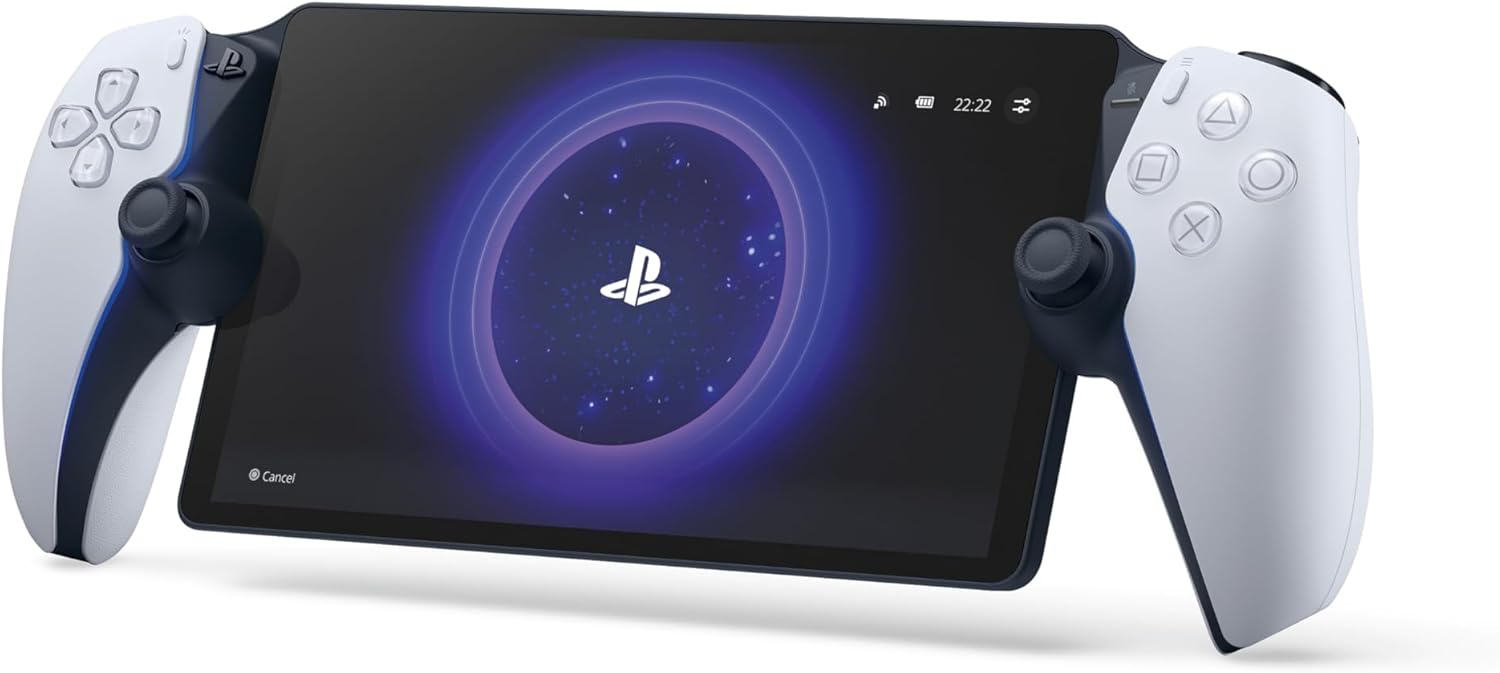
PlayStation Portal™ Remote Player gives you access to the games on your PS5® console over your home Wi-Fi, letting you jump into gaming on a gorgeous 8” LCD screen capable of 1080p resolution play at 60fps, all without needing to play on a TV
Reviews:
5.0 out of 5 stars Best Buy
(function() { P.when('cr-A', 'ready').execute(function(A) { if(typeof A.toggleExpanderAriaLabel === 'function') { A.toggleExpanderAriaLabel('review_text_read_more', 'Read more of this review', 'Read less of this review'); } }); })(); .review-text-read-more-expander:focus-visible { outline: 2px solid #2162a1; outline-offset: 2px; border-radius: 5px; } As an avid PlayStation enthusiast, the challenge of having only one TV often meant making compromises—until I discovered the portal. This ingenious device has revolutionized my gaming setup, allowing me to immerse myself in gameplay while keeping the TV available for others.The ergonomic design of the portal is a triumph, nestling into my hands with the same ease and comfort as the PS5 controllers. The display is nothing short of spectacular, boasting brilliant clarity and picture quality that brings games to life. Despite rigorous testing, I’ve experienced no lag or connectivity issues, though my ultra-fast internet connection might deserve some credit here.The battery life is exceptional, powering through a staggering six hours of intense gaming. I’ve found that disabling the lights extends this even further, a small tweak for prolonged adventures. While the portal’s audio is impressive, I prefer to connect my PS5 headset for an uninterrupted sonic experience.I’m holding out hope for future enhancements from Sony, particularly the ability to stream directly to the portal. This feature would elevate an already remarkable device to new heights. Nonetheless, the portal stands out as a flawless piece of technology in its current form.A special mention must go to the delivery driver, whose diligence in ensuring the integrity of the package despite visible damage was commendable. It’s heartening to see such dedication to customer satisfaction.
5.0 out of 5 stars Flawless for me.
I have my PS5 wired to my router. It's not using the Virgin Media router for WiFi. I have theirs in "modem mode" and use a £90 TP-Link Wi-Fi 6 router with 4 aerials on it. I don't have a fancy mesh setup or anything like that, it's just a regular router you'd buy if upgrading from your ISP's with no tech skills required. So this isn't some elitist ultimate experience that is only available to network professionals.I have not, and flat out refused, to change any settings on PS5 - e.g. changing the resolution to 1080p and any of that nonsense people suggest. The device is worthless if every time you use your console on the TV, you have to keep switching your resolution back and forth, so I point blank refused to do it. It's set to 4K, 120hz and HDR as per normal.I have got in the habit of putting my PS5 in rest mode rather than shutting down, and enabled the network connection when in rest mode - that way your PS5 turns on when you turn on the Portal.Performance for me is flawless. I've been all around the house with it (modest 3 bed semi) and no issues. I'm used to streaming, having used Geforce Now extensively, and Nvidia Gamestream - so I know what good streaming is like. With it running over your local network rather than the web (unlike GF Now) this is obviously the optimum streaming experience.I am playing in May '24, and I gather there was a major patch that "significantly" improved the performance of the device a month or so earlier. So my experience may differ from early adopters. I don't see compression artefacts, judder, stutter, latency or disconnects. It all just works perfectly; like owning a "PS5 Switch".It's particularly good for older games, or those running in performance mode, as the 1080p Portal Screen means they run at native resolution, so it looks better than playing the game on your TV, albeit minus HDR. Something like RDR2 which has poor resolution on PS5 (compared to XSX) would definitely be better on Portal than on your TV.For the ultimate latency test I tried AC Unity, which is an old 30fps PS4 game running at 1080p. This game is now in its element on Portal. It looks amazing even compared to modern games, and whilst 30fps isn't ideal for streaming, it's actually great to play and doesn't feel laggy at all. Obviously 60fps games will feel even better.The screen is very bright and I haven't touched any brightness settings, so that's how it came out of the box. It also seems to have less glare than my iPad screen that I'd previously used for PS remote play. That's despite having a tempered glass screen protector on it.I gather the sticks are shorter than on a regular PS5 pad, but I haven't actually noticed when playing.Sound is excellent. Better than my Switch OLED even! More like my old 14" portable TV's of yesteryear than a handheld console!So yeah, this really is the "ultimate Switch"! Because my PS5 turns on with the Portal, and because it runs so flawlessly, it really is like having a Switch but with PS5 graphics.Currently playing AC Liberation which I also own on Switch, but clearly the experience is a million times better on my Portal, and looks better than if I were using my big OLED TV.99% of the time when I use my Switch in handheld mode, I'm in the house and connected to my home Wi-Fi. Sure in the Switch TV commercials it shows cherry picked trendy and attractive actors pretending to play it at a basketball court or skatepark, but let's be brutally honest..........who really plays at such places? We all mostly use the Switch in handheld mode whilst we or our partner is watching/hogging the TV or a movie in the same room.That makes this the perfect device, and more akin to whatever the Nintendo Switch 3 will be like in 2030! Albeit you have your entire Playstation collection at your fingertips, anywhere in the house!I took it to a relatives house who had good Wi-Fi broadband, and it played exactly as it did in my house, even though my PS5 was miles away. If you take it on holiday and **IF** you have good Wi-Fi and internet at your destination, then it will be perfectly useable and like taking your PS5 and TV on holiday.I tried connecting to my mobile phone as a hot spot at home, but the 5G signal here is terrible and whilst it was playable, it would occasionally stutter. In an area with good coverage, I think it would also be perfectly good.Easy 5/5 stars for me based on what I wanted it for, and how well it does it. This is my primary way of playing PS5 now and has made me want to buy all third party games for my PS5 rather than XSX or PC, simply because I have this device and the capability it offers.
5.0 out of 5 stars PS Portal value for money
Worth the money, easy to set up and align with ps store good size for travelling. Have also purchased carry case and portable charger , headphones. Quick delivery . Very pleased with quality of game play ..
4.0 out of 5 stars Ethernet = playable, Wifi = lol nah.
I read the reviews and bought a TP Link along with the portal because forewarned is forearmed.On Christmas day after fully updating the device and connecting everything sure enough my lad experienced some lag in dedicated single player games and especially with on-line Roblox content. Single player stuff was playable but annoying, multi-player stuff was laughably bad.My boys setup is in his bedroom and connected to the router via Wifi with no hardwired connection available. Had already read numerous accounts of peeps having better performance with their PS5’s connected directly to the router. Not wanting to drill holes all over the house and not having 50 ft of cable handy I instead had the TP link plugs ready and waiting. Set them up on Boxing day and created an ethernet connection to his PS5 through the house plug sockets, basic setup, cheapest option, no frills.Swapped his connection over to LAN and it’s like night and day. The portal is now useable and he’s spent all day happily playing his games. Don’t get me wrong there’s still the occasional micro-stutter and slowdown but its rare-ish and doesn’t completely spoil gameplay.As for the rest the screen is nice, the sound is pants, battery life is kinda short, ergonomics are ok and the charging port location is silly. If you buy this make sure you have a wired internet connection or you’re in for world of pains-per-second. Oh and grab yourself a gripcase and a decent set of stick-grips while you’re at it.For the time being all is good. Sony hardware, Caveat Emptor.
PS Portal
(function() { P.when('cr-A', 'ready').execute(function(A) { if(typeof A.toggleExpanderAriaLabel === 'function') { A.toggleExpanderAriaLabel('review_text_read_more', 'Read more of this review', 'Read less of this review'); } }); })(); .review-text-read-more-expander:focus-visible { outline: 2px solid #2162a1; outline-offset: 2px; border-radius: 5px; } Recomendo a loja, chegou com uma semana de antecedência. Produto novo e lacrado. Parabéns ao pessoal da Salva Smart.Quanto ao produto, comprei já sabendo de suas propostas. Precisei aumentar a minha internet de casa, de 300MG para 500Mg, pois no meu quarto que é sobrado tinha muitos travamentos. 500 megas resolveu.Valer a pena a compra do Ps Portal é uma questão muito pessoal, sinceramente para um aparelho que reproduz imagem custar mais de 1,500 reais não acho que é para qualquer usuário.Pra quem não é entusiasta e não é colecionador, acredito que 1,000 reais está muito bem pago.Não me arrependo da compra, mas hoje depois de testar o aparelho e ver como funciona e quais são suas funcionalidades, não compraria. Gastem 1,500 reais em jogos e esperem baixar para no mínimo 1,000.
nickel
agréable à utiliser. le son et l'image sont bonsOn peut jouer pendant que quelqu'un regarde la télévision c'est assez pratique.
Güzel kullanışlı
Eğer playstation nu seviyor ve heryerde oynamak istiyorsanız kesinlikle alınması lazım (internet bağlantınızın hızlı olması gerekiyor her iki taraftada)Gerçekten güzel
Great for family time
me and my wife used to have to switch between the tv and ps5 alot, but ever since i bought the portal, i can game when i want, and she can watch tv, 100% recomended
LA PS5 DIVENTA UN PORTALE REMOTO...
Considerando che nasce e vive come piattaforma pensata per il gioco remoto da PS5, PlayStation Portal fa in modo davvero eccellente il suo lavoro. Il design tutt'altro che accattivante (ma qui dipende dai gusti) trova ragion d'essere nel fatto che la realizzazione sia molto familiare una volta tenuta tra le mani. La possibilità di portare con sé i pregi di DualSense, tra vibrazioni e grilletti, si sposa a un ottimo display che rende giustizia ai titoli che si giocano. D'altro canto, l'impugnatura che replica quella di DualSense stanca più di quanto dovrebbe perché nessuno gioca tenendo DualSense in verticale, come invece servirebbe fare con Portal e la totale assenza di funzioni diverse dal remote play, compresa la possibilità di giocare i propri titoli in cloud da PlayStation Plus senza passare da PS5, un po' grida vendetta, considerando il costo del dispositivo.Portal si incastra così all'interno di una strategia di PlayStation fatta di alti e bassi, in termini di accessori: è un dispositivo molto comodo per chi condivide la TV e il salotto con qualcun altro, anche se non riesce a realizzare il suo pieno potenziale e si "accontenta" di dedicarsi, per quanto bene, solo al gioco remoto. All'altro lato della medaglia, per assolvere a questa unica funzione, rischia di assottigliare un po' la fetta di mercato che, nel lungo corso, avrebbe potuto conquistare. Soprattutto se lo scopo di Sony, come dichiarato, era effettivamente quello di aumentare il tempo trascorso a giocare, e non monetizzare, ma detto questo risulta comunque un buon prodotto per gli amanti videogiocatori.👍🏻 PRO:- Resa del gioco in streaming davvero buona, anche con una connessione non eccellente;- Mantiene la familiarità del DualSense (e le sue peculiarità);- Display nitido e godibile;- Qualità costruttiva top e grande solidità.👎🏻 CONTRO:- L'ergonomia non è il massimo perché il peso tende verso il dorso del controller, facendovi inclinare il display;- Niente supporto al Bluetooth in favore di PlayStation Link.📦 DENTRO LA SCATOLA:- 1 x PlayStation Portal;- 1 x cavo di alimentazione (da USB-C a USB-C);- 1 x manuale di istruzioni.⚙️ DESCRIZIONE:Le proporzioni dell'originale DualSense sono state mantenute e l'impugnatura ci fa sentire subito a nostro agio. Inoltre, la qualità costruttiva è molto buona, come quella dei controller PS5: non si ha la sensazione di un prodotto economico, né ci sono scricchiolii sospetti. Le rifiniture sono raffinate e per quanto il colpo d'occhio sia molto soggettivo personalmente, il design è accattivante e Sony ha lavorato bene nel mettere insieme Portal.Ciò che colpisce di più, è il generoso display. Ci si trova di fronte a 8" a 1080p e 60 Hz, ideali per giocare in full HD e fino a 60fps: si tratta di una soluzione che permette di godere dei titoli preferiti con una straordinaria nitidezza e con colori davvero vibranti.Tutti i pulsanti sono dice ci aspettiamo di trovarli, anche se qualche scelta di design è un po' infelice: sul dorso abbiamo il tasto di accensione, un pulsante di pairing e il bilanciere del volume, mentre nella parte frontale è presente la porta USB-C per la ricarica piuttosto scomoda, rispetto a dove si trova di solito su DualSense.Sono stati spostati il tasto PlayStation, ora sul lato dello stick sinistro, e quello per mutare il microfono, sistemato dal lato opposto. Tasti frontali e dorsali, grilletti inclusi, hanno il medesimo feeling del normale DualSense, compresi gli stick analogici: questo significa che, idealmente, potrebbero deteriorarsi o andare incontro al drifting proprio come sul controller standard, ma è una supposizione, dal momento che Portal è troppo giovane per potersi esprimere con certezza.Accanto è anche presente un jack da 3,5 mm per il collegamento delle cuffie cablate: una buona opzione, considerando che Portal non supporta il Bluetooth e utilizza la comunicazione wireless solo con la tecnologia proprietaria PlayStation Link.⚙️ SPECIFICHE;Dimensioni:• 30 x 11,5 x 5 cm circa;• 400 grammi circa.Display:• Touchscreen 8" a 1080p e 60 Hz;• Rapporto 16:9.Connettività:• PlayStation Link;• Jack da 3,5 mm per cuffie.PlayStation Portal è pensata come macchina per il gioco remoto da PS5 e questo significa che non si può usare per nient'altro. Non c'è nessuna funzionalità, non si possono installare app, non ha neanche un'anima da tablet a cui affianca quella di schermo partner di PS5, no: una volta premuto il tasto di accensione, la rapida configurazione del proprio account assocerà la console domestica a Portal.Una volta fatto, si imposterà la connessione internet e si potrà cliccare sull'icona che permette di collegarsi a PS5. È necessario che la console sia accesa, e successivamente almeno in modalità riposo, per poter entrare virtualmente nella sua dashboard e cominciare a giocare.Una volta associate Portal e PS5, che quindi devono essere entrambe sempre connesse a internet, per scambiarsi dati, si potrà cominciare a giocare. Quando si vorrà smettere, si può spegnere PS5 e ci si ritroverà nella schermata iniziale di Portal, che comunicherà l'avvenuta disconnessione.La durata della batteria è piuttosto buona (passano anche due ore, con la luminosità dalle parti del 60-70%, prima che perda la prima tacca) e la cosa è positiva, considerando che nella scatola non è presente una presa a muro. Questo significa che per ricaricare Portal ci si dovrà servire della porta USB-C frontale di PS5 (o di qualsiasi altra).Anche la resa audio è piuttosto buona e, una volta collegata a PS5, Portal inizierà senza problemi a riprodurlo dagli auricolari o dalle sue casse, a seconda di come l'abbiamo impostata.L'esperienza di gioco offerta da Portal, sorprende in positivo; la cosa va a braccetto con lo splendido display di cui Portal è dotata: capita di tanto in tanto che ci sia qualche blocco dei frame, ma nella maggior parte dei casi l'immagine rimane nitida e godibile, offrendo colori vivaci e piacevoli. Certo, il vetro del display è lucido e, se è vero che questo permette ai colori di essere più vibranti, lo è anche che si presta a riflessi di ogni tipo e perde qualcosina quando si cambia l'angolo di visione.Al di là di questo, l'esperienza è immediata, lo schermo di alto livello e la risposta del controller molto precisa, come quella di un DualSense.🏆 VOTO FINALE: 9
Visit the PlayStation Store
Sony, PlayStation Portal Remote Reader, For PlayStation 5 Console, Color: White
AED1,99117
Quantity:
Order today to get by 7-14 business days
This item qualifies for free delivery
Imported From: United Kingdom
At BOLO, we work hard to ensure the products you receive are new, genuine, and sourced from reputable suppliers.
BOLO is not an authorized or official retailer for most brands, nor are we affiliated with manufacturers unless specifically stated on a product page. Instead, we source verified sellers, authorized distributors or directly from the manufacturer.
Each product undergoes thorough inspection and verification at our consolidation and fulfilment centers to ensure it meets our strict authenticity and quality standards before being shipped and delivered to you.
If you ever have concerns regarding the authenticity of a product purchased from us, please contact Bolo Support. We will review your inquiry promptly and, if necessary, provide documentation verifying authenticity or offer a suitable resolution.
Your trust is our top priority, and we are committed to maintaining transparency and integrity in every transaction.
All product information, images, descriptions, and reviews originate from the manufacturer or from trusted sellers overseas. BOLO is not affiliated with, endorsed by, or an authorized retailer for most brands listed on our website unless stated otherwise.
While we strive to display accurate information, variations in packaging, labeling, instructions, or formulation may occasionally occur due to regional differences or supplier updates. For detailed or manufacturer-specific information, please contact the brand directly or reach out to BOLO Support for assistance.
Unless otherwise stated, all prices displayed on the product page include applicable taxes and import duties.
BOLO operates in accordance with the laws and regulations of United Arab Emirates. Any items found to be restricted or prohibited for sale within the UAE will be cancelled prior to shipment. We take proactive measures to ensure that only products permitted for sale in United Arab Emirates are listed on our website.
All items are shipped by air, and any products classified as “Dangerous Goods (DG)” under IATA regulations will be removed from the order and cancelled.
All orders are processed manually, and we make every effort to process them promptly once confirmed. Products cancelled due to the above reasons will be permanently removed from listings across the website.
Similar suggestions by Bolo
More from this brand
Similar items from “PlayStation 5”
Share with
Or share with link
https://www.bolo.ae/products/KO0PWWPMZXW
Visit the PlayStation Store
Sony, PlayStation Portal Remote Reader, For PlayStation 5 Console, Color: White

AED1,99117
Quantity:
Order today to get by 7-14 business days
This item qualifies for free delivery
Imported From: United Kingdom
At BOLO, we work hard to ensure the products you receive are new, genuine, and sourced from reputable suppliers.
BOLO is not an authorized or official retailer for most brands, nor are we affiliated with manufacturers unless specifically stated on a product page. Instead, we source verified sellers, authorized distributors or directly from the manufacturer.
Each product undergoes thorough inspection and verification at our consolidation and fulfilment centers to ensure it meets our strict authenticity and quality standards before being shipped and delivered to you.
If you ever have concerns regarding the authenticity of a product purchased from us, please contact Bolo Support. We will review your inquiry promptly and, if necessary, provide documentation verifying authenticity or offer a suitable resolution.
Your trust is our top priority, and we are committed to maintaining transparency and integrity in every transaction.
All product information, images, descriptions, and reviews originate from the manufacturer or from trusted sellers overseas. BOLO is not affiliated with, endorsed by, or an authorized retailer for most brands listed on our website unless stated otherwise.
While we strive to display accurate information, variations in packaging, labeling, instructions, or formulation may occasionally occur due to regional differences or supplier updates. For detailed or manufacturer-specific information, please contact the brand directly or reach out to BOLO Support for assistance.
Unless otherwise stated, all prices displayed on the product page include applicable taxes and import duties.
BOLO operates in accordance with the laws and regulations of United Arab Emirates. Any items found to be restricted or prohibited for sale within the UAE will be cancelled prior to shipment. We take proactive measures to ensure that only products permitted for sale in United Arab Emirates are listed on our website.
All items are shipped by air, and any products classified as “Dangerous Goods (DG)” under IATA regulations will be removed from the order and cancelled.
All orders are processed manually, and we make every effort to process them promptly once confirmed. Products cancelled due to the above reasons will be permanently removed from listings across the website.
Description:
PlayStation Portal™ Remote Player gives you access to the games on your PS5® console over your home Wi-Fi, letting you jump into gaming on a gorgeous 8” LCD screen capable of 1080p resolution play at 60fps, all without needing to play on a TV
Reviews:
5.0 out of 5 stars Best Buy
(function() { P.when('cr-A', 'ready').execute(function(A) { if(typeof A.toggleExpanderAriaLabel === 'function') { A.toggleExpanderAriaLabel('review_text_read_more', 'Read more of this review', 'Read less of this review'); } }); })(); .review-text-read-more-expander:focus-visible { outline: 2px solid #2162a1; outline-offset: 2px; border-radius: 5px; } As an avid PlayStation enthusiast, the challenge of having only one TV often meant making compromises—until I discovered the portal. This ingenious device has revolutionized my gaming setup, allowing me to immerse myself in gameplay while keeping the TV available for others.The ergonomic design of the portal is a triumph, nestling into my hands with the same ease and comfort as the PS5 controllers. The display is nothing short of spectacular, boasting brilliant clarity and picture quality that brings games to life. Despite rigorous testing, I’ve experienced no lag or connectivity issues, though my ultra-fast internet connection might deserve some credit here.The battery life is exceptional, powering through a staggering six hours of intense gaming. I’ve found that disabling the lights extends this even further, a small tweak for prolonged adventures. While the portal’s audio is impressive, I prefer to connect my PS5 headset for an uninterrupted sonic experience.I’m holding out hope for future enhancements from Sony, particularly the ability to stream directly to the portal. This feature would elevate an already remarkable device to new heights. Nonetheless, the portal stands out as a flawless piece of technology in its current form.A special mention must go to the delivery driver, whose diligence in ensuring the integrity of the package despite visible damage was commendable. It’s heartening to see such dedication to customer satisfaction.
5.0 out of 5 stars Flawless for me.
I have my PS5 wired to my router. It's not using the Virgin Media router for WiFi. I have theirs in "modem mode" and use a £90 TP-Link Wi-Fi 6 router with 4 aerials on it. I don't have a fancy mesh setup or anything like that, it's just a regular router you'd buy if upgrading from your ISP's with no tech skills required. So this isn't some elitist ultimate experience that is only available to network professionals.I have not, and flat out refused, to change any settings on PS5 - e.g. changing the resolution to 1080p and any of that nonsense people suggest. The device is worthless if every time you use your console on the TV, you have to keep switching your resolution back and forth, so I point blank refused to do it. It's set to 4K, 120hz and HDR as per normal.I have got in the habit of putting my PS5 in rest mode rather than shutting down, and enabled the network connection when in rest mode - that way your PS5 turns on when you turn on the Portal.Performance for me is flawless. I've been all around the house with it (modest 3 bed semi) and no issues. I'm used to streaming, having used Geforce Now extensively, and Nvidia Gamestream - so I know what good streaming is like. With it running over your local network rather than the web (unlike GF Now) this is obviously the optimum streaming experience.I am playing in May '24, and I gather there was a major patch that "significantly" improved the performance of the device a month or so earlier. So my experience may differ from early adopters. I don't see compression artefacts, judder, stutter, latency or disconnects. It all just works perfectly; like owning a "PS5 Switch".It's particularly good for older games, or those running in performance mode, as the 1080p Portal Screen means they run at native resolution, so it looks better than playing the game on your TV, albeit minus HDR. Something like RDR2 which has poor resolution on PS5 (compared to XSX) would definitely be better on Portal than on your TV.For the ultimate latency test I tried AC Unity, which is an old 30fps PS4 game running at 1080p. This game is now in its element on Portal. It looks amazing even compared to modern games, and whilst 30fps isn't ideal for streaming, it's actually great to play and doesn't feel laggy at all. Obviously 60fps games will feel even better.The screen is very bright and I haven't touched any brightness settings, so that's how it came out of the box. It also seems to have less glare than my iPad screen that I'd previously used for PS remote play. That's despite having a tempered glass screen protector on it.I gather the sticks are shorter than on a regular PS5 pad, but I haven't actually noticed when playing.Sound is excellent. Better than my Switch OLED even! More like my old 14" portable TV's of yesteryear than a handheld console!So yeah, this really is the "ultimate Switch"! Because my PS5 turns on with the Portal, and because it runs so flawlessly, it really is like having a Switch but with PS5 graphics.Currently playing AC Liberation which I also own on Switch, but clearly the experience is a million times better on my Portal, and looks better than if I were using my big OLED TV.99% of the time when I use my Switch in handheld mode, I'm in the house and connected to my home Wi-Fi. Sure in the Switch TV commercials it shows cherry picked trendy and attractive actors pretending to play it at a basketball court or skatepark, but let's be brutally honest..........who really plays at such places? We all mostly use the Switch in handheld mode whilst we or our partner is watching/hogging the TV or a movie in the same room.That makes this the perfect device, and more akin to whatever the Nintendo Switch 3 will be like in 2030! Albeit you have your entire Playstation collection at your fingertips, anywhere in the house!I took it to a relatives house who had good Wi-Fi broadband, and it played exactly as it did in my house, even though my PS5 was miles away. If you take it on holiday and **IF** you have good Wi-Fi and internet at your destination, then it will be perfectly useable and like taking your PS5 and TV on holiday.I tried connecting to my mobile phone as a hot spot at home, but the 5G signal here is terrible and whilst it was playable, it would occasionally stutter. In an area with good coverage, I think it would also be perfectly good.Easy 5/5 stars for me based on what I wanted it for, and how well it does it. This is my primary way of playing PS5 now and has made me want to buy all third party games for my PS5 rather than XSX or PC, simply because I have this device and the capability it offers.
5.0 out of 5 stars PS Portal value for money
Worth the money, easy to set up and align with ps store good size for travelling. Have also purchased carry case and portable charger , headphones. Quick delivery . Very pleased with quality of game play ..
4.0 out of 5 stars Ethernet = playable, Wifi = lol nah.
I read the reviews and bought a TP Link along with the portal because forewarned is forearmed.On Christmas day after fully updating the device and connecting everything sure enough my lad experienced some lag in dedicated single player games and especially with on-line Roblox content. Single player stuff was playable but annoying, multi-player stuff was laughably bad.My boys setup is in his bedroom and connected to the router via Wifi with no hardwired connection available. Had already read numerous accounts of peeps having better performance with their PS5’s connected directly to the router. Not wanting to drill holes all over the house and not having 50 ft of cable handy I instead had the TP link plugs ready and waiting. Set them up on Boxing day and created an ethernet connection to his PS5 through the house plug sockets, basic setup, cheapest option, no frills.Swapped his connection over to LAN and it’s like night and day. The portal is now useable and he’s spent all day happily playing his games. Don’t get me wrong there’s still the occasional micro-stutter and slowdown but its rare-ish and doesn’t completely spoil gameplay.As for the rest the screen is nice, the sound is pants, battery life is kinda short, ergonomics are ok and the charging port location is silly. If you buy this make sure you have a wired internet connection or you’re in for world of pains-per-second. Oh and grab yourself a gripcase and a decent set of stick-grips while you’re at it.For the time being all is good. Sony hardware, Caveat Emptor.
PS Portal
(function() { P.when('cr-A', 'ready').execute(function(A) { if(typeof A.toggleExpanderAriaLabel === 'function') { A.toggleExpanderAriaLabel('review_text_read_more', 'Read more of this review', 'Read less of this review'); } }); })(); .review-text-read-more-expander:focus-visible { outline: 2px solid #2162a1; outline-offset: 2px; border-radius: 5px; } Recomendo a loja, chegou com uma semana de antecedência. Produto novo e lacrado. Parabéns ao pessoal da Salva Smart.Quanto ao produto, comprei já sabendo de suas propostas. Precisei aumentar a minha internet de casa, de 300MG para 500Mg, pois no meu quarto que é sobrado tinha muitos travamentos. 500 megas resolveu.Valer a pena a compra do Ps Portal é uma questão muito pessoal, sinceramente para um aparelho que reproduz imagem custar mais de 1,500 reais não acho que é para qualquer usuário.Pra quem não é entusiasta e não é colecionador, acredito que 1,000 reais está muito bem pago.Não me arrependo da compra, mas hoje depois de testar o aparelho e ver como funciona e quais são suas funcionalidades, não compraria. Gastem 1,500 reais em jogos e esperem baixar para no mínimo 1,000.
nickel
agréable à utiliser. le son et l'image sont bonsOn peut jouer pendant que quelqu'un regarde la télévision c'est assez pratique.
Güzel kullanışlı
Eğer playstation nu seviyor ve heryerde oynamak istiyorsanız kesinlikle alınması lazım (internet bağlantınızın hızlı olması gerekiyor her iki taraftada)Gerçekten güzel
Great for family time
me and my wife used to have to switch between the tv and ps5 alot, but ever since i bought the portal, i can game when i want, and she can watch tv, 100% recomended
LA PS5 DIVENTA UN PORTALE REMOTO...
Considerando che nasce e vive come piattaforma pensata per il gioco remoto da PS5, PlayStation Portal fa in modo davvero eccellente il suo lavoro. Il design tutt'altro che accattivante (ma qui dipende dai gusti) trova ragion d'essere nel fatto che la realizzazione sia molto familiare una volta tenuta tra le mani. La possibilità di portare con sé i pregi di DualSense, tra vibrazioni e grilletti, si sposa a un ottimo display che rende giustizia ai titoli che si giocano. D'altro canto, l'impugnatura che replica quella di DualSense stanca più di quanto dovrebbe perché nessuno gioca tenendo DualSense in verticale, come invece servirebbe fare con Portal e la totale assenza di funzioni diverse dal remote play, compresa la possibilità di giocare i propri titoli in cloud da PlayStation Plus senza passare da PS5, un po' grida vendetta, considerando il costo del dispositivo.Portal si incastra così all'interno di una strategia di PlayStation fatta di alti e bassi, in termini di accessori: è un dispositivo molto comodo per chi condivide la TV e il salotto con qualcun altro, anche se non riesce a realizzare il suo pieno potenziale e si "accontenta" di dedicarsi, per quanto bene, solo al gioco remoto. All'altro lato della medaglia, per assolvere a questa unica funzione, rischia di assottigliare un po' la fetta di mercato che, nel lungo corso, avrebbe potuto conquistare. Soprattutto se lo scopo di Sony, come dichiarato, era effettivamente quello di aumentare il tempo trascorso a giocare, e non monetizzare, ma detto questo risulta comunque un buon prodotto per gli amanti videogiocatori.👍🏻 PRO:- Resa del gioco in streaming davvero buona, anche con una connessione non eccellente;- Mantiene la familiarità del DualSense (e le sue peculiarità);- Display nitido e godibile;- Qualità costruttiva top e grande solidità.👎🏻 CONTRO:- L'ergonomia non è il massimo perché il peso tende verso il dorso del controller, facendovi inclinare il display;- Niente supporto al Bluetooth in favore di PlayStation Link.📦 DENTRO LA SCATOLA:- 1 x PlayStation Portal;- 1 x cavo di alimentazione (da USB-C a USB-C);- 1 x manuale di istruzioni.⚙️ DESCRIZIONE:Le proporzioni dell'originale DualSense sono state mantenute e l'impugnatura ci fa sentire subito a nostro agio. Inoltre, la qualità costruttiva è molto buona, come quella dei controller PS5: non si ha la sensazione di un prodotto economico, né ci sono scricchiolii sospetti. Le rifiniture sono raffinate e per quanto il colpo d'occhio sia molto soggettivo personalmente, il design è accattivante e Sony ha lavorato bene nel mettere insieme Portal.Ciò che colpisce di più, è il generoso display. Ci si trova di fronte a 8" a 1080p e 60 Hz, ideali per giocare in full HD e fino a 60fps: si tratta di una soluzione che permette di godere dei titoli preferiti con una straordinaria nitidezza e con colori davvero vibranti.Tutti i pulsanti sono dice ci aspettiamo di trovarli, anche se qualche scelta di design è un po' infelice: sul dorso abbiamo il tasto di accensione, un pulsante di pairing e il bilanciere del volume, mentre nella parte frontale è presente la porta USB-C per la ricarica piuttosto scomoda, rispetto a dove si trova di solito su DualSense.Sono stati spostati il tasto PlayStation, ora sul lato dello stick sinistro, e quello per mutare il microfono, sistemato dal lato opposto. Tasti frontali e dorsali, grilletti inclusi, hanno il medesimo feeling del normale DualSense, compresi gli stick analogici: questo significa che, idealmente, potrebbero deteriorarsi o andare incontro al drifting proprio come sul controller standard, ma è una supposizione, dal momento che Portal è troppo giovane per potersi esprimere con certezza.Accanto è anche presente un jack da 3,5 mm per il collegamento delle cuffie cablate: una buona opzione, considerando che Portal non supporta il Bluetooth e utilizza la comunicazione wireless solo con la tecnologia proprietaria PlayStation Link.⚙️ SPECIFICHE;Dimensioni:• 30 x 11,5 x 5 cm circa;• 400 grammi circa.Display:• Touchscreen 8" a 1080p e 60 Hz;• Rapporto 16:9.Connettività:• PlayStation Link;• Jack da 3,5 mm per cuffie.PlayStation Portal è pensata come macchina per il gioco remoto da PS5 e questo significa che non si può usare per nient'altro. Non c'è nessuna funzionalità, non si possono installare app, non ha neanche un'anima da tablet a cui affianca quella di schermo partner di PS5, no: una volta premuto il tasto di accensione, la rapida configurazione del proprio account assocerà la console domestica a Portal.Una volta fatto, si imposterà la connessione internet e si potrà cliccare sull'icona che permette di collegarsi a PS5. È necessario che la console sia accesa, e successivamente almeno in modalità riposo, per poter entrare virtualmente nella sua dashboard e cominciare a giocare.Una volta associate Portal e PS5, che quindi devono essere entrambe sempre connesse a internet, per scambiarsi dati, si potrà cominciare a giocare. Quando si vorrà smettere, si può spegnere PS5 e ci si ritroverà nella schermata iniziale di Portal, che comunicherà l'avvenuta disconnessione.La durata della batteria è piuttosto buona (passano anche due ore, con la luminosità dalle parti del 60-70%, prima che perda la prima tacca) e la cosa è positiva, considerando che nella scatola non è presente una presa a muro. Questo significa che per ricaricare Portal ci si dovrà servire della porta USB-C frontale di PS5 (o di qualsiasi altra).Anche la resa audio è piuttosto buona e, una volta collegata a PS5, Portal inizierà senza problemi a riprodurlo dagli auricolari o dalle sue casse, a seconda di come l'abbiamo impostata.L'esperienza di gioco offerta da Portal, sorprende in positivo; la cosa va a braccetto con lo splendido display di cui Portal è dotata: capita di tanto in tanto che ci sia qualche blocco dei frame, ma nella maggior parte dei casi l'immagine rimane nitida e godibile, offrendo colori vivaci e piacevoli. Certo, il vetro del display è lucido e, se è vero che questo permette ai colori di essere più vibranti, lo è anche che si presta a riflessi di ogni tipo e perde qualcosina quando si cambia l'angolo di visione.Al di là di questo, l'esperienza è immediata, lo schermo di alto livello e la risposta del controller molto precisa, come quella di un DualSense.🏆 VOTO FINALE: 9
Similar suggestions by Bolo
More from this brand
Similar items from “PlayStation 5”
Share with
Or share with link
https://www.bolo.ae/products/KO0PWWPMZXW