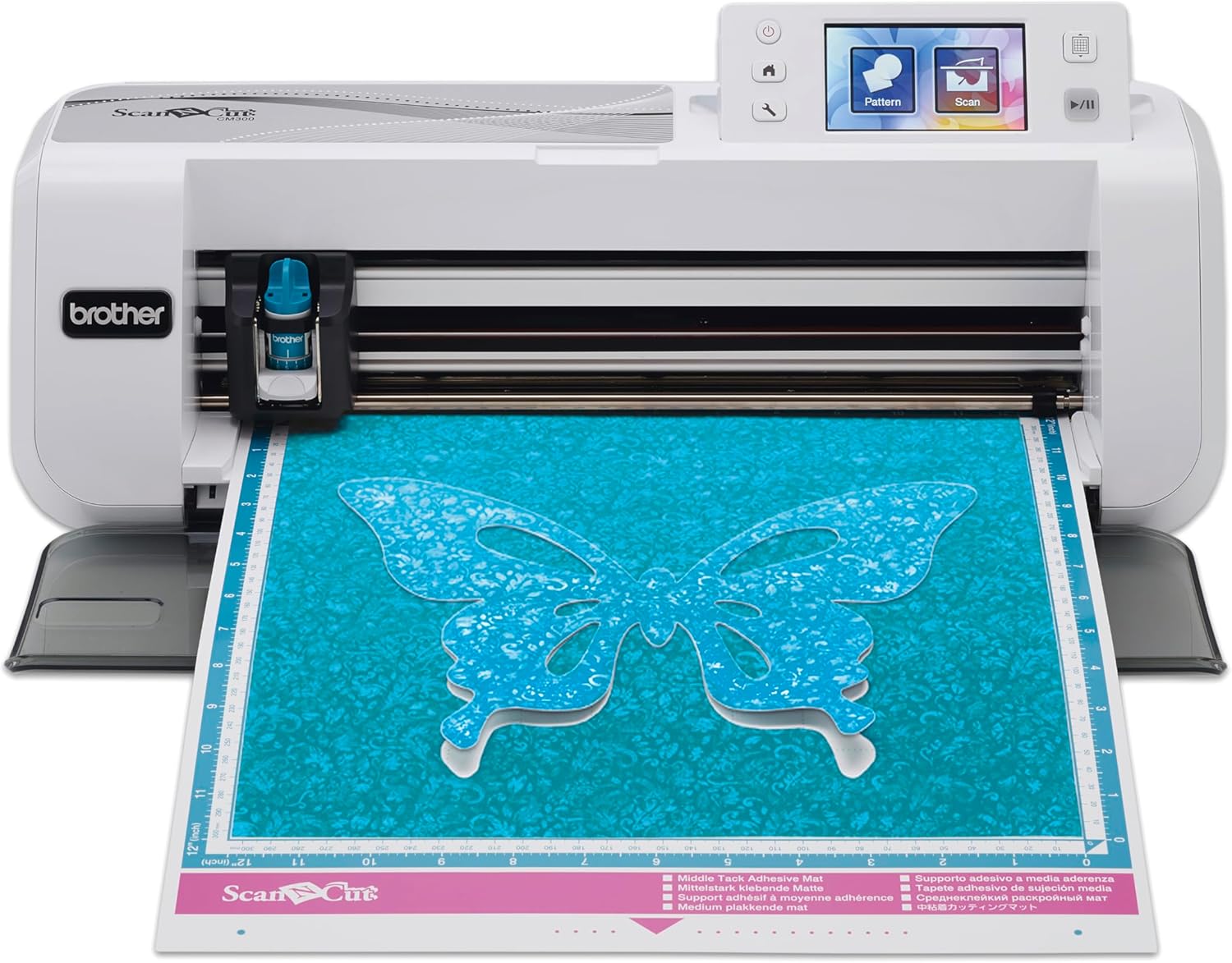
Description:
Reviews:
5.0 out of 5 stars A Crafting Essential – Easy to Use and Accurate!
(function() { P.when('cr-A', 'ready').execute(function(A) { if(typeof A.toggleExpanderAriaLabel === 'function') { A.toggleExpanderAriaLabel('review_text_read_more', 'Read more of this review', 'Read less of this review'); } }); })(); .review-text-read-more-expander:focus-visible { outline: 2px solid #2162a1; outline-offset: 2px; border-radius: 5px; } The Brother ScanNCut CM300 has been an absolute game-changer for my crafting projects. The built-in scanner makes it incredibly versatile, allowing me to cut intricate designs and patterns with precision. It’s perfect for card-making, fabric cutting, and custom DIY projects.The machine is user-friendly, with a straightforward interface that even beginners can quickly grasp. The quality of the cuts is excellent, and the variety of materials it can handle is impressive. I also love the portability – it doesn’t take up too much space, and it’s easy to store when not in use.If you’re into crafting and want a reliable, high-quality cutting machine, the ScanNCut CM300 is worth every penny. Highly recommend it for anyone looking to elevate their creative projects! ✂️🎨
4.0 out of 5 stars BROTHER cutting mat or cutting corners
The low adhesive cutting mat which comes with this item is a complete waste of time. The low adhesive means nothing actually sticks, so what ever your trying to cut moves about.Other wise this is a great bit of kit for the price.
5.0 out of 5 stars Great product
Great for scanning and cutting. Easy to use and a good price too.
5.0 out of 5 stars Need to learn
This is the first one you would need ss it gets you used to how to s brother scan and cut. Font think it's going to be easy to get the cutting depths even if you have a chart just be careful as to replace a mat is very expensive guess how I know lolOnce you have mastered it with persistence there's no stopping and the fact you don't have to buy cartridges of patterns this makes it less expensive in the long run you do not need to be on the net for it yo workI am enjoying using this product
4.0 out of 5 stars Ideal For This Novice Crafter
Received yesterday, first attempts at cutting paper and card were remarkably accurate. There were a couple of complex, multicoloured designs which didn't work out as the machine cut around darker lines within the image as well as the outline, but that's part of the learning curve.This seems ideal for my purposes (scrapbooking and journalling), and I'm glad I didn't spend twice the amount on a Cricut, as was my first intention.One complaint: The machine needs greater grip when placed on a table. I'm a bit worried that I'll knock it to the floor!
1.0 out of 5 stars Feel like I have been robbed.
OK I received my scan n cut machine in good time.I set this up and done a few cuts, cleaned it how it is suppose to do.Second time of using my machine, nothing was sticking to the mat and when It was cutting the paper was sliding it all over the place. I cleaned this to how it's suppose to be cleaned but with no luck. So after one use the mat is useless.In the instructions it states it comes with a med tack mat, horrified it was not the mat that was stated in instructions and on listing with Bolo. Spoke with brother and they have advised me to go through seller as if they are stating it comes with a med tack mat then it should. Brother has also confirmed with me that the med tack mat is discontinued now.I am hoping I can resolve this situation with the deal channel as I feel like I have been mislead on a item I have purchased.
5.0 out of 5 stars Blade cutting
Thought it would come with some paper to start off but it didnt machine looks good but be carefull of your 1st cutting session as i cut through my backing pad .blade dosent need much adjustingGreat machine otherwise cant wait to use it.
3.0 out of 5 stars Not recommended, it only good just for pure hobby
Not recommend, can’t create complicated designs
Toll!
(function() { P.when('cr-A', 'ready').execute(function(A) { if(typeof A.toggleExpanderAriaLabel === 'function') { A.toggleExpanderAriaLabel('review_text_read_more', 'Read more of this review', 'Read less of this review'); } }); })(); .review-text-read-more-expander:focus-visible { outline: 2px solid #2162a1; outline-offset: 2px; border-radius: 5px; } Was kann der Scan'n'Cut CM 300?Der Scan’n’Cut CM300 liegt im gleichen Preissegment wie der Silhouette Cameo 3. Im Vergleich hat mich der CM300 mehr überzeugt, da er eine weit höhere Schneidkraft hat und damit viel mehr Materialien schneiden kann.Keine Verbindung zum PC - ist das nicht blöd?Das dachte ich zuerst auch – ich habe es aber trotzdem gewagt und jetzt bin ich absolut begeistert.Zum Einen bringt der CM 300 neben 600 Grafiken auch verschiedene Schriftarten mit, mit denen ich Textgrafiken direkt auf dem Plotter entwerfen kann. Es gibt auch eine ganze Reihe an Formen für Patchwork-Motive -welche ich bisher aber noch nicht ausprobiert habe.Eigene SVG-Grafiken kann ich von meinem PC auf einen Stick speichern und dann direkt am Plotter auswählen und schneiden. Hierfür war ein Firmwareupdate erforderlich, welches ich aber innerhalb von 5 Minuten auf dem Plotter installiert hatte und direkt loslegen konnte.Die Grafiken lassen sich am Plotter selbst positionieren, spiegeln, vergrößern und verkleinern. Auch kann ich verschiedene Grafiken kombinieren.Das absolute Highlight, ist die Scan-Funktion. Damit kann ich ein Bild einscannen und direkt ausschneiden lassen. Wenn ich zum Beispiel ein Bild auf dem PC habe, welches ich gerne aus Stoff ausschneiden möchte, kann ich das Motiv einfach ausdrucken und mit dem Plotter einscannen. Die Scandatei kann ich entweder direkt verwenden oder auf dem Gerät abspeichern. So kann ich ganz leicht eigene Plottergrafiken entwerfen, ohne dabei mit Adobe-Illustrator etc, rumhantieren zu müssen.Bei meinem alten Schneidplotter hatte ich die Schwierigkeit, dass ich immer wieder eine Lizenz für ein Programm kaufen musste, um den Plotter ansteuern zu können. Dieses war auf Englisch und die Einstellungsmöglichkeiten waren nur begrenzt. Ich hatte zum Beispiel keine Möglichkeiten, das Motiv genau zu positionieren. Damit landete das Motiv oft nicht genau an der Stelle, wo ich es gerne haben wollte und ich hatte sehr viel Verschnitt, was bei Flockfolien etc. schnell ins Geld gehen kann. Auch nahm der Testdruck immer viel Platz in Anspruch, was bei dem CM300 gar kein Problem ist. Die Größe des Testdrucks ist nur knapp 1cm groß und kann auch frei positioniert werden. Somit habe ich fast gar keinen Verschnitt.Für mich hat die Stand-Alone-Variante nur noch Vorteile, da die Bedienung und die Möglichkeiten keineswegs eingeschränkt sind – ganz im Gegenteil.Mein FazitBisher habe ich sowohl Papier, Pappe, als auch Flex- und Flockfolie zugeschnitten. Dabei habe ich sowohl Motive ausgewählt, die auf dem Gerät gespeichert waren, die ich zuvor ausgedruckt und dann eingescannt hatte, als auch Motive, die ich als SVG-Datei mit einem Stick auf den Plotter übertragen habe.Die Handhabung ist einfach und selbsterklärend. Ein kurzer Blick in die Anleitung reicht völlig aus um das Gerät in Betrieb zu nehmen. Danach kann man dank des gut strukturiertem und beschriebenen Menüs alles verstehen und anwenden.Die Funktionen sind sehr umfangreich und konnten bisher alles abbilden, was ich mir vorgestellt habe. Das beigefügte Zubehör reicht für den Einsteiger erst einmal aus. Weitere Schneidematten, sowie Messer werde ich mir aber sicherlich noch irgendwann dazu kaufen.Das Einzige, was ein klein wenig Übung erfordert, ist das Einstellen des Messerdrucks und der Schneidetiefe. Hier gibt es zwar in der Anleitung eine Tabelle mit Empfehlungen, allerdings waren hier bisher nicht die Medien abgebildet, die ich nutzen wollte. Somit kam der Testdruck vermehrt zum Einsatz. Aber auch das hatte ich nach 2-3 Testdreiecken raus. Die Einstellungen habe ich mir jetzt selbst notiert, sodass ich mir das Testen ab sofort sparen kann.Mit dem neuen Firmware-Update lassen sich SVG-Dateien nutzen, welche man mittels Stick auf den Plotter überträgt. SVG-Dateien kann man entweder selbst mit Adobe Illustrator erstellen, im Internet kaufen oder von kostenfreien Seiten downloaden. Das Firmwareupdate lässt sich innerhalb kürzester Zeit mit einem Stick auf dem Plotter installieren. Auch das wirklich leicht verständlich und schnell.Insgesamt bin ich sehr begeistert und von meiner Entscheidung absolut überzeugt. Ich würde den CM300 jederzeit wieder kaufen (wobei dann vielleicht eines der größeren Modelle 😉 – weil zweimal kaufe ich ja nicht den gleichen).
Brother CM300
Det är en hobby maskin som fungerar men lite för liten MATTA för att göra lite större saker eller packningar annar toppen .
Utile
Je l utilise pour faire des pochoirs pour les peintures.La machine est facile d utilisation et précise.L acheter fut un gain de temps pour moi !
Perfetta
Buon prodotto, pratica e sta funzionando molto bene da mesi
Perfecta, no se como pude vivir sin esta máquina
Me ha sorprendido, es perfecto. Necesitaba un plotter de corte con scanner para cortar trabajos ya impresos y los corta con precisión. Había probado la cameo curio y realmente no me sirvió, imposible que me coincidiera el corte con el diseño impreso. Realmente no estoy haciendo uso de los diseños que trae incorporados, los mire por encima pero son muy simples. La uso para cortar hojas plásticas un poco más gruesas que una cartulina y va a la perfección.
Visit the Brother Store
Brother ScanNCut CM300 Home Cutting Machine, Off White
AED2,04660
Quantity:
Order today to get by 7-14 business days
This item qualifies for free delivery
'%3e%3crect%20x='0.599609'%20width='22.4'%20height='16'%20fill='%230A17A7'/%3e%3cpath%20fill-rule='evenodd'%20clip-rule='evenodd'%20d='M-0.426196%20-1.53223L9.1335%204.91587V-1.06506H14.4668V4.91648L24.0263%20-1.53147L25.2193%200.237148L17.6615%205.33494H23.0002V10.6683H17.6618L25.2187%2015.7655L24.0258%2017.5341L14.4668%2011.0865V17.0683H9.1335V11.0871L-0.425634%2017.5348L-1.61858%2015.7662L5.93947%2010.6683H0.600172V5.33494H5.93977L-1.61914%200.236387L-0.426196%20-1.53223Z'%20fill='white'/%3e%3cpath%20d='M15.5332%205.06615L25.6655%20-1.59961'%20stroke='%23DB1F35'%20stroke-width='0.533333'%20stroke-linecap='round'/%3e%3cpath%20d='M16.6094%2010.9578L25.6924%2017.0801'%20stroke='%23DB1F35'%20stroke-width='0.533333'%20stroke-linecap='round'/%3e%3cpath%20d='M7.00176%205.04727L-2.47266%20-1.33789'%20stroke='%23DB1F35'%20stroke-width='0.533333'%20stroke-linecap='round'/%3e%3cpath%20d='M8.02936%2010.8842L-2.47266%2017.8486'%20stroke='%23DB1F35'%20stroke-width='0.533333'%20stroke-linecap='round'/%3e%3cpath%20fill-rule='evenodd'%20clip-rule='evenodd'%20d='M0.599609%209.6H10.1996V16H13.3996V9.6H22.9996V6.4H13.3996V0H10.1996V6.4H0.599609V9.6Z'%20fill='%23E6273E'/%3e%3c/g%3e%3c/svg%3e) Imported From: United Kingdom
Imported From: United Kingdom
At BOLO, we work hard to ensure the products you receive are new, genuine, and sourced from reputable suppliers.
BOLO is not an authorized or official retailer for most brands, nor are we affiliated with manufacturers unless specifically stated on a product page. Instead, we source verified sellers, authorized distributors or directly from the manufacturer.
Each product undergoes thorough inspection and verification at our consolidation and fulfilment centers to ensure it meets our strict authenticity and quality standards before being shipped and delivered to you.
If you ever have concerns regarding the authenticity of a product purchased from us, please contact Bolo Support. We will review your inquiry promptly and, if necessary, provide documentation verifying authenticity or offer a suitable resolution.
Your trust is our top priority, and we are committed to maintaining transparency and integrity in every transaction.
All product information, images, descriptions, and reviews originate from the manufacturer or from trusted sellers overseas. BOLO is not affiliated with, endorsed by, or an authorized retailer for most brands listed on our website unless stated otherwise.
While we strive to display accurate information, variations in packaging, labeling, instructions, or formulation may occasionally occur due to regional differences or supplier updates. For detailed or manufacturer-specific information, please contact the brand directly or reach out to BOLO Support for assistance.
Unless otherwise stated, all prices displayed on the product page include applicable taxes and import duties.
BOLO operates in accordance with the laws and regulations of United Arab Emirates. Any items found to be restricted or prohibited for sale within the UAE will be cancelled prior to shipment. We take proactive measures to ensure that only products permitted for sale in United Arab Emirates are listed on our website.
All items are shipped by air, and any products classified as “Dangerous Goods (DG)” under IATA regulations will be removed from the order and cancelled.
All orders are processed manually, and we make every effort to process them promptly once confirmed. Products cancelled due to the above reasons will be permanently removed from listings across the website.
More from this brand
Similar items from “Die-Cut Machines”
Share with
Or share with link
https://www.bolo.ae/products/KO0PWSL6AQJ
Visit the Brother Store
Brother ScanNCut CM300 Home Cutting Machine, Off White
AED2,04660
Quantity:
Order today to get by 7-14 business days
This item qualifies for free delivery
Imported From: United Kingdom
At BOLO, we work hard to ensure the products you receive are new, genuine, and sourced from reputable suppliers.
BOLO is not an authorized or official retailer for most brands, nor are we affiliated with manufacturers unless specifically stated on a product page. Instead, we source verified sellers, authorized distributors or directly from the manufacturer.
Each product undergoes thorough inspection and verification at our consolidation and fulfilment centers to ensure it meets our strict authenticity and quality standards before being shipped and delivered to you.
If you ever have concerns regarding the authenticity of a product purchased from us, please contact Bolo Support. We will review your inquiry promptly and, if necessary, provide documentation verifying authenticity or offer a suitable resolution.
Your trust is our top priority, and we are committed to maintaining transparency and integrity in every transaction.
All product information, images, descriptions, and reviews originate from the manufacturer or from trusted sellers overseas. BOLO is not affiliated with, endorsed by, or an authorized retailer for most brands listed on our website unless stated otherwise.
While we strive to display accurate information, variations in packaging, labeling, instructions, or formulation may occasionally occur due to regional differences or supplier updates. For detailed or manufacturer-specific information, please contact the brand directly or reach out to BOLO Support for assistance.
Unless otherwise stated, all prices displayed on the product page include applicable taxes and import duties.
BOLO operates in accordance with the laws and regulations of United Arab Emirates. Any items found to be restricted or prohibited for sale within the UAE will be cancelled prior to shipment. We take proactive measures to ensure that only products permitted for sale in United Arab Emirates are listed on our website.
All items are shipped by air, and any products classified as “Dangerous Goods (DG)” under IATA regulations will be removed from the order and cancelled.
All orders are processed manually, and we make every effort to process them promptly once confirmed. Products cancelled due to the above reasons will be permanently removed from listings across the website.
Description:
Reviews:
5.0 out of 5 stars A Crafting Essential – Easy to Use and Accurate!
(function() { P.when('cr-A', 'ready').execute(function(A) { if(typeof A.toggleExpanderAriaLabel === 'function') { A.toggleExpanderAriaLabel('review_text_read_more', 'Read more of this review', 'Read less of this review'); } }); })(); .review-text-read-more-expander:focus-visible { outline: 2px solid #2162a1; outline-offset: 2px; border-radius: 5px; } The Brother ScanNCut CM300 has been an absolute game-changer for my crafting projects. The built-in scanner makes it incredibly versatile, allowing me to cut intricate designs and patterns with precision. It’s perfect for card-making, fabric cutting, and custom DIY projects.The machine is user-friendly, with a straightforward interface that even beginners can quickly grasp. The quality of the cuts is excellent, and the variety of materials it can handle is impressive. I also love the portability – it doesn’t take up too much space, and it’s easy to store when not in use.If you’re into crafting and want a reliable, high-quality cutting machine, the ScanNCut CM300 is worth every penny. Highly recommend it for anyone looking to elevate their creative projects! ✂️🎨
4.0 out of 5 stars BROTHER cutting mat or cutting corners
The low adhesive cutting mat which comes with this item is a complete waste of time. The low adhesive means nothing actually sticks, so what ever your trying to cut moves about.Other wise this is a great bit of kit for the price.
5.0 out of 5 stars Great product
Great for scanning and cutting. Easy to use and a good price too.
5.0 out of 5 stars Need to learn
This is the first one you would need ss it gets you used to how to s brother scan and cut. Font think it's going to be easy to get the cutting depths even if you have a chart just be careful as to replace a mat is very expensive guess how I know lolOnce you have mastered it with persistence there's no stopping and the fact you don't have to buy cartridges of patterns this makes it less expensive in the long run you do not need to be on the net for it yo workI am enjoying using this product
4.0 out of 5 stars Ideal For This Novice Crafter
Received yesterday, first attempts at cutting paper and card were remarkably accurate. There were a couple of complex, multicoloured designs which didn't work out as the machine cut around darker lines within the image as well as the outline, but that's part of the learning curve.This seems ideal for my purposes (scrapbooking and journalling), and I'm glad I didn't spend twice the amount on a Cricut, as was my first intention.One complaint: The machine needs greater grip when placed on a table. I'm a bit worried that I'll knock it to the floor!
1.0 out of 5 stars Feel like I have been robbed.
OK I received my scan n cut machine in good time.I set this up and done a few cuts, cleaned it how it is suppose to do.Second time of using my machine, nothing was sticking to the mat and when It was cutting the paper was sliding it all over the place. I cleaned this to how it's suppose to be cleaned but with no luck. So after one use the mat is useless.In the instructions it states it comes with a med tack mat, horrified it was not the mat that was stated in instructions and on listing with Bolo. Spoke with brother and they have advised me to go through seller as if they are stating it comes with a med tack mat then it should. Brother has also confirmed with me that the med tack mat is discontinued now.I am hoping I can resolve this situation with the deal channel as I feel like I have been mislead on a item I have purchased.
5.0 out of 5 stars Blade cutting
Thought it would come with some paper to start off but it didnt machine looks good but be carefull of your 1st cutting session as i cut through my backing pad .blade dosent need much adjustingGreat machine otherwise cant wait to use it.
3.0 out of 5 stars Not recommended, it only good just for pure hobby
Not recommend, can’t create complicated designs
Toll!
(function() { P.when('cr-A', 'ready').execute(function(A) { if(typeof A.toggleExpanderAriaLabel === 'function') { A.toggleExpanderAriaLabel('review_text_read_more', 'Read more of this review', 'Read less of this review'); } }); })(); .review-text-read-more-expander:focus-visible { outline: 2px solid #2162a1; outline-offset: 2px; border-radius: 5px; } Was kann der Scan'n'Cut CM 300?Der Scan’n’Cut CM300 liegt im gleichen Preissegment wie der Silhouette Cameo 3. Im Vergleich hat mich der CM300 mehr überzeugt, da er eine weit höhere Schneidkraft hat und damit viel mehr Materialien schneiden kann.Keine Verbindung zum PC - ist das nicht blöd?Das dachte ich zuerst auch – ich habe es aber trotzdem gewagt und jetzt bin ich absolut begeistert.Zum Einen bringt der CM 300 neben 600 Grafiken auch verschiedene Schriftarten mit, mit denen ich Textgrafiken direkt auf dem Plotter entwerfen kann. Es gibt auch eine ganze Reihe an Formen für Patchwork-Motive -welche ich bisher aber noch nicht ausprobiert habe.Eigene SVG-Grafiken kann ich von meinem PC auf einen Stick speichern und dann direkt am Plotter auswählen und schneiden. Hierfür war ein Firmwareupdate erforderlich, welches ich aber innerhalb von 5 Minuten auf dem Plotter installiert hatte und direkt loslegen konnte.Die Grafiken lassen sich am Plotter selbst positionieren, spiegeln, vergrößern und verkleinern. Auch kann ich verschiedene Grafiken kombinieren.Das absolute Highlight, ist die Scan-Funktion. Damit kann ich ein Bild einscannen und direkt ausschneiden lassen. Wenn ich zum Beispiel ein Bild auf dem PC habe, welches ich gerne aus Stoff ausschneiden möchte, kann ich das Motiv einfach ausdrucken und mit dem Plotter einscannen. Die Scandatei kann ich entweder direkt verwenden oder auf dem Gerät abspeichern. So kann ich ganz leicht eigene Plottergrafiken entwerfen, ohne dabei mit Adobe-Illustrator etc, rumhantieren zu müssen.Bei meinem alten Schneidplotter hatte ich die Schwierigkeit, dass ich immer wieder eine Lizenz für ein Programm kaufen musste, um den Plotter ansteuern zu können. Dieses war auf Englisch und die Einstellungsmöglichkeiten waren nur begrenzt. Ich hatte zum Beispiel keine Möglichkeiten, das Motiv genau zu positionieren. Damit landete das Motiv oft nicht genau an der Stelle, wo ich es gerne haben wollte und ich hatte sehr viel Verschnitt, was bei Flockfolien etc. schnell ins Geld gehen kann. Auch nahm der Testdruck immer viel Platz in Anspruch, was bei dem CM300 gar kein Problem ist. Die Größe des Testdrucks ist nur knapp 1cm groß und kann auch frei positioniert werden. Somit habe ich fast gar keinen Verschnitt.Für mich hat die Stand-Alone-Variante nur noch Vorteile, da die Bedienung und die Möglichkeiten keineswegs eingeschränkt sind – ganz im Gegenteil.Mein FazitBisher habe ich sowohl Papier, Pappe, als auch Flex- und Flockfolie zugeschnitten. Dabei habe ich sowohl Motive ausgewählt, die auf dem Gerät gespeichert waren, die ich zuvor ausgedruckt und dann eingescannt hatte, als auch Motive, die ich als SVG-Datei mit einem Stick auf den Plotter übertragen habe.Die Handhabung ist einfach und selbsterklärend. Ein kurzer Blick in die Anleitung reicht völlig aus um das Gerät in Betrieb zu nehmen. Danach kann man dank des gut strukturiertem und beschriebenen Menüs alles verstehen und anwenden.Die Funktionen sind sehr umfangreich und konnten bisher alles abbilden, was ich mir vorgestellt habe. Das beigefügte Zubehör reicht für den Einsteiger erst einmal aus. Weitere Schneidematten, sowie Messer werde ich mir aber sicherlich noch irgendwann dazu kaufen.Das Einzige, was ein klein wenig Übung erfordert, ist das Einstellen des Messerdrucks und der Schneidetiefe. Hier gibt es zwar in der Anleitung eine Tabelle mit Empfehlungen, allerdings waren hier bisher nicht die Medien abgebildet, die ich nutzen wollte. Somit kam der Testdruck vermehrt zum Einsatz. Aber auch das hatte ich nach 2-3 Testdreiecken raus. Die Einstellungen habe ich mir jetzt selbst notiert, sodass ich mir das Testen ab sofort sparen kann.Mit dem neuen Firmware-Update lassen sich SVG-Dateien nutzen, welche man mittels Stick auf den Plotter überträgt. SVG-Dateien kann man entweder selbst mit Adobe Illustrator erstellen, im Internet kaufen oder von kostenfreien Seiten downloaden. Das Firmwareupdate lässt sich innerhalb kürzester Zeit mit einem Stick auf dem Plotter installieren. Auch das wirklich leicht verständlich und schnell.Insgesamt bin ich sehr begeistert und von meiner Entscheidung absolut überzeugt. Ich würde den CM300 jederzeit wieder kaufen (wobei dann vielleicht eines der größeren Modelle 😉 – weil zweimal kaufe ich ja nicht den gleichen).
Brother CM300
Det är en hobby maskin som fungerar men lite för liten MATTA för att göra lite större saker eller packningar annar toppen .
Utile
Je l utilise pour faire des pochoirs pour les peintures.La machine est facile d utilisation et précise.L acheter fut un gain de temps pour moi !
Perfetta
Buon prodotto, pratica e sta funzionando molto bene da mesi
Perfecta, no se como pude vivir sin esta máquina
Me ha sorprendido, es perfecto. Necesitaba un plotter de corte con scanner para cortar trabajos ya impresos y los corta con precisión. Había probado la cameo curio y realmente no me sirvió, imposible que me coincidiera el corte con el diseño impreso. Realmente no estoy haciendo uso de los diseños que trae incorporados, los mire por encima pero son muy simples. La uso para cortar hojas plásticas un poco más gruesas que una cartulina y va a la perfección.
More from this brand
Similar items from “Die-Cut Machines”
Share with
Or share with link
https://www.bolo.ae/products/KO0PWSL6AQJ