Description:
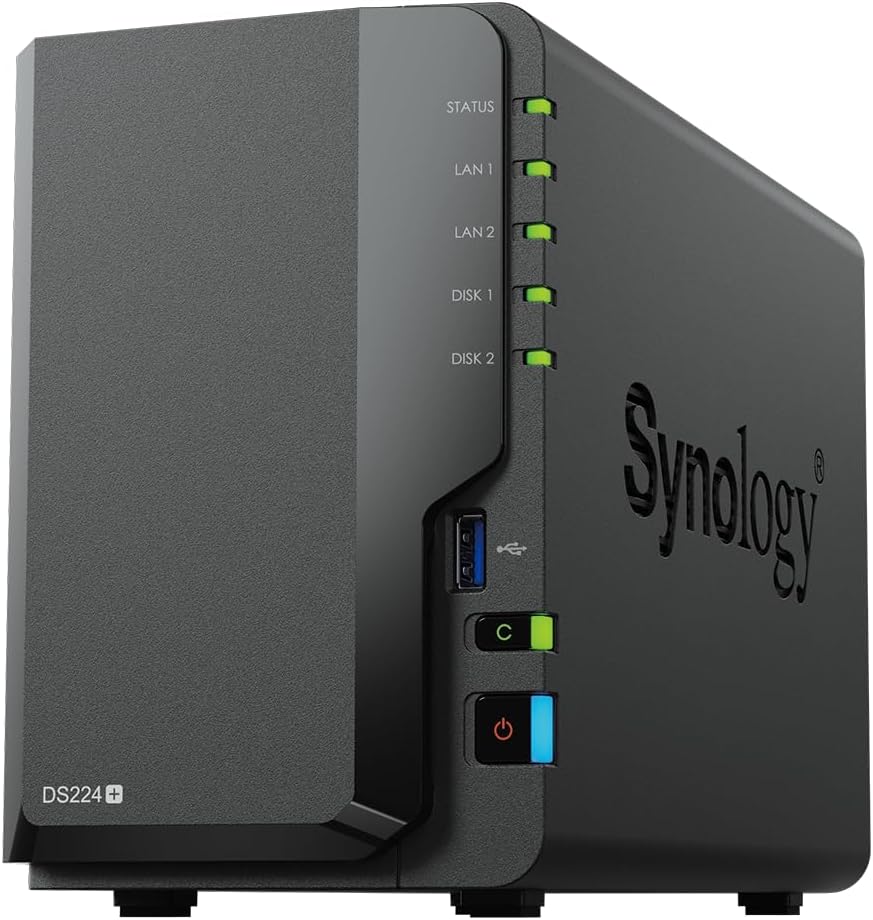
The Synology DS224+ 2 Bay NAS Desktop is your efficient storage solution for home and small business needs. This NAS, powered by a high-performance processor, offers speedy data transfers and flexible storage options. With its user-friendly interface and comprehensive data management features, it simplifies file sharing, backup, and remote access, making it an ideal choice for securing and organizing your digital content.
Reviews:
5.0 out of 5 stars [Synology DS224+]:- A Robust and Feature-Rich Storage Solution
(function() { P.when('cr-A', 'ready').execute(function(A) { if(typeof A.toggleExpanderAriaLabel === 'function') { A.toggleExpanderAriaLabel('review_text_read_more', 'Read more of this review', 'Read less of this review'); } }); })(); .review-text-read-more-expander:focus-visible { outline: 2px solid #2162a1; outline-offset: 2px; border-radius: 5px; } Usage and Initial Impressions:After two months of using the Synology DS224+, I can confidently say this NAS has exceeded my expectations in almost every aspect. Serving as the central storage hub for my household and family, the DS224+ replaced several outdated servers, effortlessly taking over their roles while adding new functionalities. The primary uses for this NAS include storing media collections (movies, TV shows, and music), backing up photos from our phones, and managing documents through Synology Office. It has significantly reduced our dependence on cloud services like Google Drive and phone manufacturers' cloud storage, providing a secure and private alternative.Upon unboxing, the NAS impressed with its minimal yet functional packaging. The device itself feels solid, well-built, and surprisingly intuitive. Concerns about cooling and vibrations were quickly dispelled as the NAS ran smoothly without any issues in these areas.Setup and Installation:Setting up the DS224+ was mostly straightforward, with one minor hiccup related to a RAM upgrade. I initially tried installing a 16GB RAM module (despite Synology's official limit being 4GB extra), which caused the NAS not to boot. After removing the module, the setup process proceeded without issue, and I later reinstalled the RAM successfully, bringing the total to 18GB. DSM (DiskStation Manager) 7.2.1-69057 Update 5 was installed without a hitch, and the documentation provided by Synology, along with online resources, made navigating the settings and customization options manageable.Performance:The performance of the DS224+ has been outstanding. Even with multiple users connected from various locations across the UK, the NAS handles tasks with ease. CPU usage remains low, even under load, and file transfer speeds are excellent, averaging around 80-100MBps over a single LAN port. The collaborative features, such as document editing and calendar syncing, work in real-time with minimal latency, providing a seamless experience.Features:The DS224+ is packed with features, many of which are customisable to suit individual needs. From Docker support to third-party app installations, the NAS offers flexibility and power. However, I would caution against installing every available package, as some third-party apps in the official package centre are outdated and may have security vulnerabilities. Despite this, the overall functionality and expandability through Docker and other means are impressive.User Interface and Software:The user interface is a hybrid of a desktop and mobile environment, providing a unique but familiar experience. While Synology excels in offering a range of features and customisation options, there are a few shortcomings. For example, the lack of a consistent dark mode across applications and the continued use of American English in the UI despite selecting British English are minor annoyances. Additionally, the outdated third-party apps in the package manager pose a security risk, which Synology should address.Storage Capacity and Expandability:With two 12TB hard drives (Sold Separately) configured in SHR-1, the DS224+ provides ample storage with fault tolerance, ensuring data safety. While the two bays are sufficient for my needs, others may find the capacity limiting. Synology's storage calculator is a helpful tool for planning your configuration, and I recommend using drives of the same size for optimal results. A word of caution however: Do not buy hard drives from Synology. They're overpriced.Noise and Cooling:The NAS offers customisable fan speed settings, allowing you to prioritise cooling or noise levels. Even at maximum speed, the fan noise is minimal and not disruptive. During a recent heatwave, the balanced setting maintained optimal temperatures without issue.Value for Money:Initially, I was hesitant about the price, given my previous experience with a subpar NAS. However, the DS224+ has proven to be worth every penny, and more! Its performance, reliability, and extensive features make it one of the best purchases I've made in recent years.Issues:While the DS224+ excels in many areas, it does have some software-related drawbacks. The outdated third-party apps in the official package manager and the inconsistent dark mode implementation are areas that could use improvement. Additionally, Synology's claim that the maximum RAM capacity is 4GB is misleading (but in a good way, I guess), as I successfully installed 16GB. Potential buyers should research compatible RAM options before upgrading and always check Bolo reviews if getting it from Bolo; look for mentions of "Synology" and "Synology NAS".Final Thoughts:Despite its minor shortcomings, the Synology DS224+ is a powerful and versatile NAS that delivers exceptional performance and value. It’s ideal for those looking to centralise their storage, reduce dependency on cloud services, and ensure data security. I highly recommend it, giving it a solid 5/5.
5.0 out of 5 stars Perfect NAS for Home and Small Office Use
The Synology DS224+ is exactly what I needed for reliable, centralized storage at home. Setup was super easy with the DSM interface—intuitive, polished, and packed with features. I use it for backing up devices, storing media, and running Plex, and it handles everything smoothly.The dual drive bays are perfect for RAID 1, giving me peace of mind with data redundancy. It's quiet, compact, and energy-efficient—ideal for running 24/7 without drawing attention or racking up the power bill.For anyone looking to start with NAS or upgrade from an older model, the DS224+ is a fantastic choice. Great performance, excellent software, and dependable Synology quality.Highly recommended!
5.0 out of 5 stars Excellent Nas
This is my 4th nas and first Synology and is by far the easiest to set up with very intuitive software, which for someone like me who only wants secure storage for photographs and family history documents. Also the Plex media server is a doddle to set up compared with “ugreen”. The build quality is great and feels built to last.Yes it is not high end in the spec department but it gets the job done simply and effectively
5.0 out of 5 stars Great way to dip you toe into NAS drives
The Synology DS224+ is an outstanding NAS! Setup was quick and easy, and DSM software is incredibly intuitive. Performance is fast, with great file transfer speeds and smooth remote access. Perfect for backups, media streaming, and personal cloud storage. Expandable RAM is a plus. Reliable, quiet, and efficient—this NAS is a must-have for home or small office use!
4.0 out of 5 stars Great device, looks good and easy to set-up
A great device overall, looks good and easy to set up. Initially I used Ironwolf Pro disks in the device and the noise was horrific, so I quickly replaced with WD Red and the device runs pretty silent. Backup of my selected drives has been generally efficient, however a number of files couldn't be copied across due to the file name length and it wasn't particularly easy to see (from the reports) which needed to be shortened as the pages ran to many. If you have short filenames, and not many sub-folders, you'll probably be fine. Remote access to files from an iphone works well and overall it was a huge step up from the WD Cloud which I had used (mostly unsatisfactorily) prior.
eine eierlegende Wollmilchsau....
(function() { P.when('cr-A', 'ready').execute(function(A) { if(typeof A.toggleExpanderAriaLabel === 'function') { A.toggleExpanderAriaLabel('review_text_read_more', 'Read more of this review', 'Read less of this review'); } }); })(); .review-text-read-more-expander:focus-visible { outline: 2px solid #2162a1; outline-offset: 2px; border-radius: 5px; } Die NAS von Synology verwenden wir schon seit vielen Jahren und sind äußerst zufrieden damit. Vor allem die Softwareunterstützung ist wunderbar.Dieses NAS gehört eher zu den kleinen, kann aber wunderbarerweise PCs als auch Server perfekt sichern. Das tun alle Geräte mit dem Plus im Namen - die unterstützen Active Backup Business, die bei Synology kostenfrei nutzbar ist.Das Auswechseln von Festplatten oder das vergrößern von Volumes geht wunderbar einfach. Leider kann man das nicht vom verkleinern sagen. Es ist nahezu unmöglich, ein Volume zu verkleinern, auch wenn der Platz gar nicht belegt ist.Dennoch ein perfektes Teil mit hervorragendem Preis- Leistungsverhältnis.Bei den Nachfolge-Serien besteht Synology mittlerweile auf von Synology freigegebenen Festplatten. Das ist äußerst lästig, nicht nur dass Synology Platten deutlich teurer sind, sie sind vor allem deutlich kleiner, als aktuelle Platten von Seagate oder WD.Insofern ist 224+ eine sehr gute Wahl.Braucht man mehr Prozessorleistung (Docker, virtuelle Maschinen oder ähnliches) nimmt man besser ein größeres Modell. Vor allem hat man dann die Möglichkeit, SSD-Cache zu installieren (hier wirklich Pro-Modelle wie z.B. die FireCuda nehmen!) bringt dann deutlichen Geschwindigkeitsgewinn.
Broederlijk naast elkaar!
Hij staat nu naast de DS213, die doet nu de backups van deze nieuwe DS224+.Voor een knappe prijs kunnen kopen! Hij staat nu 120€ duurder!!
Ayni ağ icinde kullanilmayacaksa işe yaramaz gibi
Kurulumunu yaptim ancak uzaktan erişim yapamiyorum. Kendi uygulamasini kullanarak oluyor sadece.Ben bunu sanal sürücü olarak ekleyemiyormuyum
Good product
Good product
Très bon produit
Nouveau dans le monde des NAS ? Vous hésitez entre plusieurs modèles ? Ne cherchez plus, le DS224+ est LE bon plan !C’est un super choix pour débuter (ou si vous n’avez pas besoin de 50 To de stockage 😅). L’interface DSM est ultra simple à prendre en main : créer des utilisateurs, partager des dossiers, installer des applis… franchement, c’est du gâteau 🍰.Et comme Synology est une marque très populaire, vous trouverez toujours quelqu’un (ou un tuto) pour vous aider. La communauté est énorme et super active 💬.Petit bonus : avec les applis Synology Photos ou Drive, vous pouvez carrément dire au revoir à Google Photos ou Google Drive ✌️. Et avec QuickConnect, vous accédez à vos fichiers de n’importe où, sans prise de tête 🌍.Pour les plus geeks d’entre vous, ce NAS peut aussi faire tourner des VM, un serveur Plex avec transcodage matériel (merci le GPU intégré 🔥), et vous pouvez même pousser la RAM jusqu’à 18 Go si vous aimez bidouiller 🤓.Bref, que vous soyez débutant ou un peu plus techos, ce petit NAS a tout pour plaire. Foncez !
Visit the Synology Store
Synology DS224+ 2 Bay NAS Desktop: Efficient Storage Solution
AED2,66194
Quantity:
Order today to get by 7-14 business days
This item qualifies for free delivery
Imported From: United Kingdom
At BOLO, we work hard to ensure the products you receive are new, genuine, and sourced from reputable suppliers.
BOLO is not an authorized or official retailer for most brands, nor are we affiliated with manufacturers unless specifically stated on a product page. Instead, we source verified sellers, authorized distributors or directly from the manufacturer.
Each product undergoes thorough inspection and verification at our consolidation and fulfilment centers to ensure it meets our strict authenticity and quality standards before being shipped and delivered to you.
If you ever have concerns regarding the authenticity of a product purchased from us, please contact Bolo Support. We will review your inquiry promptly and, if necessary, provide documentation verifying authenticity or offer a suitable resolution.
Your trust is our top priority, and we are committed to maintaining transparency and integrity in every transaction.
All product information, images, descriptions, and reviews originate from the manufacturer or from trusted sellers overseas. BOLO is not affiliated with, endorsed by, or an authorized retailer for most brands listed on our website unless stated otherwise.
While we strive to display accurate information, variations in packaging, labeling, instructions, or formulation may occasionally occur due to regional differences or supplier updates. For detailed or manufacturer-specific information, please contact the brand directly or reach out to BOLO Support for assistance.
Unless otherwise stated, all prices displayed on the product page include applicable taxes and import duties.
BOLO operates in accordance with the laws and regulations of United Arab Emirates. Any items found to be restricted or prohibited for sale within the UAE will be cancelled prior to shipment. We take proactive measures to ensure that only products permitted for sale in United Arab Emirates are listed on our website.
All items are shipped by air, and any products classified as “Dangerous Goods (DG)” under IATA regulations will be removed from the order and cancelled.
All orders are processed manually, and we make every effort to process them promptly once confirmed. Products cancelled due to the above reasons will be permanently removed from listings across the website.
Similar suggestions by Bolo
More from this brand
Similar items from “Enclosures”
Share with
Or share with link
https://www.bolo.ae/products/KO0POLMJS3M
Visit the Synology Store
Synology DS224+ 2 Bay NAS Desktop: Efficient Storage Solution

AED2,66194
Quantity:
Order today to get by 7-14 business days
This item qualifies for free delivery
Imported From: United Kingdom
At BOLO, we work hard to ensure the products you receive are new, genuine, and sourced from reputable suppliers.
BOLO is not an authorized or official retailer for most brands, nor are we affiliated with manufacturers unless specifically stated on a product page. Instead, we source verified sellers, authorized distributors or directly from the manufacturer.
Each product undergoes thorough inspection and verification at our consolidation and fulfilment centers to ensure it meets our strict authenticity and quality standards before being shipped and delivered to you.
If you ever have concerns regarding the authenticity of a product purchased from us, please contact Bolo Support. We will review your inquiry promptly and, if necessary, provide documentation verifying authenticity or offer a suitable resolution.
Your trust is our top priority, and we are committed to maintaining transparency and integrity in every transaction.
All product information, images, descriptions, and reviews originate from the manufacturer or from trusted sellers overseas. BOLO is not affiliated with, endorsed by, or an authorized retailer for most brands listed on our website unless stated otherwise.
While we strive to display accurate information, variations in packaging, labeling, instructions, or formulation may occasionally occur due to regional differences or supplier updates. For detailed or manufacturer-specific information, please contact the brand directly or reach out to BOLO Support for assistance.
Unless otherwise stated, all prices displayed on the product page include applicable taxes and import duties.
BOLO operates in accordance with the laws and regulations of United Arab Emirates. Any items found to be restricted or prohibited for sale within the UAE will be cancelled prior to shipment. We take proactive measures to ensure that only products permitted for sale in United Arab Emirates are listed on our website.
All items are shipped by air, and any products classified as “Dangerous Goods (DG)” under IATA regulations will be removed from the order and cancelled.
All orders are processed manually, and we make every effort to process them promptly once confirmed. Products cancelled due to the above reasons will be permanently removed from listings across the website.
Description:
The Synology DS224+ 2 Bay NAS Desktop is your efficient storage solution for home and small business needs. This NAS, powered by a high-performance processor, offers speedy data transfers and flexible storage options. With its user-friendly interface and comprehensive data management features, it simplifies file sharing, backup, and remote access, making it an ideal choice for securing and organizing your digital content.
Reviews:
5.0 out of 5 stars [Synology DS224+]:- A Robust and Feature-Rich Storage Solution
(function() { P.when('cr-A', 'ready').execute(function(A) { if(typeof A.toggleExpanderAriaLabel === 'function') { A.toggleExpanderAriaLabel('review_text_read_more', 'Read more of this review', 'Read less of this review'); } }); })(); .review-text-read-more-expander:focus-visible { outline: 2px solid #2162a1; outline-offset: 2px; border-radius: 5px; } Usage and Initial Impressions:After two months of using the Synology DS224+, I can confidently say this NAS has exceeded my expectations in almost every aspect. Serving as the central storage hub for my household and family, the DS224+ replaced several outdated servers, effortlessly taking over their roles while adding new functionalities. The primary uses for this NAS include storing media collections (movies, TV shows, and music), backing up photos from our phones, and managing documents through Synology Office. It has significantly reduced our dependence on cloud services like Google Drive and phone manufacturers' cloud storage, providing a secure and private alternative.Upon unboxing, the NAS impressed with its minimal yet functional packaging. The device itself feels solid, well-built, and surprisingly intuitive. Concerns about cooling and vibrations were quickly dispelled as the NAS ran smoothly without any issues in these areas.Setup and Installation:Setting up the DS224+ was mostly straightforward, with one minor hiccup related to a RAM upgrade. I initially tried installing a 16GB RAM module (despite Synology's official limit being 4GB extra), which caused the NAS not to boot. After removing the module, the setup process proceeded without issue, and I later reinstalled the RAM successfully, bringing the total to 18GB. DSM (DiskStation Manager) 7.2.1-69057 Update 5 was installed without a hitch, and the documentation provided by Synology, along with online resources, made navigating the settings and customization options manageable.Performance:The performance of the DS224+ has been outstanding. Even with multiple users connected from various locations across the UK, the NAS handles tasks with ease. CPU usage remains low, even under load, and file transfer speeds are excellent, averaging around 80-100MBps over a single LAN port. The collaborative features, such as document editing and calendar syncing, work in real-time with minimal latency, providing a seamless experience.Features:The DS224+ is packed with features, many of which are customisable to suit individual needs. From Docker support to third-party app installations, the NAS offers flexibility and power. However, I would caution against installing every available package, as some third-party apps in the official package centre are outdated and may have security vulnerabilities. Despite this, the overall functionality and expandability through Docker and other means are impressive.User Interface and Software:The user interface is a hybrid of a desktop and mobile environment, providing a unique but familiar experience. While Synology excels in offering a range of features and customisation options, there are a few shortcomings. For example, the lack of a consistent dark mode across applications and the continued use of American English in the UI despite selecting British English are minor annoyances. Additionally, the outdated third-party apps in the package manager pose a security risk, which Synology should address.Storage Capacity and Expandability:With two 12TB hard drives (Sold Separately) configured in SHR-1, the DS224+ provides ample storage with fault tolerance, ensuring data safety. While the two bays are sufficient for my needs, others may find the capacity limiting. Synology's storage calculator is a helpful tool for planning your configuration, and I recommend using drives of the same size for optimal results. A word of caution however: Do not buy hard drives from Synology. They're overpriced.Noise and Cooling:The NAS offers customisable fan speed settings, allowing you to prioritise cooling or noise levels. Even at maximum speed, the fan noise is minimal and not disruptive. During a recent heatwave, the balanced setting maintained optimal temperatures without issue.Value for Money:Initially, I was hesitant about the price, given my previous experience with a subpar NAS. However, the DS224+ has proven to be worth every penny, and more! Its performance, reliability, and extensive features make it one of the best purchases I've made in recent years.Issues:While the DS224+ excels in many areas, it does have some software-related drawbacks. The outdated third-party apps in the official package manager and the inconsistent dark mode implementation are areas that could use improvement. Additionally, Synology's claim that the maximum RAM capacity is 4GB is misleading (but in a good way, I guess), as I successfully installed 16GB. Potential buyers should research compatible RAM options before upgrading and always check Bolo reviews if getting it from Bolo; look for mentions of "Synology" and "Synology NAS".Final Thoughts:Despite its minor shortcomings, the Synology DS224+ is a powerful and versatile NAS that delivers exceptional performance and value. It’s ideal for those looking to centralise their storage, reduce dependency on cloud services, and ensure data security. I highly recommend it, giving it a solid 5/5.
5.0 out of 5 stars Perfect NAS for Home and Small Office Use
The Synology DS224+ is exactly what I needed for reliable, centralized storage at home. Setup was super easy with the DSM interface—intuitive, polished, and packed with features. I use it for backing up devices, storing media, and running Plex, and it handles everything smoothly.The dual drive bays are perfect for RAID 1, giving me peace of mind with data redundancy. It's quiet, compact, and energy-efficient—ideal for running 24/7 without drawing attention or racking up the power bill.For anyone looking to start with NAS or upgrade from an older model, the DS224+ is a fantastic choice. Great performance, excellent software, and dependable Synology quality.Highly recommended!
5.0 out of 5 stars Excellent Nas
This is my 4th nas and first Synology and is by far the easiest to set up with very intuitive software, which for someone like me who only wants secure storage for photographs and family history documents. Also the Plex media server is a doddle to set up compared with “ugreen”. The build quality is great and feels built to last.Yes it is not high end in the spec department but it gets the job done simply and effectively
5.0 out of 5 stars Great way to dip you toe into NAS drives
The Synology DS224+ is an outstanding NAS! Setup was quick and easy, and DSM software is incredibly intuitive. Performance is fast, with great file transfer speeds and smooth remote access. Perfect for backups, media streaming, and personal cloud storage. Expandable RAM is a plus. Reliable, quiet, and efficient—this NAS is a must-have for home or small office use!
4.0 out of 5 stars Great device, looks good and easy to set-up
A great device overall, looks good and easy to set up. Initially I used Ironwolf Pro disks in the device and the noise was horrific, so I quickly replaced with WD Red and the device runs pretty silent. Backup of my selected drives has been generally efficient, however a number of files couldn't be copied across due to the file name length and it wasn't particularly easy to see (from the reports) which needed to be shortened as the pages ran to many. If you have short filenames, and not many sub-folders, you'll probably be fine. Remote access to files from an iphone works well and overall it was a huge step up from the WD Cloud which I had used (mostly unsatisfactorily) prior.
eine eierlegende Wollmilchsau....
(function() { P.when('cr-A', 'ready').execute(function(A) { if(typeof A.toggleExpanderAriaLabel === 'function') { A.toggleExpanderAriaLabel('review_text_read_more', 'Read more of this review', 'Read less of this review'); } }); })(); .review-text-read-more-expander:focus-visible { outline: 2px solid #2162a1; outline-offset: 2px; border-radius: 5px; } Die NAS von Synology verwenden wir schon seit vielen Jahren und sind äußerst zufrieden damit. Vor allem die Softwareunterstützung ist wunderbar.Dieses NAS gehört eher zu den kleinen, kann aber wunderbarerweise PCs als auch Server perfekt sichern. Das tun alle Geräte mit dem Plus im Namen - die unterstützen Active Backup Business, die bei Synology kostenfrei nutzbar ist.Das Auswechseln von Festplatten oder das vergrößern von Volumes geht wunderbar einfach. Leider kann man das nicht vom verkleinern sagen. Es ist nahezu unmöglich, ein Volume zu verkleinern, auch wenn der Platz gar nicht belegt ist.Dennoch ein perfektes Teil mit hervorragendem Preis- Leistungsverhältnis.Bei den Nachfolge-Serien besteht Synology mittlerweile auf von Synology freigegebenen Festplatten. Das ist äußerst lästig, nicht nur dass Synology Platten deutlich teurer sind, sie sind vor allem deutlich kleiner, als aktuelle Platten von Seagate oder WD.Insofern ist 224+ eine sehr gute Wahl.Braucht man mehr Prozessorleistung (Docker, virtuelle Maschinen oder ähnliches) nimmt man besser ein größeres Modell. Vor allem hat man dann die Möglichkeit, SSD-Cache zu installieren (hier wirklich Pro-Modelle wie z.B. die FireCuda nehmen!) bringt dann deutlichen Geschwindigkeitsgewinn.
Broederlijk naast elkaar!
Hij staat nu naast de DS213, die doet nu de backups van deze nieuwe DS224+.Voor een knappe prijs kunnen kopen! Hij staat nu 120€ duurder!!
Ayni ağ icinde kullanilmayacaksa işe yaramaz gibi
Kurulumunu yaptim ancak uzaktan erişim yapamiyorum. Kendi uygulamasini kullanarak oluyor sadece.Ben bunu sanal sürücü olarak ekleyemiyormuyum
Good product
Good product
Très bon produit
Nouveau dans le monde des NAS ? Vous hésitez entre plusieurs modèles ? Ne cherchez plus, le DS224+ est LE bon plan !C’est un super choix pour débuter (ou si vous n’avez pas besoin de 50 To de stockage 😅). L’interface DSM est ultra simple à prendre en main : créer des utilisateurs, partager des dossiers, installer des applis… franchement, c’est du gâteau 🍰.Et comme Synology est une marque très populaire, vous trouverez toujours quelqu’un (ou un tuto) pour vous aider. La communauté est énorme et super active 💬.Petit bonus : avec les applis Synology Photos ou Drive, vous pouvez carrément dire au revoir à Google Photos ou Google Drive ✌️. Et avec QuickConnect, vous accédez à vos fichiers de n’importe où, sans prise de tête 🌍.Pour les plus geeks d’entre vous, ce NAS peut aussi faire tourner des VM, un serveur Plex avec transcodage matériel (merci le GPU intégré 🔥), et vous pouvez même pousser la RAM jusqu’à 18 Go si vous aimez bidouiller 🤓.Bref, que vous soyez débutant ou un peu plus techos, ce petit NAS a tout pour plaire. Foncez !
Similar suggestions by Bolo
More from this brand
Similar items from “Enclosures”
Share with
Or share with link
https://www.bolo.ae/products/KO0POLMJS3M