Deliver toUnited Arab Emirates
HUION Keydial Mini K20 Express Keys Remote Keyboard Bluetooth 5.0 for Pen Display and Drawing Tablet with Dial Controller + 18 Customized Keys, Upgrade Version of KD100 Portable Keypad

Description:

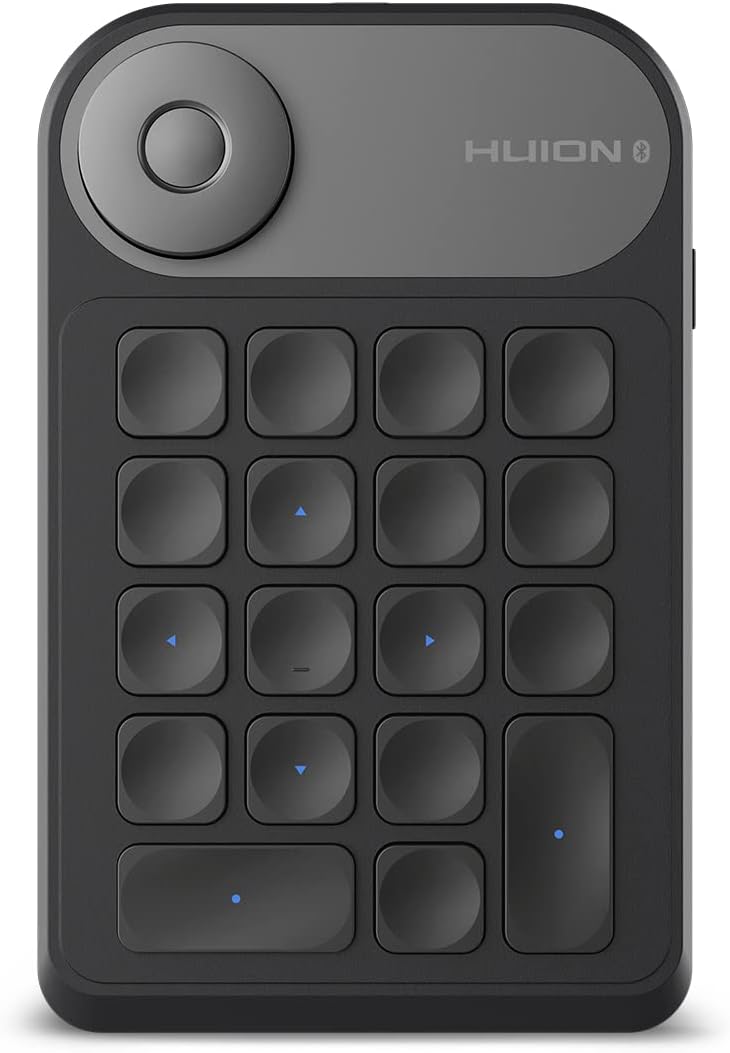
  • ⌨️18 Customizable Keys & Dial: You can customize all the keys as your preference. HUION Keydial Mini is equipped with a dial controller for switching functions to improve your work efficiency. It can be used as an ordinary one handed keyboard by setting up functions for each key, and a shortcut remote by setting up key combination functions.
  • ⌨️Multiple functions: The dial controller is not only compatible with Windows Radial Controller Protocol to enable radial menu and custom app experiences, but also can be customized to different functions via HUION driver settings.
  • ⌨️Bluetooth Connectivity: HUION Keydial Mini supports Bluetooth 5.0 with a wider coverage area and faster speed boost. It can be connected to your desktop or portables, including smartphone and tablet. Also, you can connect with computer via the USB-C port.
  • ⌨️Capture Inspiration On The Go: The built-in 1200mAh battery can support 70 hours of continuous usage. To fully charge only needs 3.6 hours (with 5V/1A charger). You can carry it anywhere with only 115g weight and 10.8mm thickness.
  • ⌨️Ergonomic and User-friendly Design: With the design of a scissor-switch keyboard, you can have a smooth keystroke experience that reduces finger fatigue. The keyboard is durable, with a lifespan of up to 3 million keystrokes. Besides, It is friendly for both right-handed and left-handed.

  • Reviews:

    5.0 out of 5 stars So good I must leave review

    R.s. · 16 February 2025

    I have only lived with This for about a month and I haven’t owned many things like this however I am very computer literate and I have been a professional in Adobe Photoshop for many of moon. I purchased this to help me navigate the many shortcuts in Adobe Photoshop quickly i.e. to speed up my workflow. My hands are extremely large however I still struggle to quickly and effectively utilise the shortcuts now I have this tool it’s amazing it’s completely customisable i.e. control alt and V can be applied in Photoshop or on any program you wish. The reason I’m now writing a review is because I’ve recently started using Canva and this morning I managed to set up shortcuts for Canva in a matter of minutes. It’s extremely versatile can be programmed to any software you wish with any string of keyboard combinations, there’s a lot of other functions that you can allow it to do using mouse keyboard the Window software itself all in all an amazing product for not a lot of money well worth it extremely user-friendly very easy to set up the only issue I have but I cannot say it’s anything to do with the device is at one point the Bluetooth didn’t work. It just stopped randomly and would not connect to my PC but it would work when plugged in that most likely is something to do with a bug with him, Windows. It eventually sorted itself out but something to know don’t let this put you off though can be used plugged in or on Bluetooth work Immediately the user interface on the driver is extremely easy to use coupled with the dial for zoom in and out it really does make life a lot easier.

    5.0 out of 5 stars Buy One

    N. · 9 September 2024

    Excellent piece of kit, I wish i'd purchased one with the tablet originally. The buttons are very tactile and responsive and all the hotkeys/wheel functions can be changed depending on your art package and preferences.It's really simple to configure multiple profiles which are saved via the device. Each profile will load automatically upon launching your software, so you don't need to adjust anything before you start working, making it a breeze to switch between art packages. You can use the stickers provided if you have trouble remembering your hotkeys. I didn't bother with those, though as there's little textured bumps on some keys and, after a couple of uses, its easy to navigate without prompts. I can imagine the stickers being a pain to remove when they inevitably wear too.It clings really well to the surface of my Huion pad, saving on workspace. And best of all, it's Bluetooth 5, so no wires cluttering up my work area and no need for a dongle as it paired straight to my pc. All in all, it's dramatically improved my workflow and made things a lot quicker and more intuitive.

    5.0 out of 5 stars Compact, works well.

    E. · 24 July 2025

    Still adapting to using this alongside Procreate but there's no reason I couldn't pair it with a PC instead.A neat functional unit, not very heavy (so a fairly light build, but robust enough). Keys are positive; wheel is clicky. There are far more expensive alternatives on the market, this feels excellent value for money.Only slight downside is having to install a companion app to configure it, but that too works well.

    4.0 out of 5 stars Multi key inputs now supported.

    J.W.E. · 2 July 2025

    Update to the below review:The newest driver on their website supports simultaneous key press shortcuts now (tested on mac).The driver required is labelled 'Kamvas 13(Gen 3)' on their website. This enabled me to program keyboard shortcuts like shift+ctrl+tab for Blender.Thanks to this, the device is now more useful. Updated my rating from 3 to 4 stars.Old review:Build quality is fine. Software is reasonable. But multi key combinations do not work (at least on mac) eg. I tried setting up keyboard shortcuts for blender and it was not able to do combinations of control + other keys. I didn't see this flagged clearly in the description so just be aware. For single keys it's fine. For my purposes it is useless.

    5.0 out of 5 stars Super quality for good price

    L. · 30 August 2024

    I’ve been using this keyboard for several months now, primarily for work. It pairs perfectly with any graphics tablet and operates without delay. It supports all kinds of graphics programs and can be quickly configured for various commands, which can also be easily switched between.However, one thing to note: do not use the stickers. The stickers are made from cheap material and lack a gloss finish, causing them to wear off quickly. The inscriptions fade fast, and the worst part is that removing the stickers leaves behind a sticky residue that’s very difficult to clean, even with alcohol.

    5.0 out of 5 stars Great product well worth the price.

    p.n. · 10 May 2025

    Great for work flow,easy to setup and easy to use, I only use photoshop so can't say what it's like for other programs but very happy.

    5.0 out of 5 stars Better than fitting a keyboard next to a kamvas

    M.H. · 12 January 2025

    Spent the better part of 3 months trying to fit my kamvas on my desk with my keyboard so I could use keybinds for software like zbrush, I ended up buying this device, I binded some of the main keys and it's small so I could have it rested on the display or next to it on the desk. Apparently it's Bluetooth, but I connect it to my pc through the usb on my kamvas, but occasionally ill get a low battery icon pop up on one of my screens which is pretty annoying considering it's not connected via Bluetooth, just the standard wire it comes with

    3.0 out of 5 stars excellent device, over priced, bundled stickers are not very good.

    H. · 24 January 2025

    I use this every day with my iPad in Clip Studio Pro.It’s easy to use, has excellent battery life, and is flat enough to rest comfortably on the edge of my sketchboard (iPad holder for art) without any issues. The USB-C charging is a great feature since I can use my iPad charger.I deducted two stars from an otherwise great product for a couple of reasons. First, the supplied stickers for labeling the buttons are disappointing. There aren’t enough icon options, and the blank ones don’t hold marker ink well. I ended up having a colleague make tiny vinyl stickers for me, which worked much better.The second reason is the price. While I’m very happy with the device, I don’t feel it justifies the full price. I got it on sale, but at retail, there are likely better-value options

    przydatny dodatek do tabletów

    P.K. · 14 February 2025

    używam z tabletem Huion Kamvas 22plus. Bardzo dobrze się uzupełnia cały zestaw.W pełni programowalne przyciski i bardzo użyteczne pokrętło z trzema trybami pracy.Bardzo użyteczna też jako numpad, ze względu na ułożenie przycisków, jak w części numerycznej klawiatury.Dodatkowo możliwość ustawienia czasu, kiedy klawiatura przechodzi w tryb uśpienia...Nie ma tego np. w Wacomie (express key remote) - stąd też zmiana firmy. Kupiłem express key remote i leży nieużywane.Keydial MINI K20 - godne polecenia!

    Short Cuts instelbaar!

    j. · 8 April 2025

    Werkt uitstekend samen met photoshop, en huion displaytablet

    Geliştirilmesi gerek…

    M. · 8 August 2024

    Bazı fonksiyonları çalışmıyor ve üretici buna henüz bir çare bulamadı. Görüşmelerde çok büyük bir ilgi var ama sonuç yok.

    Semplicemente fantastico

    R. · 14 April 2025

    Se hai bisogno di scorciatoie per qualsiasi programma non pensarci 2 volte prendilo. I primi giorni devi smanettare un pochino, può sembrare anche che non accetti le scorciatoie ma è solo una questione di mettere in pratica le indicazioni esatte. E' vero anche che qualche prest di default per la rotella di scorrimento viene indicato con nomi strani, ma tutto funziona. Una volta finite le impostazioni e inizi ad usarlo ti fai solo 1 domanda: come ho fatto a farne a meno fin ora. E' incredibile, è diverso da utilizzare le scorciatoie da tastiera, qui non alzi la mano, con 1 tasto fai 1 azione. 18 tasti personalizzabili + 1 rotella con 3 funzioni premendo il tasto centrale della rotella. QUindi in totale sono 21 funzioni programmabili. Ma il bello è che ad 1 tasto puoi assegnare un tasto multifunzione con ben 6 tasti a scelta. Niente da dire, facile, tasti ben distribuiti , facili da riconoscere. Devo dire che questo tastierino è veramente ben fatto. Funziona con il suo software identico a quello delle tavolette grafiche, nel menù a cascata visualizzi i dispositivi e li personalizzi. Funzione gradita il backup delle impostazioni date, in modo che se qualcosa va storto non devi riprogrammare tutto, ma solo ricaricare il backUp. % stelle e + per questo dispositivo.

    Super !

    O. · 13 June 2025

    Marche parfaitement et facile d’utilisation je recomande !

    HUION Keydial Mini K20 Express Keys Remote Keyboard Bluetooth 5.0 for Pen Display and Drawing Tablet with Dial Controller + 18 Customized Keys, Upgrade Version of KD100 Portable Keypad

    Product ID: KO0OZCM4P9L
    Condition: New

    4.4

    AED53038

    Price includes VAT & Import Duties
    Style Name: K20
    Availability: In Stock

    Quantity:

    |

    Order today to get by 7-14 business days

    This item qualifies for free delivery

    Returns & Warranty policies

    Imported From: United Kingdom

    At BOLO, we work hard to ensure the products you receive are new, genuine, and sourced from reputable suppliers.

    BOLO is not an authorized or official retailer for most brands, nor are we affiliated with manufacturers unless specifically stated on a product page. Instead, we source verified sellers, authorized distributors or directly from the manufacturer.

    Each product undergoes thorough inspection and verification at our consolidation and fulfilment centers to ensure it meets our strict authenticity and quality standards before being shipped and delivered to you.

    If you ever have concerns regarding the authenticity of a product purchased from us, please contact Bolo Support. We will review your inquiry promptly and, if necessary, provide documentation verifying authenticity or offer a suitable resolution.

    Your trust is our top priority, and we are committed to maintaining transparency and integrity in every transaction.

    All product information, images, descriptions, and reviews originate from the manufacturer or from trusted sellers overseas. BOLO is not affiliated with, endorsed by, or an authorized retailer for most brands listed on our website unless stated otherwise.

    While we strive to display accurate information, variations in packaging, labeling, instructions, or formulation may occasionally occur due to regional differences or supplier updates. For detailed or manufacturer-specific information, please contact the brand directly or reach out to BOLO Support for assistance.

    Unless otherwise stated, all prices displayed on the product page include applicable taxes and import duties.

    BOLO operates in accordance with the laws and regulations of United Arab Emirates. Any items found to be restricted or prohibited for sale within the UAE will be cancelled prior to shipment. We take proactive measures to ensure that only products permitted for sale in United Arab Emirates are listed on our website.

    All items are shipped by air, and any products classified as “Dangerous Goods (DG)” under IATA regulations will be removed from the order and cancelled.

    All orders are processed manually, and we make every effort to process them promptly once confirmed. Products cancelled due to the above reasons will be permanently removed from listings across the website.

    Similar suggestions by Bolo

    More from this brand

    Similar items from “Keyboards”

    HUION Keydial Mini K20 Express Keys Remote Keyboard Bluetooth 5.0 for Pen Display and Drawing Tablet with Dial Controller + 18 Customized Keys, Upgrade Version of KD100 Portable Keypad

    Product ID: KO0OZCM4P9L
    Condition: New

    4.4

    HUION Keydial Mini K20 Express Keys Remote Keyboard Bluetooth 5.0 for Pen Display and Drawing Tablet with Dial Controller + 18 Customized Keys, Upgrade Version of KD100 Portable Keypad-0
    Style Name: K20

    AED53038

    Price includes VAT & Import Duties
    Availability: In Stock

    Quantity:

    |

    Order today to get by 7-14 business days

    This item qualifies for free delivery

    Returns & Warranty policies

    Imported From: United Kingdom

    At BOLO, we work hard to ensure the products you receive are new, genuine, and sourced from reputable suppliers.

    BOLO is not an authorized or official retailer for most brands, nor are we affiliated with manufacturers unless specifically stated on a product page. Instead, we source verified sellers, authorized distributors or directly from the manufacturer.

    Each product undergoes thorough inspection and verification at our consolidation and fulfilment centers to ensure it meets our strict authenticity and quality standards before being shipped and delivered to you.

    If you ever have concerns regarding the authenticity of a product purchased from us, please contact Bolo Support. We will review your inquiry promptly and, if necessary, provide documentation verifying authenticity or offer a suitable resolution.

    Your trust is our top priority, and we are committed to maintaining transparency and integrity in every transaction.

    All product information, images, descriptions, and reviews originate from the manufacturer or from trusted sellers overseas. BOLO is not affiliated with, endorsed by, or an authorized retailer for most brands listed on our website unless stated otherwise.

    While we strive to display accurate information, variations in packaging, labeling, instructions, or formulation may occasionally occur due to regional differences or supplier updates. For detailed or manufacturer-specific information, please contact the brand directly or reach out to BOLO Support for assistance.

    Unless otherwise stated, all prices displayed on the product page include applicable taxes and import duties.

    BOLO operates in accordance with the laws and regulations of United Arab Emirates. Any items found to be restricted or prohibited for sale within the UAE will be cancelled prior to shipment. We take proactive measures to ensure that only products permitted for sale in United Arab Emirates are listed on our website.

    All items are shipped by air, and any products classified as “Dangerous Goods (DG)” under IATA regulations will be removed from the order and cancelled.

    All orders are processed manually, and we make every effort to process them promptly once confirmed. Products cancelled due to the above reasons will be permanently removed from listings across the website.

    Description:

  • ⌨️18 Customizable Keys & Dial: You can customize all the keys as your preference. HUION Keydial Mini is equipped with a dial controller for switching functions to improve your work efficiency. It can be used as an ordinary one handed keyboard by setting up functions for each key, and a shortcut remote by setting up key combination functions.
  • ⌨️Multiple functions: The dial controller is not only compatible with Windows Radial Controller Protocol to enable radial menu and custom app experiences, but also can be customized to different functions via HUION driver settings.
  • ⌨️Bluetooth Connectivity: HUION Keydial Mini supports Bluetooth 5.0 with a wider coverage area and faster speed boost. It can be connected to your desktop or portables, including smartphone and tablet. Also, you can connect with computer via the USB-C port.
  • ⌨️Capture Inspiration On The Go: The built-in 1200mAh battery can support 70 hours of continuous usage. To fully charge only needs 3.6 hours (with 5V/1A charger). You can carry it anywhere with only 115g weight and 10.8mm thickness.
  • ⌨️Ergonomic and User-friendly Design: With the design of a scissor-switch keyboard, you can have a smooth keystroke experience that reduces finger fatigue. The keyboard is durable, with a lifespan of up to 3 million keystrokes. Besides, It is friendly for both right-handed and left-handed.

  • Reviews:

    5.0 out of 5 stars So good I must leave review

    R.s. · 16 February 2025

    I have only lived with This for about a month and I haven’t owned many things like this however I am very computer literate and I have been a professional in Adobe Photoshop for many of moon. I purchased this to help me navigate the many shortcuts in Adobe Photoshop quickly i.e. to speed up my workflow. My hands are extremely large however I still struggle to quickly and effectively utilise the shortcuts now I have this tool it’s amazing it’s completely customisable i.e. control alt and V can be applied in Photoshop or on any program you wish. The reason I’m now writing a review is because I’ve recently started using Canva and this morning I managed to set up shortcuts for Canva in a matter of minutes. It’s extremely versatile can be programmed to any software you wish with any string of keyboard combinations, there’s a lot of other functions that you can allow it to do using mouse keyboard the Window software itself all in all an amazing product for not a lot of money well worth it extremely user-friendly very easy to set up the only issue I have but I cannot say it’s anything to do with the device is at one point the Bluetooth didn’t work. It just stopped randomly and would not connect to my PC but it would work when plugged in that most likely is something to do with a bug with him, Windows. It eventually sorted itself out but something to know don’t let this put you off though can be used plugged in or on Bluetooth work Immediately the user interface on the driver is extremely easy to use coupled with the dial for zoom in and out it really does make life a lot easier.

    5.0 out of 5 stars Buy One

    N. · 9 September 2024

    Excellent piece of kit, I wish i'd purchased one with the tablet originally. The buttons are very tactile and responsive and all the hotkeys/wheel functions can be changed depending on your art package and preferences.It's really simple to configure multiple profiles which are saved via the device. Each profile will load automatically upon launching your software, so you don't need to adjust anything before you start working, making it a breeze to switch between art packages. You can use the stickers provided if you have trouble remembering your hotkeys. I didn't bother with those, though as there's little textured bumps on some keys and, after a couple of uses, its easy to navigate without prompts. I can imagine the stickers being a pain to remove when they inevitably wear too.It clings really well to the surface of my Huion pad, saving on workspace. And best of all, it's Bluetooth 5, so no wires cluttering up my work area and no need for a dongle as it paired straight to my pc. All in all, it's dramatically improved my workflow and made things a lot quicker and more intuitive.

    5.0 out of 5 stars Compact, works well.

    E. · 24 July 2025

    Still adapting to using this alongside Procreate but there's no reason I couldn't pair it with a PC instead.A neat functional unit, not very heavy (so a fairly light build, but robust enough). Keys are positive; wheel is clicky. There are far more expensive alternatives on the market, this feels excellent value for money.Only slight downside is having to install a companion app to configure it, but that too works well.

    4.0 out of 5 stars Multi key inputs now supported.

    J.W.E. · 2 July 2025

    Update to the below review:The newest driver on their website supports simultaneous key press shortcuts now (tested on mac).The driver required is labelled 'Kamvas 13(Gen 3)' on their website. This enabled me to program keyboard shortcuts like shift+ctrl+tab for Blender.Thanks to this, the device is now more useful. Updated my rating from 3 to 4 stars.Old review:Build quality is fine. Software is reasonable. But multi key combinations do not work (at least on mac) eg. I tried setting up keyboard shortcuts for blender and it was not able to do combinations of control + other keys. I didn't see this flagged clearly in the description so just be aware. For single keys it's fine. For my purposes it is useless.

    5.0 out of 5 stars Super quality for good price

    L. · 30 August 2024

    I’ve been using this keyboard for several months now, primarily for work. It pairs perfectly with any graphics tablet and operates without delay. It supports all kinds of graphics programs and can be quickly configured for various commands, which can also be easily switched between.However, one thing to note: do not use the stickers. The stickers are made from cheap material and lack a gloss finish, causing them to wear off quickly. The inscriptions fade fast, and the worst part is that removing the stickers leaves behind a sticky residue that’s very difficult to clean, even with alcohol.

    5.0 out of 5 stars Great product well worth the price.

    p.n. · 10 May 2025

    Great for work flow,easy to setup and easy to use, I only use photoshop so can't say what it's like for other programs but very happy.

    5.0 out of 5 stars Better than fitting a keyboard next to a kamvas

    M.H. · 12 January 2025

    Spent the better part of 3 months trying to fit my kamvas on my desk with my keyboard so I could use keybinds for software like zbrush, I ended up buying this device, I binded some of the main keys and it's small so I could have it rested on the display or next to it on the desk. Apparently it's Bluetooth, but I connect it to my pc through the usb on my kamvas, but occasionally ill get a low battery icon pop up on one of my screens which is pretty annoying considering it's not connected via Bluetooth, just the standard wire it comes with

    3.0 out of 5 stars excellent device, over priced, bundled stickers are not very good.

    H. · 24 January 2025

    I use this every day with my iPad in Clip Studio Pro.It’s easy to use, has excellent battery life, and is flat enough to rest comfortably on the edge of my sketchboard (iPad holder for art) without any issues. The USB-C charging is a great feature since I can use my iPad charger.I deducted two stars from an otherwise great product for a couple of reasons. First, the supplied stickers for labeling the buttons are disappointing. There aren’t enough icon options, and the blank ones don’t hold marker ink well. I ended up having a colleague make tiny vinyl stickers for me, which worked much better.The second reason is the price. While I’m very happy with the device, I don’t feel it justifies the full price. I got it on sale, but at retail, there are likely better-value options

    przydatny dodatek do tabletów

    P.K. · 14 February 2025

    używam z tabletem Huion Kamvas 22plus. Bardzo dobrze się uzupełnia cały zestaw.W pełni programowalne przyciski i bardzo użyteczne pokrętło z trzema trybami pracy.Bardzo użyteczna też jako numpad, ze względu na ułożenie przycisków, jak w części numerycznej klawiatury.Dodatkowo możliwość ustawienia czasu, kiedy klawiatura przechodzi w tryb uśpienia...Nie ma tego np. w Wacomie (express key remote) - stąd też zmiana firmy. Kupiłem express key remote i leży nieużywane.Keydial MINI K20 - godne polecenia!

    Short Cuts instelbaar!

    j. · 8 April 2025

    Werkt uitstekend samen met photoshop, en huion displaytablet

    Geliştirilmesi gerek…

    M. · 8 August 2024

    Bazı fonksiyonları çalışmıyor ve üretici buna henüz bir çare bulamadı. Görüşmelerde çok büyük bir ilgi var ama sonuç yok.

    Semplicemente fantastico

    R. · 14 April 2025

    Se hai bisogno di scorciatoie per qualsiasi programma non pensarci 2 volte prendilo. I primi giorni devi smanettare un pochino, può sembrare anche che non accetti le scorciatoie ma è solo una questione di mettere in pratica le indicazioni esatte. E' vero anche che qualche prest di default per la rotella di scorrimento viene indicato con nomi strani, ma tutto funziona. Una volta finite le impostazioni e inizi ad usarlo ti fai solo 1 domanda: come ho fatto a farne a meno fin ora. E' incredibile, è diverso da utilizzare le scorciatoie da tastiera, qui non alzi la mano, con 1 tasto fai 1 azione. 18 tasti personalizzabili + 1 rotella con 3 funzioni premendo il tasto centrale della rotella. QUindi in totale sono 21 funzioni programmabili. Ma il bello è che ad 1 tasto puoi assegnare un tasto multifunzione con ben 6 tasti a scelta. Niente da dire, facile, tasti ben distribuiti , facili da riconoscere. Devo dire che questo tastierino è veramente ben fatto. Funziona con il suo software identico a quello delle tavolette grafiche, nel menù a cascata visualizzi i dispositivi e li personalizzi. Funzione gradita il backup delle impostazioni date, in modo che se qualcosa va storto non devi riprogrammare tutto, ma solo ricaricare il backUp. % stelle e + per questo dispositivo.

    Super !

    O. · 13 June 2025

    Marche parfaitement et facile d’utilisation je recomande !

    Similar suggestions by Bolo

    More from this brand

    Similar items from “Keyboards”