Deliver toUnited Arab Emirates
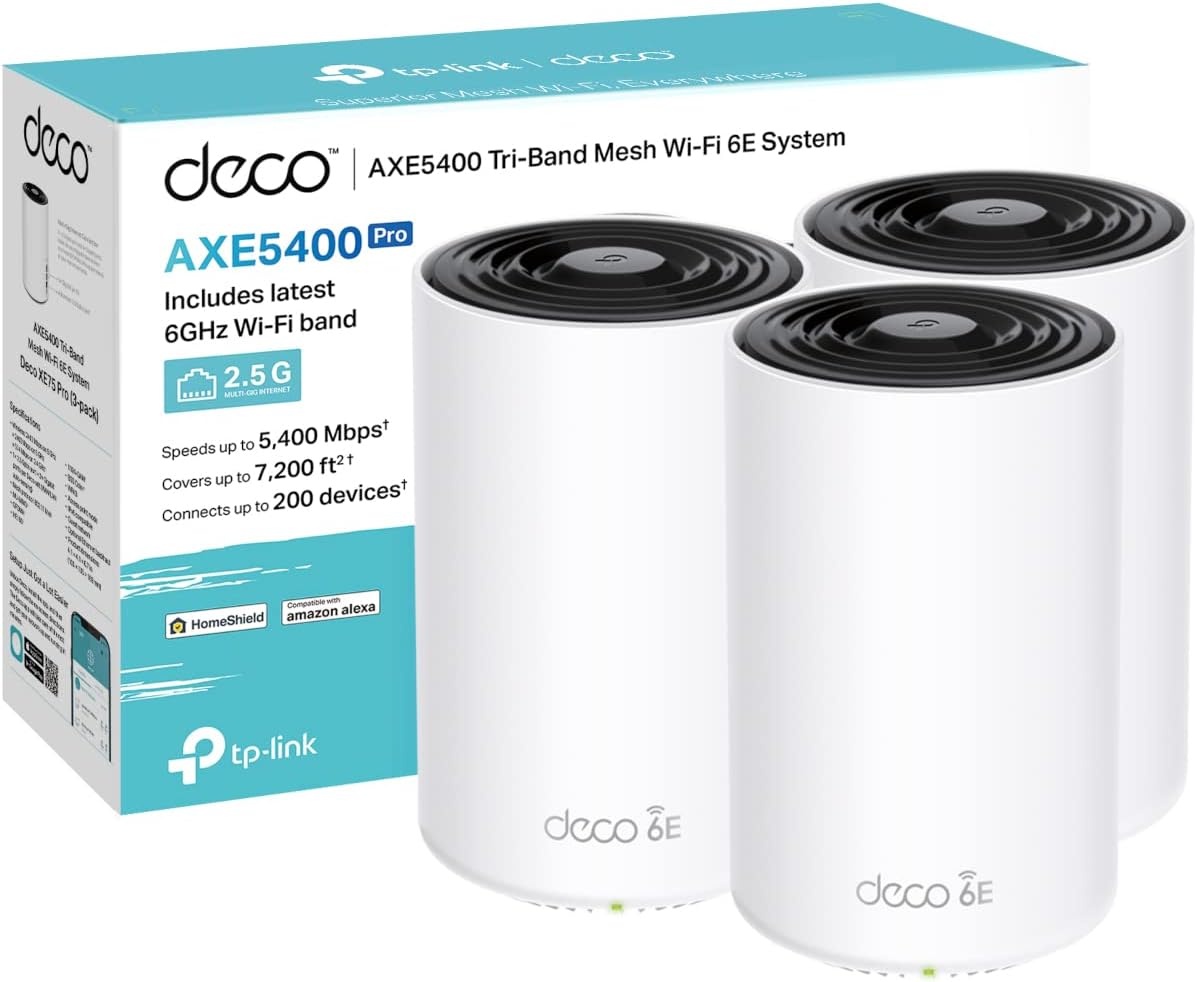
TP-Link Deco XE75 Pro(3-pack) AXE5400Mbps Mesh WiFi 6E System, True Tri-Band Speed, 2.5 Gbps Port, AI-Driven, Coverage up to 7200ft², WiFi Router, WiFi Extender Booster, Gaming & 4K, Easy Setup

Description:

  • Whole Home Wi-Fi 6E – Cover up to 7,200 ft2(670m2) with next-gen seamless Wi-Fi and make dead zones and buffering a thing of the past
  • Brand-New 6 GHz Band – Experience the latest frequency of Wi-Fi, eliminating interference from all legacy devices. With Tri-Band Speed, All three Wi-Fi bands work together to unleash your network’s total speeds up to 5,400 Mbps for 200 devices
  • AI-Driven Mesh – Unites your home under one name and password while delivering the best connections as you move room to room
  • TP-Link HomeShield – Keeps your home network safe with cutting-edge features for network and IoT protection
  • Universal Compatibility – Backward compatible with all Wi-Fi generations and works with any internet service provider (ISP) and modem, Setup Made Easier Than Ever, with 3 years manufactory warranty

  • Reviews:

    5.0 out of 5 stars Worth every penny

    A. · 24 April 2025

    (function() { P.when('cr-A', 'ready').execute(function(A) { if(typeof A.toggleExpanderAriaLabel === 'function') { A.toggleExpanderAriaLabel('review_text_read_more', 'Read more of this review', 'Read less of this review'); } }); })(); .review-text-read-more-expander:focus-visible { outline: 2px solid #2162a1; outline-offset: 2px; border-radius: 5px; } After a decade of waiting for fibre optic broadband, I finally received a 1Gbps connection to my home. However, the initial experience was underwhelming. Despite the upgrade, I was only achieving around 70Mbps in my third-floor room, located on the opposite side of the house from the modem. Given that my PC supports Wi-Fi 7, there were clearly no limitations on the device end. The issue appeared to be the standard modem provided by Sky, which performed poorly.I began researching mesh systems and initially considered the Deco XE50, but decided against it due to its Wi-Fi 6 limitation, the same as my existing Sky modem. I instead opted for the Deco XE75 Pro, which supports Wi-Fi 6E. Although it cost approximately £120 more at the time, I deemed it a worthwhile investment given the performance gap and future-proofingThe improvement was immediate and significant. In the same room that couldn't even reach 100Mbps, I now consistently receive speeds exceeding 600Mbps, occasionally peaking at 800Mbps (via Ethernet connection to the wireless hub). The range of the XE75 Pro is exceptional, especially considering the physical distance from the main pod. I purchased the three-pack version, which ensures seamless handover between pods for mobile devices and always connects to the fastest and most stable node.The accompanying Deco app is intuitive and offers a solid range of functions, including device prioritisation, firmware updates, security protocol options, guest network creation, and even VPN support (VPN is an add-on for a monthly subscription).Overall, I’m thoroughly impressed with the Deco XE75 Pro. It delivers on performance, range, stability, and features. If you’re paying for high-speed internet, it only makes sense to invest in hardware that allows you to benefit from it. In my view, this device is worth every penny.

    5.0 out of 5 stars Unleash Lightning-Fast WiFi Across Your Home!

    P.C. · 7 January 2025

    I've been a long-time user of the TP-Link Deco system, and the Deco XE75 Pro has solidified my trust in their products. It offers an outstanding balance between performance and price, making it a perfect upgrade for anyone seeking improved network performance without breaking the bank.Why I UpgradedI chose this model to enhance my internal backhaul speeds, especially for data movement to my home NAS. While I considered the newer 7G systems, this option provided a significant performance boost at a fraction of the cost. It also saved me from the hassle and expense of installing Ethernet cabling throughout my home—a win for both my budget and convenience.Performance and CoverageThe improvement in speed and reliability has been remarkable. The mesh system effortlessly covers my 12+ room house, ensuring no dead spots and consistently strong connections. Internal data transfer speeds are incredibly fast, making tasks like NAS backups a breeze. The system integrates seamlessly with my existing Deco devices, creating a unified and efficient network.App and FeaturesThe TP-Link app is straightforward and functional, handling essential tasks like setup and device management with ease. However, it could benefit from more advanced controls, such as manually assigning devices to specific nodes. While this lack of customization can be mildly frustrating, it doesn’t overshadow the product’s overall reliability and bulletproof performance.VerdictThe TP-Link Deco XE75 Pro delivers excellent coverage, fast internal speeds, and reliable operation, all at a price that feels more than fair. If you're looking to upgrade your home network without venturing into the premium price bracket, this is a fantastic choice. Despite some app limitations, the product excels where it matters most, making it a worthy investment for any connected household.Rating: 5/5

    4.0 out of 5 stars Seem to mostly work, but a few issues make them not for me.

    D.W. · 21 November 2023

    This review is for the XE75 Pro 3 pack.I bought these to replace a BT Smarthub 2 900MB Complete wifi setup consisting of the SH2 and 3 additional discs.Firstly, the setup of these was simple with a BT FTTP. Just plugged one into the modem on the wall in router mode, added the BT username and password and bang, it works. Fast wifi. My phone connected to this (wifi) saw download speeds of 3-400, where as on BT i could get around 100. The AP's are again easy to setup, I placed them in positions I used to have the complete wifi in and they were often redundant, no devices seemed to need them as the signal from the main one was often sufficient. My son's PC (main reason for switching as his room is where wifi signals go to die) used to have a BT disc in there and could manage maybe 10 - 15 meg with that setup, now didn't need a disc and could connect to a disc in the office and get 100 meg. Another plus for these is the dedicated iot newtork at 2.4ghz, and the guest network. I spent some time moving iot devices to the dedicated network, turned off the mesh option for static devices and arranging the AP's for best signal, i ended up daisychaining them rather than them all trying to connect back to the main router. My problems with these though are that they don't work well with BT hardware (the BT TV Pro box) and Google Nest devices (of which i have many). The BT TV box firstly would connect and then drop out randomly, like wise with the Google nest devices. The BT issue is apparently something to do with multicast support, and the nest, some people have had success turning off some features in the Deco's and using AES security, but it didn't seem to work for me. MAybe I should have given them more time and played with settings some more, but I didn't have these issues with the B hardware, so for now i am returning them.i may try the ASUS T8 or T9 after christmas as these may work better for me.

    .

    ي.ا. · 10 December 2023

    (function() { P.when('cr-A', 'ready').execute(function(A) { if(typeof A.toggleExpanderAriaLabel === 'function') { A.toggleExpanderAriaLabel('review_text_read_more', 'Read more of this review', 'Read less of this review'); } }); })(); .review-text-read-more-expander:focus-visible { outline: 2px solid #2162a1; outline-offset: 2px; border-radius: 5px; } ممتاز

    Sehr gutes WLAN-mesh system - Vergleich mit ORBI und LYRA

    M. · 24 November 2017

    Es galt bei mir eine 280 m2 Altbauwohnung mit dicken Ziegelmauern und Zwischenwänden und langgestreckter Konfiguration verlässlich mit WLAN zu versorgen, wobei der Telefonanschluss, an dem der Internet-Router hängt noch dazu ungünstig in einer Ecke positioniert ist. D.H. die Grundkonfiguration ist problematisch. Noch dazu sollen gleichzeitig ca. 2 PC's, 3 Tablets und 4 Phones und einige ioT Geräte versorgt werden, wobei zu "Stoßzeiten" auch 3 streams (Youtube, BoloTV) gleichzeitig erfolgen. Basis-speed am router ist 40-60 Mbit/s down, 15Mbit/s up. Eine anspruchsvolle Ausgangsbasis. Das DECO M5 meistert diese Problematik mehr als zufriedenstellend.Ich hatte zunächst das Netgear ORBI mesh-system mit 2 Geräte (1 Basis, 1 Satellit), das mich jedoch überhaupt nicht zufrieden stellte. Auch wenn die Spezifikationen dieses Systems theoretisch besser sind als das Deco (ORBI hat triband mit dezitiertem 5Ghz backhaul-channel zwischen den Geräten): es kam ständig zu Verbindungsabbrüchen und Apple-clients wurden eine Zeit lang (dies hat sich nach einem firmwareupdate gebessert, ist jedoch nicht völlig verschwunden) regelmäßig häufig disconnected.Danach ASUS lyra: schon viel besser als ORBI, ebenfalls triband mit dezitiertem backhaul-channel, die Verbindung war stabil. Dieses System hat sehr gute und für echte Profis geeignete Konfigurationsmöglichkeiten via PC, die Weboberfläche via PC ist für Laien eher "überwältigend" und in der usability nicht ideal. Die app war auch nicht so benutzerfreundlich und schlecht übersetzt. Gelegentliche disconnects der Satelliten kam vor (ca. 1x monatlich), war jedoch durch Neustart lösbar. Bei mehreren streams gleichzeitig hie und da (selten) etwas "bockige" Verbindung. Weitergegebene Geschwindigkeit am "Ende" des Netzwerkes zwischen 20 Mbit/s down und 5-8 Mbit/s up, also gut. Die LYRA Satelliten selbst sind jedoch eher groß und "klobig", in meinen Augen ziemlich hässlich und werden vor allem *sehr* warm! (ich habe wirklich Angst, dass die Oberflächen, auf denen die Geräte stehen durch die Hitze leiden). Das frohe LED-Farbenspiel auf der fast gesamten Oberseite der LYRA Geräte ist aber einfach "zuviel" und ist ohne Bedienungsanleitung nicht intuitiv zu erfassen..."was will mir das Gerät jetzt sagen"?? Diese Beleuchtung ist groß und sehr hell, zwar via software abschaltbar, jedoch imo ziemlich hässlich. LYRAs Äußeres wirkt auch nicht wirklich hochwertig. LYRA hat jedoch einen eingebauten Online-"Viren"-Schutz (wie Deco, ORBI hat das nicht) von "trend-micro". Hier sollen infizierte Geräte und unsichere Websites geblockt werden. Diese Funktion hat bei mir ein paar mal "angesprochen", aber vermutlich "nur" weben eines Werbenetzwerkes (Gerät lud Werbung von einem server im Hintergrund nach).Die Einrichtung war bei ORBI etwas leichter und Bedienungsfreundlicher als bei LYRA, jedoch in beiden Fällen kein Problem.Nun zum TPlink Deco M5:Zunächst ist es ein wirklich schickes System, die Geräte (Satelliten) sind relativ klein, weiß und rund und optisch ansprechend, fast "edel". ORBI mit seinen hohen "Vasen" ist wirklich riesig und muss als optisches Element in die Aufstellungsumgebung integriert werden (d.H. man sieht die Geräte immer). LYRA mit seinen sehr großen Plastikschüsseln ist optisch nicht so bestimmend wie ORBI allerdings auch nicht wirklich "versteckbar" oder "hochwertig" aussehend. Vom Design und der Möglichkeit der *unaufdringlichen* Integrierung in eine Wohnumgebung ist das Deco haushoher Sieger.ORBI besteht grundsätzlich im Set aus 2 Geräten, d.H. hat nur einen "Satelliten"; gilt es - wie in meinem Fall - problematischere Grundrisse zu bedienen, ist ein Satellit zu weinig. LYRA hat gesamt 3 Geräte, d.H. 2 für vom router entfernte Positionen (bei allen Systemen muss ein Gerät ("Base") mit Netzwerkkabel mit dem Router verbunden sein und wird daher in den meisten Fällen nahe beim Router stehen). Bei allen 3 Systemen gibt es LAN-Anschlüsse an den Satelliten, beim ORBI 4, bei LYRA und Deco jeweils 2 (bei der "Base" ist jeweils einer von der Leitung zum router (WAN) belegt) LYRA und Deco bieten mit ihren insgesamt 3 Geräten daher mehr Möglichkeiten, in unterschiedlichen Plätzen der Wohnung verkabelte Geräte (NAS,Spielkonsolen, FireTV... etc.) anzubinden.Was mich am Deco jedoch begeistert hat, was die einfache Einrichtung mittels der App. Manche mag es stören, jedoch ist bei Deco *keine* Administration per PC (Webinterface) möglich sondern NUR mit der App. LYRA an erster Stelle und danach ORBI bieten für Profiuser viel mehr Konfigurationsmöglichkeiten, an die Einfachheit und usability von DECO M5 für "Standardfälle" kommen sie jedoch nicht heran. Die Einrichtung und Bedienung von Deco ist wirklich einfach.Obwohl Deco "nur" ein Dualband-System ohne dezitierten Backhaul-channel ist, daher rein nach den Daten ORBI und LYRA unterlegen sein sollte, ist bei mir kein Geschwindigkeitsnachteil erkennbar, im Gegenteil, es ist "gefühlt" einen Tick schneller als die anderen beiden Systeme. Auch bei connect mehrerer Geräte und gleichzeitiger streams gehen 20-40 MBit/s down und 5-10 MBit/s up problemlos in der ganzen Wohnung "durch". Deco kann - im Gegensatz zu LYRA - nicht nur ("QoS") einzelne Arten von Diensten (Gaming, Surfen, Download, Stream...) priorisieren, sondern auch einzelne Geräte. Das bringt echt merklichen speed für ein priorisiertes Gerät.LYRA und Deco haben ein parental-control system (Kindersicherung), das konnte ich noch nicht testen, beim Deco sieht es jedoch leicht konfigurierbar aus.Fazit: Deco ist das schickste (am besten designte) mesh-system der drei Kandidaten, fast "Apple-like", im täglichen Gebrauch trotz theoretisch etwas "schlechterer" Technik *nicht* langsamer sondern "gefühlt" etwas schneller. Mit eingebautem Viren- und Malwareschutz sticht es aus der Menge heraus (nur das LYRA bietet Gleichwertiges). Wer sich nicht am fehlenden Webinterface (Administration über PC) und der "Zwangsregistrierung" (online account bei tplink wird zwingend benötigt) stößt und keine tiefgehenden Poweruser-Konfigurationsmöglichkeiten benötigt, bekommt die einfachste Steuerung/Konfiguration der 3 Kandidaten per schöner App.Klare Empfehlung, sofern bei sehr guter Leistung auch Bedienungsfreundlichkeit und Optik nicht zurückstehen sollen.(Ergänzung: die Datenraten sind tatsächlich mit speedtest gemessene down/uploadraten in Netz, die Verbindungsraten sind natürlich wesentlich höher, im gleichen Raum wie ein Satellit sind es die max. 876 Mbit/s sonst 250 MBit/s und höher. )

    Easy to set up

    C. · 18 September 2024

    This product has done a good job on getting rid of the dead spots in my flat and it is very easy to set up.

    I expect it to made clear you purchase from Amazon.com.au the electronic item had a UK power plug

    S. · 24 July 2023

    I expect it to made clear when you purchase from Bolo.com.au the electronic item had a UK power plug.The item was the older version there was no mention of the version in the specs.I was inconvenienced and disappointed with purchase.I contacted the manufacturer and that was a unsatisfactory outcome.

    Parfait

    j. · 25 June 2023

    Facile à configurer

    TP-Link Deco XE75 Pro(3-pack) AXE5400Mbps Mesh WiFi 6E System, True Tri-Band Speed, 2.5 Gbps Port, AI-Driven, Coverage up to 7200ft², WiFi Router, WiFi Extender Booster, Gaming & 4K, Easy Setup

    Product ID: KO0OS5TX7GQ
    Condition: New

    4.3

    AED2,76385

    Price includes VAT & Import Duties
    Size Name: 3 Pack
    Style Name: AXE5400 WiFi 6E
    Availability: In Stock

    Quantity:

    |

    Order today to get by 7-14 business days

    This item qualifies for free delivery

    Returns & Warranty policies

    Imported From: United Kingdom

    At BOLO, we work hard to ensure the products you receive are new, genuine, and sourced from reputable suppliers.

    BOLO is not an authorized or official retailer for most brands, nor are we affiliated with manufacturers unless specifically stated on a product page. Instead, we source verified sellers, authorized distributors or directly from the manufacturer.

    Each product undergoes thorough inspection and verification at our consolidation and fulfilment centers to ensure it meets our strict authenticity and quality standards before being shipped and delivered to you.

    If you ever have concerns regarding the authenticity of a product purchased from us, please contact Bolo Support. We will review your inquiry promptly and, if necessary, provide documentation verifying authenticity or offer a suitable resolution.

    Your trust is our top priority, and we are committed to maintaining transparency and integrity in every transaction.

    All product information, images, descriptions, and reviews originate from the manufacturer or from trusted sellers overseas. BOLO is not affiliated with, endorsed by, or an authorized retailer for most brands listed on our website unless stated otherwise.

    While we strive to display accurate information, variations in packaging, labeling, instructions, or formulation may occasionally occur due to regional differences or supplier updates. For detailed or manufacturer-specific information, please contact the brand directly or reach out to BOLO Support for assistance.

    Unless otherwise stated, all prices displayed on the product page include applicable taxes and import duties.

    BOLO operates in accordance with the laws and regulations of United Arab Emirates. Any items found to be restricted or prohibited for sale within the UAE will be cancelled prior to shipment. We take proactive measures to ensure that only products permitted for sale in United Arab Emirates are listed on our website.

    All items are shipped by air, and any products classified as “Dangerous Goods (DG)” under IATA regulations will be removed from the order and cancelled.

    All orders are processed manually, and we make every effort to process them promptly once confirmed. Products cancelled due to the above reasons will be permanently removed from listings across the website.

    Similar suggestions by Bolo

    More from this brand

    Similar items from “Whole Home & Mesh Wi-Fi Systems”

    TP-Link Deco XE75 Pro(3-pack) AXE5400Mbps Mesh WiFi 6E System, True Tri-Band Speed, 2.5 Gbps Port, AI-Driven, Coverage up to 7200ft², WiFi Router, WiFi Extender Booster, Gaming & 4K, Easy Setup

    Product ID: KO0OS5TX7GQ
    Condition: New

    4.3

    TP-Link Deco XE75 Pro(3-pack) AXE5400Mbps Mesh WiFi 6E System, True Tri-Band Speed, 2.5 Gbps Port, AI-Driven, Coverage up to 7200ft², WiFi Router, WiFi Extender Booster, Gaming & 4K, Easy Setup-0
    Size Name: 3 Pack
    Style Name: AXE5400 WiFi 6E

    AED2,76385

    Price includes VAT & Import Duties
    Availability: In Stock

    Quantity:

    |

    Order today to get by 7-14 business days

    This item qualifies for free delivery

    Returns & Warranty policies

    Imported From: United Kingdom

    At BOLO, we work hard to ensure the products you receive are new, genuine, and sourced from reputable suppliers.

    BOLO is not an authorized or official retailer for most brands, nor are we affiliated with manufacturers unless specifically stated on a product page. Instead, we source verified sellers, authorized distributors or directly from the manufacturer.

    Each product undergoes thorough inspection and verification at our consolidation and fulfilment centers to ensure it meets our strict authenticity and quality standards before being shipped and delivered to you.

    If you ever have concerns regarding the authenticity of a product purchased from us, please contact Bolo Support. We will review your inquiry promptly and, if necessary, provide documentation verifying authenticity or offer a suitable resolution.

    Your trust is our top priority, and we are committed to maintaining transparency and integrity in every transaction.

    All product information, images, descriptions, and reviews originate from the manufacturer or from trusted sellers overseas. BOLO is not affiliated with, endorsed by, or an authorized retailer for most brands listed on our website unless stated otherwise.

    While we strive to display accurate information, variations in packaging, labeling, instructions, or formulation may occasionally occur due to regional differences or supplier updates. For detailed or manufacturer-specific information, please contact the brand directly or reach out to BOLO Support for assistance.

    Unless otherwise stated, all prices displayed on the product page include applicable taxes and import duties.

    BOLO operates in accordance with the laws and regulations of United Arab Emirates. Any items found to be restricted or prohibited for sale within the UAE will be cancelled prior to shipment. We take proactive measures to ensure that only products permitted for sale in United Arab Emirates are listed on our website.

    All items are shipped by air, and any products classified as “Dangerous Goods (DG)” under IATA regulations will be removed from the order and cancelled.

    All orders are processed manually, and we make every effort to process them promptly once confirmed. Products cancelled due to the above reasons will be permanently removed from listings across the website.

    Description:

  • Whole Home Wi-Fi 6E – Cover up to 7,200 ft2(670m2) with next-gen seamless Wi-Fi and make dead zones and buffering a thing of the past
  • Brand-New 6 GHz Band – Experience the latest frequency of Wi-Fi, eliminating interference from all legacy devices. With Tri-Band Speed, All three Wi-Fi bands work together to unleash your network’s total speeds up to 5,400 Mbps for 200 devices
  • AI-Driven Mesh – Unites your home under one name and password while delivering the best connections as you move room to room
  • TP-Link HomeShield – Keeps your home network safe with cutting-edge features for network and IoT protection
  • Universal Compatibility – Backward compatible with all Wi-Fi generations and works with any internet service provider (ISP) and modem, Setup Made Easier Than Ever, with 3 years manufactory warranty

  • Reviews:

    5.0 out of 5 stars Worth every penny

    A. · 24 April 2025

    (function() { P.when('cr-A', 'ready').execute(function(A) { if(typeof A.toggleExpanderAriaLabel === 'function') { A.toggleExpanderAriaLabel('review_text_read_more', 'Read more of this review', 'Read less of this review'); } }); })(); .review-text-read-more-expander:focus-visible { outline: 2px solid #2162a1; outline-offset: 2px; border-radius: 5px; } After a decade of waiting for fibre optic broadband, I finally received a 1Gbps connection to my home. However, the initial experience was underwhelming. Despite the upgrade, I was only achieving around 70Mbps in my third-floor room, located on the opposite side of the house from the modem. Given that my PC supports Wi-Fi 7, there were clearly no limitations on the device end. The issue appeared to be the standard modem provided by Sky, which performed poorly.I began researching mesh systems and initially considered the Deco XE50, but decided against it due to its Wi-Fi 6 limitation, the same as my existing Sky modem. I instead opted for the Deco XE75 Pro, which supports Wi-Fi 6E. Although it cost approximately £120 more at the time, I deemed it a worthwhile investment given the performance gap and future-proofingThe improvement was immediate and significant. In the same room that couldn't even reach 100Mbps, I now consistently receive speeds exceeding 600Mbps, occasionally peaking at 800Mbps (via Ethernet connection to the wireless hub). The range of the XE75 Pro is exceptional, especially considering the physical distance from the main pod. I purchased the three-pack version, which ensures seamless handover between pods for mobile devices and always connects to the fastest and most stable node.The accompanying Deco app is intuitive and offers a solid range of functions, including device prioritisation, firmware updates, security protocol options, guest network creation, and even VPN support (VPN is an add-on for a monthly subscription).Overall, I’m thoroughly impressed with the Deco XE75 Pro. It delivers on performance, range, stability, and features. If you’re paying for high-speed internet, it only makes sense to invest in hardware that allows you to benefit from it. In my view, this device is worth every penny.

    5.0 out of 5 stars Unleash Lightning-Fast WiFi Across Your Home!

    P.C. · 7 January 2025

    I've been a long-time user of the TP-Link Deco system, and the Deco XE75 Pro has solidified my trust in their products. It offers an outstanding balance between performance and price, making it a perfect upgrade for anyone seeking improved network performance without breaking the bank.Why I UpgradedI chose this model to enhance my internal backhaul speeds, especially for data movement to my home NAS. While I considered the newer 7G systems, this option provided a significant performance boost at a fraction of the cost. It also saved me from the hassle and expense of installing Ethernet cabling throughout my home—a win for both my budget and convenience.Performance and CoverageThe improvement in speed and reliability has been remarkable. The mesh system effortlessly covers my 12+ room house, ensuring no dead spots and consistently strong connections. Internal data transfer speeds are incredibly fast, making tasks like NAS backups a breeze. The system integrates seamlessly with my existing Deco devices, creating a unified and efficient network.App and FeaturesThe TP-Link app is straightforward and functional, handling essential tasks like setup and device management with ease. However, it could benefit from more advanced controls, such as manually assigning devices to specific nodes. While this lack of customization can be mildly frustrating, it doesn’t overshadow the product’s overall reliability and bulletproof performance.VerdictThe TP-Link Deco XE75 Pro delivers excellent coverage, fast internal speeds, and reliable operation, all at a price that feels more than fair. If you're looking to upgrade your home network without venturing into the premium price bracket, this is a fantastic choice. Despite some app limitations, the product excels where it matters most, making it a worthy investment for any connected household.Rating: 5/5

    4.0 out of 5 stars Seem to mostly work, but a few issues make them not for me.

    D.W. · 21 November 2023

    This review is for the XE75 Pro 3 pack.I bought these to replace a BT Smarthub 2 900MB Complete wifi setup consisting of the SH2 and 3 additional discs.Firstly, the setup of these was simple with a BT FTTP. Just plugged one into the modem on the wall in router mode, added the BT username and password and bang, it works. Fast wifi. My phone connected to this (wifi) saw download speeds of 3-400, where as on BT i could get around 100. The AP's are again easy to setup, I placed them in positions I used to have the complete wifi in and they were often redundant, no devices seemed to need them as the signal from the main one was often sufficient. My son's PC (main reason for switching as his room is where wifi signals go to die) used to have a BT disc in there and could manage maybe 10 - 15 meg with that setup, now didn't need a disc and could connect to a disc in the office and get 100 meg. Another plus for these is the dedicated iot newtork at 2.4ghz, and the guest network. I spent some time moving iot devices to the dedicated network, turned off the mesh option for static devices and arranging the AP's for best signal, i ended up daisychaining them rather than them all trying to connect back to the main router. My problems with these though are that they don't work well with BT hardware (the BT TV Pro box) and Google Nest devices (of which i have many). The BT TV box firstly would connect and then drop out randomly, like wise with the Google nest devices. The BT issue is apparently something to do with multicast support, and the nest, some people have had success turning off some features in the Deco's and using AES security, but it didn't seem to work for me. MAybe I should have given them more time and played with settings some more, but I didn't have these issues with the B hardware, so for now i am returning them.i may try the ASUS T8 or T9 after christmas as these may work better for me.

    .

    ي.ا. · 10 December 2023

    (function() { P.when('cr-A', 'ready').execute(function(A) { if(typeof A.toggleExpanderAriaLabel === 'function') { A.toggleExpanderAriaLabel('review_text_read_more', 'Read more of this review', 'Read less of this review'); } }); })(); .review-text-read-more-expander:focus-visible { outline: 2px solid #2162a1; outline-offset: 2px; border-radius: 5px; } ممتاز

    Sehr gutes WLAN-mesh system - Vergleich mit ORBI und LYRA

    M. · 24 November 2017

    Es galt bei mir eine 280 m2 Altbauwohnung mit dicken Ziegelmauern und Zwischenwänden und langgestreckter Konfiguration verlässlich mit WLAN zu versorgen, wobei der Telefonanschluss, an dem der Internet-Router hängt noch dazu ungünstig in einer Ecke positioniert ist. D.H. die Grundkonfiguration ist problematisch. Noch dazu sollen gleichzeitig ca. 2 PC's, 3 Tablets und 4 Phones und einige ioT Geräte versorgt werden, wobei zu "Stoßzeiten" auch 3 streams (Youtube, BoloTV) gleichzeitig erfolgen. Basis-speed am router ist 40-60 Mbit/s down, 15Mbit/s up. Eine anspruchsvolle Ausgangsbasis. Das DECO M5 meistert diese Problematik mehr als zufriedenstellend.Ich hatte zunächst das Netgear ORBI mesh-system mit 2 Geräte (1 Basis, 1 Satellit), das mich jedoch überhaupt nicht zufrieden stellte. Auch wenn die Spezifikationen dieses Systems theoretisch besser sind als das Deco (ORBI hat triband mit dezitiertem 5Ghz backhaul-channel zwischen den Geräten): es kam ständig zu Verbindungsabbrüchen und Apple-clients wurden eine Zeit lang (dies hat sich nach einem firmwareupdate gebessert, ist jedoch nicht völlig verschwunden) regelmäßig häufig disconnected.Danach ASUS lyra: schon viel besser als ORBI, ebenfalls triband mit dezitiertem backhaul-channel, die Verbindung war stabil. Dieses System hat sehr gute und für echte Profis geeignete Konfigurationsmöglichkeiten via PC, die Weboberfläche via PC ist für Laien eher "überwältigend" und in der usability nicht ideal. Die app war auch nicht so benutzerfreundlich und schlecht übersetzt. Gelegentliche disconnects der Satelliten kam vor (ca. 1x monatlich), war jedoch durch Neustart lösbar. Bei mehreren streams gleichzeitig hie und da (selten) etwas "bockige" Verbindung. Weitergegebene Geschwindigkeit am "Ende" des Netzwerkes zwischen 20 Mbit/s down und 5-8 Mbit/s up, also gut. Die LYRA Satelliten selbst sind jedoch eher groß und "klobig", in meinen Augen ziemlich hässlich und werden vor allem *sehr* warm! (ich habe wirklich Angst, dass die Oberflächen, auf denen die Geräte stehen durch die Hitze leiden). Das frohe LED-Farbenspiel auf der fast gesamten Oberseite der LYRA Geräte ist aber einfach "zuviel" und ist ohne Bedienungsanleitung nicht intuitiv zu erfassen..."was will mir das Gerät jetzt sagen"?? Diese Beleuchtung ist groß und sehr hell, zwar via software abschaltbar, jedoch imo ziemlich hässlich. LYRAs Äußeres wirkt auch nicht wirklich hochwertig. LYRA hat jedoch einen eingebauten Online-"Viren"-Schutz (wie Deco, ORBI hat das nicht) von "trend-micro". Hier sollen infizierte Geräte und unsichere Websites geblockt werden. Diese Funktion hat bei mir ein paar mal "angesprochen", aber vermutlich "nur" weben eines Werbenetzwerkes (Gerät lud Werbung von einem server im Hintergrund nach).Die Einrichtung war bei ORBI etwas leichter und Bedienungsfreundlicher als bei LYRA, jedoch in beiden Fällen kein Problem.Nun zum TPlink Deco M5:Zunächst ist es ein wirklich schickes System, die Geräte (Satelliten) sind relativ klein, weiß und rund und optisch ansprechend, fast "edel". ORBI mit seinen hohen "Vasen" ist wirklich riesig und muss als optisches Element in die Aufstellungsumgebung integriert werden (d.H. man sieht die Geräte immer). LYRA mit seinen sehr großen Plastikschüsseln ist optisch nicht so bestimmend wie ORBI allerdings auch nicht wirklich "versteckbar" oder "hochwertig" aussehend. Vom Design und der Möglichkeit der *unaufdringlichen* Integrierung in eine Wohnumgebung ist das Deco haushoher Sieger.ORBI besteht grundsätzlich im Set aus 2 Geräten, d.H. hat nur einen "Satelliten"; gilt es - wie in meinem Fall - problematischere Grundrisse zu bedienen, ist ein Satellit zu weinig. LYRA hat gesamt 3 Geräte, d.H. 2 für vom router entfernte Positionen (bei allen Systemen muss ein Gerät ("Base") mit Netzwerkkabel mit dem Router verbunden sein und wird daher in den meisten Fällen nahe beim Router stehen). Bei allen 3 Systemen gibt es LAN-Anschlüsse an den Satelliten, beim ORBI 4, bei LYRA und Deco jeweils 2 (bei der "Base" ist jeweils einer von der Leitung zum router (WAN) belegt) LYRA und Deco bieten mit ihren insgesamt 3 Geräten daher mehr Möglichkeiten, in unterschiedlichen Plätzen der Wohnung verkabelte Geräte (NAS,Spielkonsolen, FireTV... etc.) anzubinden.Was mich am Deco jedoch begeistert hat, was die einfache Einrichtung mittels der App. Manche mag es stören, jedoch ist bei Deco *keine* Administration per PC (Webinterface) möglich sondern NUR mit der App. LYRA an erster Stelle und danach ORBI bieten für Profiuser viel mehr Konfigurationsmöglichkeiten, an die Einfachheit und usability von DECO M5 für "Standardfälle" kommen sie jedoch nicht heran. Die Einrichtung und Bedienung von Deco ist wirklich einfach.Obwohl Deco "nur" ein Dualband-System ohne dezitierten Backhaul-channel ist, daher rein nach den Daten ORBI und LYRA unterlegen sein sollte, ist bei mir kein Geschwindigkeitsnachteil erkennbar, im Gegenteil, es ist "gefühlt" einen Tick schneller als die anderen beiden Systeme. Auch bei connect mehrerer Geräte und gleichzeitiger streams gehen 20-40 MBit/s down und 5-10 MBit/s up problemlos in der ganzen Wohnung "durch". Deco kann - im Gegensatz zu LYRA - nicht nur ("QoS") einzelne Arten von Diensten (Gaming, Surfen, Download, Stream...) priorisieren, sondern auch einzelne Geräte. Das bringt echt merklichen speed für ein priorisiertes Gerät.LYRA und Deco haben ein parental-control system (Kindersicherung), das konnte ich noch nicht testen, beim Deco sieht es jedoch leicht konfigurierbar aus.Fazit: Deco ist das schickste (am besten designte) mesh-system der drei Kandidaten, fast "Apple-like", im täglichen Gebrauch trotz theoretisch etwas "schlechterer" Technik *nicht* langsamer sondern "gefühlt" etwas schneller. Mit eingebautem Viren- und Malwareschutz sticht es aus der Menge heraus (nur das LYRA bietet Gleichwertiges). Wer sich nicht am fehlenden Webinterface (Administration über PC) und der "Zwangsregistrierung" (online account bei tplink wird zwingend benötigt) stößt und keine tiefgehenden Poweruser-Konfigurationsmöglichkeiten benötigt, bekommt die einfachste Steuerung/Konfiguration der 3 Kandidaten per schöner App.Klare Empfehlung, sofern bei sehr guter Leistung auch Bedienungsfreundlichkeit und Optik nicht zurückstehen sollen.(Ergänzung: die Datenraten sind tatsächlich mit speedtest gemessene down/uploadraten in Netz, die Verbindungsraten sind natürlich wesentlich höher, im gleichen Raum wie ein Satellit sind es die max. 876 Mbit/s sonst 250 MBit/s und höher. )

    Easy to set up

    C. · 18 September 2024

    This product has done a good job on getting rid of the dead spots in my flat and it is very easy to set up.

    I expect it to made clear you purchase from Amazon.com.au the electronic item had a UK power plug

    S. · 24 July 2023

    I expect it to made clear when you purchase from Bolo.com.au the electronic item had a UK power plug.The item was the older version there was no mention of the version in the specs.I was inconvenienced and disappointed with purchase.I contacted the manufacturer and that was a unsatisfactory outcome.

    Parfait

    j. · 25 June 2023

    Facile à configurer

    Similar suggestions by Bolo

    More from this brand

    Similar items from “Whole Home & Mesh Wi-Fi Systems”