Deliver toUnited Arab Emirates
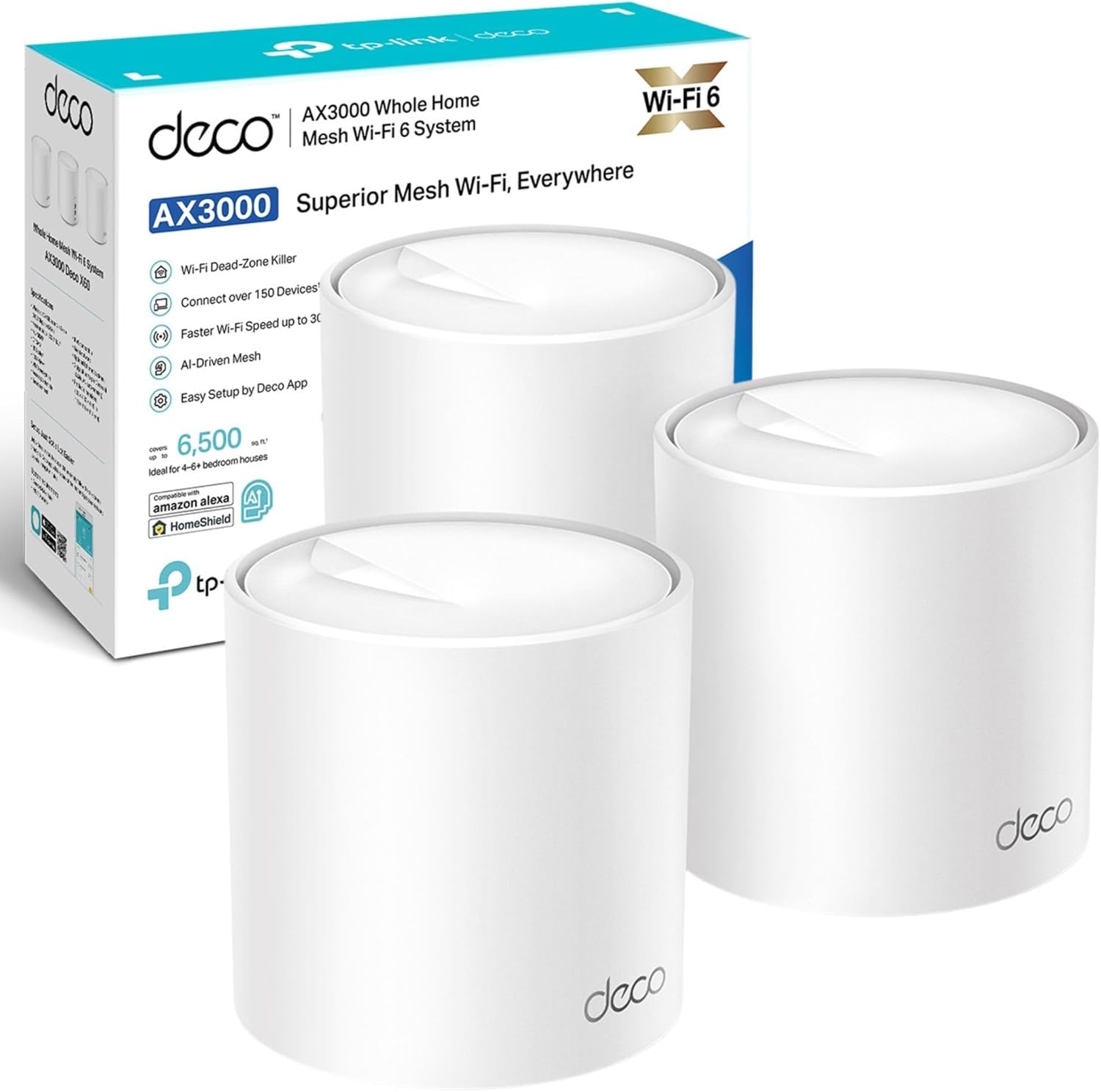
TP-Link Deco X50(3-pack) AX3000Mbps Mesh WiFi 6 System, AI-Driven, Coverage up to 6500ft², Seamless Roaming WiFi Mesh System, Gaming & 4K, Easy Setup, Alexa & Google Home, TP-Link HomeShield

Description:

  • Superior Wireless Speed – Combines wireless speeds up to 2402Mbps over 5 GHz, and 574 Mbps over 2.4 GHz, Per Deco Unit has 3× Gigabit Ports
  • AI-Driven Mesh: Intelligently learns the network environment to provide ideal Wi-Fi unique to your home
  • Boosted Seamless Coverage: Achieve seamless whole home coverage with a clearer and stronger whole home Wi-Fi signal generated by Wi-Fi 6, Coverage up to 6,500 ft2
  • TP-Link HomeShield: Keeps your home network safe with cutting-edge features for network and IoT protection, easy setup
  • Connect More Devices: Connect over 150 devices without dragging down performance, 3 years manufactory warranty

  • Reviews:

    5.0 out of 5 stars TOTALLY SUPERCHARGED my Virgin SuperHub!!

    D.D. · 16 September 2020

    **** Overview ****I should be working, but I’m taking time out to write this elongated review of the Deco M5 X3 for good reason. Read on….I purchased the Deco x 3 after reading a review here on Bolo stating that it worked great with Virgin Superhub 3. I carried out additional research and the Deco was listed as the best to buy on a few websites, especially for the price. I took the plunge and eagerly awaited it to be delivered 2 days later after suffering a seriously bad wifi connect for 2 months. In the past week, it became even worse and I decided I had to make the move to fix the issue.PackagingUpon receiving the package, I admittedly wasn’t particularly ecstatic to see that it was in its cellophane covered retail box without any Bolo other packaging. I usually save boxes for my gear and like them to be in good condition if I resell, but as luck would have it, there wasn’t any damage worthy of note. More to the point, I’ll be damned if i’m selling this any time soon due to it’s astounding performance!The box is well presented with the 3 ‘Deco’ nodes on the front with PC Pro ‘Recommended seal as well as Bolo Alexa and IFTT logo assuring that the product will work with those devices and service. There’s also a sticker on it which assures that the hardware will work with any broadband provider which definitely gives peace of mind. There a ‘HomeCare’ 3 year free service emblem too, which I believe relates to virus protection.Opening the box, you’re greeted with the 3 futuristic looking dish style ‘nodes’. Beneath this tray, is a row of 3 power adapters, ethernet cable and a Quick Start Guide. The presentation is immaculate and resembles that of Apple. It looks like quality and feels like quality which gives assurance of a quality product from the get go.**** Product ****Each node is a circular disc, around 2.5cm in height and 12cm in diameter with a small multicoloured LED in the centre. The nodes design suggests the form of a radar which I thought was quite innovative. They are fairly light, they look like part of the ‘Deco’.Ports on the back include power and 2 ethernet.Power adapters and cables are high quality, as is the supplied ethernet cable.**** Setup ****On the top tray, there is a clear, simple instruction to download the app from the Apple or Android store. A quick search and I had the app installed within a minute or so through my then slow wifi. The app is very basic and to the point. It requests the user to create an account (or login if you have an account) choosing email and password. You then confirm on that email address. After this, it prompts the user to plug one of the 3 nodes (it doesn’t matter which) into the modem / router and then plug it in using the power adapter.The light on-top of the node lights up and signifies its state:Yellow - Start upBlue Pule - Ready for setupBlue Solid - Setting upGreen - All is well.Red - IssueThe app shows a 3D plan of a property and prompts you to select one of three which matches your home best - one floor, two floors and 3 floors. The diagram shows how you should consider spacing the nodes too.After asking which room the node will be placed in, the app then connects to the node through your router / modem and the lights change according to the state. After going from all stages (apart from red) from yellow to green, it notifies the user that it’s successfully connected.The user is then given the option to name their network and apply a password to access within wireless devices.It then gives the user the option to add another TP Link product. In this case, there were two more to add so I added the second in the same way and the third. Each was a breeze just like the first.There was a notification for a firmware update, so I ran that and it installed and rebooted all devices within 4 minutes.Although the product comes with a Quick Start Guide, this wasn’t necessary. The app makes things simple.This setup process was a godsend, since i’m not tech minded and I always prepare for things like this to just fail to work. It was absolutely childsplay!Approximately 20 mins to unbox and set up!**** Speed & Coverage ****After installing the first node in my office (connecter to the router), I ran a set eager to see what effect it had and to my amazement, on my 100 mbs connection, after testing my wifi previously and getting a mere 8 mbs, I was clocking in 105 mbs- through the air! It’s clearly solved a huge problem with pertaining to Virgins Superhub 3!What’s more after installing the next two in the same way - one in the lounge and one in the kitchen at the rear of my flat, the speeds, as I moved around with my iPad (after connecting with new Network and password) were almost the same minus a few meg. Delighted!I reached for the TV remote for my new 60 inch OLED LG which was previously bottlenecking with it’s capability and my previous poor wifi, entered network and Password and booted dup Netflix. It painted the screen immediately with all content. I clicking into a movie and it played after a second and fast forwarding was done equally as quick. Despite it previously pixelating and buffering often throughout media, it is now working perfectly!General Internet browsing on iPad and iPhone is notably faster.Whats more….At the very end of a flight out stairs, outside, on a level below, I have full strength WiFi in my GARDEN which i didn’t have previously. RESULT! Streaming tunes in the summer!Full Strength literally everywhere where I will go throughout the vicinity of my entire 2 bed upstairs flat with downstairs remote garden.**** Experience ****Netflix, Bolo Video and Apple TV would take a while to load and the content would often be pixelated and buffer, however now it’s as slick as butter. General Internet browsing is so much more effective and enjoyable now too. I click and something happens - usually a near immediate download of a web page or stream of a video, stable as can be.**** Alexa ****To use Alexa with the devices, you need to install the relevant skill.This is not mentioned in the app, but I’m told it is mentioned in the quick start guide.Searching ‘TP-link Router’ within ’Skills’ in the Alexa app and clicking ‘Enable to Use’, the skill is downloaded.You are prompted to log in to your TP-link account to enable the skill. You do so, by clicking ‘Authorise’ once logged in.The Alexa app prompts to find new devices to which we accept. It then discovers the TP-Link router.Clicking ’Set up Device’ and ‘Done’, the Deco will be shown in ‘Devices’.You can then add it to any roomAlthough I’m an ardent Alexa fan as an owner of a ‘Smart Home’ I wasn’t aware of how these devices would work with Alexa. Having searched for the skill however, the page informs us that Alexa allows us to:* Enable Guest Network when friends come over* Activate WPS to add new devices to the network* Turn off the routers (‘nodes’) LEDS at night* Check the Internet connection speed you’re getting from your provider* Prioritise online applications or devices at those important momentsPrimary commands (at time of writing):‘[Alexa] Turn off the LED’s’‘[Alexa] Enable night mode’‘[Alexa] Enable my guest network’* I haven’t managed to get Alexa to work with any commands as yet, but will report back.**** Summary ****As a Virgin Superhub 3 user, I’m over the moon with this! As an owner of a two bedroomed flat, I did consider that this package might be overkill. Seeing the performance, I could have possibly done with only two, but the pricing for 3 and the availability here on Bolo (x2 were only available for delivery in a few weeks) promoted me to buy the Deco M3 X 3.This hasn’t only changed the way I entertain myself, but also my actual work which pays for this kind of stuff. I can now work much more faster and more efficient. With this considered, it’s one of the best investments I’ve made in years. I wish I had of bought this much sooner. My fear of tech, error and complications always deters me, but as mentioned, this could not be more simple. It products like this that give me the confidence to spread my wings and buy more.Running circa 106 mbs - That’s a 98 mbs increase!Very pleased!Thoroughly recommended!

    5.0 out of 5 stars No more slow speeds, super easy, better than Virgin Hub 3 by miles

    M.S. · 26 April 2021

    I'm running this in a typical mid terrace which is Victorian with all solid walls and high ceilings with thick plasterwork. I've had Virgin 200mbps for a while now but never got better than 30mbps upstairs and nothing in garden or bottom of kitchen. I had always struggled with calls dropping, slow downloads, inability to stream well upstairs and have this a go as it was very well priced and I'd already been using a TP Link extender to some effect for connecting an Alexa dot that was too far away.As you will see from pics you get a really nice flat disc like router and two pods. They are all interchangeable - as in to say it doesn't matter which is router.For me install was as follows: set existing router to modem only (via the login you find under Virgin router, and you do still keep your old router just it doesn't need to be in view anymore), wait for Hub 3.0 to glow red. Turn it off. Attach one of these to the router (any slot but I went with port 1) with a good quality Cat 5/6 cable (they include one but it isn't marked as any specific rating and didn't look very robust). Download the TPLink app to a phone, follow the set up instructions, turn back on router and wait for final setup instruction. Connect the other two via the app when plugged in (no other cables needed). It even shows you via app if you have optimum location.Now, I get 217mbps in my living room, and even at the furthest point away from router at the bottom of my garden - so over 50ft and three solid walls away - I get 179mbps. I get range even over the road 6 houses down from house on good days. Plus being WiFi mesh it means I don't need to connect extenders and have to either have SSIDs like _EXT or for my phone to drop a call as I move from one range to another. Just one SSID, one network, served by 3 pods. Very smart. And excellent value for money. Want more pods? Buy more. They allow other TP Link mesh wi-fi routers to be added via app in a few clicks and will simply work in same way. Don't even need to be the M5s either, they have 4 or 5 other types all accepted too.Best of all, it just stays up all the time. I never had such stable internet before so these routers are clearly better than whatever is inside the Virgin Hub 3.0 I was using. Also, considering costs a moment, Virgin offer their own mesh style add on boosters. However these are limited to one per house unless an engineer deems more as necessary, cost £5 a month, and have not got the same capabilities as this 3 unit setup.Very highly recommended as it has been a dream since installing. I used to have slow speeds needing router reset once a month or so, and I've not had to do that once since. Oh and I had a power cut during last thunderstorm...all back up and no drama, not even a need to glance at the app. Bliss. ☮️🕊️

    4.0 out of 5 stars Good WiFI Upgrade

    T. · 13 September 2024

    I bought these Deco X50 Mesh 6 as an upgrade to a TalkTalk router as this was causing issues, poor wifi in back of house and never worked well with extenders. So after much research of functionality need against price (you can easily buy something you don't need with these systems and spend huge sums!) I chose the Deco X50 double pack.Pro'sEasy to set up via the app, only took me a few minutes and I am deffo not a tech or even close!Wifi signal improved a lot (have a 1911 victorian terrace on 3 floors) and having the same wifi name as previous meant did not need to reset anything eg. Computers, TV's etc.I got the double pack and then realised as good as it is, it was not really sufficient and should have got the 3 pack, so ordered another single one which paired immediately. Now have full coverage at full strength as I move around the house.The ports are also useful if needed.ConsThe double pack came with 2 pin plugs so had to use adapters (very annoying) but not the end of the world, however the single additional one came with a UK plug!You will NOT get wifi any faster than your package allows for, what you should get is the max you pay for depending on placement of the routers around your home, and wall thickness.So all in all very happy, been running now for a month with no drop outs or anything.......it just works! Will likely upgrade in years to come to whatever the standard is by then, but for me this is all I need so getting a wifi 7 version would not make any difference as it gives me max speed for my package anyways with the X50 so why pay for something I don't need!Overall, would recommend if you have weak areas or use additional extenders that have different connection names.

    UK plugs only

    D.b. · 13 February 2025

    The product is sold for delivery Belgium, but cannot be used, due to UK standard plugs, not compatible with Belgian power outlets. This is NOWHERE mentioned explicitly!!

    سهلة التنصيب وكاملة السرعة

    A.M.H. · 30 June 2025

    تركيبها سهل وسرعة توصل كاملة وتغطيتها ممتازة

    رائع

    z. · 1 December 2024

    انصح الكل بيه حل مشكلة ضعف النت وقوالي الشبكه فكل البيت 5G وبرمجته جدا سهله تقدر تسويها بنفسك عن طريق التطبيق

    Très très bien

    j. · 31 March 2025

    Pratique, simple à mettre en placeTrès bonne portance

    Good product

    M. · 24 February 2024

    Unfortunately I made a huge mistake by getting this product from the UKThe power adapters are not suitable for the Australian market and I would need to buy converters.Also I am unable to get Australian power adapters anywhereThey are not sold as a separate item

    TP-Link Deco X50(3-pack) AX3000Mbps Mesh WiFi 6 System, AI-Driven, Coverage up to 6500ft², Seamless Roaming WiFi Mesh System, Gaming & 4K, Easy Setup, Alexa & Google Home, TP-Link HomeShield

    Product ID: KO09ZSJALP3
    Condition: New

    4.5

    AED1,71834

    Price includes VAT & Import Duties
    Style Name: AX3000 WiFi 6
    Size Name: 3 Pack
    Availability: In Stock

    Quantity:

    |

    Order today to get by 7-14 business days

    This item qualifies for free delivery

    Returns & Warranty policies

    Imported From: United Kingdom

    At BOLO, we work hard to ensure the products you receive are new, genuine, and sourced from reputable suppliers.

    BOLO is not an authorized or official retailer for most brands, nor are we affiliated with manufacturers unless specifically stated on a product page. Instead, we source verified sellers, authorized distributors or directly from the manufacturer.

    Each product undergoes thorough inspection and verification at our consolidation and fulfilment centers to ensure it meets our strict authenticity and quality standards before being shipped and delivered to you.

    If you ever have concerns regarding the authenticity of a product purchased from us, please contact Bolo Support. We will review your inquiry promptly and, if necessary, provide documentation verifying authenticity or offer a suitable resolution.

    Your trust is our top priority, and we are committed to maintaining transparency and integrity in every transaction.

    All product information, images, descriptions, and reviews originate from the manufacturer or from trusted sellers overseas. BOLO is not affiliated with, endorsed by, or an authorized retailer for most brands listed on our website unless stated otherwise.

    While we strive to display accurate information, variations in packaging, labeling, instructions, or formulation may occasionally occur due to regional differences or supplier updates. For detailed or manufacturer-specific information, please contact the brand directly or reach out to BOLO Support for assistance.

    Unless otherwise stated, all prices displayed on the product page include applicable taxes and import duties.

    BOLO operates in accordance with the laws and regulations of United Arab Emirates. Any items found to be restricted or prohibited for sale within the UAE will be cancelled prior to shipment. We take proactive measures to ensure that only products permitted for sale in United Arab Emirates are listed on our website.

    All items are shipped by air, and any products classified as “Dangerous Goods (DG)” under IATA regulations will be removed from the order and cancelled.

    All orders are processed manually, and we make every effort to process them promptly once confirmed. Products cancelled due to the above reasons will be permanently removed from listings across the website.

    Similar suggestions by Bolo

    More from this brand

    Similar items from “Whole Home & Mesh Wi-Fi Systems”

    TP-Link Deco X50(3-pack) AX3000Mbps Mesh WiFi 6 System, AI-Driven, Coverage up to 6500ft², Seamless Roaming WiFi Mesh System, Gaming & 4K, Easy Setup, Alexa & Google Home, TP-Link HomeShield

    Product ID: KO09ZSJALP3
    Condition: New

    4.5

    TP-Link Deco X50(3-pack) AX3000Mbps Mesh WiFi 6 System, AI-Driven, Coverage up to 6500ft², Seamless Roaming WiFi Mesh System, Gaming & 4K, Easy Setup, Alexa & Google Home, TP-Link HomeShield-0
    Style Name: AX3000 WiFi 6
    Size Name: 3 Pack

    AED1,71834

    Price includes VAT & Import Duties
    Availability: In Stock

    Quantity:

    |

    Order today to get by 7-14 business days

    This item qualifies for free delivery

    Returns & Warranty policies

    Imported From: United Kingdom

    At BOLO, we work hard to ensure the products you receive are new, genuine, and sourced from reputable suppliers.

    BOLO is not an authorized or official retailer for most brands, nor are we affiliated with manufacturers unless specifically stated on a product page. Instead, we source verified sellers, authorized distributors or directly from the manufacturer.

    Each product undergoes thorough inspection and verification at our consolidation and fulfilment centers to ensure it meets our strict authenticity and quality standards before being shipped and delivered to you.

    If you ever have concerns regarding the authenticity of a product purchased from us, please contact Bolo Support. We will review your inquiry promptly and, if necessary, provide documentation verifying authenticity or offer a suitable resolution.

    Your trust is our top priority, and we are committed to maintaining transparency and integrity in every transaction.

    All product information, images, descriptions, and reviews originate from the manufacturer or from trusted sellers overseas. BOLO is not affiliated with, endorsed by, or an authorized retailer for most brands listed on our website unless stated otherwise.

    While we strive to display accurate information, variations in packaging, labeling, instructions, or formulation may occasionally occur due to regional differences or supplier updates. For detailed or manufacturer-specific information, please contact the brand directly or reach out to BOLO Support for assistance.

    Unless otherwise stated, all prices displayed on the product page include applicable taxes and import duties.

    BOLO operates in accordance with the laws and regulations of United Arab Emirates. Any items found to be restricted or prohibited for sale within the UAE will be cancelled prior to shipment. We take proactive measures to ensure that only products permitted for sale in United Arab Emirates are listed on our website.

    All items are shipped by air, and any products classified as “Dangerous Goods (DG)” under IATA regulations will be removed from the order and cancelled.

    All orders are processed manually, and we make every effort to process them promptly once confirmed. Products cancelled due to the above reasons will be permanently removed from listings across the website.

    Description:

  • Superior Wireless Speed – Combines wireless speeds up to 2402Mbps over 5 GHz, and 574 Mbps over 2.4 GHz, Per Deco Unit has 3× Gigabit Ports
  • AI-Driven Mesh: Intelligently learns the network environment to provide ideal Wi-Fi unique to your home
  • Boosted Seamless Coverage: Achieve seamless whole home coverage with a clearer and stronger whole home Wi-Fi signal generated by Wi-Fi 6, Coverage up to 6,500 ft2
  • TP-Link HomeShield: Keeps your home network safe with cutting-edge features for network and IoT protection, easy setup
  • Connect More Devices: Connect over 150 devices without dragging down performance, 3 years manufactory warranty

  • Reviews:

    5.0 out of 5 stars TOTALLY SUPERCHARGED my Virgin SuperHub!!

    D.D. · 16 September 2020

    **** Overview ****I should be working, but I’m taking time out to write this elongated review of the Deco M5 X3 for good reason. Read on….I purchased the Deco x 3 after reading a review here on Bolo stating that it worked great with Virgin Superhub 3. I carried out additional research and the Deco was listed as the best to buy on a few websites, especially for the price. I took the plunge and eagerly awaited it to be delivered 2 days later after suffering a seriously bad wifi connect for 2 months. In the past week, it became even worse and I decided I had to make the move to fix the issue.PackagingUpon receiving the package, I admittedly wasn’t particularly ecstatic to see that it was in its cellophane covered retail box without any Bolo other packaging. I usually save boxes for my gear and like them to be in good condition if I resell, but as luck would have it, there wasn’t any damage worthy of note. More to the point, I’ll be damned if i’m selling this any time soon due to it’s astounding performance!The box is well presented with the 3 ‘Deco’ nodes on the front with PC Pro ‘Recommended seal as well as Bolo Alexa and IFTT logo assuring that the product will work with those devices and service. There’s also a sticker on it which assures that the hardware will work with any broadband provider which definitely gives peace of mind. There a ‘HomeCare’ 3 year free service emblem too, which I believe relates to virus protection.Opening the box, you’re greeted with the 3 futuristic looking dish style ‘nodes’. Beneath this tray, is a row of 3 power adapters, ethernet cable and a Quick Start Guide. The presentation is immaculate and resembles that of Apple. It looks like quality and feels like quality which gives assurance of a quality product from the get go.**** Product ****Each node is a circular disc, around 2.5cm in height and 12cm in diameter with a small multicoloured LED in the centre. The nodes design suggests the form of a radar which I thought was quite innovative. They are fairly light, they look like part of the ‘Deco’.Ports on the back include power and 2 ethernet.Power adapters and cables are high quality, as is the supplied ethernet cable.**** Setup ****On the top tray, there is a clear, simple instruction to download the app from the Apple or Android store. A quick search and I had the app installed within a minute or so through my then slow wifi. The app is very basic and to the point. It requests the user to create an account (or login if you have an account) choosing email and password. You then confirm on that email address. After this, it prompts the user to plug one of the 3 nodes (it doesn’t matter which) into the modem / router and then plug it in using the power adapter.The light on-top of the node lights up and signifies its state:Yellow - Start upBlue Pule - Ready for setupBlue Solid - Setting upGreen - All is well.Red - IssueThe app shows a 3D plan of a property and prompts you to select one of three which matches your home best - one floor, two floors and 3 floors. The diagram shows how you should consider spacing the nodes too.After asking which room the node will be placed in, the app then connects to the node through your router / modem and the lights change according to the state. After going from all stages (apart from red) from yellow to green, it notifies the user that it’s successfully connected.The user is then given the option to name their network and apply a password to access within wireless devices.It then gives the user the option to add another TP Link product. In this case, there were two more to add so I added the second in the same way and the third. Each was a breeze just like the first.There was a notification for a firmware update, so I ran that and it installed and rebooted all devices within 4 minutes.Although the product comes with a Quick Start Guide, this wasn’t necessary. The app makes things simple.This setup process was a godsend, since i’m not tech minded and I always prepare for things like this to just fail to work. It was absolutely childsplay!Approximately 20 mins to unbox and set up!**** Speed & Coverage ****After installing the first node in my office (connecter to the router), I ran a set eager to see what effect it had and to my amazement, on my 100 mbs connection, after testing my wifi previously and getting a mere 8 mbs, I was clocking in 105 mbs- through the air! It’s clearly solved a huge problem with pertaining to Virgins Superhub 3!What’s more after installing the next two in the same way - one in the lounge and one in the kitchen at the rear of my flat, the speeds, as I moved around with my iPad (after connecting with new Network and password) were almost the same minus a few meg. Delighted!I reached for the TV remote for my new 60 inch OLED LG which was previously bottlenecking with it’s capability and my previous poor wifi, entered network and Password and booted dup Netflix. It painted the screen immediately with all content. I clicking into a movie and it played after a second and fast forwarding was done equally as quick. Despite it previously pixelating and buffering often throughout media, it is now working perfectly!General Internet browsing on iPad and iPhone is notably faster.Whats more….At the very end of a flight out stairs, outside, on a level below, I have full strength WiFi in my GARDEN which i didn’t have previously. RESULT! Streaming tunes in the summer!Full Strength literally everywhere where I will go throughout the vicinity of my entire 2 bed upstairs flat with downstairs remote garden.**** Experience ****Netflix, Bolo Video and Apple TV would take a while to load and the content would often be pixelated and buffer, however now it’s as slick as butter. General Internet browsing is so much more effective and enjoyable now too. I click and something happens - usually a near immediate download of a web page or stream of a video, stable as can be.**** Alexa ****To use Alexa with the devices, you need to install the relevant skill.This is not mentioned in the app, but I’m told it is mentioned in the quick start guide.Searching ‘TP-link Router’ within ’Skills’ in the Alexa app and clicking ‘Enable to Use’, the skill is downloaded.You are prompted to log in to your TP-link account to enable the skill. You do so, by clicking ‘Authorise’ once logged in.The Alexa app prompts to find new devices to which we accept. It then discovers the TP-Link router.Clicking ’Set up Device’ and ‘Done’, the Deco will be shown in ‘Devices’.You can then add it to any roomAlthough I’m an ardent Alexa fan as an owner of a ‘Smart Home’ I wasn’t aware of how these devices would work with Alexa. Having searched for the skill however, the page informs us that Alexa allows us to:* Enable Guest Network when friends come over* Activate WPS to add new devices to the network* Turn off the routers (‘nodes’) LEDS at night* Check the Internet connection speed you’re getting from your provider* Prioritise online applications or devices at those important momentsPrimary commands (at time of writing):‘[Alexa] Turn off the LED’s’‘[Alexa] Enable night mode’‘[Alexa] Enable my guest network’* I haven’t managed to get Alexa to work with any commands as yet, but will report back.**** Summary ****As a Virgin Superhub 3 user, I’m over the moon with this! As an owner of a two bedroomed flat, I did consider that this package might be overkill. Seeing the performance, I could have possibly done with only two, but the pricing for 3 and the availability here on Bolo (x2 were only available for delivery in a few weeks) promoted me to buy the Deco M3 X 3.This hasn’t only changed the way I entertain myself, but also my actual work which pays for this kind of stuff. I can now work much more faster and more efficient. With this considered, it’s one of the best investments I’ve made in years. I wish I had of bought this much sooner. My fear of tech, error and complications always deters me, but as mentioned, this could not be more simple. It products like this that give me the confidence to spread my wings and buy more.Running circa 106 mbs - That’s a 98 mbs increase!Very pleased!Thoroughly recommended!

    5.0 out of 5 stars No more slow speeds, super easy, better than Virgin Hub 3 by miles

    M.S. · 26 April 2021

    I'm running this in a typical mid terrace which is Victorian with all solid walls and high ceilings with thick plasterwork. I've had Virgin 200mbps for a while now but never got better than 30mbps upstairs and nothing in garden or bottom of kitchen. I had always struggled with calls dropping, slow downloads, inability to stream well upstairs and have this a go as it was very well priced and I'd already been using a TP Link extender to some effect for connecting an Alexa dot that was too far away.As you will see from pics you get a really nice flat disc like router and two pods. They are all interchangeable - as in to say it doesn't matter which is router.For me install was as follows: set existing router to modem only (via the login you find under Virgin router, and you do still keep your old router just it doesn't need to be in view anymore), wait for Hub 3.0 to glow red. Turn it off. Attach one of these to the router (any slot but I went with port 1) with a good quality Cat 5/6 cable (they include one but it isn't marked as any specific rating and didn't look very robust). Download the TPLink app to a phone, follow the set up instructions, turn back on router and wait for final setup instruction. Connect the other two via the app when plugged in (no other cables needed). It even shows you via app if you have optimum location.Now, I get 217mbps in my living room, and even at the furthest point away from router at the bottom of my garden - so over 50ft and three solid walls away - I get 179mbps. I get range even over the road 6 houses down from house on good days. Plus being WiFi mesh it means I don't need to connect extenders and have to either have SSIDs like _EXT or for my phone to drop a call as I move from one range to another. Just one SSID, one network, served by 3 pods. Very smart. And excellent value for money. Want more pods? Buy more. They allow other TP Link mesh wi-fi routers to be added via app in a few clicks and will simply work in same way. Don't even need to be the M5s either, they have 4 or 5 other types all accepted too.Best of all, it just stays up all the time. I never had such stable internet before so these routers are clearly better than whatever is inside the Virgin Hub 3.0 I was using. Also, considering costs a moment, Virgin offer their own mesh style add on boosters. However these are limited to one per house unless an engineer deems more as necessary, cost £5 a month, and have not got the same capabilities as this 3 unit setup.Very highly recommended as it has been a dream since installing. I used to have slow speeds needing router reset once a month or so, and I've not had to do that once since. Oh and I had a power cut during last thunderstorm...all back up and no drama, not even a need to glance at the app. Bliss. ☮️🕊️

    4.0 out of 5 stars Good WiFI Upgrade

    T. · 13 September 2024

    I bought these Deco X50 Mesh 6 as an upgrade to a TalkTalk router as this was causing issues, poor wifi in back of house and never worked well with extenders. So after much research of functionality need against price (you can easily buy something you don't need with these systems and spend huge sums!) I chose the Deco X50 double pack.Pro'sEasy to set up via the app, only took me a few minutes and I am deffo not a tech or even close!Wifi signal improved a lot (have a 1911 victorian terrace on 3 floors) and having the same wifi name as previous meant did not need to reset anything eg. Computers, TV's etc.I got the double pack and then realised as good as it is, it was not really sufficient and should have got the 3 pack, so ordered another single one which paired immediately. Now have full coverage at full strength as I move around the house.The ports are also useful if needed.ConsThe double pack came with 2 pin plugs so had to use adapters (very annoying) but not the end of the world, however the single additional one came with a UK plug!You will NOT get wifi any faster than your package allows for, what you should get is the max you pay for depending on placement of the routers around your home, and wall thickness.So all in all very happy, been running now for a month with no drop outs or anything.......it just works! Will likely upgrade in years to come to whatever the standard is by then, but for me this is all I need so getting a wifi 7 version would not make any difference as it gives me max speed for my package anyways with the X50 so why pay for something I don't need!Overall, would recommend if you have weak areas or use additional extenders that have different connection names.

    UK plugs only

    D.b. · 13 February 2025

    The product is sold for delivery Belgium, but cannot be used, due to UK standard plugs, not compatible with Belgian power outlets. This is NOWHERE mentioned explicitly!!

    سهلة التنصيب وكاملة السرعة

    A.M.H. · 30 June 2025

    تركيبها سهل وسرعة توصل كاملة وتغطيتها ممتازة

    رائع

    z. · 1 December 2024

    انصح الكل بيه حل مشكلة ضعف النت وقوالي الشبكه فكل البيت 5G وبرمجته جدا سهله تقدر تسويها بنفسك عن طريق التطبيق

    Très très bien

    j. · 31 March 2025

    Pratique, simple à mettre en placeTrès bonne portance

    Good product

    M. · 24 February 2024

    Unfortunately I made a huge mistake by getting this product from the UKThe power adapters are not suitable for the Australian market and I would need to buy converters.Also I am unable to get Australian power adapters anywhereThey are not sold as a separate item

    Similar suggestions by Bolo

    More from this brand

    Similar items from “Whole Home & Mesh Wi-Fi Systems”