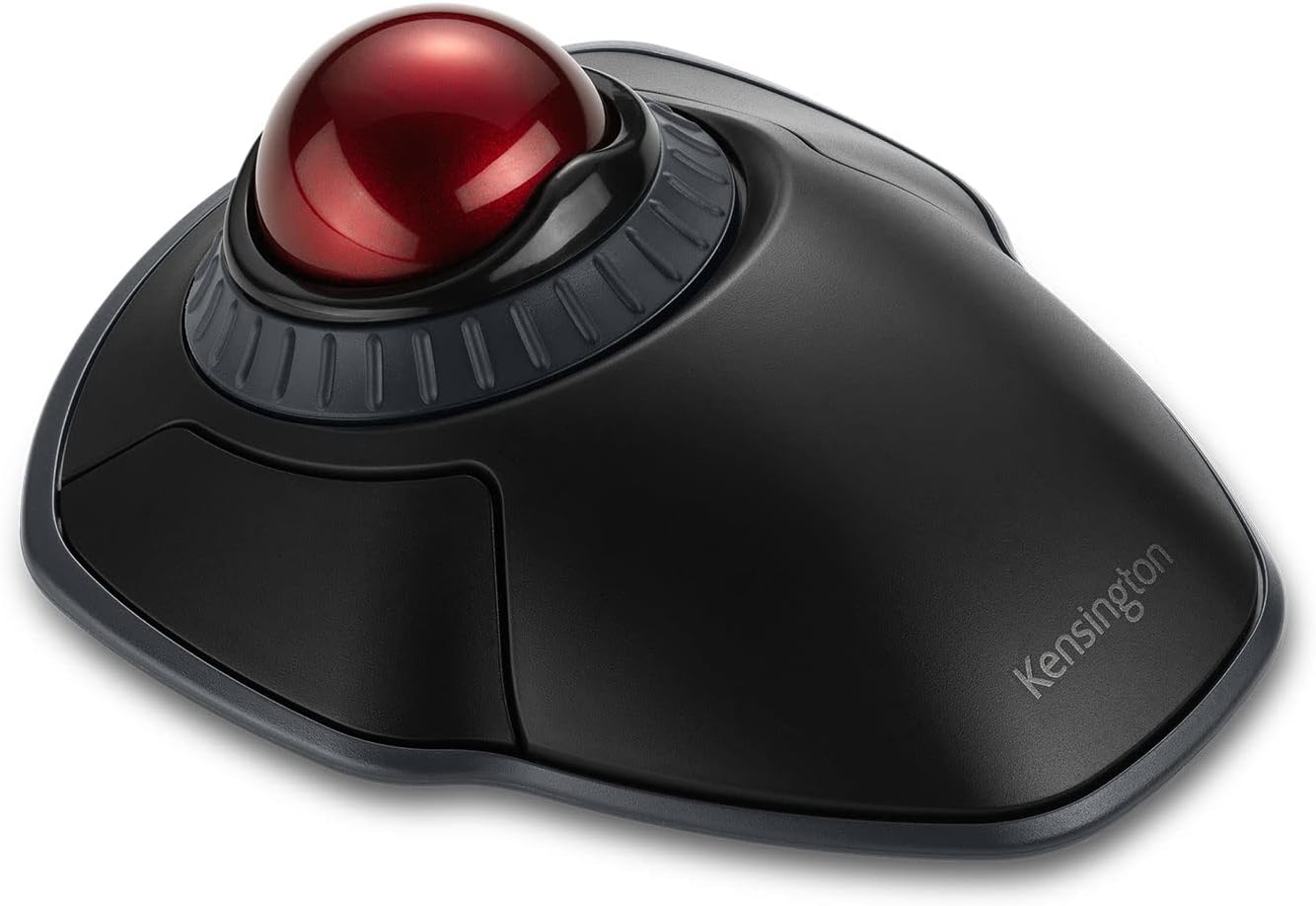
Description:
Reviews:
5.0 out of 5 stars Beautiful designed compact trackball
When I was looking at this trackball here at Bolo there were two very negative reviews but I have had such good experiences with Kensington trackballs and this one looked perfect for my use and so I bought it. I am very glad I did because it is excellent.I first started using trackballs in 1992 when I was living in a tiny flat in London. Space was so limited that I did not have enough space to use a regular mouse so I bought a Kensington trackball for my Mac LCII and soon I realised it was a superb input device.Today I use the brilliant Kensington Expert Mouse (it is a trackball) with my Mac Pro, but I also have a MacBook Pro and when I am travelling I wanted a petite trackball to use with it. I searched Bolo and of course this little Kensington trackball looked just right.And it is just right! The two negative reviews are understandable. One person just couldn't get on with it, and to be honest I think that if you have never used a trackball then this little one would seem hard to get used to after a regular mouse. Another person found that his little finger would not work well with this trackball, however I find the trackball to fit my hand very well, and I have quite large hands.Smaller trackballs are harder to get used to than the bigger ones so I recommend keeping this trackball for a while and try getting used to it, if you find it disconcerting at first. This trackball is very free in movement, which I like, but at first it might seem rather lively. Soon however you will readjust to it and it will seem very natural and extremely fast and accurate.This little trackball has a very clever system for scrolling. This is done by moving your fingers around touch sensors either side of the trackball. It works well for me.The trackball has two buttons, some people like a lot of buttons on input devices but I am not one of them. My Kensington Expert Mouse (it's a trackball) has four buttons but I find I mostly only ever use two of them.With the Kensington "Trackball Works" software you can configure it so that pressing the two buttons at the same time gives a third action. As the buttons are on the sides of the device this feels very natural to do, it is just a squeeze. I have "drag" configured for the third action.I think this petite trackball is very attractively designed and nicely finished. It sits very squarely on the desktop and even though it is light it is stable. This stability is important in a trackball because unlike a mouse, the trackball body does not move :)If you do buy it and it seems a bit odd, then give it a bit of time. Once you adjust I think you'll be glad you stuck with it for a bit.
5.0 out of 5 stars Great piece of kit works very well and easy
Does a great job and easy to use. No major setting up needed
4.0 out of 5 stars Good trackball, just not for me
I am a long time trackball user, having used Slimblade and various Elecom trackballs. When my Elecom Deft Pro died, I decided to try the Orbit Fusion. I turned out to be a good trackball - reasonably well built and with a smooth ball out of the box - the Elecom for contract was a struggle in the first couple of weeks. The scroll ring could have been executed better - it feels lower quality compared to the rest of the unit. I used Steermouse to scroll with the ball - so that was not a big issue for me. Also, the wireless range is very poor - requires the dongle to be very close to the trackball. I ultimately did not like the shape of it - there angle between the buttons and the ball makes it really uncomfortable for me - a personal preference that does not affect the rating.
5.0 out of 5 stars Excellent ergonomic trackball
Surprisingly good. After reading the reviews, I have to admit I was a bit unsure about this purchase. I have and use an expensive thumb based trackball which is very good, but the rubberised coating is beginning to deteriorate.I wanted to try a finger based trackball and decided to give this a go. I work nine hour days on average from home and have used it solidly now for about two working weeks. The thumball has been relegated to the shelf at the minute. I absolutely love the feel of this thing. It took a few days to get the muscle memory for thumb and ring finger clicking. After that it has been plain sailing.Pluses:*Super smooth trackball feels great.*Scroll ring is great (scratchy feel at first though, but has smoothed out a bit now)*excellent ergonomics, no tired aching joints or wrists.*very configurable via software.*AA battery lasts a long time, apparently.*easy to configure keyboard keypress to invoke/disengage high precision mode. (Super useful for detail work)Minuses:*No Bluetooth or wired connection.*not found equivalent for left-right scroll wheel click.*cannot seem to find an equivalent for logitechs gesture mode.*no proper manual for how to configure or use kensington software.All in all, the ergonomics and sheer pleasure of using this device has probably converted me to fingerball type devices. This has surprised me because I was fairly certain thumballs were going to remain my weapon of choice so-to-speak.Although I do still love and will still use my mx-ergo it will just not be as my daily driver. There are things I would like to see on the next version of the orbit fusion, highlighted in the 'minus' section above. It's a pity that a product such as this couldn't have Bluetooth and also a wired option, like it's main competitors. However, it's ergonomics, just about make up for that minor irritation for now.I also use a number of (usually about seven) virtual desktops on my work pc, on the scroll-wheel of the thumball, I'd configured left and right tilt to shift between screens. The orbit fusion doesn't have this function so for now I've reconfigured the forward and backward buttons for that purpose but it's not ideal. However, on the logitech you can configure a gesture key and swipe the ball left and right if you don't want to use the tilting scroll wheel. I cannot find an equivalent method on the orbit fusion. If it's there I haven't figured it out yet. Still searching a solution for that one. Not a showstopper though, just a nice to have, first world issue, lol.Obviously, I canot speak to it's robustness or reliability over such a short time. However it seems we'll made, it's very comfortable, isn't covered in that stupid rubbery goo like coating manufacturers are so fond of nowadays and it just works.A note on the wireless dongle. I read a review here that suggested it wasn't useful for extended periods of use due to overheating or something like and others that bemoan its reliability at a distance.I've plugged the dongle into a USB port on the front of my kvm and use the trackball seamlessly on two pc's and a macbook air. It's plugged in 24/7 and in two weeks it has been fine. No issues, except one, once. On day three, USB connectivity from the kvm to pc 1 failed upon waking the pc from sleep. Quickly switching to pc 2 and back solved it. Not sure if it was a pc issue a kvm issue or a dongle or driver issue. But it only happened the once in the first week and took five seconds to solve. It's not something that occurred before with the logitech, though.The dongle itself is plugged in fairly close i.e.: less than the width of a 34 inch monitor so I cannot say how well or not it works from a distance, but sat at a desk I cannot see it as an issue, most monitors have usb hubs and ports in them nowadays, as do some keyboards.I haven't tried it for gaming, and am not likely to. I use a console controller when gaming, so can't comment. But as a productivity tool it is very useful.Hope this review helpsUpdate 8th July 2022:A quick note to say that I'm still just as impressed and it still working flawlessly as my daily driver. Absolutely no issues whatsoever. I thought it worth updating today because it is the day 11 months in that my original battery needed replacing. To me that is excellent.Update 12 May 2024Another short update to say that this is still my daily driver. Everything is still working as if it were brand new. Absolutely no signs of use any other problems. Battery life is ablsolutely amazing, I only just replaced the battery again; I'm getting about a nine-months to a year from a single AA cell, which I think is superb. I never have any connectivity issues, it just works. Uprating to 5 stars.Update May 2025.Still my daily driver, no degradation, everything just as good as it was last year. Battery life is so impressive, I forget completely about it. Basically 1 AA battery per year. This is a true five star product.
Absolute Quality!
I've been using Kensington mice ever since their early entrance into the market. They never failed me then and they are still #1. This track ball is "wireless". I had a wired Kensington mouse, but got fed up with the wire getting in my way at a very busy work station. It is battery driven and you will know when it's drained by the fact that the mouse pointer becomes lazy and won't go as fast as it should or you have trouble putting the pointer on any specific place on your screen. As far as I'm concerned, you'd be tragically missing out on possibly the best mouse ever made. And I stand behind it!
Scratchy scroll wheel and jumpy ball
Wish I'd read some proper tech reviews, instead of just the Bolo reviews, before buying. The scroll wheel has a plastic on plastic scrape as you spin it, which apparently can be fixed if you pull the thing apart and do some modifications, but for this price it shouldn't need fixing. The ball will jump in it's socket if you try and do a quick flick move, so definitely no good for gaming. The left mouse button under the thumb also has two switches under it, one front and one rear. If your thumb rests at one end, you'll get good consistent clicks. If you rest in the middle though, when you click it will sometimes fail to register if both switches are triggered, which is a very bad design flaw. Overall it's decent, but those flaws have annoyed me. I'd likely need to spend a lot more though to get the same feature set without flaws like this, so it's not a complete fail.
Bra!
Fungerar riktigt bra. Använder den som komplement till vanlig mus för att behandla smärtan från min musarm.
No software required in order to use
Did not need to download any software on my Imac.Ergonomically is easy to use
Best trackball on the market
As most trackball users in current time would be, I'm also a long time trackball user and have had 7 different track ball models over the last 15 years, including both generations of the logitech M57x series and this is the best one I've had.Those who complain about the smoothness (or lack there of) of the ball movement, give it a week or so. Once everything is broken in, it is smooth as butter. Yes I know the original M570 was good to go from day 1 but anyone who has experienced the downfall of logitech QC in the past 10 years would surely be aware of the late batches of M570s were plagued with poor button quality. And, the current M575 units actually have worse ball movement than this Kensington. Once past the break-in period, the Kensington is noticeably smoother than the M575.Now, the best part about the TB450 is the ergonomics for people with big hands. While I liked the M570 and M575 a lot, it always felt just a touch too small and perhaps too 'flat'. I like my trackball to have more dome shape to it so my hand wraps around it.Connectivity wise, the triple pairing capability on the TB450 is just awesome. It has the traditional USB dongle for 2.4Ghz connection plus 2 bluetooth channels. You can flip through 3 different devices quickly with the program button in the middle just behind the scroll wheel. Being a contractor with a dedicated laptop for each different organization, this is such a handy feature for me.
Visit the Kensington Store
Kensington Orbit Wireless Trackball with Scroll Ring, Professional Computer Mouse with Bluetooth, (2.4GHz Wireless), Optical Tracking & AES Encryption Security, Left or Right Handed - Black (K70992WW)
AED50385


Quantity:
Order today to get by 7-14 business days
This item qualifies for free delivery
Imported From: United Kingdom
At BOLO, we work hard to ensure the products you receive are new, genuine, and sourced from reputable suppliers.
BOLO is not an authorized or official retailer for most brands, nor are we affiliated with manufacturers unless specifically stated on a product page. Instead, we source verified sellers, authorized distributors or directly from the manufacturer.
Each product undergoes thorough inspection and verification at our consolidation and fulfilment centers to ensure it meets our strict authenticity and quality standards before being shipped and delivered to you.
If you ever have concerns regarding the authenticity of a product purchased from us, please contact Bolo Support. We will review your inquiry promptly and, if necessary, provide documentation verifying authenticity or offer a suitable resolution.
Your trust is our top priority, and we are committed to maintaining transparency and integrity in every transaction.
All product information, images, descriptions, and reviews originate from the manufacturer or from trusted sellers overseas. BOLO is not affiliated with, endorsed by, or an authorized retailer for most brands listed on our website unless stated otherwise.
While we strive to display accurate information, variations in packaging, labeling, instructions, or formulation may occasionally occur due to regional differences or supplier updates. For detailed or manufacturer-specific information, please contact the brand directly or reach out to BOLO Support for assistance.
Unless otherwise stated, all prices displayed on the product page include applicable taxes and import duties.
BOLO operates in accordance with the laws and regulations of United Arab Emirates. Any items found to be restricted or prohibited for sale within the UAE will be cancelled prior to shipment. We take proactive measures to ensure that only products permitted for sale in United Arab Emirates are listed on our website.
All items are shipped by air, and any products classified as “Dangerous Goods (DG)” under IATA regulations will be removed from the order and cancelled.
All orders are processed manually, and we make every effort to process them promptly once confirmed. Products cancelled due to the above reasons will be permanently removed from listings across the website.
Similar suggestions by Bolo
More from this brand
Similar items from “Mice”
Share with
Or share with link
https://www.bolo.ae/products/KO09SDPJXCJ
Visit the Kensington Store
Kensington Orbit Wireless Trackball with Scroll Ring, Professional Computer Mouse with Bluetooth, (2.4GHz Wireless), Optical Tracking & AES Encryption Security, Left or Right Handed - Black (K70992WW)


AED50385
Quantity:
Order today to get by 7-14 business days
This item qualifies for free delivery
Imported From: United Kingdom
At BOLO, we work hard to ensure the products you receive are new, genuine, and sourced from reputable suppliers.
BOLO is not an authorized or official retailer for most brands, nor are we affiliated with manufacturers unless specifically stated on a product page. Instead, we source verified sellers, authorized distributors or directly from the manufacturer.
Each product undergoes thorough inspection and verification at our consolidation and fulfilment centers to ensure it meets our strict authenticity and quality standards before being shipped and delivered to you.
If you ever have concerns regarding the authenticity of a product purchased from us, please contact Bolo Support. We will review your inquiry promptly and, if necessary, provide documentation verifying authenticity or offer a suitable resolution.
Your trust is our top priority, and we are committed to maintaining transparency and integrity in every transaction.
All product information, images, descriptions, and reviews originate from the manufacturer or from trusted sellers overseas. BOLO is not affiliated with, endorsed by, or an authorized retailer for most brands listed on our website unless stated otherwise.
While we strive to display accurate information, variations in packaging, labeling, instructions, or formulation may occasionally occur due to regional differences or supplier updates. For detailed or manufacturer-specific information, please contact the brand directly or reach out to BOLO Support for assistance.
Unless otherwise stated, all prices displayed on the product page include applicable taxes and import duties.
BOLO operates in accordance with the laws and regulations of United Arab Emirates. Any items found to be restricted or prohibited for sale within the UAE will be cancelled prior to shipment. We take proactive measures to ensure that only products permitted for sale in United Arab Emirates are listed on our website.
All items are shipped by air, and any products classified as “Dangerous Goods (DG)” under IATA regulations will be removed from the order and cancelled.
All orders are processed manually, and we make every effort to process them promptly once confirmed. Products cancelled due to the above reasons will be permanently removed from listings across the website.
Description:
Reviews:
5.0 out of 5 stars Beautiful designed compact trackball
When I was looking at this trackball here at Bolo there were two very negative reviews but I have had such good experiences with Kensington trackballs and this one looked perfect for my use and so I bought it. I am very glad I did because it is excellent.I first started using trackballs in 1992 when I was living in a tiny flat in London. Space was so limited that I did not have enough space to use a regular mouse so I bought a Kensington trackball for my Mac LCII and soon I realised it was a superb input device.Today I use the brilliant Kensington Expert Mouse (it is a trackball) with my Mac Pro, but I also have a MacBook Pro and when I am travelling I wanted a petite trackball to use with it. I searched Bolo and of course this little Kensington trackball looked just right.And it is just right! The two negative reviews are understandable. One person just couldn't get on with it, and to be honest I think that if you have never used a trackball then this little one would seem hard to get used to after a regular mouse. Another person found that his little finger would not work well with this trackball, however I find the trackball to fit my hand very well, and I have quite large hands.Smaller trackballs are harder to get used to than the bigger ones so I recommend keeping this trackball for a while and try getting used to it, if you find it disconcerting at first. This trackball is very free in movement, which I like, but at first it might seem rather lively. Soon however you will readjust to it and it will seem very natural and extremely fast and accurate.This little trackball has a very clever system for scrolling. This is done by moving your fingers around touch sensors either side of the trackball. It works well for me.The trackball has two buttons, some people like a lot of buttons on input devices but I am not one of them. My Kensington Expert Mouse (it's a trackball) has four buttons but I find I mostly only ever use two of them.With the Kensington "Trackball Works" software you can configure it so that pressing the two buttons at the same time gives a third action. As the buttons are on the sides of the device this feels very natural to do, it is just a squeeze. I have "drag" configured for the third action.I think this petite trackball is very attractively designed and nicely finished. It sits very squarely on the desktop and even though it is light it is stable. This stability is important in a trackball because unlike a mouse, the trackball body does not move :)If you do buy it and it seems a bit odd, then give it a bit of time. Once you adjust I think you'll be glad you stuck with it for a bit.
5.0 out of 5 stars Great piece of kit works very well and easy
Does a great job and easy to use. No major setting up needed
4.0 out of 5 stars Good trackball, just not for me
I am a long time trackball user, having used Slimblade and various Elecom trackballs. When my Elecom Deft Pro died, I decided to try the Orbit Fusion. I turned out to be a good trackball - reasonably well built and with a smooth ball out of the box - the Elecom for contract was a struggle in the first couple of weeks. The scroll ring could have been executed better - it feels lower quality compared to the rest of the unit. I used Steermouse to scroll with the ball - so that was not a big issue for me. Also, the wireless range is very poor - requires the dongle to be very close to the trackball. I ultimately did not like the shape of it - there angle between the buttons and the ball makes it really uncomfortable for me - a personal preference that does not affect the rating.
5.0 out of 5 stars Excellent ergonomic trackball
Surprisingly good. After reading the reviews, I have to admit I was a bit unsure about this purchase. I have and use an expensive thumb based trackball which is very good, but the rubberised coating is beginning to deteriorate.I wanted to try a finger based trackball and decided to give this a go. I work nine hour days on average from home and have used it solidly now for about two working weeks. The thumball has been relegated to the shelf at the minute. I absolutely love the feel of this thing. It took a few days to get the muscle memory for thumb and ring finger clicking. After that it has been plain sailing.Pluses:*Super smooth trackball feels great.*Scroll ring is great (scratchy feel at first though, but has smoothed out a bit now)*excellent ergonomics, no tired aching joints or wrists.*very configurable via software.*AA battery lasts a long time, apparently.*easy to configure keyboard keypress to invoke/disengage high precision mode. (Super useful for detail work)Minuses:*No Bluetooth or wired connection.*not found equivalent for left-right scroll wheel click.*cannot seem to find an equivalent for logitechs gesture mode.*no proper manual for how to configure or use kensington software.All in all, the ergonomics and sheer pleasure of using this device has probably converted me to fingerball type devices. This has surprised me because I was fairly certain thumballs were going to remain my weapon of choice so-to-speak.Although I do still love and will still use my mx-ergo it will just not be as my daily driver. There are things I would like to see on the next version of the orbit fusion, highlighted in the 'minus' section above. It's a pity that a product such as this couldn't have Bluetooth and also a wired option, like it's main competitors. However, it's ergonomics, just about make up for that minor irritation for now.I also use a number of (usually about seven) virtual desktops on my work pc, on the scroll-wheel of the thumball, I'd configured left and right tilt to shift between screens. The orbit fusion doesn't have this function so for now I've reconfigured the forward and backward buttons for that purpose but it's not ideal. However, on the logitech you can configure a gesture key and swipe the ball left and right if you don't want to use the tilting scroll wheel. I cannot find an equivalent method on the orbit fusion. If it's there I haven't figured it out yet. Still searching a solution for that one. Not a showstopper though, just a nice to have, first world issue, lol.Obviously, I canot speak to it's robustness or reliability over such a short time. However it seems we'll made, it's very comfortable, isn't covered in that stupid rubbery goo like coating manufacturers are so fond of nowadays and it just works.A note on the wireless dongle. I read a review here that suggested it wasn't useful for extended periods of use due to overheating or something like and others that bemoan its reliability at a distance.I've plugged the dongle into a USB port on the front of my kvm and use the trackball seamlessly on two pc's and a macbook air. It's plugged in 24/7 and in two weeks it has been fine. No issues, except one, once. On day three, USB connectivity from the kvm to pc 1 failed upon waking the pc from sleep. Quickly switching to pc 2 and back solved it. Not sure if it was a pc issue a kvm issue or a dongle or driver issue. But it only happened the once in the first week and took five seconds to solve. It's not something that occurred before with the logitech, though.The dongle itself is plugged in fairly close i.e.: less than the width of a 34 inch monitor so I cannot say how well or not it works from a distance, but sat at a desk I cannot see it as an issue, most monitors have usb hubs and ports in them nowadays, as do some keyboards.I haven't tried it for gaming, and am not likely to. I use a console controller when gaming, so can't comment. But as a productivity tool it is very useful.Hope this review helpsUpdate 8th July 2022:A quick note to say that I'm still just as impressed and it still working flawlessly as my daily driver. Absolutely no issues whatsoever. I thought it worth updating today because it is the day 11 months in that my original battery needed replacing. To me that is excellent.Update 12 May 2024Another short update to say that this is still my daily driver. Everything is still working as if it were brand new. Absolutely no signs of use any other problems. Battery life is ablsolutely amazing, I only just replaced the battery again; I'm getting about a nine-months to a year from a single AA cell, which I think is superb. I never have any connectivity issues, it just works. Uprating to 5 stars.Update May 2025.Still my daily driver, no degradation, everything just as good as it was last year. Battery life is so impressive, I forget completely about it. Basically 1 AA battery per year. This is a true five star product.
Absolute Quality!
I've been using Kensington mice ever since their early entrance into the market. They never failed me then and they are still #1. This track ball is "wireless". I had a wired Kensington mouse, but got fed up with the wire getting in my way at a very busy work station. It is battery driven and you will know when it's drained by the fact that the mouse pointer becomes lazy and won't go as fast as it should or you have trouble putting the pointer on any specific place on your screen. As far as I'm concerned, you'd be tragically missing out on possibly the best mouse ever made. And I stand behind it!
Scratchy scroll wheel and jumpy ball
Wish I'd read some proper tech reviews, instead of just the Bolo reviews, before buying. The scroll wheel has a plastic on plastic scrape as you spin it, which apparently can be fixed if you pull the thing apart and do some modifications, but for this price it shouldn't need fixing. The ball will jump in it's socket if you try and do a quick flick move, so definitely no good for gaming. The left mouse button under the thumb also has two switches under it, one front and one rear. If your thumb rests at one end, you'll get good consistent clicks. If you rest in the middle though, when you click it will sometimes fail to register if both switches are triggered, which is a very bad design flaw. Overall it's decent, but those flaws have annoyed me. I'd likely need to spend a lot more though to get the same feature set without flaws like this, so it's not a complete fail.
Bra!
Fungerar riktigt bra. Använder den som komplement till vanlig mus för att behandla smärtan från min musarm.
No software required in order to use
Did not need to download any software on my Imac.Ergonomically is easy to use
Best trackball on the market
As most trackball users in current time would be, I'm also a long time trackball user and have had 7 different track ball models over the last 15 years, including both generations of the logitech M57x series and this is the best one I've had.Those who complain about the smoothness (or lack there of) of the ball movement, give it a week or so. Once everything is broken in, it is smooth as butter. Yes I know the original M570 was good to go from day 1 but anyone who has experienced the downfall of logitech QC in the past 10 years would surely be aware of the late batches of M570s were plagued with poor button quality. And, the current M575 units actually have worse ball movement than this Kensington. Once past the break-in period, the Kensington is noticeably smoother than the M575.Now, the best part about the TB450 is the ergonomics for people with big hands. While I liked the M570 and M575 a lot, it always felt just a touch too small and perhaps too 'flat'. I like my trackball to have more dome shape to it so my hand wraps around it.Connectivity wise, the triple pairing capability on the TB450 is just awesome. It has the traditional USB dongle for 2.4Ghz connection plus 2 bluetooth channels. You can flip through 3 different devices quickly with the program button in the middle just behind the scroll wheel. Being a contractor with a dedicated laptop for each different organization, this is such a handy feature for me.
Similar suggestions by Bolo
More from this brand
Similar items from “Mice”
Share with
Or share with link
https://www.bolo.ae/products/KO09SDPJXCJ