Deliver toUnited Arab Emirates
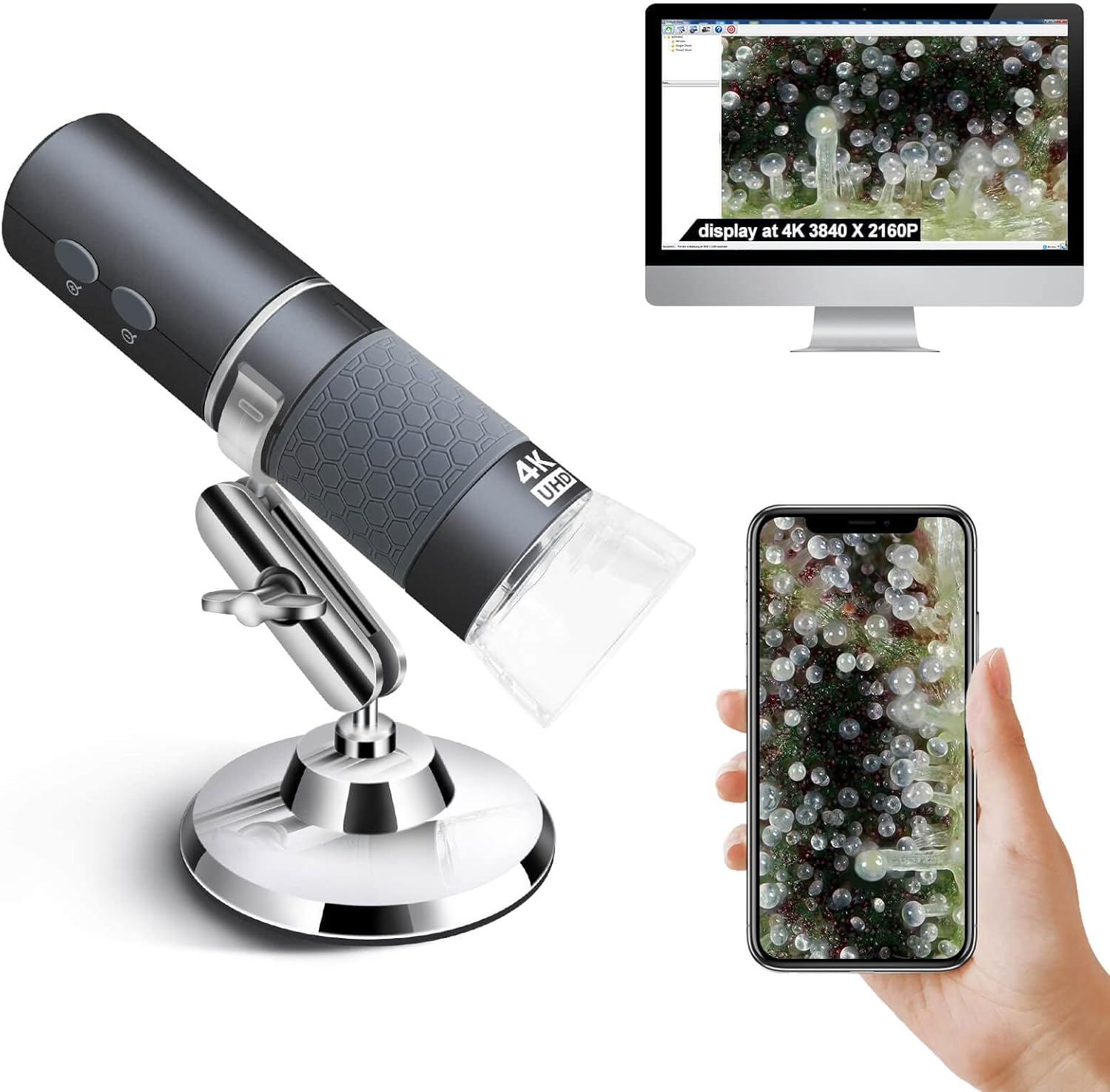
Ninyoon 4K WiFi Microscope for iPhone/Android PC, 50 to 1000X USB Digital Microscope Wireless Super HD Endoscope Camera Compatible with All Cellphones iPad Android Tablet Windows Mac Chrome Linux

Description:

  • 【First 4K WiFi Microscope】As an expert in digital microscopes for decades, we are pleased to announce that the world's first 4K 3840x2160P wireless home microscope has come out and debuted on the Amazon platform only.
  • 【Broad Compatibility】Except 4K resolution, we also overcome the insurmountable problem of compatibility to make it work with any smart devices. Be compatible with iOS iPhone, iPad, Android Phones and tablets, iMac Mac mini/Pro MacBook Air/Pro, Windows XP 7 8 10 11 and even Linux, Chrome OS system. Work wirelessly on cellphone and wire-connect to work on PC. 【If your phone screen does not support 4K(3840x2160P), it will only display the highest pixel supported by the screen. 】
  • 【Wide Angle + Long Focal Length】We have added several practical features like wide angle and long focal length to suit the needs of different usage demands. For coin collections, the wide angle allows to easily obtain the whole object in screen. For electric welding, the telephoto can keep the microscope away from the circuit board to free up more space for electric welding.
  • 【Home Usage Microscope】We recommend that every family is equipped with such a microscope as it is good for all ages people. It is good for collectors to identify coins, cashes, stamps and diamonds, as well as worker to weld circuit boards and plant jobs. Besides, it is good for students and teacher for their nature course. It is also helpful for inspections of skin, pores and scalp.
  • 【Reliable Service】 As a professional microscope producer and seller, Ninyoon has established timely communication and reliable after-sales service. Any quality issues will only be replaced by new replacement.

  • Reviews:

    5.0 out of 5 stars A Review of 4K Digital WiFi USB Microscope

    k. · 14 May 2023

    The Ninyoon “4K Digital WiFi USB Microscope” offers greater "real life" magnification than many of the earlier so-called 'USB Microscopes' because it has a higher resolution image sensor.That sensor seems to be about 6mm (1/4 inch ?) wide and has 3840 pixels across that axis. ( So this digital microscope device should more properly be described as a “3.8k” (pixels) device [or more precisely as “3.75K”, since technically 1K = 1024 ] )It is easy to connect and use with an MS/Windows PC when connected via USB cable (supplied) or with an Android or Apple Tablet or Phone via WiFi (which is generated by the ‘4K’ itself).This “4K Digital Microscope” is a cylinder shaped object, about 112mm long with a diameter of 33mm. That contrasts with the F210 (1M pixel microscope) which is slightly shorter at about 110mm and a diameter of 37mm. The 4K unit is decently engineered, providing a smoothly operated focussing ‘barrel’ ring, together with a power on/off button and a ‘star-wheel’ to adjust the brightness of the incorporated LED sample illumination.I strongly recommend the use of the sturdy, decent quality, adjustable metal stand and holder (see photo) which is available from Ninyoon (gratis, if one asks nicely !). The rather flimsy “articulated” holder which has recently been supplied, in a cardboard box alongside the 4K unit, is really rather unstable and difficult to manoeuvre securely. The much better Aluminium alloy ‘ring holder’ clamp and stand permits reasonably fine and stable adjustment of microscope focus and height above the item being examined. Even if you have to pay extra for that ‘Ali’ metal stand, do so.As with *all* digital Microscopes, the size of the image actually observed is dependent on the parameters of the (digital) display screen used - the viewed image size depends on the physical size and the pixel resolution of that screen. Like all modest quality “USB Digital Microscopes” the “4K Microscope” is essentially a “WebCam” with a "Macro" lens system together with an extended (order of 100+ mm) barrel to allow close-up focussing of the object’s image onto a conventional microchip sensor. The higher the quality of the image sensor, the better (within limits).The images observed onscreen (using the recommended software App (‘xploview’) on a MS/Windows PC) can be captured as 'snapshot(s)' or video files, of up to the ‘native’ image sensor capability of 3840 x 2160 pixels. Other software systems (such as Windows 'native' camera software, or other USB camera packages) can also be used with a PC, but with different manipulation and filing capabilities.The images shown via WiFi on an Android or Apple Tablet or Phone (using the recommended ‘WiFi Check’ software App) adopt something of a “trick” whereby the images actually displayed are a subset ‘block’ of the actual scope’s sensor image. Specifically, it displays just a little under half of the sensor capture, presenting images onscreen of 1600 x 1200 pixels (vs. the 3840 x 2160 of the sensor itself). This is to correctly present a high level of magnification on the physically smaller (albeit high resolution) screens of typical Android or Apple handheld devices. But it is also the case that the images (photo or video) that can be filed from these ‘host’ devices are only available as 1600 x 1200 pixels (or, as a ‘WiFi Check’ menu choice, as 1280 x 720 pixels).The 'DM WiFi' software App also works OK via WiFi with the ‘4K’ microscope on my Android Tab, but offers rather lower resolution and is a bit 'picky' about saving images (as ‘jpg’ files falsely labelled as ‘png’ !).In any case, it seems that the 4K scope is not “USB OTG compliant” (or else not “UVC compliant”) and does not support USB connection to Android at all (even if the attached screen devices do themselves support “USB On-The-Go” ). You *must* use the scope’s inbuilt WiFi to connect this digital microscope to Android or Apple Tablet or Phone devices.It is also important to ensure that the 4K Microscopes internal battery is well charged (via the supplied USB cable) before and during use via WiFi connection to a Tablet or Phone. Failure to do so will lead to the onscreen image(s) ‘freezing’ or to losing WiFi connection altogether.A maximum "real world" magnification of about 370 can be obtained (for the image observed on a 61cm (24inch) PC screen of 1920 x 1080 pixels which has a pixel pitch = 0.2745mm ), with the bottom end of the scope unit's ‘barrel’ set at about 20mm from the object being examined. That is to say with the plastic lens ‘hood’ attached and with the focus ring set almost to its max limit, so that the lens assembly projects beyond the bottom of the scope ‘barrel’. At maximum magnification, the 'Field of View’ (FoV) is about 2.8mm.This is really very good – rather more than 3 times the magnification of the earlier F210 scope (which had an image sensor of only about 1 MB). See the attached image xxx_0001 where the dark lines are 1mm apart (images of the markings on a metric Vernier gauge).The maximum *optical* magnification (alone) of the 4K scope seems to be just over 2 (recall that at max magnification the FoV=2.8 mm whilst the image sensor is about 6mm wide). But remember that the image is captured digitally by the "camera sensor" (probably a CMOS 'chip') within the unit, and that digital image is then transmitted to the computer or Tablet or smart Phone to be viewed on a (separate) digital display monitor. Hence the practically achievable overall magnification that is seen, on a digital display screen, of well over 300.When set to its maximum magnification, the 4K microscope has an image resolution of about 1 micrometre (actually about 0.75 micrometre at best), being (FoV=2.8mm) / (3840 pixels). The small, relatively simple optics (about 2mm in diameter with an effective focal length of about 12mm) seem to be good enough to not adversely impact (reduce) that electronics imposed resolution. Except that when set very close to maximum magnification a yellowish colour cast chromatic aberration does seem to intrude slightly.The focussing ring provides about 30mm ‘travel’ of the microscope’s lens system, allowing for the focussing distance from the sample being examined to range from about 15mm beyond the end of the unit’s ‘barrel’ (hence the benefit of the ‘lens hood’) to well over a metre (indeed, almost to infinity! ). That will allow for examination of larger objects some distance from the actual microscope unit. Increasing distance from the ‘sample’ to the microscope body will however (inevitably) result in reduced observable magnification.The third image (xxx_0002) shows the result when the scope ‘barrel’ end is set about 60mm above the sample, giving an effective magnification then of about 40.The fourth image (xxx_0005) shows the magnified view (6mm wide onscreen) of a couple of strands of human hair (brown & grey – mine!), which have a nominal diameter of 50-70 micrometres and thus are seen at a magnification of about 100. The final image (xxx_0006) shows the pistil, stamens and petals of a Common Bluebell, with acceptable ‘depth of focus’, at a magnification of about 65.

    5.0 out of 5 stars Excellent for portable use, connecting by WiFi to a phone or tablet.

    R.B. · 8 February 2023

    I’ve tried this microscope on various phones using its WiFi connection and various computers using USB, with the phones, it is excellent, easy to connect so long as you follow the instructions, remove the lens cover, (it's clear plastic so easy to forget), turn on microscope, connect to its WiFi then launch the WiFi check app. Connection is limited to one device at a time, I have tried it on Android 13, Android 9 and iOS 15.7.3 and it worked flawlessly, the zoom buttons and photo button on the microscope responded as they should, the image was sharp and it was easy to focus, here I will say that the supplied stand is poor and I would recommend getting a better stand, there are some available on Bolo and they do improve the ease of use of the microscope.Now to using it with a computer, first thing to mention is that you cannot connect to a computer using WiFi you have to use a USB cable, I tried the microscope on three windows 11 desktops, one windows 10 desktop and one windows 10 laptop, it worked okay on two of the windows 11 desktops and both the windows 10 computers, when connected to the other windows 11 desktop it caused the AMD graphics drivers to crash after a few minutes of use, the same AMD graphics drivers were on two of the other desktops that had no driver issues but all have different graphics cards, the highest end one being the one giving the problem, here I’ve got to say the support from the seller was excellent, emails were replied to within 24 hours and although no solution has been found yet the support is excellent. The reason I say it only worked okay on the computers is because the image had a tendency to freeze at regular intervals on all the windows systems I used, not a major issue if you're looking at coins or stamps and such like because changing the focus unfreezes the image until next time but not good if you’re going to be using it for soldering circuit boards, I tested them all using the windows camera app that is the recommended app to use. Another thing to bear in mind when using it connected to a computer is that the buttons on the microscope don’t work.Other things maybe worth a mention is that the USB lead is also used to charge the microscope battery, there is a wheel on the side to change the brightness of the light.To sum up, excellent for portable use, connecting by WiFi to a phone or tablet, okay for occasional use connected to a computer but if you’re going to be using it solely for connecting to a computer then I’d say get a USB microscope. Excellent and quick support available from the suppliers if it’s required.

    4.0 out of 5 stars Great little unit, terrible stand

    A. · 30 September 2023

    The microscope itself is good value. The stand is useless. Unit is easy to setup and use and gives good results ( I use it for PC repairs mainly) in termss of clarity of the picture, focus, zoom and brightness. The stand it comes with is quite frankly a waste of materials. It barely holds the microscope and offers completely inadequate adjustment or positioning. If you need a stand, you wont be using this one, so be prepared to get something else to use with it.

    5.0 out of 5 stars Does what it says and good value

    N. · 18 June 2025

    I was very skeptical about how good this would be as it is relatively cheap and all I can say is I’m very impressed! I’ve only used it for very basic things at the moment but considering the detail I can get on the coin, which I can’t even see with a naked eye I’m looking forward to using this more and more. It’s relatively simple to use and you get better clarity with the stand because at that level of detail your hand will wobble too much. Great product and highly recommend it.

    Mikroskop

    M. · 30 December 2022

    Den är fantastisk bra och prisvärd!

    5 stars says it all.

    G.G.1. · 29 December 2024

    5 stars says it all.

    4K WiFi Microscope

    J. · 2 January 2024

    I was looking for a digital microscope that had excellent image quality and was easy to use. I previously tried cheaper options and even though they did the job, I think it’s worth it to get this upgraded version since the price is similar enough and you get a better product. And if you are an iPhone user then the wifi connectivity makes this iPhone compatible which was especially convenient for me. Just make sure to get a USB to USB-C adapter if you are going to connect the microscope to a Mac.If you're debating between a cheaper option and this one, and you care about image quality and convenience, then definitely get this one! Great product!

    fijne microscoop en prettig draadloos

    A.C. · 24 February 2023

    Ik gebruik de microscoop om planten op plagen te inspecteren en daarbij is het heel fijn dat hij draadloos is en vlot op een mobieltje kan worden aangesloten. Ook de verlichting werkt goed.

    Image de bonne qualité

    S.B. · 20 March 2023

    Déjà possesseur d’un microscope USB à la résolution 640x480, j’ai dû m’en trouver un second.. Et j’ai profité de l’occasion pour prendre un modèle amélioré, la version en 2K.Je vous donne mon avis sur ce nouveau modèle.Pour information, j’utilise ce microscope avec un iMac via le port USB-C, et le logiciel Plugable Digital Viewer. Logiciel que l’on trouve sur le site internet du constructeur.Description:Le corps de l’appareil est revêtu d’une matière caoutchouté anti-dérapante. L’appareil est très léger (70 g environs) et le câble USB est d’une longueur de 145 cm environs.Cela rend la manipulation à main levée est plutôt aisée.Sur le câble on a un variateur pour modifier l’éclairage LED. Et sur le corps du microscope un bouton vous permet de modifier l’éclairage (par clics successifs), avec quatre réglages d’intensité pré-réglés.Ça s’avère assez pratique, cela évite de lâcher l’appareil pour partir à la recherche du variateur.Le second bouton ”Snap” sert à faire un instantané directement, mais cette fonction n’est utilisable qu’avec certains système d’exploitation. Pas sur MacOS, entre autre.Coté connectiques on a une prise USB bien sûr, modifiable en micro-usb et un adaptateur USB-C.Dans la boite on trouve aussi un support qui reste à mon avis, trop léger et pas très stable. Ce qui limite le positionnement du microscope. Mais il a le mérite d’être là.On peut faire varier la résolution de l’image de 640x480 à 2560x1440 via le logiciel.Usage:Concernant la qualité de l’image, là pas de problème. Par rapport au modèle de base en 640x480, avec le modèle 2K on obtient une qualité d’image plus importante.Prenons deux images; la première avec une définition de 640x480 et la seconde en 2K (1920x1440)Pour une définition égale entre les deux images, on obtiendra une image beaucoup plus grande avec la résolution 2K (voir photo Fig.1).A l’inverse si l’on agrandit les deux images à la même dimension, la 2K sera plus nette (voir photo Fig.2).Pour le grossissement, il est suffisamment, à mon goût, pour un usage courant (voir photos Fig.3 à Fig.6).Bien sûr on aura pas un grossissement aussi important qu’on pourrait avoir avec un appareil de laboratoire, par exemple.Malgré tout, l’utilisation de cet appareil et de son logiciel reste facile, pratique au quotidien et peut s’avérer instructif.En ce qui concerne le grand angle et la longue distance focale décrites dans l’annonce.” Nous avons ajouté plusieurs fonctionnalités pratiques telles que le grand angle et la longue distance focale”, dixit Ninyoon.J’avoue n’avoir pas trouvé où et comment profiter de ces nouvelles fonctions ?????Pour finir Ninyoon annonce une garantie à vie.Voilà, pour ceux qui auront lu jusqu’au bout. J’ai essayé de vous fournir un maximum d’informations, afin de facilité votre choix.En espérant vous avoir été utile.

    Ninyoon 4K WiFi Microscope for iPhone/Android PC, 50 to 1000X USB Digital Microscope Wireless Super HD Endoscope Camera Compatible with All Cellphones iPad Android Tablet Windows Mac Chrome Linux

    Product ID: KO09FAFCUKK
    Condition: New

    4.2

    AED29982

    Price includes VAT & Import Duties
    Color: Grey
    Product imageProduct imageProduct imageProduct imageProduct image
    Availability: In Stock

    Quantity:

    |

    Order today to get by 7-14 business days

    This item qualifies for free delivery

    Returns & Warranty policies

    Imported From: United Kingdom

    At BOLO, we work hard to ensure the products you receive are new, genuine, and sourced from reputable suppliers.

    BOLO is not an authorized or official retailer for most brands, nor are we affiliated with manufacturers unless specifically stated on a product page. Instead, we source verified sellers, authorized distributors or directly from the manufacturer.

    Each product undergoes thorough inspection and verification at our consolidation and fulfilment centers to ensure it meets our strict authenticity and quality standards before being shipped and delivered to you.

    If you ever have concerns regarding the authenticity of a product purchased from us, please contact Bolo Support. We will review your inquiry promptly and, if necessary, provide documentation verifying authenticity or offer a suitable resolution.

    Your trust is our top priority, and we are committed to maintaining transparency and integrity in every transaction.

    All product information, images, descriptions, and reviews originate from the manufacturer or from trusted sellers overseas. BOLO is not affiliated with, endorsed by, or an authorized retailer for most brands listed on our website unless stated otherwise.

    While we strive to display accurate information, variations in packaging, labeling, instructions, or formulation may occasionally occur due to regional differences or supplier updates. For detailed or manufacturer-specific information, please contact the brand directly or reach out to BOLO Support for assistance.

    Unless otherwise stated, all prices displayed on the product page include applicable taxes and import duties.

    BOLO operates in accordance with the laws and regulations of United Arab Emirates. Any items found to be restricted or prohibited for sale within the UAE will be cancelled prior to shipment. We take proactive measures to ensure that only products permitted for sale in United Arab Emirates are listed on our website.

    All items are shipped by air, and any products classified as “Dangerous Goods (DG)” under IATA regulations will be removed from the order and cancelled.

    All orders are processed manually, and we make every effort to process them promptly once confirmed. Products cancelled due to the above reasons will be permanently removed from listings across the website.

    Similar suggestions by Bolo

    More from this brand

    Similar items from “Handheld Digital Microscopes”

    Ninyoon 4K WiFi Microscope for iPhone/Android PC, 50 to 1000X USB Digital Microscope Wireless Super HD Endoscope Camera Compatible with All Cellphones iPad Android Tablet Windows Mac Chrome Linux

    Product ID: KO09FAFCUKK
    Condition: New

    4.2

    Ninyoon 4K WiFi Microscope for iPhone/Android PC, 50 to 1000X USB Digital Microscope Wireless Super HD Endoscope Camera Compatible with All Cellphones iPad Android Tablet Windows Mac Chrome Linux-0
    Color: Grey
    Product imageProduct imageProduct imageProduct imageProduct image

    AED29982

    Price includes VAT & Import Duties
    Availability: In Stock

    Quantity:

    |

    Order today to get by 7-14 business days

    This item qualifies for free delivery

    Returns & Warranty policies

    Imported From: United Kingdom

    At BOLO, we work hard to ensure the products you receive are new, genuine, and sourced from reputable suppliers.

    BOLO is not an authorized or official retailer for most brands, nor are we affiliated with manufacturers unless specifically stated on a product page. Instead, we source verified sellers, authorized distributors or directly from the manufacturer.

    Each product undergoes thorough inspection and verification at our consolidation and fulfilment centers to ensure it meets our strict authenticity and quality standards before being shipped and delivered to you.

    If you ever have concerns regarding the authenticity of a product purchased from us, please contact Bolo Support. We will review your inquiry promptly and, if necessary, provide documentation verifying authenticity or offer a suitable resolution.

    Your trust is our top priority, and we are committed to maintaining transparency and integrity in every transaction.

    All product information, images, descriptions, and reviews originate from the manufacturer or from trusted sellers overseas. BOLO is not affiliated with, endorsed by, or an authorized retailer for most brands listed on our website unless stated otherwise.

    While we strive to display accurate information, variations in packaging, labeling, instructions, or formulation may occasionally occur due to regional differences or supplier updates. For detailed or manufacturer-specific information, please contact the brand directly or reach out to BOLO Support for assistance.

    Unless otherwise stated, all prices displayed on the product page include applicable taxes and import duties.

    BOLO operates in accordance with the laws and regulations of United Arab Emirates. Any items found to be restricted or prohibited for sale within the UAE will be cancelled prior to shipment. We take proactive measures to ensure that only products permitted for sale in United Arab Emirates are listed on our website.

    All items are shipped by air, and any products classified as “Dangerous Goods (DG)” under IATA regulations will be removed from the order and cancelled.

    All orders are processed manually, and we make every effort to process them promptly once confirmed. Products cancelled due to the above reasons will be permanently removed from listings across the website.

    Description:

  • 【First 4K WiFi Microscope】As an expert in digital microscopes for decades, we are pleased to announce that the world's first 4K 3840x2160P wireless home microscope has come out and debuted on the Amazon platform only.
  • 【Broad Compatibility】Except 4K resolution, we also overcome the insurmountable problem of compatibility to make it work with any smart devices. Be compatible with iOS iPhone, iPad, Android Phones and tablets, iMac Mac mini/Pro MacBook Air/Pro, Windows XP 7 8 10 11 and even Linux, Chrome OS system. Work wirelessly on cellphone and wire-connect to work on PC. 【If your phone screen does not support 4K(3840x2160P), it will only display the highest pixel supported by the screen. 】
  • 【Wide Angle + Long Focal Length】We have added several practical features like wide angle and long focal length to suit the needs of different usage demands. For coin collections, the wide angle allows to easily obtain the whole object in screen. For electric welding, the telephoto can keep the microscope away from the circuit board to free up more space for electric welding.
  • 【Home Usage Microscope】We recommend that every family is equipped with such a microscope as it is good for all ages people. It is good for collectors to identify coins, cashes, stamps and diamonds, as well as worker to weld circuit boards and plant jobs. Besides, it is good for students and teacher for their nature course. It is also helpful for inspections of skin, pores and scalp.
  • 【Reliable Service】 As a professional microscope producer and seller, Ninyoon has established timely communication and reliable after-sales service. Any quality issues will only be replaced by new replacement.

  • Reviews:

    5.0 out of 5 stars A Review of 4K Digital WiFi USB Microscope

    k. · 14 May 2023

    The Ninyoon “4K Digital WiFi USB Microscope” offers greater "real life" magnification than many of the earlier so-called 'USB Microscopes' because it has a higher resolution image sensor.That sensor seems to be about 6mm (1/4 inch ?) wide and has 3840 pixels across that axis. ( So this digital microscope device should more properly be described as a “3.8k” (pixels) device [or more precisely as “3.75K”, since technically 1K = 1024 ] )It is easy to connect and use with an MS/Windows PC when connected via USB cable (supplied) or with an Android or Apple Tablet or Phone via WiFi (which is generated by the ‘4K’ itself).This “4K Digital Microscope” is a cylinder shaped object, about 112mm long with a diameter of 33mm. That contrasts with the F210 (1M pixel microscope) which is slightly shorter at about 110mm and a diameter of 37mm. The 4K unit is decently engineered, providing a smoothly operated focussing ‘barrel’ ring, together with a power on/off button and a ‘star-wheel’ to adjust the brightness of the incorporated LED sample illumination.I strongly recommend the use of the sturdy, decent quality, adjustable metal stand and holder (see photo) which is available from Ninyoon (gratis, if one asks nicely !). The rather flimsy “articulated” holder which has recently been supplied, in a cardboard box alongside the 4K unit, is really rather unstable and difficult to manoeuvre securely. The much better Aluminium alloy ‘ring holder’ clamp and stand permits reasonably fine and stable adjustment of microscope focus and height above the item being examined. Even if you have to pay extra for that ‘Ali’ metal stand, do so.As with *all* digital Microscopes, the size of the image actually observed is dependent on the parameters of the (digital) display screen used - the viewed image size depends on the physical size and the pixel resolution of that screen. Like all modest quality “USB Digital Microscopes” the “4K Microscope” is essentially a “WebCam” with a "Macro" lens system together with an extended (order of 100+ mm) barrel to allow close-up focussing of the object’s image onto a conventional microchip sensor. The higher the quality of the image sensor, the better (within limits).The images observed onscreen (using the recommended software App (‘xploview’) on a MS/Windows PC) can be captured as 'snapshot(s)' or video files, of up to the ‘native’ image sensor capability of 3840 x 2160 pixels. Other software systems (such as Windows 'native' camera software, or other USB camera packages) can also be used with a PC, but with different manipulation and filing capabilities.The images shown via WiFi on an Android or Apple Tablet or Phone (using the recommended ‘WiFi Check’ software App) adopt something of a “trick” whereby the images actually displayed are a subset ‘block’ of the actual scope’s sensor image. Specifically, it displays just a little under half of the sensor capture, presenting images onscreen of 1600 x 1200 pixels (vs. the 3840 x 2160 of the sensor itself). This is to correctly present a high level of magnification on the physically smaller (albeit high resolution) screens of typical Android or Apple handheld devices. But it is also the case that the images (photo or video) that can be filed from these ‘host’ devices are only available as 1600 x 1200 pixels (or, as a ‘WiFi Check’ menu choice, as 1280 x 720 pixels).The 'DM WiFi' software App also works OK via WiFi with the ‘4K’ microscope on my Android Tab, but offers rather lower resolution and is a bit 'picky' about saving images (as ‘jpg’ files falsely labelled as ‘png’ !).In any case, it seems that the 4K scope is not “USB OTG compliant” (or else not “UVC compliant”) and does not support USB connection to Android at all (even if the attached screen devices do themselves support “USB On-The-Go” ). You *must* use the scope’s inbuilt WiFi to connect this digital microscope to Android or Apple Tablet or Phone devices.It is also important to ensure that the 4K Microscopes internal battery is well charged (via the supplied USB cable) before and during use via WiFi connection to a Tablet or Phone. Failure to do so will lead to the onscreen image(s) ‘freezing’ or to losing WiFi connection altogether.A maximum "real world" magnification of about 370 can be obtained (for the image observed on a 61cm (24inch) PC screen of 1920 x 1080 pixels which has a pixel pitch = 0.2745mm ), with the bottom end of the scope unit's ‘barrel’ set at about 20mm from the object being examined. That is to say with the plastic lens ‘hood’ attached and with the focus ring set almost to its max limit, so that the lens assembly projects beyond the bottom of the scope ‘barrel’. At maximum magnification, the 'Field of View’ (FoV) is about 2.8mm.This is really very good – rather more than 3 times the magnification of the earlier F210 scope (which had an image sensor of only about 1 MB). See the attached image xxx_0001 where the dark lines are 1mm apart (images of the markings on a metric Vernier gauge).The maximum *optical* magnification (alone) of the 4K scope seems to be just over 2 (recall that at max magnification the FoV=2.8 mm whilst the image sensor is about 6mm wide). But remember that the image is captured digitally by the "camera sensor" (probably a CMOS 'chip') within the unit, and that digital image is then transmitted to the computer or Tablet or smart Phone to be viewed on a (separate) digital display monitor. Hence the practically achievable overall magnification that is seen, on a digital display screen, of well over 300.When set to its maximum magnification, the 4K microscope has an image resolution of about 1 micrometre (actually about 0.75 micrometre at best), being (FoV=2.8mm) / (3840 pixels). The small, relatively simple optics (about 2mm in diameter with an effective focal length of about 12mm) seem to be good enough to not adversely impact (reduce) that electronics imposed resolution. Except that when set very close to maximum magnification a yellowish colour cast chromatic aberration does seem to intrude slightly.The focussing ring provides about 30mm ‘travel’ of the microscope’s lens system, allowing for the focussing distance from the sample being examined to range from about 15mm beyond the end of the unit’s ‘barrel’ (hence the benefit of the ‘lens hood’) to well over a metre (indeed, almost to infinity! ). That will allow for examination of larger objects some distance from the actual microscope unit. Increasing distance from the ‘sample’ to the microscope body will however (inevitably) result in reduced observable magnification.The third image (xxx_0002) shows the result when the scope ‘barrel’ end is set about 60mm above the sample, giving an effective magnification then of about 40.The fourth image (xxx_0005) shows the magnified view (6mm wide onscreen) of a couple of strands of human hair (brown & grey – mine!), which have a nominal diameter of 50-70 micrometres and thus are seen at a magnification of about 100. The final image (xxx_0006) shows the pistil, stamens and petals of a Common Bluebell, with acceptable ‘depth of focus’, at a magnification of about 65.

    5.0 out of 5 stars Excellent for portable use, connecting by WiFi to a phone or tablet.

    R.B. · 8 February 2023

    I’ve tried this microscope on various phones using its WiFi connection and various computers using USB, with the phones, it is excellent, easy to connect so long as you follow the instructions, remove the lens cover, (it's clear plastic so easy to forget), turn on microscope, connect to its WiFi then launch the WiFi check app. Connection is limited to one device at a time, I have tried it on Android 13, Android 9 and iOS 15.7.3 and it worked flawlessly, the zoom buttons and photo button on the microscope responded as they should, the image was sharp and it was easy to focus, here I will say that the supplied stand is poor and I would recommend getting a better stand, there are some available on Bolo and they do improve the ease of use of the microscope.Now to using it with a computer, first thing to mention is that you cannot connect to a computer using WiFi you have to use a USB cable, I tried the microscope on three windows 11 desktops, one windows 10 desktop and one windows 10 laptop, it worked okay on two of the windows 11 desktops and both the windows 10 computers, when connected to the other windows 11 desktop it caused the AMD graphics drivers to crash after a few minutes of use, the same AMD graphics drivers were on two of the other desktops that had no driver issues but all have different graphics cards, the highest end one being the one giving the problem, here I’ve got to say the support from the seller was excellent, emails were replied to within 24 hours and although no solution has been found yet the support is excellent. The reason I say it only worked okay on the computers is because the image had a tendency to freeze at regular intervals on all the windows systems I used, not a major issue if you're looking at coins or stamps and such like because changing the focus unfreezes the image until next time but not good if you’re going to be using it for soldering circuit boards, I tested them all using the windows camera app that is the recommended app to use. Another thing to bear in mind when using it connected to a computer is that the buttons on the microscope don’t work.Other things maybe worth a mention is that the USB lead is also used to charge the microscope battery, there is a wheel on the side to change the brightness of the light.To sum up, excellent for portable use, connecting by WiFi to a phone or tablet, okay for occasional use connected to a computer but if you’re going to be using it solely for connecting to a computer then I’d say get a USB microscope. Excellent and quick support available from the suppliers if it’s required.

    4.0 out of 5 stars Great little unit, terrible stand

    A. · 30 September 2023

    The microscope itself is good value. The stand is useless. Unit is easy to setup and use and gives good results ( I use it for PC repairs mainly) in termss of clarity of the picture, focus, zoom and brightness. The stand it comes with is quite frankly a waste of materials. It barely holds the microscope and offers completely inadequate adjustment or positioning. If you need a stand, you wont be using this one, so be prepared to get something else to use with it.

    5.0 out of 5 stars Does what it says and good value

    N. · 18 June 2025

    I was very skeptical about how good this would be as it is relatively cheap and all I can say is I’m very impressed! I’ve only used it for very basic things at the moment but considering the detail I can get on the coin, which I can’t even see with a naked eye I’m looking forward to using this more and more. It’s relatively simple to use and you get better clarity with the stand because at that level of detail your hand will wobble too much. Great product and highly recommend it.

    Mikroskop

    M. · 30 December 2022

    Den är fantastisk bra och prisvärd!

    5 stars says it all.

    G.G.1. · 29 December 2024

    5 stars says it all.

    4K WiFi Microscope

    J. · 2 January 2024

    I was looking for a digital microscope that had excellent image quality and was easy to use. I previously tried cheaper options and even though they did the job, I think it’s worth it to get this upgraded version since the price is similar enough and you get a better product. And if you are an iPhone user then the wifi connectivity makes this iPhone compatible which was especially convenient for me. Just make sure to get a USB to USB-C adapter if you are going to connect the microscope to a Mac.If you're debating between a cheaper option and this one, and you care about image quality and convenience, then definitely get this one! Great product!

    fijne microscoop en prettig draadloos

    A.C. · 24 February 2023

    Ik gebruik de microscoop om planten op plagen te inspecteren en daarbij is het heel fijn dat hij draadloos is en vlot op een mobieltje kan worden aangesloten. Ook de verlichting werkt goed.

    Image de bonne qualité

    S.B. · 20 March 2023

    Déjà possesseur d’un microscope USB à la résolution 640x480, j’ai dû m’en trouver un second.. Et j’ai profité de l’occasion pour prendre un modèle amélioré, la version en 2K.Je vous donne mon avis sur ce nouveau modèle.Pour information, j’utilise ce microscope avec un iMac via le port USB-C, et le logiciel Plugable Digital Viewer. Logiciel que l’on trouve sur le site internet du constructeur.Description:Le corps de l’appareil est revêtu d’une matière caoutchouté anti-dérapante. L’appareil est très léger (70 g environs) et le câble USB est d’une longueur de 145 cm environs.Cela rend la manipulation à main levée est plutôt aisée.Sur le câble on a un variateur pour modifier l’éclairage LED. Et sur le corps du microscope un bouton vous permet de modifier l’éclairage (par clics successifs), avec quatre réglages d’intensité pré-réglés.Ça s’avère assez pratique, cela évite de lâcher l’appareil pour partir à la recherche du variateur.Le second bouton ”Snap” sert à faire un instantané directement, mais cette fonction n’est utilisable qu’avec certains système d’exploitation. Pas sur MacOS, entre autre.Coté connectiques on a une prise USB bien sûr, modifiable en micro-usb et un adaptateur USB-C.Dans la boite on trouve aussi un support qui reste à mon avis, trop léger et pas très stable. Ce qui limite le positionnement du microscope. Mais il a le mérite d’être là.On peut faire varier la résolution de l’image de 640x480 à 2560x1440 via le logiciel.Usage:Concernant la qualité de l’image, là pas de problème. Par rapport au modèle de base en 640x480, avec le modèle 2K on obtient une qualité d’image plus importante.Prenons deux images; la première avec une définition de 640x480 et la seconde en 2K (1920x1440)Pour une définition égale entre les deux images, on obtiendra une image beaucoup plus grande avec la résolution 2K (voir photo Fig.1).A l’inverse si l’on agrandit les deux images à la même dimension, la 2K sera plus nette (voir photo Fig.2).Pour le grossissement, il est suffisamment, à mon goût, pour un usage courant (voir photos Fig.3 à Fig.6).Bien sûr on aura pas un grossissement aussi important qu’on pourrait avoir avec un appareil de laboratoire, par exemple.Malgré tout, l’utilisation de cet appareil et de son logiciel reste facile, pratique au quotidien et peut s’avérer instructif.En ce qui concerne le grand angle et la longue distance focale décrites dans l’annonce.” Nous avons ajouté plusieurs fonctionnalités pratiques telles que le grand angle et la longue distance focale”, dixit Ninyoon.J’avoue n’avoir pas trouvé où et comment profiter de ces nouvelles fonctions ?????Pour finir Ninyoon annonce une garantie à vie.Voilà, pour ceux qui auront lu jusqu’au bout. J’ai essayé de vous fournir un maximum d’informations, afin de facilité votre choix.En espérant vous avoir été utile.

    Similar suggestions by Bolo

    More from this brand

    Similar items from “Handheld Digital Microscopes”