Description:
Reviews:
5.0 out of 5 stars Makes 3D Printing So Much Easier!
I installed the Creality CR Touch Auto Leveling Kit on my printer, and itâs been a game changer. The setup was straightforward, and the auto-leveling works perfectly every time. No more wasting time fiddling with manual levelingâprints stick better, and the first layers come out flawless.If you want to improve your 3D printing experience and reduce headaches, this kit is definitely worth it. Reliable, easy to use, and a real time-saver!
5.0 out of 5 stars Makes bed levelling a breeze.
Easy to fit on an Ender 3. Be aware though, that unless you have a Creality controller board, you will need to verify the pin outs before connecting. Also be aware that the pin-outs may not be the same as a BL-Touch. My board (SKR mini e3 v1.2) does not have a 5 pin connector for a probe so I had to de-pin the connector to split it into a 2 and 3. Once fitted and with offsets calculated, and firmware re-flashed, itâs very easy to use. Improved print quality as you can level the bed as often as you like. Good value, durable little probe.
5.0 out of 5 stars Excellent bit of kit
I have an Ender-5 Pro and, unfortunately, I had issues with the bed being uneven or warped - something I'm sure a lot of Creality Ender owners have seen (especially the older models). I first bought the Glass bed to see if this would help, and whilst it did make a bit of a difference, it didn't fix the issue fully.Buying this CRTouch was the best thing I could have done, the installation can sometimes be a bit finicky as I had to download Firmware from the Creality website and edit the file (I searched online for the issue I was seeing, it seemed to be somewhat common). However, installing the CRTouch hardware was easily done.At the end of all this, you still level the bed manually to the best of your ability, and then the CRTouch takes over the rest by probing points of the bed and noting the warping - my prints are much better now!
5.0 out of 5 stars life changer, if you do not have one you need one
This is a game changer...life changer.My Creality Ender 3d V2 did not have an auto-level and doing the levelling every time with the paper technique was painful and most of the prints were failing (not sticking on the bed).Installation is quick- very quick - but the instructions on how to upgrade the firmware of the printer to work with it were simply horrible - almost impossible to follow if you are a regular user - very hard even if you consider yourself a techie - really hard to understand what to do if you are not familiar with hacking your devices . i had never upgraded the firmware of my printer so that added extra difficulty.once this is in place, and you calibrate it according to the instructions and save the new profile on your printer, EVERY print performs auto-levelling at the beginning and not a single print has failed ever since. none.I cannot and would go back to a printer without auto-levelling.
4.0 out of 5 stars good product, needs better instructions.
Got this to upgrade my ender 5 to auto level the bed. Used this along side Klipper and a few other components. A bit of a pain to program as there is not many guides but i got it working and it is great. a lot less print fails now.
5.0 out of 5 stars Works exactly as hoped
After years of manually levelling, printing "1st layer tests" and live adjusting almost every other print, I finally decided to save myself the headache and just get one of these. If you know how to custom build Marlin I'd advise enabling a bunch of other features such as the tramming wizard and the z-probe wizard, which are absolute gamechangers. You still need to tram your bed somewhat level every now and then, and you're going to have to configure a bunch of custom options relating to the probe position. You can also use the pre-built Creality firmware but as I didn't do that, I can't speak to it's accuracy - latest info I have on these says they don't include the optional features above (but perhaps they do, now). Very impressed.
3.0 out of 5 stars Pain in the backside to install new firmware
Had to follow a YouTube tutorial to follow how to install the hardware.But installing the firmware was such a faff I nearly gave up.Many failed attempts before finding tip to rename file to firmware1234.binFirst working attempt loaded firmware that didn't work - couldn't move z axis down.Second attempt with different firmware file worked. But sweaty and annoyed by this point.Shame the creality manuals are so crap. Hardware is good.
5.0 out of 5 stars Great product.
Easy to install and set up. Makes printing so much easier
harika çalıĆıyor
tablası tam dĂŒz olmayan ender 3 v2 de bile sorunsuz baskı alıyorum, mĂŒkemmel bed leveling yapıyor. kesinlikle tavsiye ederim.
Ideal para calibraciĂłn
Muy correcto y excelente resultado.
Fast shipping and definitely a huge upgrade!
Worked just like it should, a very good and cheap upgrade for the printer. Also shipping was faster than estimated.
Nooit meer stellenâŠ
Fijne upgrade van mijn ender3. Had ik veel eerder moeten doen.
Das wohl beste Upgrade fĂŒr jeden Drucker!
Zusammenfassung:Das wohl beste Upgrade, was man in jeden Drucker verbauen kann!Der Einbau dauert ist in ca. 20 Minuten erledigt und die Firmware anzupassen ist durch unzĂ€hlige Videos und Forum BeitrĂ€ge ebenfalls schnell erledigt. FĂŒr 45⏠bekommt man hier ein Upgrade, welches einem Das Leveln des Druckbettes fast komplett abnimmt. Ich kann es jedem der noch kein Auto Bed Leveling verbaut hat nur dringend empfehlen eins zu kaufen und zu verbauen, denn die Erfolgsquote steigt und die erste Schicht sieht immer perfekt aus.Also kommen wir zu dem ausfĂŒhrlichen Teil.Bestellt habe ich mit den CR-Touch fĂŒr meinen Ender 3 V2. Dieser lĂ€uft zum Zeitpunkt der Review auf Marlin 2.1.2.Nach dem Auspacken sieht man direkt das alle benötigten Teile im Karton enthalten sind. Die diversen Halterungen passen auf verschiedenste Ender Drucker, welche ich jedoch nicht benötigt habe, dass ich diesen direkt mit dem Mod vom Hero Me Gen 7 MS2.1 verbaut habe.Der Einab ist zwar sehr einfach jedoch etwas fummelig das man den "dicken" Stecker durch den gesamtem Kabelkanal durchbekommen muss. Mit etwas Geduld war jedoch auch das nach ca.10 Minuten erledigt und ich konnte ihn am Drucker montieren.Danach muss die Firmware richtig eingestellt werden. Ich benutze dafĂŒr Marlin 2.1.2 wo es genĂŒgen Videos auf YouTube und ca. gibt die alles Schritt fĂŒr Schritt erklĂ€ren. Danach hies es die Firmware neu flashen und siehe da, er fĂ€hrt aus!Beim ersten Mal muss man dann erstmal den Z-Offset am Drucker einstellen und alle 4 Ecken noch einmal grob per Hand Leveln, dazu habe ich mir die passende Funktion in Marlin aktiviert, sodass ich es direkt ĂŒber das Display am Drucker machen konnte. Danach habe ich das Bett das erste Mal gelevelt, da habe ich mich fĂŒr ein 4x4 Muster entschieden, also 16 verschiedene Messpunkte. Alles verlief ohne Probleme und die erste Schicht sieht absolut perfekt aus.Wichtig, bei mir gab es Probleme das, das Mesh zwar erstellt wurde, beim Druck dann aber einfach nicht benutzte, solltet ihr also Marlin benutzen aktiviert unbedingt die funktion "#define RESTORE_LEVELING_AFTER_G28" ansonsten verliert er nach jedem Home wieder das Mesh + schreibt in die letzte Zeile eures Start G-Codes M420 S1, damit lĂ€dt er das Mesh erst in dem moment wo der Druck beginnt.Also zu guter Letzt, es bekommt von mir eine klare Empfehlung, es funktioniert seit etwa 2 Monten ohne die kleinsten Probleme und verrichtet seine Arbeit immer zuverlĂ€ssig. Jeder der also drĂŒber nachdenkt sich einen CR-Touch zuzulegen, der sollte es jetzt tun und sich dieses nervige Leveln ersparen!
Visit the Creality Store
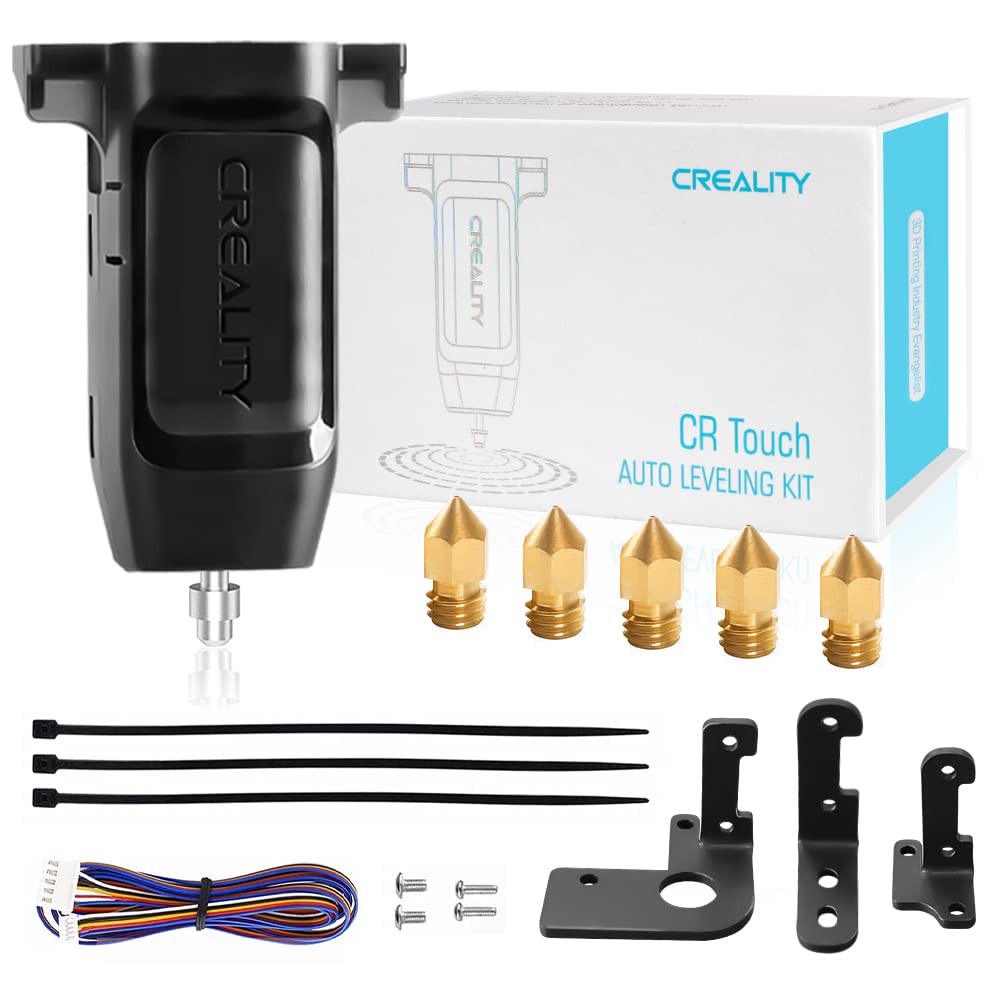
Creality Official CR Touch Auto Bed Leveling Sensor and 5 PCS 3D Printer Nozzles Kit for Ender 3 / Ender 3 V2 / Ender 3 Pro/Ender 5 / CR-10 3D Printer with 32 Bit V4.2.2 / V4.2.7 Mainboard
AED32919


Quantity:
Order today to get by 7-14 business days
This item qualifies for free delivery
Imported From: United Kingdom
At BOLO, we work hard to ensure the products you receive are new, genuine, and sourced from reputable suppliers.
BOLO is not an authorized or official retailer for most brands, nor are we affiliated with manufacturers unless specifically stated on a product page. Instead, we source verified sellers, authorized distributors or directly from the manufacturer.
Each product undergoes thorough inspection and verification at our consolidation and fulfilment centers to ensure it meets our strict authenticity and quality standards before being shipped and delivered to you.
If you ever have concerns regarding the authenticity of a product purchased from us, please contact Bolo Support. We will review your inquiry promptly and, if necessary, provide documentation verifying authenticity or offer a suitable resolution.
Your trust is our top priority, and we are committed to maintaining transparency and integrity in every transaction.
All product information, images, descriptions, and reviews originate from the manufacturer or from trusted sellers overseas. BOLO is not affiliated with, endorsed by, or an authorized retailer for most brands listed on our website unless stated otherwise.
While we strive to display accurate information, variations in packaging, labeling, instructions, or formulation may occasionally occur due to regional differences or supplier updates. For detailed or manufacturer-specific information, please contact the brand directly or reach out to BOLO Support for assistance.
Unless otherwise stated, all prices displayed on the product page include applicable taxes and import duties.
BOLO operates in accordance with the laws and regulations of United Arab Emirates. Any items found to be restricted or prohibited for sale within the UAE will be cancelled prior to shipment. We take proactive measures to ensure that only products permitted for sale in United Arab Emirates are listed on our website.
All items are shipped by air, and any products classified as âDangerous Goods (DG)â under IATA regulations will be removed from the order and cancelled.
All orders are processed manually, and we make every effort to process them promptly once confirmed. Products cancelled due to the above reasons will be permanently removed from listings across the website.
Similar suggestions by Bolo
More from this brand
Similar items from â3D Printer Accessoriesâ
Share with
Or share with link
https://www.bolo.ae/products/KO09DCSLA6L
Visit the Creality Store
Creality Official CR Touch Auto Bed Leveling Sensor and 5 PCS 3D Printer Nozzles Kit for Ender 3 / Ender 3 V2 / Ender 3 Pro/Ender 5 / CR-10 3D Printer with 32 Bit V4.2.2 / V4.2.7 Mainboard


AED32919
Quantity:
Order today to get by 7-14 business days
This item qualifies for free delivery
Imported From: United Kingdom
At BOLO, we work hard to ensure the products you receive are new, genuine, and sourced from reputable suppliers.
BOLO is not an authorized or official retailer for most brands, nor are we affiliated with manufacturers unless specifically stated on a product page. Instead, we source verified sellers, authorized distributors or directly from the manufacturer.
Each product undergoes thorough inspection and verification at our consolidation and fulfilment centers to ensure it meets our strict authenticity and quality standards before being shipped and delivered to you.
If you ever have concerns regarding the authenticity of a product purchased from us, please contact Bolo Support. We will review your inquiry promptly and, if necessary, provide documentation verifying authenticity or offer a suitable resolution.
Your trust is our top priority, and we are committed to maintaining transparency and integrity in every transaction.
All product information, images, descriptions, and reviews originate from the manufacturer or from trusted sellers overseas. BOLO is not affiliated with, endorsed by, or an authorized retailer for most brands listed on our website unless stated otherwise.
While we strive to display accurate information, variations in packaging, labeling, instructions, or formulation may occasionally occur due to regional differences or supplier updates. For detailed or manufacturer-specific information, please contact the brand directly or reach out to BOLO Support for assistance.
Unless otherwise stated, all prices displayed on the product page include applicable taxes and import duties.
BOLO operates in accordance with the laws and regulations of United Arab Emirates. Any items found to be restricted or prohibited for sale within the UAE will be cancelled prior to shipment. We take proactive measures to ensure that only products permitted for sale in United Arab Emirates are listed on our website.
All items are shipped by air, and any products classified as âDangerous Goods (DG)â under IATA regulations will be removed from the order and cancelled.
All orders are processed manually, and we make every effort to process them promptly once confirmed. Products cancelled due to the above reasons will be permanently removed from listings across the website.
Description:
Reviews:
5.0 out of 5 stars Makes 3D Printing So Much Easier!
I installed the Creality CR Touch Auto Leveling Kit on my printer, and itâs been a game changer. The setup was straightforward, and the auto-leveling works perfectly every time. No more wasting time fiddling with manual levelingâprints stick better, and the first layers come out flawless.If you want to improve your 3D printing experience and reduce headaches, this kit is definitely worth it. Reliable, easy to use, and a real time-saver!
5.0 out of 5 stars Makes bed levelling a breeze.
Easy to fit on an Ender 3. Be aware though, that unless you have a Creality controller board, you will need to verify the pin outs before connecting. Also be aware that the pin-outs may not be the same as a BL-Touch. My board (SKR mini e3 v1.2) does not have a 5 pin connector for a probe so I had to de-pin the connector to split it into a 2 and 3. Once fitted and with offsets calculated, and firmware re-flashed, itâs very easy to use. Improved print quality as you can level the bed as often as you like. Good value, durable little probe.
5.0 out of 5 stars Excellent bit of kit
I have an Ender-5 Pro and, unfortunately, I had issues with the bed being uneven or warped - something I'm sure a lot of Creality Ender owners have seen (especially the older models). I first bought the Glass bed to see if this would help, and whilst it did make a bit of a difference, it didn't fix the issue fully.Buying this CRTouch was the best thing I could have done, the installation can sometimes be a bit finicky as I had to download Firmware from the Creality website and edit the file (I searched online for the issue I was seeing, it seemed to be somewhat common). However, installing the CRTouch hardware was easily done.At the end of all this, you still level the bed manually to the best of your ability, and then the CRTouch takes over the rest by probing points of the bed and noting the warping - my prints are much better now!
5.0 out of 5 stars life changer, if you do not have one you need one
This is a game changer...life changer.My Creality Ender 3d V2 did not have an auto-level and doing the levelling every time with the paper technique was painful and most of the prints were failing (not sticking on the bed).Installation is quick- very quick - but the instructions on how to upgrade the firmware of the printer to work with it were simply horrible - almost impossible to follow if you are a regular user - very hard even if you consider yourself a techie - really hard to understand what to do if you are not familiar with hacking your devices . i had never upgraded the firmware of my printer so that added extra difficulty.once this is in place, and you calibrate it according to the instructions and save the new profile on your printer, EVERY print performs auto-levelling at the beginning and not a single print has failed ever since. none.I cannot and would go back to a printer without auto-levelling.
4.0 out of 5 stars good product, needs better instructions.
Got this to upgrade my ender 5 to auto level the bed. Used this along side Klipper and a few other components. A bit of a pain to program as there is not many guides but i got it working and it is great. a lot less print fails now.
5.0 out of 5 stars Works exactly as hoped
After years of manually levelling, printing "1st layer tests" and live adjusting almost every other print, I finally decided to save myself the headache and just get one of these. If you know how to custom build Marlin I'd advise enabling a bunch of other features such as the tramming wizard and the z-probe wizard, which are absolute gamechangers. You still need to tram your bed somewhat level every now and then, and you're going to have to configure a bunch of custom options relating to the probe position. You can also use the pre-built Creality firmware but as I didn't do that, I can't speak to it's accuracy - latest info I have on these says they don't include the optional features above (but perhaps they do, now). Very impressed.
3.0 out of 5 stars Pain in the backside to install new firmware
Had to follow a YouTube tutorial to follow how to install the hardware.But installing the firmware was such a faff I nearly gave up.Many failed attempts before finding tip to rename file to firmware1234.binFirst working attempt loaded firmware that didn't work - couldn't move z axis down.Second attempt with different firmware file worked. But sweaty and annoyed by this point.Shame the creality manuals are so crap. Hardware is good.
5.0 out of 5 stars Great product.
Easy to install and set up. Makes printing so much easier
harika çalıĆıyor
tablası tam dĂŒz olmayan ender 3 v2 de bile sorunsuz baskı alıyorum, mĂŒkemmel bed leveling yapıyor. kesinlikle tavsiye ederim.
Ideal para calibraciĂłn
Muy correcto y excelente resultado.
Fast shipping and definitely a huge upgrade!
Worked just like it should, a very good and cheap upgrade for the printer. Also shipping was faster than estimated.
Nooit meer stellenâŠ
Fijne upgrade van mijn ender3. Had ik veel eerder moeten doen.
Das wohl beste Upgrade fĂŒr jeden Drucker!
Zusammenfassung:Das wohl beste Upgrade, was man in jeden Drucker verbauen kann!Der Einbau dauert ist in ca. 20 Minuten erledigt und die Firmware anzupassen ist durch unzĂ€hlige Videos und Forum BeitrĂ€ge ebenfalls schnell erledigt. FĂŒr 45⏠bekommt man hier ein Upgrade, welches einem Das Leveln des Druckbettes fast komplett abnimmt. Ich kann es jedem der noch kein Auto Bed Leveling verbaut hat nur dringend empfehlen eins zu kaufen und zu verbauen, denn die Erfolgsquote steigt und die erste Schicht sieht immer perfekt aus.Also kommen wir zu dem ausfĂŒhrlichen Teil.Bestellt habe ich mit den CR-Touch fĂŒr meinen Ender 3 V2. Dieser lĂ€uft zum Zeitpunkt der Review auf Marlin 2.1.2.Nach dem Auspacken sieht man direkt das alle benötigten Teile im Karton enthalten sind. Die diversen Halterungen passen auf verschiedenste Ender Drucker, welche ich jedoch nicht benötigt habe, dass ich diesen direkt mit dem Mod vom Hero Me Gen 7 MS2.1 verbaut habe.Der Einab ist zwar sehr einfach jedoch etwas fummelig das man den "dicken" Stecker durch den gesamtem Kabelkanal durchbekommen muss. Mit etwas Geduld war jedoch auch das nach ca.10 Minuten erledigt und ich konnte ihn am Drucker montieren.Danach muss die Firmware richtig eingestellt werden. Ich benutze dafĂŒr Marlin 2.1.2 wo es genĂŒgen Videos auf YouTube und ca. gibt die alles Schritt fĂŒr Schritt erklĂ€ren. Danach hies es die Firmware neu flashen und siehe da, er fĂ€hrt aus!Beim ersten Mal muss man dann erstmal den Z-Offset am Drucker einstellen und alle 4 Ecken noch einmal grob per Hand Leveln, dazu habe ich mir die passende Funktion in Marlin aktiviert, sodass ich es direkt ĂŒber das Display am Drucker machen konnte. Danach habe ich das Bett das erste Mal gelevelt, da habe ich mich fĂŒr ein 4x4 Muster entschieden, also 16 verschiedene Messpunkte. Alles verlief ohne Probleme und die erste Schicht sieht absolut perfekt aus.Wichtig, bei mir gab es Probleme das, das Mesh zwar erstellt wurde, beim Druck dann aber einfach nicht benutzte, solltet ihr also Marlin benutzen aktiviert unbedingt die funktion "#define RESTORE_LEVELING_AFTER_G28" ansonsten verliert er nach jedem Home wieder das Mesh + schreibt in die letzte Zeile eures Start G-Codes M420 S1, damit lĂ€dt er das Mesh erst in dem moment wo der Druck beginnt.Also zu guter Letzt, es bekommt von mir eine klare Empfehlung, es funktioniert seit etwa 2 Monten ohne die kleinsten Probleme und verrichtet seine Arbeit immer zuverlĂ€ssig. Jeder der also drĂŒber nachdenkt sich einen CR-Touch zuzulegen, der sollte es jetzt tun und sich dieses nervige Leveln ersparen!
Similar suggestions by Bolo
More from this brand
Similar items from â3D Printer Accessoriesâ
Share with
Or share with link
https://www.bolo.ae/products/KO09DCSLA6L