Deliver toUnited Arab Emirates
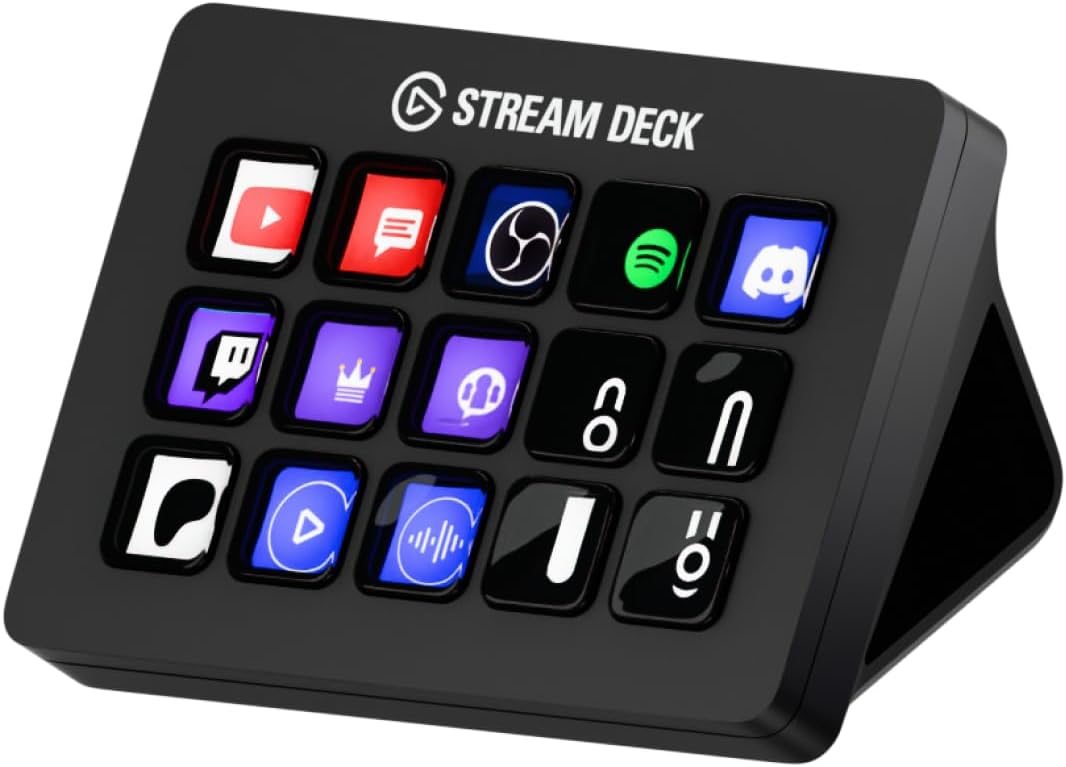
Elgato Stream Deck MK.2 – Studio Controller, 15 macro keys, trigger actions in apps and software like OBS, Twitch, ​YouTube and more, works with Mac and PC

Description:

  • 15 Customisable LCD Keys: instantly control your apps, tools and platforms.
  • One-Touch Operation: trigger single or multiple actions, launch social posts, adjust audio, mute mic, turn on lights, and much more.
  • Visual Feedback: know that your command has been executed.
  • Powerful Plugins: Elgato 4KCU, OBS, Streamlabs, Twitch, YouTube, Twitter, Spotify, Philips Hue, and many more.
  • Hotkey Actions: streamline your film editing, music production, photography workflow, etc.

  • Reviews:

    5.0 out of 5 stars invaluable if you regularly use different audio, visual & office software on Mac & PC

    B. · 4 September 2023

    (function() { P.when('cr-A', 'ready').execute(function(A) { if(typeof A.toggleExpanderAriaLabel === 'function') { A.toggleExpanderAriaLabel('review_text_read_more', 'Read more of this review', 'Read less of this review'); } }); })(); .review-text-read-more-expander:focus-visible { outline: 2px solid #2162a1; outline-offset: 2px; border-radius: 5px; } Spoiler alert. This device is awesome and invaluable if you regularly use different Mac and PC software programmes, especially for editing audio & video.You can stop there or read on for a bit of a story and the actual review - your choice.The storyThis device sat on a shelf for well over 12 months. It was a compulsive purchase based on a video I watched on YouTube and possibly at the end of a night out with friends, erm…I had almost forgotten about this purchase, not because it wasn’t of use, I just didn’t think I needed it at the time; my mistake!Let me explain…As mentioned, this was an impulse purchase because it looked cool and I told myself I’d use it…eventually.It must have struck a chord of sorts because I was sure to buy the upgraded MKII version with a detachable/replaceable USB cable.I didn’t use it.Jump forward 12 months and video editing is now a main focus and keyboard short cuts are all the rage. As my editing skills develop and my editing frequency increases and as ridiculous as this sounds (it did to me when I heard other editors say it) multiple key short cuts were becoming a pain in the backside and in particular the blade cut and delete (yes, Final Cut Pro X on the Mac) Enter the Elgato Stream Deck.The ReviewThe Elgato Stream Deck is a fully customisable macro keypad that allows you to set single key inputs for what would normally be multi-keyboard/finger short-cuts e.g. ctrl+cmd+arrow up to lift a clip from the timeline in Final Cut Pro, is now a one button press and with a nice vibrant pic displayed on the very smooth LCD buttons to boot. More on that in a bit.This little device works across a variety of apps for both Mac & PC and not just editing software. It also comes with Elgato (via download) free software for optimising and customising the macro keys and shortcuts.This is a super tidy unit (specs below) and well built. It won’t take being bounced off the floor, but oddly enough, that’s not its intended purpose. The main icon panel can sit directly on your desk or in the angled case. The USB cable is attached under the unit, but flat and right angled so that the unit can sit flush with your desk regardless of preferred set-up.The 15 macro key version I have sits just about right for my needs at the moment, but you may wish to look at the 6 or the much bigger 32 key versions, depending on your own needs. I will say that after finding out just how useful this piece of equipment can be, I am looking at the 32 key version for in the not too distant future.As an example of the speed of work flow, I’ll use another FCP application - I have the mouse on the right and the Stream Deck on the left. I select the point I wish to cut. Press the centre macro key and then press the macro key underneath its it is set to delete. This finger/thumb quick action is so convenient and time saving.The LCD keys are also customisable via the previously mentioned Elgato software. This option also allows you to assign set functions to keys and also assign an icon. A pleasant surprise was that there are loads of free icons available in the Elgato icon library. One of my main hotkey shortcuts is for YouTube (yes, you can assign URLs to the macro keys too) and there was a YouTube icon in the library along with multiple community created ones, which for the most part are great! There are even animated icons if you want them, but I personally prefer the static icons, but it’s your choice.The next pleasant surprise was that you can set different profiles or ‘pages’ of icons for the different software you are using. If you are jumping from Premier Pro to Microsoft Office or Final Cut Pro to Light Room, then you can set up you own pages, hotkeys & icons as you wish which equals fantastic versatility!All good so far, so now a couple of minor gripes…Every once in a while the unit won’t boot up properly, but this is pretty rare.The angle of the stand is great visually, but for my (left) hand it’s too steep at roughly a 60 degree angle, when half that would have been much more comfortable whilst still allowing you to see the icons. You can take the unit off the stand and as you get more used to and with more frequency, you won’t even look at the buttons. This is the best way to go in my opinion, but again it’s nice to have the option of stand or no stand.One last note and this is nothing to do with the unit; I would suggest you learn some main/most used keyboard shortcuts before you use the Stream Deck. Reason - if the deck stops working in the middle of an edit and you don’t know/remember the actual keyboard ones, then you’re stuck. Again, this is unlikely, but worth considering.On the whole an awesome and effective idea, executed fantastically by Elgato.Side note:Elgato have also released the + version which features 8 macro keys, a touch stripe and dials, which can be incorporate into a streaming set up. I cannot comment on that device at the moment, but perhaps in the future…Specs:Size: 11.8 x 8.4 x 2.5cm without standWeight: 145gConnection: USB 2.0 (cable is roughly 1.5 metres)Stand angle: Approx. 60degreesMaterials: Plastic

    5.0 out of 5 stars Highly Customizable and User-Friendly Controller

    A. · 20 June 2024

    the customizable and easy-to-use aspects of this controller. They highlight the wealth of options it provides for personalization, seamless integrations, and a hassle-free setup process. The build quality is also praised, with users appreciating the device's durability and usefulness. For those who frequently work with various Mac and PC software programs, especially for audio and video editing, this controller is an invaluable asset. Its versatility knows no bounds, allowing you to effortlessly launch applications, game, work, edit, stream, make voice calls, control lighting, adjust system settings, or even integrate with IFTTT programs. The accompanying app boasts an intuitive and user-friendly interface, enabling you to customize icons, install apps from the store, and more. Furthermore, a plethora of YouTube guides are available to assist you in configuring the controller to your specific needs, ensuring a seamless and personalized experience. With its near-endless possibilities, this controller is a game-changer for those seeking efficiency, productivity, and a tailored computing experience.

    5.0 out of 5 stars Great device for gaming too!

    G. · 30 July 2021

    I've had this device for less than a week but I'm using it for gaming and photo editing.It adds a great level of immersion to Euro Truck Simulator 2 (someone has created custom icons for it too if you Google it), efficiency to Defense Grid 2 (I created icons including the tower and the prices, as well as uprades etc.) and I made a quick and dirty setup for Paint.Net, which made the icon creation much faster.In addition to this I'm using it for:- Philips Hue lighting in the room it's in- Spotify control on my computer and an Echo device- Train Sim World 2 (this was free and seemed like a good test)- Starting a Linux VM in VMware Workstation (there are further control I could add to this)- Starting specific applicationsI can definitely see me using this on more games, especially simulators and strategy games, possibly binding scripts for easier automation and finding efficiencies for repetitive tasks in different apps.There are a fair few plugins, but these are mainly geared towards streamers (no surprise there) but there are a few for graphics related apps too. The hotkey, hotkey switch, multi action and multi action switch really make up for this. I've not pushed these too far but they seem great so far e.g. in ETS2 I press a key to turn on the ignition, delay for a second and then starts the engine, if I press the button a second time it turns the engine off, the two states have different icons.You can even use animated gifs for the icons, although I've read that the overuse of these can cause performance issues (unsure if that's the case on the MK2). It's perfect for a hazard light indicator in ETS2 though!If I had to add one criticism, it's that it could do with a bit more anti-slip by either being grippier or heavier, it's not terrible on that front and I could probably find a solution myself but worth mentioning for a fair review.The 15 seems to be a perfect size, the XL is tempting but at that point it almost a keyboard from a finding-the-right-key perspective, though not having used to XL you can take my opinion with a pinch of salt and it'll really depend on how you want to use it. As well as having profiles (that auto-switches when an exe is running and selected) each icon can be a folder which can contain other folders, I'm not sure if there are depth limits.All-in-all this piece of kit is so customisable that it'd be difficult not to find a use for it if you are a regular computer user. Highly recommend!

    Excelente

    E.L. · 6 February 2025

    (function() { P.when('cr-A', 'ready').execute(function(A) { if(typeof A.toggleExpanderAriaLabel === 'function') { A.toggleExpanderAriaLabel('review_text_read_more', 'Read more of this review', 'Read less of this review'); } }); })(); .review-text-read-more-expander:focus-visible { outline: 2px solid #2162a1; outline-offset: 2px; border-radius: 5px; } Me ha resultado de muchísima utilidad, elgato siempre respalda la calidad de sus productos.- Excelente material.- Muy buena Goma anti-derrape.- El brillo y los colores de los botones es excelente.- Aplicación fácil de usar, ha sido entretenido configurarlo.- Funciona muy bien con OBS, sólo hay que bajar el plugin gratuito.- Amplia personalización y a eso súmale que puedes bajar más.Puede parecer costoso, pero por las ventajas que ofrece, valió por completo la pena.

    Atende ao que se propõe

    F.P. · 5 October 2024

    Recebi dentro do prazo e ainda preciso aprender como utilizar

    Wrong version of device

    A.C. · 7 September 2022

    In description it's MK.2 version. But I got first version. Not big deal for me - it's still usable. But it's wrong in description. Be carefully if you need exactly MK.2 version. Otherwise - no problem at all. Device works perfectly.

    Yararlı bir yardımcı aksesuar

    N.D. · 2 June 2024

    Ürün malzeme olarak kaliteli. Aynı tuş sayısına sahip iki farklı model var. Daha yeni olan model satın alındı. PC üzerinde programların tek tuşla çalıştırılması yanında, OBS gibi canli yayın ve kayıt esnasında farklı senaryoları, kameraları, alt yazi ve sahneleri değiştirmek yoluyla profesyonel işler çıkarmanız gerektiğinde başarılı bir asistan gibi yardımcı oluyor. Üzerindeki tuşlar ışıklı ve siz logo yerleştirebiliyorsunuz. Bir sayfada mevcut tuş sayısına ilave sayfalar açarak, sağa ve sola sayfa değiştirme tuşları koymak suretiyle ihtiyacınız kadar kısa yol tuşu açabiliyorsunuz. Güncelleme alabiliyorsunuz. Ayrıca ücretsiz ya da ücretli eklentiler ile fonksiyonel ekler alıp daha da gelistirebiliyorsunuz. Bunun için Web sayfasından inceleme yapmanızı öneririm. Kısaca esnek, geliştirilebilir, yardımcı ve çok yönlü bir aksesuar.

    Great even if you don't stream

    H.S. · 7 June 2025

    I do no streaming or any real audio/video related work at all. I'm a software developer.I had previously programmed my 4 keyboard macro keys to the 4 most often used apps. This saved me lots of time as I could hit a key without looking instead of having to ALT-TAB through all my open windows as I was accustomed to. But I wanted more time saving keys.While I do need to look to see what key to push as it's not part of the keyboard, there are many more options available. On the top row, I have 'page selectors' that let me pick sets of keys to display. I have a personal page, a work page, and a page for my development tools.The buttons have an industrial feel to them. Not soft, but not too hard. Each button is a video display allowing for images, icons, text, whatever you want.The software used for configuration was easy to understand in about 15 minutes of playing around. The only thing I found that could be improved was the inability to move button configurations from one page to the next. It would be very helpful to be able to remove a configuration from one page and move it to a different page with one action.I believe there are a maximum of 10 pages that you can configure. However, it also supports 'folders' where one button can open up folder containing a whole new button configuration.I thought about getting the 6 button version, but I figured once I started playing around, I'd want more buttons. I was right.

    Elgato Stream Deck MK.2 – Studio Controller, 15 macro keys, trigger actions in apps and software like OBS, Twitch, ​YouTube and more, works with Mac and PC

    Product ID: KO09738PI2T
    Condition: New

    4.6

    AED91902

    Price includes VAT & Import Duties
    Color: Black
    Product imageProduct image
    Availability: In Stock

    Quantity:

    |

    Order today to get by 7-14 business days

    This item qualifies for free delivery

    Returns & Warranty policies

    Imported From: United Kingdom

    At BOLO, we work hard to ensure the products you receive are new, genuine, and sourced from reputable suppliers.

    BOLO is not an authorized or official retailer for most brands, nor are we affiliated with manufacturers unless specifically stated on a product page. Instead, we source verified sellers, authorized distributors or directly from the manufacturer.

    Each product undergoes thorough inspection and verification at our consolidation and fulfilment centers to ensure it meets our strict authenticity and quality standards before being shipped and delivered to you.

    If you ever have concerns regarding the authenticity of a product purchased from us, please contact Bolo Support. We will review your inquiry promptly and, if necessary, provide documentation verifying authenticity or offer a suitable resolution.

    Your trust is our top priority, and we are committed to maintaining transparency and integrity in every transaction.

    All product information, images, descriptions, and reviews originate from the manufacturer or from trusted sellers overseas. BOLO is not affiliated with, endorsed by, or an authorized retailer for most brands listed on our website unless stated otherwise.

    While we strive to display accurate information, variations in packaging, labeling, instructions, or formulation may occasionally occur due to regional differences or supplier updates. For detailed or manufacturer-specific information, please contact the brand directly or reach out to BOLO Support for assistance.

    Unless otherwise stated, all prices displayed on the product page include applicable taxes and import duties.

    BOLO operates in accordance with the laws and regulations of United Arab Emirates. Any items found to be restricted or prohibited for sale within the UAE will be cancelled prior to shipment. We take proactive measures to ensure that only products permitted for sale in United Arab Emirates are listed on our website.

    All items are shipped by air, and any products classified as “Dangerous Goods (DG)” under IATA regulations will be removed from the order and cancelled.

    All orders are processed manually, and we make every effort to process them promptly once confirmed. Products cancelled due to the above reasons will be permanently removed from listings across the website.

    Similar suggestions by Bolo

    More from this brand

    Similar items from “Keyboards, Mice & Input Devices”

    Elgato Stream Deck MK.2 – Studio Controller, 15 macro keys, trigger actions in apps and software like OBS, Twitch, ​YouTube and more, works with Mac and PC

    Product ID: KO09738PI2T
    Condition: New

    4.6

    Elgato Stream Deck MK.2 – Studio Controller, 15 macro keys, trigger actions in apps and software like OBS, Twitch, ​YouTube and more, works with Mac and PC-0
    Color: Black
    Product imageProduct image

    AED91902

    Price includes VAT & Import Duties
    Availability: In Stock

    Quantity:

    |

    Order today to get by 7-14 business days

    This item qualifies for free delivery

    Returns & Warranty policies

    Imported From: United Kingdom

    At BOLO, we work hard to ensure the products you receive are new, genuine, and sourced from reputable suppliers.

    BOLO is not an authorized or official retailer for most brands, nor are we affiliated with manufacturers unless specifically stated on a product page. Instead, we source verified sellers, authorized distributors or directly from the manufacturer.

    Each product undergoes thorough inspection and verification at our consolidation and fulfilment centers to ensure it meets our strict authenticity and quality standards before being shipped and delivered to you.

    If you ever have concerns regarding the authenticity of a product purchased from us, please contact Bolo Support. We will review your inquiry promptly and, if necessary, provide documentation verifying authenticity or offer a suitable resolution.

    Your trust is our top priority, and we are committed to maintaining transparency and integrity in every transaction.

    All product information, images, descriptions, and reviews originate from the manufacturer or from trusted sellers overseas. BOLO is not affiliated with, endorsed by, or an authorized retailer for most brands listed on our website unless stated otherwise.

    While we strive to display accurate information, variations in packaging, labeling, instructions, or formulation may occasionally occur due to regional differences or supplier updates. For detailed or manufacturer-specific information, please contact the brand directly or reach out to BOLO Support for assistance.

    Unless otherwise stated, all prices displayed on the product page include applicable taxes and import duties.

    BOLO operates in accordance with the laws and regulations of United Arab Emirates. Any items found to be restricted or prohibited for sale within the UAE will be cancelled prior to shipment. We take proactive measures to ensure that only products permitted for sale in United Arab Emirates are listed on our website.

    All items are shipped by air, and any products classified as “Dangerous Goods (DG)” under IATA regulations will be removed from the order and cancelled.

    All orders are processed manually, and we make every effort to process them promptly once confirmed. Products cancelled due to the above reasons will be permanently removed from listings across the website.

    Description:

  • 15 Customisable LCD Keys: instantly control your apps, tools and platforms.
  • One-Touch Operation: trigger single or multiple actions, launch social posts, adjust audio, mute mic, turn on lights, and much more.
  • Visual Feedback: know that your command has been executed.
  • Powerful Plugins: Elgato 4KCU, OBS, Streamlabs, Twitch, YouTube, Twitter, Spotify, Philips Hue, and many more.
  • Hotkey Actions: streamline your film editing, music production, photography workflow, etc.

  • Reviews:

    5.0 out of 5 stars invaluable if you regularly use different audio, visual & office software on Mac & PC

    B. · 4 September 2023

    (function() { P.when('cr-A', 'ready').execute(function(A) { if(typeof A.toggleExpanderAriaLabel === 'function') { A.toggleExpanderAriaLabel('review_text_read_more', 'Read more of this review', 'Read less of this review'); } }); })(); .review-text-read-more-expander:focus-visible { outline: 2px solid #2162a1; outline-offset: 2px; border-radius: 5px; } Spoiler alert. This device is awesome and invaluable if you regularly use different Mac and PC software programmes, especially for editing audio & video.You can stop there or read on for a bit of a story and the actual review - your choice.The storyThis device sat on a shelf for well over 12 months. It was a compulsive purchase based on a video I watched on YouTube and possibly at the end of a night out with friends, erm…I had almost forgotten about this purchase, not because it wasn’t of use, I just didn’t think I needed it at the time; my mistake!Let me explain…As mentioned, this was an impulse purchase because it looked cool and I told myself I’d use it…eventually.It must have struck a chord of sorts because I was sure to buy the upgraded MKII version with a detachable/replaceable USB cable.I didn’t use it.Jump forward 12 months and video editing is now a main focus and keyboard short cuts are all the rage. As my editing skills develop and my editing frequency increases and as ridiculous as this sounds (it did to me when I heard other editors say it) multiple key short cuts were becoming a pain in the backside and in particular the blade cut and delete (yes, Final Cut Pro X on the Mac) Enter the Elgato Stream Deck.The ReviewThe Elgato Stream Deck is a fully customisable macro keypad that allows you to set single key inputs for what would normally be multi-keyboard/finger short-cuts e.g. ctrl+cmd+arrow up to lift a clip from the timeline in Final Cut Pro, is now a one button press and with a nice vibrant pic displayed on the very smooth LCD buttons to boot. More on that in a bit.This little device works across a variety of apps for both Mac & PC and not just editing software. It also comes with Elgato (via download) free software for optimising and customising the macro keys and shortcuts.This is a super tidy unit (specs below) and well built. It won’t take being bounced off the floor, but oddly enough, that’s not its intended purpose. The main icon panel can sit directly on your desk or in the angled case. The USB cable is attached under the unit, but flat and right angled so that the unit can sit flush with your desk regardless of preferred set-up.The 15 macro key version I have sits just about right for my needs at the moment, but you may wish to look at the 6 or the much bigger 32 key versions, depending on your own needs. I will say that after finding out just how useful this piece of equipment can be, I am looking at the 32 key version for in the not too distant future.As an example of the speed of work flow, I’ll use another FCP application - I have the mouse on the right and the Stream Deck on the left. I select the point I wish to cut. Press the centre macro key and then press the macro key underneath its it is set to delete. This finger/thumb quick action is so convenient and time saving.The LCD keys are also customisable via the previously mentioned Elgato software. This option also allows you to assign set functions to keys and also assign an icon. A pleasant surprise was that there are loads of free icons available in the Elgato icon library. One of my main hotkey shortcuts is for YouTube (yes, you can assign URLs to the macro keys too) and there was a YouTube icon in the library along with multiple community created ones, which for the most part are great! There are even animated icons if you want them, but I personally prefer the static icons, but it’s your choice.The next pleasant surprise was that you can set different profiles or ‘pages’ of icons for the different software you are using. If you are jumping from Premier Pro to Microsoft Office or Final Cut Pro to Light Room, then you can set up you own pages, hotkeys & icons as you wish which equals fantastic versatility!All good so far, so now a couple of minor gripes…Every once in a while the unit won’t boot up properly, but this is pretty rare.The angle of the stand is great visually, but for my (left) hand it’s too steep at roughly a 60 degree angle, when half that would have been much more comfortable whilst still allowing you to see the icons. You can take the unit off the stand and as you get more used to and with more frequency, you won’t even look at the buttons. This is the best way to go in my opinion, but again it’s nice to have the option of stand or no stand.One last note and this is nothing to do with the unit; I would suggest you learn some main/most used keyboard shortcuts before you use the Stream Deck. Reason - if the deck stops working in the middle of an edit and you don’t know/remember the actual keyboard ones, then you’re stuck. Again, this is unlikely, but worth considering.On the whole an awesome and effective idea, executed fantastically by Elgato.Side note:Elgato have also released the + version which features 8 macro keys, a touch stripe and dials, which can be incorporate into a streaming set up. I cannot comment on that device at the moment, but perhaps in the future…Specs:Size: 11.8 x 8.4 x 2.5cm without standWeight: 145gConnection: USB 2.0 (cable is roughly 1.5 metres)Stand angle: Approx. 60degreesMaterials: Plastic

    5.0 out of 5 stars Highly Customizable and User-Friendly Controller

    A. · 20 June 2024

    the customizable and easy-to-use aspects of this controller. They highlight the wealth of options it provides for personalization, seamless integrations, and a hassle-free setup process. The build quality is also praised, with users appreciating the device's durability and usefulness. For those who frequently work with various Mac and PC software programs, especially for audio and video editing, this controller is an invaluable asset. Its versatility knows no bounds, allowing you to effortlessly launch applications, game, work, edit, stream, make voice calls, control lighting, adjust system settings, or even integrate with IFTTT programs. The accompanying app boasts an intuitive and user-friendly interface, enabling you to customize icons, install apps from the store, and more. Furthermore, a plethora of YouTube guides are available to assist you in configuring the controller to your specific needs, ensuring a seamless and personalized experience. With its near-endless possibilities, this controller is a game-changer for those seeking efficiency, productivity, and a tailored computing experience.

    5.0 out of 5 stars Great device for gaming too!

    G. · 30 July 2021

    I've had this device for less than a week but I'm using it for gaming and photo editing.It adds a great level of immersion to Euro Truck Simulator 2 (someone has created custom icons for it too if you Google it), efficiency to Defense Grid 2 (I created icons including the tower and the prices, as well as uprades etc.) and I made a quick and dirty setup for Paint.Net, which made the icon creation much faster.In addition to this I'm using it for:- Philips Hue lighting in the room it's in- Spotify control on my computer and an Echo device- Train Sim World 2 (this was free and seemed like a good test)- Starting a Linux VM in VMware Workstation (there are further control I could add to this)- Starting specific applicationsI can definitely see me using this on more games, especially simulators and strategy games, possibly binding scripts for easier automation and finding efficiencies for repetitive tasks in different apps.There are a fair few plugins, but these are mainly geared towards streamers (no surprise there) but there are a few for graphics related apps too. The hotkey, hotkey switch, multi action and multi action switch really make up for this. I've not pushed these too far but they seem great so far e.g. in ETS2 I press a key to turn on the ignition, delay for a second and then starts the engine, if I press the button a second time it turns the engine off, the two states have different icons.You can even use animated gifs for the icons, although I've read that the overuse of these can cause performance issues (unsure if that's the case on the MK2). It's perfect for a hazard light indicator in ETS2 though!If I had to add one criticism, it's that it could do with a bit more anti-slip by either being grippier or heavier, it's not terrible on that front and I could probably find a solution myself but worth mentioning for a fair review.The 15 seems to be a perfect size, the XL is tempting but at that point it almost a keyboard from a finding-the-right-key perspective, though not having used to XL you can take my opinion with a pinch of salt and it'll really depend on how you want to use it. As well as having profiles (that auto-switches when an exe is running and selected) each icon can be a folder which can contain other folders, I'm not sure if there are depth limits.All-in-all this piece of kit is so customisable that it'd be difficult not to find a use for it if you are a regular computer user. Highly recommend!

    Excelente

    E.L. · 6 February 2025

    (function() { P.when('cr-A', 'ready').execute(function(A) { if(typeof A.toggleExpanderAriaLabel === 'function') { A.toggleExpanderAriaLabel('review_text_read_more', 'Read more of this review', 'Read less of this review'); } }); })(); .review-text-read-more-expander:focus-visible { outline: 2px solid #2162a1; outline-offset: 2px; border-radius: 5px; } Me ha resultado de muchísima utilidad, elgato siempre respalda la calidad de sus productos.- Excelente material.- Muy buena Goma anti-derrape.- El brillo y los colores de los botones es excelente.- Aplicación fácil de usar, ha sido entretenido configurarlo.- Funciona muy bien con OBS, sólo hay que bajar el plugin gratuito.- Amplia personalización y a eso súmale que puedes bajar más.Puede parecer costoso, pero por las ventajas que ofrece, valió por completo la pena.

    Atende ao que se propõe

    F.P. · 5 October 2024

    Recebi dentro do prazo e ainda preciso aprender como utilizar

    Wrong version of device

    A.C. · 7 September 2022

    In description it's MK.2 version. But I got first version. Not big deal for me - it's still usable. But it's wrong in description. Be carefully if you need exactly MK.2 version. Otherwise - no problem at all. Device works perfectly.

    Yararlı bir yardımcı aksesuar

    N.D. · 2 June 2024

    Ürün malzeme olarak kaliteli. Aynı tuş sayısına sahip iki farklı model var. Daha yeni olan model satın alındı. PC üzerinde programların tek tuşla çalıştırılması yanında, OBS gibi canli yayın ve kayıt esnasında farklı senaryoları, kameraları, alt yazi ve sahneleri değiştirmek yoluyla profesyonel işler çıkarmanız gerektiğinde başarılı bir asistan gibi yardımcı oluyor. Üzerindeki tuşlar ışıklı ve siz logo yerleştirebiliyorsunuz. Bir sayfada mevcut tuş sayısına ilave sayfalar açarak, sağa ve sola sayfa değiştirme tuşları koymak suretiyle ihtiyacınız kadar kısa yol tuşu açabiliyorsunuz. Güncelleme alabiliyorsunuz. Ayrıca ücretsiz ya da ücretli eklentiler ile fonksiyonel ekler alıp daha da gelistirebiliyorsunuz. Bunun için Web sayfasından inceleme yapmanızı öneririm. Kısaca esnek, geliştirilebilir, yardımcı ve çok yönlü bir aksesuar.

    Great even if you don't stream

    H.S. · 7 June 2025

    I do no streaming or any real audio/video related work at all. I'm a software developer.I had previously programmed my 4 keyboard macro keys to the 4 most often used apps. This saved me lots of time as I could hit a key without looking instead of having to ALT-TAB through all my open windows as I was accustomed to. But I wanted more time saving keys.While I do need to look to see what key to push as it's not part of the keyboard, there are many more options available. On the top row, I have 'page selectors' that let me pick sets of keys to display. I have a personal page, a work page, and a page for my development tools.The buttons have an industrial feel to them. Not soft, but not too hard. Each button is a video display allowing for images, icons, text, whatever you want.The software used for configuration was easy to understand in about 15 minutes of playing around. The only thing I found that could be improved was the inability to move button configurations from one page to the next. It would be very helpful to be able to remove a configuration from one page and move it to a different page with one action.I believe there are a maximum of 10 pages that you can configure. However, it also supports 'folders' where one button can open up folder containing a whole new button configuration.I thought about getting the 6 button version, but I figured once I started playing around, I'd want more buttons. I was right.

    Similar suggestions by Bolo

    More from this brand

    Similar items from “Keyboards, Mice & Input Devices”