Description:
Reviews:
5.0 out of 5 stars Is This Worth Buying in 2025?
This device is knocking on a bit now, having been first released in Oct 2017.Is it still worth buying in 2025? - Absolutely!! It’s a superb bit of kit! And there are no signs yet of a Mk4 version being released any time soon.You do need know what you are buying though…First and foremost, this is not a ‘standalone’ item.This cannot produce any sounds on its own – none whatsoever!It is a controller, designed to control specific software on a computer.This software is called 'Maschine'.Version 3 is the latest version (since Nov ’24) and is bundled with the Mikro when bought new, and available after registering your Mikro with Native Instruments.Here’s where some 5-star reviewers are being quite harsh, criticising some 1-star reviewers.One 5-star reviewer in particular shouldn’t be quite so glib about stating this definitely comes with the required software. Yes, if bought new, it will do - but…If you buy this used here, there is a high probability that the unit has been registered with NI by the original purchaser and not de-registered on return, so you cannot re-register it in your account and therefore cannot gain access to the required software, rendering the unit next to useless!Please, if you buy this new and return it, have the decency to de-register it in your NI account and include the code NI give you to pass on to the next owner with your return!!So, onto using this device to create music…At the very least you will need a computer and an internet connection.This can be a PC - Windows laptop, desktop etc running Win10/11.Or a Mac (Intel or Silicon) running an up-to-date version of Mac OS.This does not work with an iPad or iPhone!A USB cable is included.Connect to your computer and you’ll see a flurry of lights at first, but then nothing! – This is normal - the controller is waiting for the Maschine software to run.Look at the black card that comes with the device and go to the web address shown – see my photo.You will need a Native Instruments account – free and easy to obtain.You then need to download and install Native Instruments’ ‘Native Access 2’ app – again free and easy to install.Log in to your account within the Native Access app and register the serial number of your nice new Maschine Mikro Mk3. This is printed on the black card that came with your device and is also on the base of the device. Click ‘add serial number’ on the bottom left of access and key in your serial number.You will then gain licensed access to download the bundled software through Native Access – see my screenshot from Access on my PC.If Native Access reports the serial number is already registered, you have probably bought a used unit where the previous owner has failed to de-register. NI support can very often help with this if you show them proof of purchase etc. But the safest way to buy this, is to buy new!It’s worth noting that if you buy used and have the older Maschine 2 software bundled with it, upgrading from version 2 to the latest full Maschine 3 software will set you back around £60, possibly making buying used less attractive. The full Maschine 3 software is automatically supplied with any Maschine Mk3 controller newly purchased and registered since Nov ’24.When registered, you will receive emails thanking you for your purchase with some great getting started guides. The full manual is easily found on NI’s site through the links provided in the emails from NI.Once the Maschine software is up and running, your Mikro Mk3 sparks into life and stops behaving dead!When first run, the software may take some time to start due to a one-off plug-in scan. The time taken depends on how many audio plugins you already have on your computer. This scan only runs once and the start-up time will be near instant the next time you run the software. I have a lot of plugins on my system and the first scan took close to 20 minutes!The Mikro Mk3 is reassuringly well built, with some nice weight to it. It’s a great cut down from the full controller, great value and fun to use.The included sound library is superb with sounds for all genres of music making. Lots of inspiration for musician’s block!The latest Maschine Version 3 software is well worth having. The stems feature alone is amazing and great fun! The UI is a bit more friendly too.The learning curve is not simple, I’ll be honest, but there is plenty of help and advice available on NI’s site to help you learn. Check out their YT channel too – look for the Maschine playlists. There are 2 playlists, one for the Mikro Mk3 hardware and one for the vers 3 software.If you experience any issues, NI support is really very good in my experience.As well as Maschine I also own their ‘Komplete 15 Collector's Edition’ and the Kontrol S61 MK3 Keyboard, which is just fabulous and integrates with the Maschine software in a very funky way!If you got this far, thanks for reading! I do hope I’ve helped :-)
5.0 out of 5 stars A versatile little bit of kit!
The Maschine hardware is great for the price. I use it to lay down beats for my tracks, and have started to use the software to slice up breaks and map them to the pads - awesome!A lot of the NI packs come with Maschine presets, so there are plenty of cool sounds to chose from, whatever genre of music you are making.In MIDI mode I set this up to work with Output Arcade and it's great for triggering samples and messing with rhythms.Fun!
5.0 out of 5 stars Excellent
Being a newbie with music making and production, I love this product, I've been Inspired by fred again and kenya grace lately and wanted to try my own music journey, maschine mikro mk3 far exceeds this! The amount of possibilities are endless with any genre of music and imagination.Brilliant quality, ease of use and performance, comfortably woth far more than it's priced at given you can make professional music with it and.the included software.If you have any interst in digital music making or production, this is a must to get started on.
5.0 out of 5 stars Great buy
Fantastic add on to the excellent software
4.0 out of 5 stars it doesn't work on the ipad
this controller would be the best drum controller on the market but it doesn't support midi standalone mode, or to be clear better, while most of the other native instruments controller have a sequence of buttons to switch it to normal usb midi, this doesn't have it so you need the NI driver to use it with other apps.this for example means that I cannot use it on my android tablet or ipad or in devices where i can't install the Ni machine and drivers. that's simply stupid
5.0 out of 5 stars Great at this price point
For the money this is an excellent piece of hardware to use either with the provided software or within your Daw of choice. Obviously it would be even better if it was standalone but they have Maschine plus for that (if your pockets are deep enough!)👍 I have this setup with the komplete Kontrol m32 which is a great pairing and can do everything when paired with the right software. This is especially good if you are on a tight budget and a good starting point if you are new to music production.
5.0 out of 5 stars Great Maschine!
Excellent device, great value. Ignore the weird stuff from other reviewers, it works fine with Windows 10 and Bolo send you a perfectly fine device that registers the software fine. A fantastic entry into music production. Can’t believe other people have given it 1/5 because it has ‘no instructions’ or the fact it isn’t a midi player even though it doesn’t say it is ,maybe they should buy fisher price. I knew what I had ordered and I’m very pleased with it,any struggles I have our my own as producing music isn’t easy. The hardware is responsive,intuitive and excellent
5.0 out of 5 stars Great value for money.
You will need a computer to use the software. Once you get your head around that it's a joy.I use it with Komplete Kontrol S49 Mk 2 and it's really exciting to use.However; if you are a beginner it can be confusing at first. Native Instruments are difficult but well worth the effort to master.If you are after a stand alone buy a Maschine Mk3.
Genuine and brand new
Got a brand new device with all software and hardware working as expected. All code registrations on official website were completed smoothly without any issues. Seller was Soundglitz and they Delivered 3 days before delivery date.Good device by Native instruments but need to learn their workflow to make best use of all the features. Overall happy with the order and delivery process of these unique devices by the seller.
Excelente producto
Muy recomendable
Excelente!
A Mikro3 é a forma mais acessível para quem quiser entrar no mundo Maschine da Native Instruments. Os pads são os melhores que já experimentei. Atenção: ela precisa ser acoplada a um notebook.
最初の設定がむずい
いい!
Best bang for the buck.
I was looking for a new way to approach tune making. This device shines with its Machine DAW software and the ability to customize it with the configuration software. You can view many Youtube videos demonstrating its capabilities, so I will summarize here:The Maschine software is a DAW that can use existing VSTs and any of the NI expansion packs to create songs.Maschine software is based on the concept of building blocks for your composition...build a beat or phrase, chain beats and/or phrases and link them together.This is not how I create music but it's very useful, nonetheless.I love the key and chord modes that allow great experimentation. You configure your scale and base key and pretty much can't go wrong with the pad strikes. There's many different chord types and scales to choose from which really opens up the experimental aspect.I use Cubase and Reason and it integrates perfectly as a VST instrument in both cases.Many instances can be opened, so you can create a song using your favorite DAW and using the Maschine as an instrument for each track. This is what works best for me.Additionally, it is easily set up in MIDI mode by pressing (SHIFT + project) and using the configuration software, the pads can be adjusted to match your favorite drum machine. The config software allows you to adjust pad colors in MIDI mode.Maschine works really well if you have another NI keyboard. I have a Kontrol S61 and it can be used to browse and play harmonic notes right alongside the pads.Lastly, Maschine hardware seems really well built and has fantastic tactile response.Everything is downloaded from NI. The software, owners' manual and all the other documentation is well written, straightforward and do a good job explaining all the concepts they dicuss.
Visit the Native Instruments Store
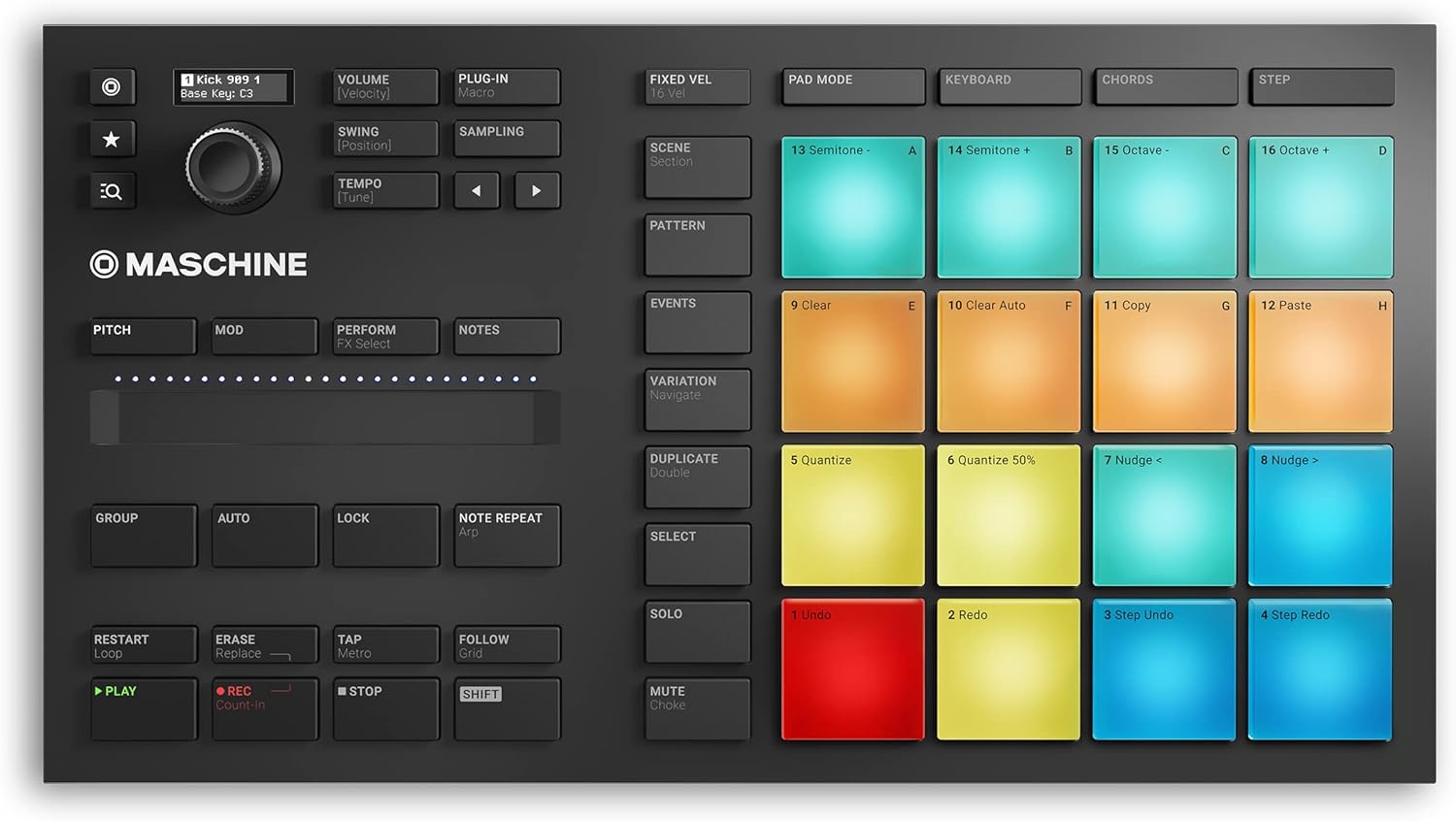
Native Instruments Maschine Mikro Mk3 – USB MIDI Controller Drum Pad with 16 Pads and Massive, Monark and Reaktor Prism Softwares. Includes 1.6 GB Keyboard Factory Selection Samples
AED1,82252
Quantity:
Order today to get by 7-14 business days
This item qualifies for free delivery
Imported From: United Kingdom
At BOLO, we work hard to ensure the products you receive are new, genuine, and sourced from reputable suppliers.
BOLO is not an authorized or official retailer for most brands, nor are we affiliated with manufacturers unless specifically stated on a product page. Instead, we source verified sellers, authorized distributors or directly from the manufacturer.
Each product undergoes thorough inspection and verification at our consolidation and fulfilment centers to ensure it meets our strict authenticity and quality standards before being shipped and delivered to you.
If you ever have concerns regarding the authenticity of a product purchased from us, please contact Bolo Support. We will review your inquiry promptly and, if necessary, provide documentation verifying authenticity or offer a suitable resolution.
Your trust is our top priority, and we are committed to maintaining transparency and integrity in every transaction.
All product information, images, descriptions, and reviews originate from the manufacturer or from trusted sellers overseas. BOLO is not affiliated with, endorsed by, or an authorized retailer for most brands listed on our website unless stated otherwise.
While we strive to display accurate information, variations in packaging, labeling, instructions, or formulation may occasionally occur due to regional differences or supplier updates. For detailed or manufacturer-specific information, please contact the brand directly or reach out to BOLO Support for assistance.
Unless otherwise stated, all prices displayed on the product page include applicable taxes and import duties.
BOLO operates in accordance with the laws and regulations of United Arab Emirates. Any items found to be restricted or prohibited for sale within the UAE will be cancelled prior to shipment. We take proactive measures to ensure that only products permitted for sale in United Arab Emirates are listed on our website.
All items are shipped by air, and any products classified as “Dangerous Goods (DG)” under IATA regulations will be removed from the order and cancelled.
All orders are processed manually, and we make every effort to process them promptly once confirmed. Products cancelled due to the above reasons will be permanently removed from listings across the website.
Similar suggestions by Bolo
More from this brand
Share with
Or share with link
https://www.bolo.ae/products/KO07TL8P68W
Visit the Native Instruments Store
Native Instruments Maschine Mikro Mk3 – USB MIDI Controller Drum Pad with 16 Pads and Massive, Monark and Reaktor Prism Softwares. Includes 1.6 GB Keyboard Factory Selection Samples

AED1,82252
Quantity:
Order today to get by 7-14 business days
This item qualifies for free delivery
Imported From: United Kingdom
At BOLO, we work hard to ensure the products you receive are new, genuine, and sourced from reputable suppliers.
BOLO is not an authorized or official retailer for most brands, nor are we affiliated with manufacturers unless specifically stated on a product page. Instead, we source verified sellers, authorized distributors or directly from the manufacturer.
Each product undergoes thorough inspection and verification at our consolidation and fulfilment centers to ensure it meets our strict authenticity and quality standards before being shipped and delivered to you.
If you ever have concerns regarding the authenticity of a product purchased from us, please contact Bolo Support. We will review your inquiry promptly and, if necessary, provide documentation verifying authenticity or offer a suitable resolution.
Your trust is our top priority, and we are committed to maintaining transparency and integrity in every transaction.
All product information, images, descriptions, and reviews originate from the manufacturer or from trusted sellers overseas. BOLO is not affiliated with, endorsed by, or an authorized retailer for most brands listed on our website unless stated otherwise.
While we strive to display accurate information, variations in packaging, labeling, instructions, or formulation may occasionally occur due to regional differences or supplier updates. For detailed or manufacturer-specific information, please contact the brand directly or reach out to BOLO Support for assistance.
Unless otherwise stated, all prices displayed on the product page include applicable taxes and import duties.
BOLO operates in accordance with the laws and regulations of United Arab Emirates. Any items found to be restricted or prohibited for sale within the UAE will be cancelled prior to shipment. We take proactive measures to ensure that only products permitted for sale in United Arab Emirates are listed on our website.
All items are shipped by air, and any products classified as “Dangerous Goods (DG)” under IATA regulations will be removed from the order and cancelled.
All orders are processed manually, and we make every effort to process them promptly once confirmed. Products cancelled due to the above reasons will be permanently removed from listings across the website.
Description:
Reviews:
5.0 out of 5 stars Is This Worth Buying in 2025?
This device is knocking on a bit now, having been first released in Oct 2017.Is it still worth buying in 2025? - Absolutely!! It’s a superb bit of kit! And there are no signs yet of a Mk4 version being released any time soon.You do need know what you are buying though…First and foremost, this is not a ‘standalone’ item.This cannot produce any sounds on its own – none whatsoever!It is a controller, designed to control specific software on a computer.This software is called 'Maschine'.Version 3 is the latest version (since Nov ’24) and is bundled with the Mikro when bought new, and available after registering your Mikro with Native Instruments.Here’s where some 5-star reviewers are being quite harsh, criticising some 1-star reviewers.One 5-star reviewer in particular shouldn’t be quite so glib about stating this definitely comes with the required software. Yes, if bought new, it will do - but…If you buy this used here, there is a high probability that the unit has been registered with NI by the original purchaser and not de-registered on return, so you cannot re-register it in your account and therefore cannot gain access to the required software, rendering the unit next to useless!Please, if you buy this new and return it, have the decency to de-register it in your NI account and include the code NI give you to pass on to the next owner with your return!!So, onto using this device to create music…At the very least you will need a computer and an internet connection.This can be a PC - Windows laptop, desktop etc running Win10/11.Or a Mac (Intel or Silicon) running an up-to-date version of Mac OS.This does not work with an iPad or iPhone!A USB cable is included.Connect to your computer and you’ll see a flurry of lights at first, but then nothing! – This is normal - the controller is waiting for the Maschine software to run.Look at the black card that comes with the device and go to the web address shown – see my photo.You will need a Native Instruments account – free and easy to obtain.You then need to download and install Native Instruments’ ‘Native Access 2’ app – again free and easy to install.Log in to your account within the Native Access app and register the serial number of your nice new Maschine Mikro Mk3. This is printed on the black card that came with your device and is also on the base of the device. Click ‘add serial number’ on the bottom left of access and key in your serial number.You will then gain licensed access to download the bundled software through Native Access – see my screenshot from Access on my PC.If Native Access reports the serial number is already registered, you have probably bought a used unit where the previous owner has failed to de-register. NI support can very often help with this if you show them proof of purchase etc. But the safest way to buy this, is to buy new!It’s worth noting that if you buy used and have the older Maschine 2 software bundled with it, upgrading from version 2 to the latest full Maschine 3 software will set you back around £60, possibly making buying used less attractive. The full Maschine 3 software is automatically supplied with any Maschine Mk3 controller newly purchased and registered since Nov ’24.When registered, you will receive emails thanking you for your purchase with some great getting started guides. The full manual is easily found on NI’s site through the links provided in the emails from NI.Once the Maschine software is up and running, your Mikro Mk3 sparks into life and stops behaving dead!When first run, the software may take some time to start due to a one-off plug-in scan. The time taken depends on how many audio plugins you already have on your computer. This scan only runs once and the start-up time will be near instant the next time you run the software. I have a lot of plugins on my system and the first scan took close to 20 minutes!The Mikro Mk3 is reassuringly well built, with some nice weight to it. It’s a great cut down from the full controller, great value and fun to use.The included sound library is superb with sounds for all genres of music making. Lots of inspiration for musician’s block!The latest Maschine Version 3 software is well worth having. The stems feature alone is amazing and great fun! The UI is a bit more friendly too.The learning curve is not simple, I’ll be honest, but there is plenty of help and advice available on NI’s site to help you learn. Check out their YT channel too – look for the Maschine playlists. There are 2 playlists, one for the Mikro Mk3 hardware and one for the vers 3 software.If you experience any issues, NI support is really very good in my experience.As well as Maschine I also own their ‘Komplete 15 Collector's Edition’ and the Kontrol S61 MK3 Keyboard, which is just fabulous and integrates with the Maschine software in a very funky way!If you got this far, thanks for reading! I do hope I’ve helped :-)
5.0 out of 5 stars A versatile little bit of kit!
The Maschine hardware is great for the price. I use it to lay down beats for my tracks, and have started to use the software to slice up breaks and map them to the pads - awesome!A lot of the NI packs come with Maschine presets, so there are plenty of cool sounds to chose from, whatever genre of music you are making.In MIDI mode I set this up to work with Output Arcade and it's great for triggering samples and messing with rhythms.Fun!
5.0 out of 5 stars Excellent
Being a newbie with music making and production, I love this product, I've been Inspired by fred again and kenya grace lately and wanted to try my own music journey, maschine mikro mk3 far exceeds this! The amount of possibilities are endless with any genre of music and imagination.Brilliant quality, ease of use and performance, comfortably woth far more than it's priced at given you can make professional music with it and.the included software.If you have any interst in digital music making or production, this is a must to get started on.
5.0 out of 5 stars Great buy
Fantastic add on to the excellent software
4.0 out of 5 stars it doesn't work on the ipad
this controller would be the best drum controller on the market but it doesn't support midi standalone mode, or to be clear better, while most of the other native instruments controller have a sequence of buttons to switch it to normal usb midi, this doesn't have it so you need the NI driver to use it with other apps.this for example means that I cannot use it on my android tablet or ipad or in devices where i can't install the Ni machine and drivers. that's simply stupid
5.0 out of 5 stars Great at this price point
For the money this is an excellent piece of hardware to use either with the provided software or within your Daw of choice. Obviously it would be even better if it was standalone but they have Maschine plus for that (if your pockets are deep enough!)👍 I have this setup with the komplete Kontrol m32 which is a great pairing and can do everything when paired with the right software. This is especially good if you are on a tight budget and a good starting point if you are new to music production.
5.0 out of 5 stars Great Maschine!
Excellent device, great value. Ignore the weird stuff from other reviewers, it works fine with Windows 10 and Bolo send you a perfectly fine device that registers the software fine. A fantastic entry into music production. Can’t believe other people have given it 1/5 because it has ‘no instructions’ or the fact it isn’t a midi player even though it doesn’t say it is ,maybe they should buy fisher price. I knew what I had ordered and I’m very pleased with it,any struggles I have our my own as producing music isn’t easy. The hardware is responsive,intuitive and excellent
5.0 out of 5 stars Great value for money.
You will need a computer to use the software. Once you get your head around that it's a joy.I use it with Komplete Kontrol S49 Mk 2 and it's really exciting to use.However; if you are a beginner it can be confusing at first. Native Instruments are difficult but well worth the effort to master.If you are after a stand alone buy a Maschine Mk3.
Genuine and brand new
Got a brand new device with all software and hardware working as expected. All code registrations on official website were completed smoothly without any issues. Seller was Soundglitz and they Delivered 3 days before delivery date.Good device by Native instruments but need to learn their workflow to make best use of all the features. Overall happy with the order and delivery process of these unique devices by the seller.
Excelente producto
Muy recomendable
Excelente!
A Mikro3 é a forma mais acessível para quem quiser entrar no mundo Maschine da Native Instruments. Os pads são os melhores que já experimentei. Atenção: ela precisa ser acoplada a um notebook.
最初の設定がむずい
いい!
Best bang for the buck.
I was looking for a new way to approach tune making. This device shines with its Machine DAW software and the ability to customize it with the configuration software. You can view many Youtube videos demonstrating its capabilities, so I will summarize here:The Maschine software is a DAW that can use existing VSTs and any of the NI expansion packs to create songs.Maschine software is based on the concept of building blocks for your composition...build a beat or phrase, chain beats and/or phrases and link them together.This is not how I create music but it's very useful, nonetheless.I love the key and chord modes that allow great experimentation. You configure your scale and base key and pretty much can't go wrong with the pad strikes. There's many different chord types and scales to choose from which really opens up the experimental aspect.I use Cubase and Reason and it integrates perfectly as a VST instrument in both cases.Many instances can be opened, so you can create a song using your favorite DAW and using the Maschine as an instrument for each track. This is what works best for me.Additionally, it is easily set up in MIDI mode by pressing (SHIFT + project) and using the configuration software, the pads can be adjusted to match your favorite drum machine. The config software allows you to adjust pad colors in MIDI mode.Maschine works really well if you have another NI keyboard. I have a Kontrol S61 and it can be used to browse and play harmonic notes right alongside the pads.Lastly, Maschine hardware seems really well built and has fantastic tactile response.Everything is downloaded from NI. The software, owners' manual and all the other documentation is well written, straightforward and do a good job explaining all the concepts they dicuss.
Similar suggestions by Bolo
More from this brand
Share with
Or share with link
https://www.bolo.ae/products/KO07TL8P68W