Deliver toUnited Arab Emirates
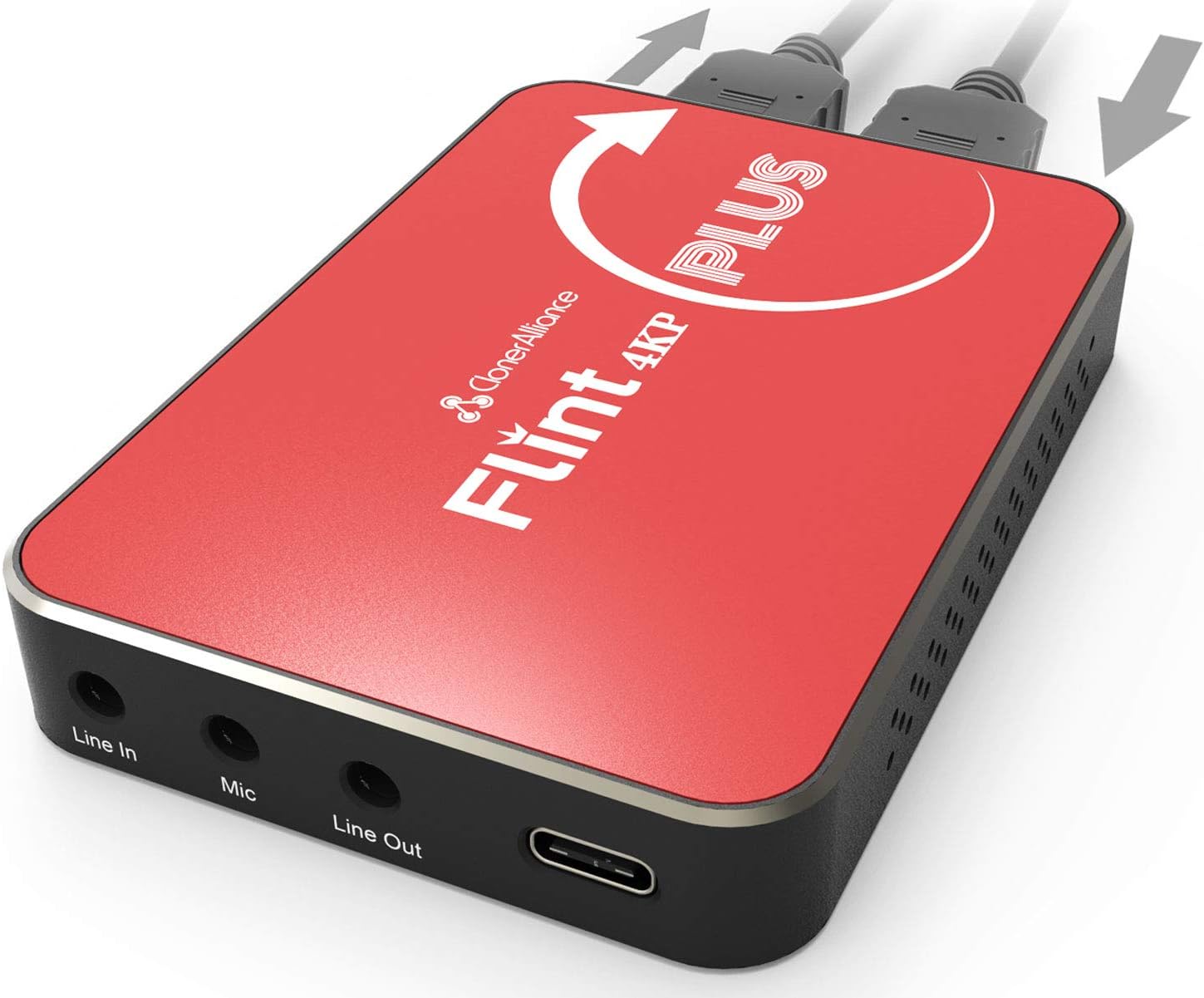
ClonerAlliance Flint 4KP Plus, 4K@60fps Passthrough, 1080p@60fps Video Capture with Mic Input, Ultra-Low Latency, Plug&Play. For Game Consoles, DSLR

Description:

  • 4K@60fps Passthrough - Experience 4K while recording or streaming at 1080p@60fps without sacrifice.
  • High-performance - USB 3.0 Type-C port for PC and Mobile. Converters, adapters included.
  • Plug and Play right out of the box - UVC standard. Windows, Mac, Linux, and Android supported.
  • Ultra-Low Latency - No lag for gaming play. Perfect compatibility with popular 3rd party software.
  • Live Commentary - Add your voice to live or recorded video and output to headphones or speakers.

  • Reviews:

    5.0 out of 5 stars Plug and play

    A. · 13 June 2020

    Worked straight out of the boxUsed to hook my Panasonic Lumix GH4 to my MacBook Pro as a webcam/livestream device...

    5.0 out of 5 stars No fuss HDMI to USB.

    M.T.J.A. · 24 June 2020

    Does what is says it does. So far no problems. Worked a treat straight out of the box.

    4.0 out of 5 stars A few negatives but still worth buying

    A.C. · 22 June 2020

    Good points: worked out the box on mac in teams, zoom, obs. Picture quality is excellent and had no problems capturing from a variety of sources, DSLR, camcorder fire stick. Seems sturdy. Not tested pass through as I don't need it.Less good: usb-c to usb-a cable seems a bit loose on the c end. Changing to another cable was better. There's included usb-a female to usb-c male adaptors included, one is blue and one is silver - no idea what the difference is and both seem to work. I can't get the headphone or line input audio to work on Mac and can't find any instructions anywhere, hdmi audio works fine. Using the included cable I got a number of ' usb device using too much power' messages on Mac, having swapped cables they've stopped, so maybe it's just the slightly loose connector that caused it.Overall: I've listed quite a number of negatives, but none are show stoppers and I still would have bought it knowing what I know now.

    5.0 out of 5 stars excellent

    M.P.W. · 17 January 2020

    want to get into streaming your gamming but lag is an issue?...well not anymore with this nifty little box. easy to set up after watching a few online tutorials you find it very simple and easy to use. It provides you with actual 4k clarity and there is no percievable lag that I can see. Comes with most of teh leads you will need and theres available software to download. A great piece of kit for anyone wanting to share thier gaming life with the rest of teh world

    3.0 out of 5 stars Initially no audio - working after a week of frustration

    t. · 26 March 2020

    Got sound working eventually.To help others: make sure the HDMI source outputs either Stereo or PCM; the product will not work with anything else.Since it comes with only basic set up info, this took a week or so of discussion with their support/developers to sort out.To be fair, the support people were diligent in trying to find and fix the problem, but it would be better if they were clear about this constraint from the start.

    5.0 out of 5 stars Excellent at handing heavy loads of FPS data and demanding 4K images

    C. · 2 January 2020

    Some Passthroughs advertise 4K, But in reality many can only deal with HDCP 2.2, Basically making them worthless and unable to play movies on Blu-ray players, As they won't work correctly. This Flint 4KP Plus fully supports high FPS data streams during gameplay and can handle heavy loads of 4K movie data without even breaking a sweat.The 4k Resolution is crystal clear with no lagging, And gives me average of 55-60fps. This beast of a passthrough eases up the strain that most inbuilt hardware cant handle, Essentially making this the centre hub for all the demanding jobs of gaming and streaming.The passthrough has simple plug and play interface, With a USB 3 C style port for laptops, PC's, And phones. It comes with all the necessary adapters and converters to start streaming and playing straight away and supports most OS such as windows, Linux, Mac and even android.

    1.0 out of 5 stars Didn’t work.

    J.C. · 1 February 2020

    Couldn’t get it to stream a viable video feed from my DSLR camera to my PC. Colours washed out and grainy, like an old video tape.

    2.0 out of 5 stars Maybe its good, I don't know

    P.P. · 29 May 2021

    Unfortunately not plug-and-play for me ... the image from my Panasonic Lumix camera appeared to be washed out colours, with only a green tinge. Customer support sent me the usual script: restart camera, check camera settings, reboot your PC ... whatever. Sent it back and got a Magwell instead - boom! Worked straight out the box - nothing wrong with my set up.I could have spent a few days working it out ... but I didn't have a few days to spare. Sorry.

    Tut was es, leider nicht das was ich gebraucht habe

    A.K. · 28 January 2020

    Ich war sehr zufrieden mit der Leistung der ClonerAlliance Flint 5KP plus. Ich konnte ohne weiteres einen Teil meines Desktops an den für Recording und Streaming ausgelegten Rechner übertragen. Leider wurden auch die typischen X11 screen tears übermittelt, welches die Aufnahmen und Streams beeinträchtigt haben.Verifizieren konnte ich den 4K pass through Modus, den FullHD Output und eine nahezu Latenz freie Übertragung. Auch die Verwendung unter Linux war 1A, da es ein V4L2 Device ist. Der Ton war auch gut, alles in allem war ich zufrieden, aber mit den von mir kommenden screen tears war es nicht das was ich gebraucht habe.Statt dessen habe ich einen RTMP Server aufgesetzt und verwende inhouse streaming, welches mir mehr Freiheiten und auch bessere Ergebnisse liefert. Nicht desto trotz, für Konsolen recording / streaming ist dieses Gerät Einwand frei.

    Works fine

    A.C. · 11 August 2022

    Works fine for capturing video from handhelds with output to HDMI 720p/1080p@60Hz.In comparison to AverMedia GC553 I've used before:- Flint can be used with more types of hubs. At least with hub I've it just works, GC553 required USB3.1 Gen1 and did not like USB3.0 (which should be USB3.1 Gen1 I guess but does not work with GC553 for some reason) or USB3.2 Gen2 ports. Works with direct connection to laptop though.- both support UVC and work with OBS, however AverMedia has also soft for macOS which is a bit easier to use without need to setup video encoder much- Flint gets warm but is silent, seems to have passive cooling (GC553 has somewhat noisy fan)

    Solid capture card for 1080p60

    u. · 11 April 2020

    I bought this card to record Xbox One X 4k gameplay in 1080p60. This card stood out to me as it promised to do 4k60 passthrough.Upon receiving the unit, I hooked it up to my system and was ready to record videos in under 1 minute. Worked fantastically on a Mac, with zero configs. The image is crystal clear through the YUY2 feed. The latency is also really good. If I were to make a guess, I would say it's only maybe 5 frames behind the TV screen. This is probably as good as it gets on the USB 3.0 interface.Unfortunately, I am having a hard time getting 4k60 passthrough to work. My source is a base 4k60 with no HDR, which should be compatible with this device, but still no luck. I may have gotten a defective copy or something. I will have to spend some time and look into this.The unit only works with Stereo uncompressed audio. This means that you will either need to plug your audio source directly to an AVR unit or do something similar, to get surround sound. This is pretty typical for capture cards in this price range.Other than the passthrough problem I am having, I think this product is a solid 4-star.Update:I exchanged multiple emails with ClonerAlliance about my problem in the past few days, and they concluded that there is a compatibility issue between my TV and Xbox. I have an Apple TV 4th Gen and the passthrough feature worked just fine with that device, so I am not sure what's up with my Xbox. I am just going to have to continue to fiddle with the devices until I find out more info.Although they did not fix my Xbox problem, I am actually bumping up my review to 5-star. I was very happy with the diligence they showed during the communication and their commitment to deliver satisfaction. I have no doubt that you will get the help you need from this company, which, I think, should be reflected in the product review.For the benefit of the future buyers, my TV is Vizio E65-E1 2017.

    1920 X 1080 60FPS confirmed in Linux! Here are a few tricks.

    B.S. · 25 July 2020

    The media could not be loaded. This was a plug and play device that worked right with Ubuntu 18.04 and also worked with windows, also plug and play, if you care about that sort of OS. I originally used this to screencast from a different machine and although it recorded video footage fine, i was getting awful quality from recording a screen. It turns out Cheese, the default linux webcam program, did an amazing job. It pulled 1920 x 1080 30fps at perfect quality without hardly adjusting a setting. I eventually got OBS working after a lot of settings tweaks. So if you need something easy, try running this thing through cheese. I'm including some footage - cheese has vivid colors and is extremely sharp compared to OBS but isn't as good in darker settings- probably ideal for screencasting. I'm also including a few OBS configurations in Linux in the video too with the original to help compare.VLC media player has a codec analysis tool that can tell you if you're truly recording at 1920 x 1080 and what fps. In the beginning, my card was recording at 720 even though the settings were at 1080. I figured out I could rescale the input from OBS and then I was truly in 1080 60fps. I recommend checking the codec to make sure it's truly at the definition the settings are at, I would have never known otherwise.Support was OK. I contacted them with regard to the screencast quality problems and every reply they had was prompt. The answers were vague, such as 'adjust your settings' and 'try it in windows'. But they stand behind their product, and I feel good about purchasing from them again because of the level of service I received.Great product, highly recommend!

    does the job

    l. · 4 November 2021

    does what it supposed to, I’ve had capture cards that claim to capture at 60fps but only to find out they’re capped at 30fps. this truly does 60fps capture indeed.

    ClonerAlliance Flint 4KP Plus, 4K@60fps Passthrough, 1080p@60fps Video Capture with Mic Input, Ultra-Low Latency, Plug&Play. For Game Consoles, DSLR

    Product ID: KO07LL52LC6
    Condition: New

    4.1

    AED1,55659

    Price includes VAT & Import Duties
    Availability: In Stock

    Quantity:

    |

    Order today to get by 7-14 business days

    This item qualifies for free delivery

    Returns & Warranty policies

    Imported From: United Kingdom

    At BOLO, we work hard to ensure the products you receive are new, genuine, and sourced from reputable suppliers.

    BOLO is not an authorized or official retailer for most brands, nor are we affiliated with manufacturers unless specifically stated on a product page. Instead, we source verified sellers, authorized distributors or directly from the manufacturer.

    Each product undergoes thorough inspection and verification at our consolidation and fulfilment centers to ensure it meets our strict authenticity and quality standards before being shipped and delivered to you.

    If you ever have concerns regarding the authenticity of a product purchased from us, please contact Bolo Support. We will review your inquiry promptly and, if necessary, provide documentation verifying authenticity or offer a suitable resolution.

    Your trust is our top priority, and we are committed to maintaining transparency and integrity in every transaction.

    All product information, images, descriptions, and reviews originate from the manufacturer or from trusted sellers overseas. BOLO is not affiliated with, endorsed by, or an authorized retailer for most brands listed on our website unless stated otherwise.

    While we strive to display accurate information, variations in packaging, labeling, instructions, or formulation may occasionally occur due to regional differences or supplier updates. For detailed or manufacturer-specific information, please contact the brand directly or reach out to BOLO Support for assistance.

    Unless otherwise stated, all prices displayed on the product page include applicable taxes and import duties.

    BOLO operates in accordance with the laws and regulations of United Arab Emirates. Any items found to be restricted or prohibited for sale within the UAE will be cancelled prior to shipment. We take proactive measures to ensure that only products permitted for sale in United Arab Emirates are listed on our website.

    All items are shipped by air, and any products classified as “Dangerous Goods (DG)” under IATA regulations will be removed from the order and cancelled.

    All orders are processed manually, and we make every effort to process them promptly once confirmed. Products cancelled due to the above reasons will be permanently removed from listings across the website.

    Similar suggestions by Bolo

    More from this brand

    Similar items from “Video Converters”

    ClonerAlliance Flint 4KP Plus, 4K@60fps Passthrough, 1080p@60fps Video Capture with Mic Input, Ultra-Low Latency, Plug&Play. For Game Consoles, DSLR

    Product ID: KO07LL52LC6
    Condition: New

    4.1

    ClonerAlliance Flint 4KP Plus, 4K@60fps Passthrough, 1080p@60fps Video Capture with Mic Input, Ultra-Low Latency, Plug&Play. For Game Consoles, DSLR-0

    AED1,55659

    Price includes VAT & Import Duties
    Availability: In Stock

    Quantity:

    |

    Order today to get by 7-14 business days

    This item qualifies for free delivery

    Returns & Warranty policies

    Imported From: United Kingdom

    At BOLO, we work hard to ensure the products you receive are new, genuine, and sourced from reputable suppliers.

    BOLO is not an authorized or official retailer for most brands, nor are we affiliated with manufacturers unless specifically stated on a product page. Instead, we source verified sellers, authorized distributors or directly from the manufacturer.

    Each product undergoes thorough inspection and verification at our consolidation and fulfilment centers to ensure it meets our strict authenticity and quality standards before being shipped and delivered to you.

    If you ever have concerns regarding the authenticity of a product purchased from us, please contact Bolo Support. We will review your inquiry promptly and, if necessary, provide documentation verifying authenticity or offer a suitable resolution.

    Your trust is our top priority, and we are committed to maintaining transparency and integrity in every transaction.

    All product information, images, descriptions, and reviews originate from the manufacturer or from trusted sellers overseas. BOLO is not affiliated with, endorsed by, or an authorized retailer for most brands listed on our website unless stated otherwise.

    While we strive to display accurate information, variations in packaging, labeling, instructions, or formulation may occasionally occur due to regional differences or supplier updates. For detailed or manufacturer-specific information, please contact the brand directly or reach out to BOLO Support for assistance.

    Unless otherwise stated, all prices displayed on the product page include applicable taxes and import duties.

    BOLO operates in accordance with the laws and regulations of United Arab Emirates. Any items found to be restricted or prohibited for sale within the UAE will be cancelled prior to shipment. We take proactive measures to ensure that only products permitted for sale in United Arab Emirates are listed on our website.

    All items are shipped by air, and any products classified as “Dangerous Goods (DG)” under IATA regulations will be removed from the order and cancelled.

    All orders are processed manually, and we make every effort to process them promptly once confirmed. Products cancelled due to the above reasons will be permanently removed from listings across the website.

    Description:

  • 4K@60fps Passthrough - Experience 4K while recording or streaming at 1080p@60fps without sacrifice.
  • High-performance - USB 3.0 Type-C port for PC and Mobile. Converters, adapters included.
  • Plug and Play right out of the box - UVC standard. Windows, Mac, Linux, and Android supported.
  • Ultra-Low Latency - No lag for gaming play. Perfect compatibility with popular 3rd party software.
  • Live Commentary - Add your voice to live or recorded video and output to headphones or speakers.

  • Reviews:

    5.0 out of 5 stars Plug and play

    A. · 13 June 2020

    Worked straight out of the boxUsed to hook my Panasonic Lumix GH4 to my MacBook Pro as a webcam/livestream device...

    5.0 out of 5 stars No fuss HDMI to USB.

    M.T.J.A. · 24 June 2020

    Does what is says it does. So far no problems. Worked a treat straight out of the box.

    4.0 out of 5 stars A few negatives but still worth buying

    A.C. · 22 June 2020

    Good points: worked out the box on mac in teams, zoom, obs. Picture quality is excellent and had no problems capturing from a variety of sources, DSLR, camcorder fire stick. Seems sturdy. Not tested pass through as I don't need it.Less good: usb-c to usb-a cable seems a bit loose on the c end. Changing to another cable was better. There's included usb-a female to usb-c male adaptors included, one is blue and one is silver - no idea what the difference is and both seem to work. I can't get the headphone or line input audio to work on Mac and can't find any instructions anywhere, hdmi audio works fine. Using the included cable I got a number of ' usb device using too much power' messages on Mac, having swapped cables they've stopped, so maybe it's just the slightly loose connector that caused it.Overall: I've listed quite a number of negatives, but none are show stoppers and I still would have bought it knowing what I know now.

    5.0 out of 5 stars excellent

    M.P.W. · 17 January 2020

    want to get into streaming your gamming but lag is an issue?...well not anymore with this nifty little box. easy to set up after watching a few online tutorials you find it very simple and easy to use. It provides you with actual 4k clarity and there is no percievable lag that I can see. Comes with most of teh leads you will need and theres available software to download. A great piece of kit for anyone wanting to share thier gaming life with the rest of teh world

    3.0 out of 5 stars Initially no audio - working after a week of frustration

    t. · 26 March 2020

    Got sound working eventually.To help others: make sure the HDMI source outputs either Stereo or PCM; the product will not work with anything else.Since it comes with only basic set up info, this took a week or so of discussion with their support/developers to sort out.To be fair, the support people were diligent in trying to find and fix the problem, but it would be better if they were clear about this constraint from the start.

    5.0 out of 5 stars Excellent at handing heavy loads of FPS data and demanding 4K images

    C. · 2 January 2020

    Some Passthroughs advertise 4K, But in reality many can only deal with HDCP 2.2, Basically making them worthless and unable to play movies on Blu-ray players, As they won't work correctly. This Flint 4KP Plus fully supports high FPS data streams during gameplay and can handle heavy loads of 4K movie data without even breaking a sweat.The 4k Resolution is crystal clear with no lagging, And gives me average of 55-60fps. This beast of a passthrough eases up the strain that most inbuilt hardware cant handle, Essentially making this the centre hub for all the demanding jobs of gaming and streaming.The passthrough has simple plug and play interface, With a USB 3 C style port for laptops, PC's, And phones. It comes with all the necessary adapters and converters to start streaming and playing straight away and supports most OS such as windows, Linux, Mac and even android.

    1.0 out of 5 stars Didn’t work.

    J.C. · 1 February 2020

    Couldn’t get it to stream a viable video feed from my DSLR camera to my PC. Colours washed out and grainy, like an old video tape.

    2.0 out of 5 stars Maybe its good, I don't know

    P.P. · 29 May 2021

    Unfortunately not plug-and-play for me ... the image from my Panasonic Lumix camera appeared to be washed out colours, with only a green tinge. Customer support sent me the usual script: restart camera, check camera settings, reboot your PC ... whatever. Sent it back and got a Magwell instead - boom! Worked straight out the box - nothing wrong with my set up.I could have spent a few days working it out ... but I didn't have a few days to spare. Sorry.

    Tut was es, leider nicht das was ich gebraucht habe

    A.K. · 28 January 2020

    Ich war sehr zufrieden mit der Leistung der ClonerAlliance Flint 5KP plus. Ich konnte ohne weiteres einen Teil meines Desktops an den für Recording und Streaming ausgelegten Rechner übertragen. Leider wurden auch die typischen X11 screen tears übermittelt, welches die Aufnahmen und Streams beeinträchtigt haben.Verifizieren konnte ich den 4K pass through Modus, den FullHD Output und eine nahezu Latenz freie Übertragung. Auch die Verwendung unter Linux war 1A, da es ein V4L2 Device ist. Der Ton war auch gut, alles in allem war ich zufrieden, aber mit den von mir kommenden screen tears war es nicht das was ich gebraucht habe.Statt dessen habe ich einen RTMP Server aufgesetzt und verwende inhouse streaming, welches mir mehr Freiheiten und auch bessere Ergebnisse liefert. Nicht desto trotz, für Konsolen recording / streaming ist dieses Gerät Einwand frei.

    Works fine

    A.C. · 11 August 2022

    Works fine for capturing video from handhelds with output to HDMI 720p/1080p@60Hz.In comparison to AverMedia GC553 I've used before:- Flint can be used with more types of hubs. At least with hub I've it just works, GC553 required USB3.1 Gen1 and did not like USB3.0 (which should be USB3.1 Gen1 I guess but does not work with GC553 for some reason) or USB3.2 Gen2 ports. Works with direct connection to laptop though.- both support UVC and work with OBS, however AverMedia has also soft for macOS which is a bit easier to use without need to setup video encoder much- Flint gets warm but is silent, seems to have passive cooling (GC553 has somewhat noisy fan)

    Solid capture card for 1080p60

    u. · 11 April 2020

    I bought this card to record Xbox One X 4k gameplay in 1080p60. This card stood out to me as it promised to do 4k60 passthrough.Upon receiving the unit, I hooked it up to my system and was ready to record videos in under 1 minute. Worked fantastically on a Mac, with zero configs. The image is crystal clear through the YUY2 feed. The latency is also really good. If I were to make a guess, I would say it's only maybe 5 frames behind the TV screen. This is probably as good as it gets on the USB 3.0 interface.Unfortunately, I am having a hard time getting 4k60 passthrough to work. My source is a base 4k60 with no HDR, which should be compatible with this device, but still no luck. I may have gotten a defective copy or something. I will have to spend some time and look into this.The unit only works with Stereo uncompressed audio. This means that you will either need to plug your audio source directly to an AVR unit or do something similar, to get surround sound. This is pretty typical for capture cards in this price range.Other than the passthrough problem I am having, I think this product is a solid 4-star.Update:I exchanged multiple emails with ClonerAlliance about my problem in the past few days, and they concluded that there is a compatibility issue between my TV and Xbox. I have an Apple TV 4th Gen and the passthrough feature worked just fine with that device, so I am not sure what's up with my Xbox. I am just going to have to continue to fiddle with the devices until I find out more info.Although they did not fix my Xbox problem, I am actually bumping up my review to 5-star. I was very happy with the diligence they showed during the communication and their commitment to deliver satisfaction. I have no doubt that you will get the help you need from this company, which, I think, should be reflected in the product review.For the benefit of the future buyers, my TV is Vizio E65-E1 2017.

    1920 X 1080 60FPS confirmed in Linux! Here are a few tricks.

    B.S. · 25 July 2020

    The media could not be loaded. This was a plug and play device that worked right with Ubuntu 18.04 and also worked with windows, also plug and play, if you care about that sort of OS. I originally used this to screencast from a different machine and although it recorded video footage fine, i was getting awful quality from recording a screen. It turns out Cheese, the default linux webcam program, did an amazing job. It pulled 1920 x 1080 30fps at perfect quality without hardly adjusting a setting. I eventually got OBS working after a lot of settings tweaks. So if you need something easy, try running this thing through cheese. I'm including some footage - cheese has vivid colors and is extremely sharp compared to OBS but isn't as good in darker settings- probably ideal for screencasting. I'm also including a few OBS configurations in Linux in the video too with the original to help compare.VLC media player has a codec analysis tool that can tell you if you're truly recording at 1920 x 1080 and what fps. In the beginning, my card was recording at 720 even though the settings were at 1080. I figured out I could rescale the input from OBS and then I was truly in 1080 60fps. I recommend checking the codec to make sure it's truly at the definition the settings are at, I would have never known otherwise.Support was OK. I contacted them with regard to the screencast quality problems and every reply they had was prompt. The answers were vague, such as 'adjust your settings' and 'try it in windows'. But they stand behind their product, and I feel good about purchasing from them again because of the level of service I received.Great product, highly recommend!

    does the job

    l. · 4 November 2021

    does what it supposed to, I’ve had capture cards that claim to capture at 60fps but only to find out they’re capped at 30fps. this truly does 60fps capture indeed.

    Similar suggestions by Bolo

    More from this brand

    Similar items from “Video Converters”