Deliver toUnited Arab Emirates
XP-Pen Deco Pro Professional Graphics Drawing Tablet With 8192 Levels Pen Pressure Battery-Free Pen 8 Shortcut Keys Support Windows, Mac & Android (Medium)

Description:

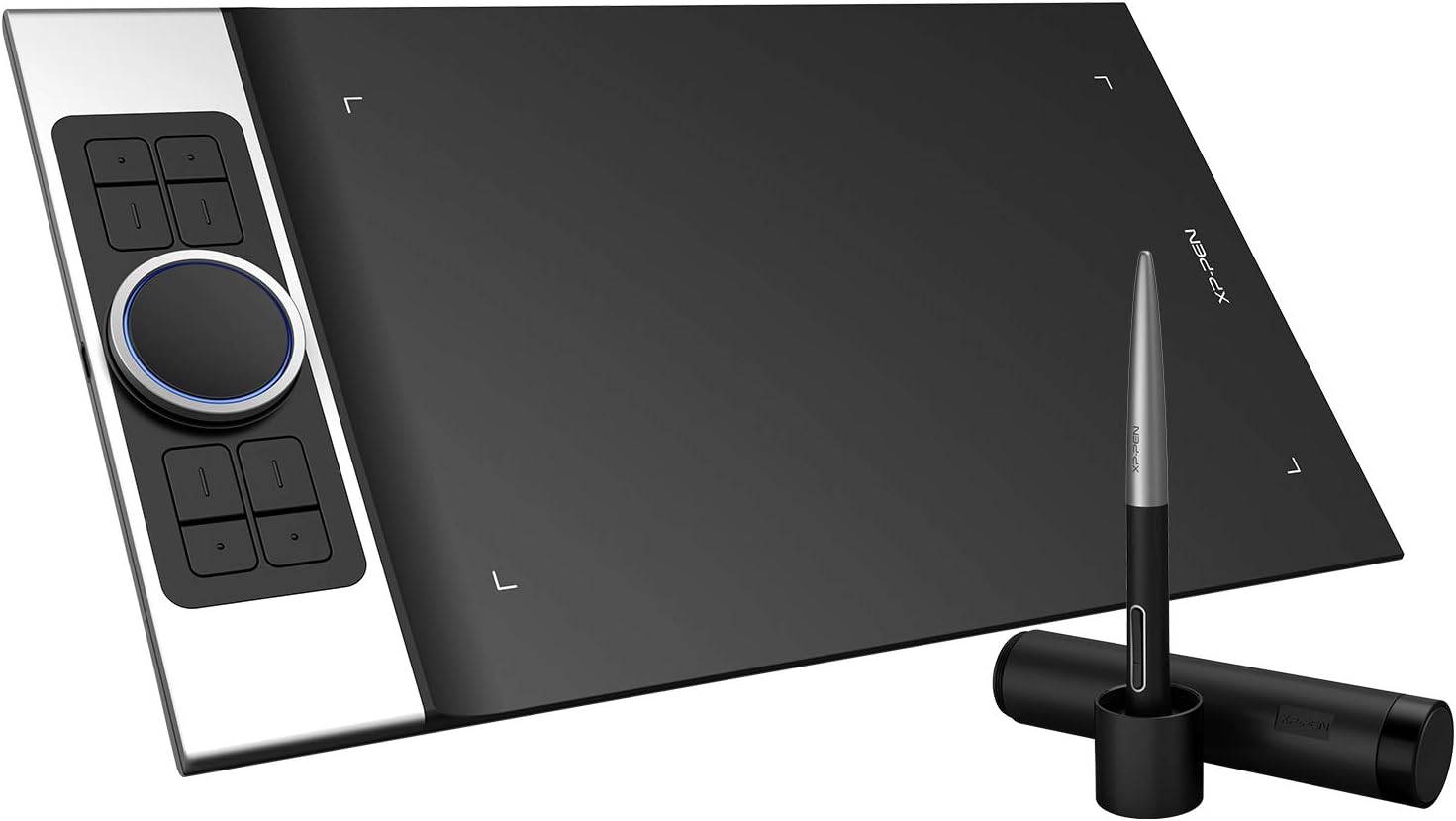
  • Outstanding design💥 The Deco Pro, XP-Pen’s latest tablet release, makes its debut as the 2019 Red Dot Design Award Winner and the 2018 Good Design Award Winner! It features double wheel interface and 8 responsive shortcut keys,which extremely improve your work efficiency.
  • Speed up your workflow💥 The new groundbreaking double wheel interface combines a mechanical and virtual wheel that makes it possible to perform multiple actions with one hand. It also helps eliminate distractions and interruptions from your workflow and creative process. With two wheels, it’s easier and quicker than ever to capture, write, draw, and edit, guaranteeing greater speed and a complete focus on your creation.
  • Focus on your creativity💥 The XP-Pen Deco Pro Medium supports up to 60 degrees of tilt function, quickly and easily responding to the way your hand naturally moves. You can enjoy a natural drawing experience. With up to 8,192 levels of pressure sensitivity, the Deco Pro provides you precise control and accuracy. Create fine lines in a fluid and incredibly natural experience. With the newly designed battery-free stylus, no batteries or charging is ever required.
  • Take it everywhere 💥 The Deco Pro Medium features an 11 x 6 inch working area, giving you a bigger canvas for your creations. Made with an aluminum casing and featuring a curved form as thin as 7mm, making it smooth to use and sleek in appearance.The Deco Pro Medium features a smart Type-C USB port and a user-friendly symmetric design that fits both right- and left-handed users.The Deco Pro comes with a multi-function pen holder to keep your pen and pen nibs safe.
  • Start your drawing journey with art softwares 💥 The XP-Pen Deco Pro Medium is compatible with Windows 7/8/10, Linux (Detailed versions), Mac OS X 10.10 and above, and works with most major creative software including Photoshop, SAI, Painter, Illustrator, Clip Studio, and more. It supports connections with Android devices 6.0 or above.
  • What's in the box?

  • Deco Pro Medium Tablet, Battery-Free Stylus, Pen Holder, 8x Replacement Pen Nibs, USB-C to USB Cable, USB to USB-C adapter, USB to micro USB adapter, Drawing Glove, Quick Guide

  • Reviews:

    Perfectly Beautiful Tablet that is a real joy to use.

    a. · 31 May 2020

    Love the look and feel of this Tablet. Got rid of my old Wacom tablet and researched well and came across this amazing piece of tech. Arrived as promised and on time. Very Well packed in a solid good looking box to protect the tablet and bits. As shown in the pictures the unpacking and the location of the tablet near my iMac 27”. This tablet is so good looking it is a Sin. Very well built and quality oozes with the tablet and pen and pen holder and even the USB lead is of very good quality. It is a bit of a bind trying to set it up, probably me rather than the tablet, but eventually getting there. It very easy to use once software installed and pen set up. It is 200% better than my old Wacom. It is a thing of beauty. Just can’t stop looking at it and using it. The wheel is so smooth and the express keys are very useful indeed. The pen is fully adjustable to suit your taste. I just can’t imagine ever stop using this tablet. It’s only early days but going from strength to strength. If anyone is hesitant, don’t be go ahead and get it , you will not regret it. Works well with my iMac on Catalina 10.15 and Affinity photo-software. There is free art software when you register the product. Being a photographer rather than artist, it is great to use as well as on the photo software. This tablet is not small as you can see near my 27” iMac, it is perfect for me. Thanks XP-PEN and Bolo for timely delivery and an amazing product. Just love it. Very highly recommended indeed.

    Excellent quality and value for money

    A. · 29 July 2020

    I'm a professional designer and used Wacom tablets for many years but became disappointed in their attitude and steep prices, I took a chance on the XP-Pen Pro tablet after reading some positive reviews here and elsewhere.After a month of daily use I can honestly say it's a worthy alternative. Well designed with a good solid feel - it has an aluminium chassis and the four programmable button and wheel feel very positive. I've programmed the inner and outer wheel for zoom and trackpad - very useful in Photoshop.The pen is quite light but very comfortable to use. It has a programmable toogle switch that I've set for left-click, right-click.The Pen Tablet (Mac) software will be familiar to Wacom users and offers the high degree of personalisation. I'm left handed and easyily set the tablet orientation to 180 degrees with the pressure set to slightly harder than the default. Photoshop brushes work perfectly with XP-Pen with both size and paint reacting immediately to pen pressure changes.The drawing surface is matt black with a very slightly rough texture. That took a little while to get used to but I like it. There are some that criticise that it's not wireless but that really isn't an issue for me; there's no lag in pen reponse and it's not a device that I'd carry around.Conclusion: Well designed, good solid construction, very good driver software. Great price for such a well thought out piece of kit - you won't be disappointed.

    The best risky buy I have ever done!

    J. · 1 September 2022

    If you're like me, a first time tablet buyer, you might have panicked and auto went for big name brands like Wacom or Huion.I am so happy I didn't and bought an XP device instead. During my research I had heard rumblings that those 2 brands mentioned above have a heavy overhead on the actual price of the tablet, aka a brand name tax.After purchasing this XP tablet (which is made of quality alluminium and dense plastic for the drawing surface) I discovered that for the price there was literally no compeition between what XP offers vs Huion & Wacom.XP have won me over for life, this is one of the most well built, function filled, easy to use products I have ever bought (relating to art). The pen is perfect, never have any issues when drawing or using photoshop. The quick select buttons are excellent and I use them constantly and of course that beautiful metal, glowing dial on the left side is a life saver for changing brush sizes. It genuinely saves so much time.I have never said this in a product review but I have ZERO complaints. It's all posiitves so honestly do yourself a favour and support XP. A brand actually trying to innovate and offer value for your money instead of trying to overcharge you for a brand name.

    Nearly there...

    D. · 31 October 2020

    This is a good tablet. Sensitive and with tilt feature it makes drawing and painting a joy. So why only three stars? The settings program is the let down. You've got a wheel there which it would make sense to use to rotate your page - but you can't set it to work with artrage 6 or krita 4. I reached out to the developers of these programs and they couldn't help either, so it's not just that I'm missing something obvious. The settings program is just a bit under developed to cope with the apps you're likely to use it with. Fix this glitch and it will be a five out of five.

    XP-Pen Deco Pro Professional Graphics Drawing Tablet With 8192 Levels Pen Pressure Battery-Free Pen 8 Shortcut Keys Support Windows, Mac & Android (Medium)

    Product ID: KO07EL1Z3J4
    Condition: New

    4.3

    AED1,04418

    Price includes VAT & Import Duties
    Availability: In Stock

    Quantity:

    |

    Order today to get by 7-14 business days

    This item qualifies for free delivery

    Returns & Warranty policies

    Imported From: United Kingdom

    At BOLO, we work hard to ensure the products you receive are new, genuine, and sourced from reputable suppliers.

    BOLO is not an authorized or official retailer for most brands, nor are we affiliated with manufacturers unless specifically stated on a product page. Instead, we source verified sellers, authorized distributors or directly from the manufacturer.

    Each product undergoes thorough inspection and verification at our consolidation and fulfilment centers to ensure it meets our strict authenticity and quality standards before being shipped and delivered to you.

    If you ever have concerns regarding the authenticity of a product purchased from us, please contact Bolo Support. We will review your inquiry promptly and, if necessary, provide documentation verifying authenticity or offer a suitable resolution.

    Your trust is our top priority, and we are committed to maintaining transparency and integrity in every transaction.

    All product information, images, descriptions, and reviews originate from the manufacturer or from trusted sellers overseas. BOLO is not affiliated with, endorsed by, or an authorized retailer for most brands listed on our website unless stated otherwise.

    While we strive to display accurate information, variations in packaging, labeling, instructions, or formulation may occasionally occur due to regional differences or supplier updates. For detailed or manufacturer-specific information, please contact the brand directly or reach out to BOLO Support for assistance.

    Unless otherwise stated, all prices displayed on the product page include applicable taxes and import duties.

    BOLO operates in accordance with the laws and regulations of United Arab Emirates. Any items found to be restricted or prohibited for sale within the UAE will be cancelled prior to shipment. We take proactive measures to ensure that only products permitted for sale in United Arab Emirates are listed on our website.

    All items are shipped by air, and any products classified as “Dangerous Goods (DG)” under IATA regulations will be removed from the order and cancelled.

    All orders are processed manually, and we make every effort to process them promptly once confirmed. Products cancelled due to the above reasons will be permanently removed from listings across the website.

    More from this brand

    Similar items from “Graphic Tablets”

    XP-Pen Deco Pro Professional Graphics Drawing Tablet With 8192 Levels Pen Pressure Battery-Free Pen 8 Shortcut Keys Support Windows, Mac & Android (Medium)

    Product ID: KO07EL1Z3J4
    Condition: New

    4.3

    XP-Pen Deco Pro Professional Graphics Drawing Tablet With 8192 Levels Pen Pressure Battery-Free Pen 8 Shortcut Keys Support Windows, Mac & Android (Medium)-0

    AED1,04418

    Price includes VAT & Import Duties
    Availability: In Stock

    Quantity:

    |

    Order today to get by 7-14 business days

    This item qualifies for free delivery

    Returns & Warranty policies

    Imported From: United Kingdom

    At BOLO, we work hard to ensure the products you receive are new, genuine, and sourced from reputable suppliers.

    BOLO is not an authorized or official retailer for most brands, nor are we affiliated with manufacturers unless specifically stated on a product page. Instead, we source verified sellers, authorized distributors or directly from the manufacturer.

    Each product undergoes thorough inspection and verification at our consolidation and fulfilment centers to ensure it meets our strict authenticity and quality standards before being shipped and delivered to you.

    If you ever have concerns regarding the authenticity of a product purchased from us, please contact Bolo Support. We will review your inquiry promptly and, if necessary, provide documentation verifying authenticity or offer a suitable resolution.

    Your trust is our top priority, and we are committed to maintaining transparency and integrity in every transaction.

    All product information, images, descriptions, and reviews originate from the manufacturer or from trusted sellers overseas. BOLO is not affiliated with, endorsed by, or an authorized retailer for most brands listed on our website unless stated otherwise.

    While we strive to display accurate information, variations in packaging, labeling, instructions, or formulation may occasionally occur due to regional differences or supplier updates. For detailed or manufacturer-specific information, please contact the brand directly or reach out to BOLO Support for assistance.

    Unless otherwise stated, all prices displayed on the product page include applicable taxes and import duties.

    BOLO operates in accordance with the laws and regulations of United Arab Emirates. Any items found to be restricted or prohibited for sale within the UAE will be cancelled prior to shipment. We take proactive measures to ensure that only products permitted for sale in United Arab Emirates are listed on our website.

    All items are shipped by air, and any products classified as “Dangerous Goods (DG)” under IATA regulations will be removed from the order and cancelled.

    All orders are processed manually, and we make every effort to process them promptly once confirmed. Products cancelled due to the above reasons will be permanently removed from listings across the website.

    Description:

  • Outstanding design💥 The Deco Pro, XP-Pen’s latest tablet release, makes its debut as the 2019 Red Dot Design Award Winner and the 2018 Good Design Award Winner! It features double wheel interface and 8 responsive shortcut keys,which extremely improve your work efficiency.
  • Speed up your workflow💥 The new groundbreaking double wheel interface combines a mechanical and virtual wheel that makes it possible to perform multiple actions with one hand. It also helps eliminate distractions and interruptions from your workflow and creative process. With two wheels, it’s easier and quicker than ever to capture, write, draw, and edit, guaranteeing greater speed and a complete focus on your creation.
  • Focus on your creativity💥 The XP-Pen Deco Pro Medium supports up to 60 degrees of tilt function, quickly and easily responding to the way your hand naturally moves. You can enjoy a natural drawing experience. With up to 8,192 levels of pressure sensitivity, the Deco Pro provides you precise control and accuracy. Create fine lines in a fluid and incredibly natural experience. With the newly designed battery-free stylus, no batteries or charging is ever required.
  • Take it everywhere 💥 The Deco Pro Medium features an 11 x 6 inch working area, giving you a bigger canvas for your creations. Made with an aluminum casing and featuring a curved form as thin as 7mm, making it smooth to use and sleek in appearance.The Deco Pro Medium features a smart Type-C USB port and a user-friendly symmetric design that fits both right- and left-handed users.The Deco Pro comes with a multi-function pen holder to keep your pen and pen nibs safe.
  • Start your drawing journey with art softwares 💥 The XP-Pen Deco Pro Medium is compatible with Windows 7/8/10, Linux (Detailed versions), Mac OS X 10.10 and above, and works with most major creative software including Photoshop, SAI, Painter, Illustrator, Clip Studio, and more. It supports connections with Android devices 6.0 or above.
  • What's in the box?

  • Deco Pro Medium Tablet, Battery-Free Stylus, Pen Holder, 8x Replacement Pen Nibs, USB-C to USB Cable, USB to USB-C adapter, USB to micro USB adapter, Drawing Glove, Quick Guide

  • Reviews:

    Perfectly Beautiful Tablet that is a real joy to use.

    a. · 31 May 2020

    Love the look and feel of this Tablet. Got rid of my old Wacom tablet and researched well and came across this amazing piece of tech. Arrived as promised and on time. Very Well packed in a solid good looking box to protect the tablet and bits. As shown in the pictures the unpacking and the location of the tablet near my iMac 27”. This tablet is so good looking it is a Sin. Very well built and quality oozes with the tablet and pen and pen holder and even the USB lead is of very good quality. It is a bit of a bind trying to set it up, probably me rather than the tablet, but eventually getting there. It very easy to use once software installed and pen set up. It is 200% better than my old Wacom. It is a thing of beauty. Just can’t stop looking at it and using it. The wheel is so smooth and the express keys are very useful indeed. The pen is fully adjustable to suit your taste. I just can’t imagine ever stop using this tablet. It’s only early days but going from strength to strength. If anyone is hesitant, don’t be go ahead and get it , you will not regret it. Works well with my iMac on Catalina 10.15 and Affinity photo-software. There is free art software when you register the product. Being a photographer rather than artist, it is great to use as well as on the photo software. This tablet is not small as you can see near my 27” iMac, it is perfect for me. Thanks XP-PEN and Bolo for timely delivery and an amazing product. Just love it. Very highly recommended indeed.

    Excellent quality and value for money

    A. · 29 July 2020

    I'm a professional designer and used Wacom tablets for many years but became disappointed in their attitude and steep prices, I took a chance on the XP-Pen Pro tablet after reading some positive reviews here and elsewhere.After a month of daily use I can honestly say it's a worthy alternative. Well designed with a good solid feel - it has an aluminium chassis and the four programmable button and wheel feel very positive. I've programmed the inner and outer wheel for zoom and trackpad - very useful in Photoshop.The pen is quite light but very comfortable to use. It has a programmable toogle switch that I've set for left-click, right-click.The Pen Tablet (Mac) software will be familiar to Wacom users and offers the high degree of personalisation. I'm left handed and easyily set the tablet orientation to 180 degrees with the pressure set to slightly harder than the default. Photoshop brushes work perfectly with XP-Pen with both size and paint reacting immediately to pen pressure changes.The drawing surface is matt black with a very slightly rough texture. That took a little while to get used to but I like it. There are some that criticise that it's not wireless but that really isn't an issue for me; there's no lag in pen reponse and it's not a device that I'd carry around.Conclusion: Well designed, good solid construction, very good driver software. Great price for such a well thought out piece of kit - you won't be disappointed.

    The best risky buy I have ever done!

    J. · 1 September 2022

    If you're like me, a first time tablet buyer, you might have panicked and auto went for big name brands like Wacom or Huion.I am so happy I didn't and bought an XP device instead. During my research I had heard rumblings that those 2 brands mentioned above have a heavy overhead on the actual price of the tablet, aka a brand name tax.After purchasing this XP tablet (which is made of quality alluminium and dense plastic for the drawing surface) I discovered that for the price there was literally no compeition between what XP offers vs Huion & Wacom.XP have won me over for life, this is one of the most well built, function filled, easy to use products I have ever bought (relating to art). The pen is perfect, never have any issues when drawing or using photoshop. The quick select buttons are excellent and I use them constantly and of course that beautiful metal, glowing dial on the left side is a life saver for changing brush sizes. It genuinely saves so much time.I have never said this in a product review but I have ZERO complaints. It's all posiitves so honestly do yourself a favour and support XP. A brand actually trying to innovate and offer value for your money instead of trying to overcharge you for a brand name.

    Nearly there...

    D. · 31 October 2020

    This is a good tablet. Sensitive and with tilt feature it makes drawing and painting a joy. So why only three stars? The settings program is the let down. You've got a wheel there which it would make sense to use to rotate your page - but you can't set it to work with artrage 6 or krita 4. I reached out to the developers of these programs and they couldn't help either, so it's not just that I'm missing something obvious. The settings program is just a bit under developed to cope with the apps you're likely to use it with. Fix this glitch and it will be a five out of five.

    More from this brand

    Similar items from “Graphic Tablets”