Description:
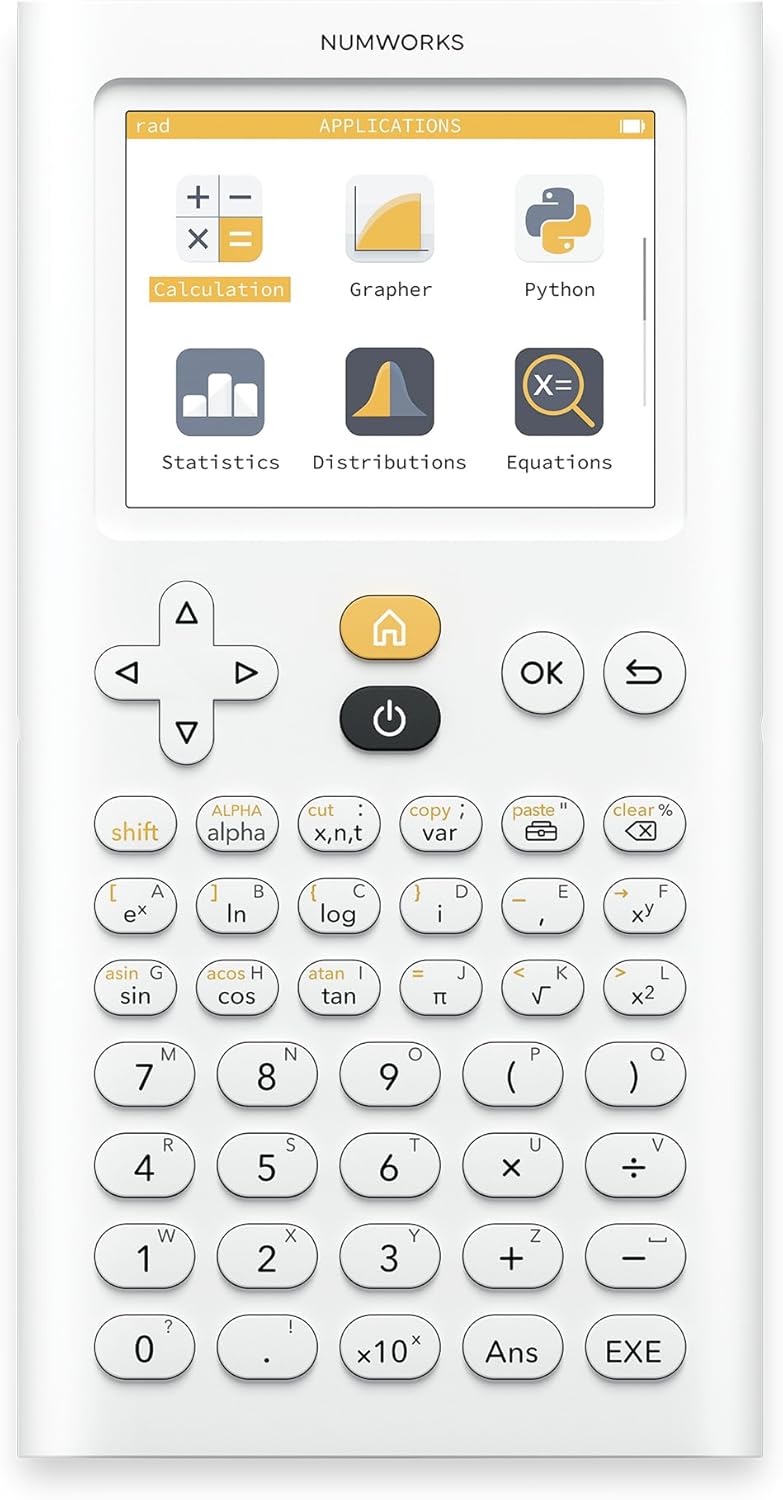
Contains all the necessary functions for mathematics lessons at all high school levels Fast and intuitive handling and training Highresolution color display 320 x 240 px rechargeable longterm battery included Languages German English French Spanish Portuguese USB charging cable included
Reviews:
5.0 out of 5 stars The best school graphing calculator available
As a long-time user of graphing calculators and teacher of maths at IB Higher level/AP/A-level I can say without doubt that this is the best calculator for any pre-university maths course. I own and use Ti 84s, Ti Nspires, Casio FX-CG50s and have used the HP Prime in emulator form, and finding this calculator has been a breath of fresh air. It is so much easier to pick up and learn to use, more powerful, more flexible, and overall better thought out than the exam board accepted alternatives. It's lightning fast and significantly cheaper than the Ti/Casio/HP alternatives.Best of all you can try before you buy! There is a free emulator app that you can use on your phone, iPad, or computer. I used it for a good year and a half on my phone before I bought the physical calculator as I could no longer justify being a bad example to my students and constantly getting my phone out in class.If you need a graphing calculator for your maths course then get this one. You'll save at least £30 on the competition and find your life easier. If you currently are using an alternative and possibly finding it tricky to learn (looking at you Ti 84, looking at you...) then download the app to your phone or tablet, and try it for free. Be warned, however, if you do then you will want to purchase a physical copy as it is that much better that you'll end up addicted.The only negative that I can think of to offer in the way of balance is that if you are a student then your teacher is less likely to be familiar with it to help you as it is the new kid on the block. To this I always say Google is your friend, and the online tutorials and help pages are easy to find and follow (again, those of you with Ti's will know that this is a refreshing change).
5.0 out of 5 stars Underrated graphing calculator! Now with USB Type C!
This must be one of the most powerful but thinnest and smallest graphing calculators! Performing better than the Ti-Nspire CX II, GC50 and only slightly below the HP Prime, the super intuitive interface and minimalist design makes it the best option for any exam! (allowed for IB and A Level etc) Not to say the amazing value at £89! Only missing a CAS (which has been removed in recent updates and can only be added by a custom OS), and also I can’t not mention the controversy of Numworks locking down custom OS flashing both on software and hardware with the new versions…
5.0 out of 5 stars Good quality
Purchased as a gift for my son-teenager, he loves match and physics, and study in the highest rated school, useful calculator.
4.0 out of 5 stars A revolutionary graphics calculator
This probably has Casio, TI, HP etc. very worried, because it's cheaper, better designed hardware and software, including a clean/fresh look, and will probably continue to add more functionality, via firmware updates, until it more than matches the tired old products from the incumbents. I like that this calculator has easy copy and paste, remembers what you were doing in each of the menu sections, is instant on/off, and has a built-in rechargeable battery. It astonishes me that any graphics calculator still uses disposal batteries, given the short battery life! This may replace all school calculators, not just graphical ones, especially given Casio's WT* idiotic design in recent scientific calculator models!Such limited calculators will continue to be needed until someone produces a far more powerful, approved, mobile-phone-sized like tablet, with no wireless connectivity, which you can sideload existing, approved apps, into it via USB file transfer, and educators/exam-boards recognise that such further revolution needs support. This calculator could be seen as a precursor to that.
5.0 out of 5 stars Good Calculator
Intuitive Design and Powerful
5.0 out of 5 stars At long last, a modern graphing calculator!
I am a big nostalgic of my TI 92... but at the same time I was not very proud to see that teenagers still use the same repackaged calculator 20 years later!That new calculator is a refreshing change! Thin, light, and with such an easy to use interface. I remember the user guide of my Ti 92, thick as a dictionary. I didn't even bother looking for one, finally a calculator with a user experience of the iPhone era, not from the 80s when the best was the Commodore 64...And this is really a modern device: color screen, rechargeable battery, stunning graph display. And, cherry on the cake, it's an open source device: using the provided USB cable I could very quickly update my device - and they already had built a Python app!Last but not least, it comes with a free simulator on the manufacturer's website which is very cool.So happy to recommend this to all the teenagers and looking forward to a new generation of coders who will have learnt to program on their calculator using Python and ASM or TI-Basic!
5.0 out of 5 stars Great Calculator for A-Level Maths & Further Maths
Originally bought a Casio Cg50, but changed it for Numworks. Numworks is easy to use, sleek and constantly updated (numworks listen to feedback). Overall great calculator at a good price 5star product !
5.0 out of 5 stars Great calculator
Very happy with purchase, does everything I need it to do.
Pretty much the best calculator I've ever owned
The media could not be loaded. Pros:More updated interface than the TI-84Simple to useOpen source hardwareEpsilon (the calculator's "OS" (more like a math interpreter) is open sourceThin and lightCosts less than the TI-84 plus ceLess confusing naming scheme than TIUses a more updated chip than the TI-84 Plus CE (STM32 ARM Cortex M4 based microcontroller vs Zialog eZ80)Runs MicroPython (which is good for running custom code on the calculator, like a stoicheometry calculator for chemistry)Web-based interface on computer that allows you to update the calculator and upload python codeClean designApp-based interfaceIt doesn't just give decimals and fractions, it gives both, and can simplify expressionsCan calculate complex numbersCons:No dark mode (Small complaint though (and it wouldn't fit in with the white theme of the calculator)Cannot write custom apps or install custom firmware. I found this out when I was trying to add an overclocking script. I got everything set up, but a critical folder on GitHub was blocked off. This does make sense because it prevents people from writing cheating software for the calculator. Since it's been approved for exams like the SAT (and that's one of the main selling points), it has to store all user data in RAM, and if you could modify its code you could have a user program permanently on the calculator that could allow you to cheat on a test. They could have made it completely open source in hardware and software, but that would have made it not legal on any standardized test.Buttons are somewhat mushyLimited button layout compared to ti-84 plus ceNobody else really has this calculator so there is less available for it than is available for something more popular like the ti-84 plus ceWhite plastic is easy to scratch and markGraphing program is slow when navigating because it redraws all of the graph every time you move.Keyboard is hard to use (but that's because I am not used to typing on a calculator and there are not very many buttons)The video shows some of the calculators features in calculator mode.
よくできている
MicroPythonが動いたり、WebDFUでブラウザからファームウェアアップデートできたりと、かなりモダンかつ良く作られている。筐体もオシャレで、無理な力を掛けない限りは壊れなさそう。また、この中で動いているOSはオープンソースで公開されており、学習しやすいレイヤに分けて構成されている。https://github.com/numworks/epsilon実用的かと言われると、まだ不足している機能(RPNとか)は残っているが、組み込みソフトウェア学習者にはかなりオススメ。そうか、自分で実装すればいいのか...
Un must para ingenieros
De cara a estudiar una carrera técnica esta calculadora será tu mejor amiga. Pues a día de hoy sigue recibiendo actualizaciones de software y hasta tu mismo le puedes meter tus programas en Python. Una maravilla de calculadora muy completa
Super calculatrice pour apprendre à coder en Python
J’ai acheté la calculatrice NumWorks pour mon fils au lycée, et je dois dire que j’ai été très surpris (en bien !) par son approche moderne. En plus de faire tout ce qu’on attend d’une calculatrice graphique, elle permet surtout de s’initier à Python de manière simple et ludique.L’interface est claire, intuitive, et il y a un vrai environnement de programmation intégré. Mon fils, qui n’avait jamais codé avant, s’est pris au jeu : il a commencé par modifier de petits scripts, puis il a rapidement créé ses propres programmes pour automatiser des calculs. C’est une super porte d’entrée vers la programmation.Autre point positif : la calculatrice est légère, bien finie, et les mises à jour se font facilement via le site de NumWorks. Le côté "open" et évolutif est un vrai plus — on sent que ce n’est pas un simple gadget mais un outil pensé pour les élèves d’aujourd’hui.Je recommande vivement, surtout si vous voulez que votre ado découvre Python en même temps que les maths !
Helpful
Updated and reliable
Visit the NumWorks Store
NumWorks Graphing Calculator
AED76056
Quantity:
Order today to get by 7-14 business days
This item qualifies for free delivery
Imported From: United Kingdom
At BOLO, we work hard to ensure the products you receive are new, genuine, and sourced from reputable suppliers.
BOLO is not an authorized or official retailer for most brands, nor are we affiliated with manufacturers unless specifically stated on a product page. Instead, we source verified sellers, authorized distributors or directly from the manufacturer.
Each product undergoes thorough inspection and verification at our consolidation and fulfilment centers to ensure it meets our strict authenticity and quality standards before being shipped and delivered to you.
If you ever have concerns regarding the authenticity of a product purchased from us, please contact Bolo Support. We will review your inquiry promptly and, if necessary, provide documentation verifying authenticity or offer a suitable resolution.
Your trust is our top priority, and we are committed to maintaining transparency and integrity in every transaction.
All product information, images, descriptions, and reviews originate from the manufacturer or from trusted sellers overseas. BOLO is not affiliated with, endorsed by, or an authorized retailer for most brands listed on our website unless stated otherwise.
While we strive to display accurate information, variations in packaging, labeling, instructions, or formulation may occasionally occur due to regional differences or supplier updates. For detailed or manufacturer-specific information, please contact the brand directly or reach out to BOLO Support for assistance.
Unless otherwise stated, all prices displayed on the product page include applicable taxes and import duties.
BOLO operates in accordance with the laws and regulations of United Arab Emirates. Any items found to be restricted or prohibited for sale within the UAE will be cancelled prior to shipment. We take proactive measures to ensure that only products permitted for sale in United Arab Emirates are listed on our website.
All items are shipped by air, and any products classified as “Dangerous Goods (DG)” under IATA regulations will be removed from the order and cancelled.
All orders are processed manually, and we make every effort to process them promptly once confirmed. Products cancelled due to the above reasons will be permanently removed from listings across the website.
Similar suggestions by Bolo
More from this brand
Similar items from “Graphing”
Share with
Or share with link
https://www.bolo.ae/products/KO0747EDTS5
Visit the NumWorks Store
NumWorks Graphing Calculator

AED76056
Quantity:
Order today to get by 7-14 business days
This item qualifies for free delivery
Imported From: United Kingdom
At BOLO, we work hard to ensure the products you receive are new, genuine, and sourced from reputable suppliers.
BOLO is not an authorized or official retailer for most brands, nor are we affiliated with manufacturers unless specifically stated on a product page. Instead, we source verified sellers, authorized distributors or directly from the manufacturer.
Each product undergoes thorough inspection and verification at our consolidation and fulfilment centers to ensure it meets our strict authenticity and quality standards before being shipped and delivered to you.
If you ever have concerns regarding the authenticity of a product purchased from us, please contact Bolo Support. We will review your inquiry promptly and, if necessary, provide documentation verifying authenticity or offer a suitable resolution.
Your trust is our top priority, and we are committed to maintaining transparency and integrity in every transaction.
All product information, images, descriptions, and reviews originate from the manufacturer or from trusted sellers overseas. BOLO is not affiliated with, endorsed by, or an authorized retailer for most brands listed on our website unless stated otherwise.
While we strive to display accurate information, variations in packaging, labeling, instructions, or formulation may occasionally occur due to regional differences or supplier updates. For detailed or manufacturer-specific information, please contact the brand directly or reach out to BOLO Support for assistance.
Unless otherwise stated, all prices displayed on the product page include applicable taxes and import duties.
BOLO operates in accordance with the laws and regulations of United Arab Emirates. Any items found to be restricted or prohibited for sale within the UAE will be cancelled prior to shipment. We take proactive measures to ensure that only products permitted for sale in United Arab Emirates are listed on our website.
All items are shipped by air, and any products classified as “Dangerous Goods (DG)” under IATA regulations will be removed from the order and cancelled.
All orders are processed manually, and we make every effort to process them promptly once confirmed. Products cancelled due to the above reasons will be permanently removed from listings across the website.
Description:
Contains all the necessary functions for mathematics lessons at all high school levels Fast and intuitive handling and training Highresolution color display 320 x 240 px rechargeable longterm battery included Languages German English French Spanish Portuguese USB charging cable included
Reviews:
5.0 out of 5 stars The best school graphing calculator available
As a long-time user of graphing calculators and teacher of maths at IB Higher level/AP/A-level I can say without doubt that this is the best calculator for any pre-university maths course. I own and use Ti 84s, Ti Nspires, Casio FX-CG50s and have used the HP Prime in emulator form, and finding this calculator has been a breath of fresh air. It is so much easier to pick up and learn to use, more powerful, more flexible, and overall better thought out than the exam board accepted alternatives. It's lightning fast and significantly cheaper than the Ti/Casio/HP alternatives.Best of all you can try before you buy! There is a free emulator app that you can use on your phone, iPad, or computer. I used it for a good year and a half on my phone before I bought the physical calculator as I could no longer justify being a bad example to my students and constantly getting my phone out in class.If you need a graphing calculator for your maths course then get this one. You'll save at least £30 on the competition and find your life easier. If you currently are using an alternative and possibly finding it tricky to learn (looking at you Ti 84, looking at you...) then download the app to your phone or tablet, and try it for free. Be warned, however, if you do then you will want to purchase a physical copy as it is that much better that you'll end up addicted.The only negative that I can think of to offer in the way of balance is that if you are a student then your teacher is less likely to be familiar with it to help you as it is the new kid on the block. To this I always say Google is your friend, and the online tutorials and help pages are easy to find and follow (again, those of you with Ti's will know that this is a refreshing change).
5.0 out of 5 stars Underrated graphing calculator! Now with USB Type C!
This must be one of the most powerful but thinnest and smallest graphing calculators! Performing better than the Ti-Nspire CX II, GC50 and only slightly below the HP Prime, the super intuitive interface and minimalist design makes it the best option for any exam! (allowed for IB and A Level etc) Not to say the amazing value at £89! Only missing a CAS (which has been removed in recent updates and can only be added by a custom OS), and also I can’t not mention the controversy of Numworks locking down custom OS flashing both on software and hardware with the new versions…
5.0 out of 5 stars Good quality
Purchased as a gift for my son-teenager, he loves match and physics, and study in the highest rated school, useful calculator.
4.0 out of 5 stars A revolutionary graphics calculator
This probably has Casio, TI, HP etc. very worried, because it's cheaper, better designed hardware and software, including a clean/fresh look, and will probably continue to add more functionality, via firmware updates, until it more than matches the tired old products from the incumbents. I like that this calculator has easy copy and paste, remembers what you were doing in each of the menu sections, is instant on/off, and has a built-in rechargeable battery. It astonishes me that any graphics calculator still uses disposal batteries, given the short battery life! This may replace all school calculators, not just graphical ones, especially given Casio's WT* idiotic design in recent scientific calculator models!Such limited calculators will continue to be needed until someone produces a far more powerful, approved, mobile-phone-sized like tablet, with no wireless connectivity, which you can sideload existing, approved apps, into it via USB file transfer, and educators/exam-boards recognise that such further revolution needs support. This calculator could be seen as a precursor to that.
5.0 out of 5 stars Good Calculator
Intuitive Design and Powerful
5.0 out of 5 stars At long last, a modern graphing calculator!
I am a big nostalgic of my TI 92... but at the same time I was not very proud to see that teenagers still use the same repackaged calculator 20 years later!That new calculator is a refreshing change! Thin, light, and with such an easy to use interface. I remember the user guide of my Ti 92, thick as a dictionary. I didn't even bother looking for one, finally a calculator with a user experience of the iPhone era, not from the 80s when the best was the Commodore 64...And this is really a modern device: color screen, rechargeable battery, stunning graph display. And, cherry on the cake, it's an open source device: using the provided USB cable I could very quickly update my device - and they already had built a Python app!Last but not least, it comes with a free simulator on the manufacturer's website which is very cool.So happy to recommend this to all the teenagers and looking forward to a new generation of coders who will have learnt to program on their calculator using Python and ASM or TI-Basic!
5.0 out of 5 stars Great Calculator for A-Level Maths & Further Maths
Originally bought a Casio Cg50, but changed it for Numworks. Numworks is easy to use, sleek and constantly updated (numworks listen to feedback). Overall great calculator at a good price 5star product !
5.0 out of 5 stars Great calculator
Very happy with purchase, does everything I need it to do.
Pretty much the best calculator I've ever owned
The media could not be loaded. Pros:More updated interface than the TI-84Simple to useOpen source hardwareEpsilon (the calculator's "OS" (more like a math interpreter) is open sourceThin and lightCosts less than the TI-84 plus ceLess confusing naming scheme than TIUses a more updated chip than the TI-84 Plus CE (STM32 ARM Cortex M4 based microcontroller vs Zialog eZ80)Runs MicroPython (which is good for running custom code on the calculator, like a stoicheometry calculator for chemistry)Web-based interface on computer that allows you to update the calculator and upload python codeClean designApp-based interfaceIt doesn't just give decimals and fractions, it gives both, and can simplify expressionsCan calculate complex numbersCons:No dark mode (Small complaint though (and it wouldn't fit in with the white theme of the calculator)Cannot write custom apps or install custom firmware. I found this out when I was trying to add an overclocking script. I got everything set up, but a critical folder on GitHub was blocked off. This does make sense because it prevents people from writing cheating software for the calculator. Since it's been approved for exams like the SAT (and that's one of the main selling points), it has to store all user data in RAM, and if you could modify its code you could have a user program permanently on the calculator that could allow you to cheat on a test. They could have made it completely open source in hardware and software, but that would have made it not legal on any standardized test.Buttons are somewhat mushyLimited button layout compared to ti-84 plus ceNobody else really has this calculator so there is less available for it than is available for something more popular like the ti-84 plus ceWhite plastic is easy to scratch and markGraphing program is slow when navigating because it redraws all of the graph every time you move.Keyboard is hard to use (but that's because I am not used to typing on a calculator and there are not very many buttons)The video shows some of the calculators features in calculator mode.
よくできている
MicroPythonが動いたり、WebDFUでブラウザからファームウェアアップデートできたりと、かなりモダンかつ良く作られている。筐体もオシャレで、無理な力を掛けない限りは壊れなさそう。また、この中で動いているOSはオープンソースで公開されており、学習しやすいレイヤに分けて構成されている。https://github.com/numworks/epsilon実用的かと言われると、まだ不足している機能(RPNとか)は残っているが、組み込みソフトウェア学習者にはかなりオススメ。そうか、自分で実装すればいいのか...
Un must para ingenieros
De cara a estudiar una carrera técnica esta calculadora será tu mejor amiga. Pues a día de hoy sigue recibiendo actualizaciones de software y hasta tu mismo le puedes meter tus programas en Python. Una maravilla de calculadora muy completa
Super calculatrice pour apprendre à coder en Python
J’ai acheté la calculatrice NumWorks pour mon fils au lycée, et je dois dire que j’ai été très surpris (en bien !) par son approche moderne. En plus de faire tout ce qu’on attend d’une calculatrice graphique, elle permet surtout de s’initier à Python de manière simple et ludique.L’interface est claire, intuitive, et il y a un vrai environnement de programmation intégré. Mon fils, qui n’avait jamais codé avant, s’est pris au jeu : il a commencé par modifier de petits scripts, puis il a rapidement créé ses propres programmes pour automatiser des calculs. C’est une super porte d’entrée vers la programmation.Autre point positif : la calculatrice est légère, bien finie, et les mises à jour se font facilement via le site de NumWorks. Le côté "open" et évolutif est un vrai plus — on sent que ce n’est pas un simple gadget mais un outil pensé pour les élèves d’aujourd’hui.Je recommande vivement, surtout si vous voulez que votre ado découvre Python en même temps que les maths !
Helpful
Updated and reliable
Similar suggestions by Bolo
More from this brand
Similar items from “Graphing”
Share with
Or share with link
https://www.bolo.ae/products/KO0747EDTS5