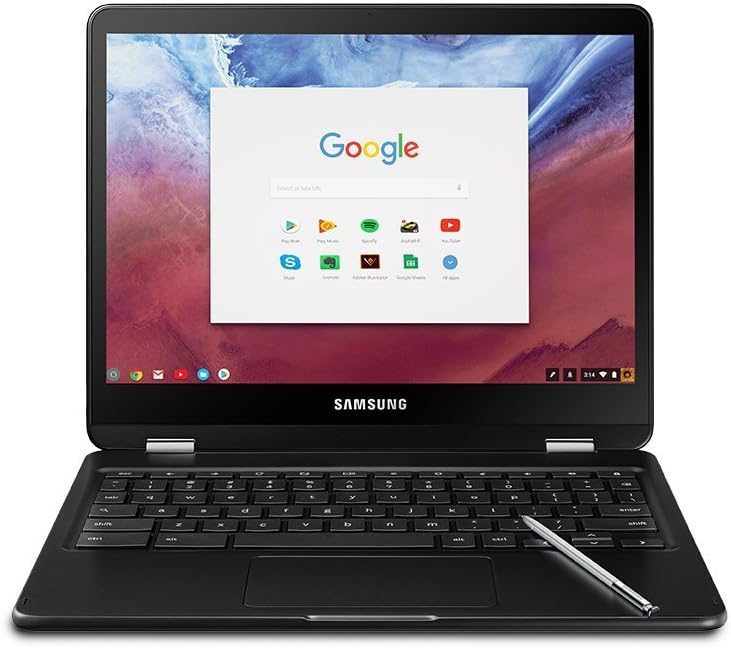
Description:
Samsung Electronics America, Inc. today announced the Samsung Chromebook Plus and Chromebook Pro, the latest generation of its Chromebooks that pairs the power and productivity of a laptop with the flexibility and versatility of a tablet. Samsung and Google partnered to design this next generation Chromebook, which is born at the intersection of hardware and software innovation. The Samsung Chromebook Plus and Chromebook Pro are designed for Google Play so you can use all the apps you love in addition to movies, books and music. The new Samsung Chromebooks also offer a 360-degree rotating touchscreen, quad HD screen, built-in digitized pen and new lightweight metal design.
Reviews:
Great device for the pricetag
(function() { P.when('cr-A', 'ready').execute(function(A) { if(typeof A.toggleExpanderAriaLabel === 'function') { A.toggleExpanderAriaLabel('review_text_read_more', 'Read more of this review', 'Read less of this review'); } }); })(); .review-text-read-more-expander:focus-visible { outline: 2px solid #2162a1; outline-offset: 2px; border-radius: 5px; } Because this is a rather long review, I will offer the conclusion right from the begining: the Samsung Chromebook Pro has been a great buy for me! I will now try to elaborate why.Purchase background: I was out for a device that can combine the versatility of a svelte basic notebook with the portability of a tablet. I work in academia and travel a lot. I, therefore, have to present often either in the classroom or in conferences abroad. I tried to achieve this with the Samsung Tab S3 (I prefer the Android\Google Ecosystem to Apple, as I personally work more with Google products and also find the Apple ecosystem too locked). I was also not aware of the Chromebook Os\Android fusion, as Chromebooks are not available in Europe, where I live, this is why I first opted for the Tab S3. The Samsung flagship tablet didn't do the trick though, despite its overall great features for a Tablet. So, long story short, I was again in the search for the "do-it-all device" (media consumption and productivity), that is portable and does not break the bank. After an extensive market search and hours of video reviews, I limited my choices to two devices: the Samsung Chromebook Pro and the Asus Chromebook flip c302 (despite its undeniably incredible features, the PIxelbook is way out of my budget). The choice was tough, as both of them are nearly perfect, but I think it all comes down to what one needs. If one needs mainly a laptop, that will occasionally be turned to tablet mode, then the Asus c302 is probably the way to go. I personally wanted more of a tablet, that can, upon request, transform to a laptop for my basic needs on the go (emails, text processing, presentations, pdf annotations). In that sense I did not regret opting for the Chromebook pro.Hardware: the Samsung Chromebook Pro is a well built and beautiful device. It is all metal with a black finish (instead of the silver on the Samsung Chromebook Plus). In reality, it looks much better than in photos or videos. To me, it is simply gorgeous and if one also pays attention on looks, the Samsung Chromebook Pro will not disappoint. The device is very thin and light, delivering on its promise to double as a tablet. In fact, because it is so thin, I mostly use it on tablet mode and change to laptop only when I shall answer an email, process a text etc..Input methods: although the keyboard of the Chromebook Pro is not the ultimate highlight of the device, it does not disappoint either. Granted, it is not as good as the one in Pixelbook or Asus flip c302. The keys are, generally, normal in size, apart from two major exceptions: backspace and tab. That takes some time to get used to and one must be ready to compromize at the level of keyboard, if one opts for the Chromebook Pro. All in all, after some hours using it (I am, in fact, writing the review on it) the keyboard will grow on the user and one will have no problems writing on it. It will serve its purpose without causing frustration (but it will also not blow ones mind), so it is far from being a deal breaker (especially if one takes into account that this is a 2-in-1 device, so the expectations on the keyboard shall not be extremely high). Many reviews complain about the lack of backlight on the keyboard, but that shall not discourage someone from buying the device. The screen is very bright, so the keys will receive enough lighting, even in the lowest brightness setting. For premium devices, nonetheless, keyboard backlighting shall be a given, and will I do not notice a huge difference here, due to the extremely bright screen, I would still like the backlighting, without implying that one shall not buy the device for the lack of it. A nice addition is the inclusion of the stylus for free. It might not be long or thick, propably because it has to fit within the device which makes it ultra practical and impossible to loose, but works great for annotations, note taking and filling out documents (no lag whatsoever; palm rejection is also excellent). All major apps work well with the stylus (I personally use mostly xodo, the android version, for annotations and onenote for writing and both work perfectly on the device). The trackpad is also very good. It is big enough and it is also responsive, without attracting much oil on it (occasionally it will, but after many-many hours of usage).Display: the Samsung Chromebook pro display is a definite, if not the definite, highlight. One can easily fall in love with it. It is vibrant and bright. Everything looks great on it, in fact it might make one find it difficult to go back to another device. I think one shall see the display to get the full picture, but it is really great and not something that one usually gets on this price range.Connectivity: two usb-c ports and a headphone jack is all one will find here, propably to keep the size of the device small and thin. Practically that means that one is a single dongle away from all kinds of peripherals, so it is pretty convenient. Both usb-c ports work for both power and connectivity. An SD card slot is also available, so the expansion of storage capability will not be a hustle.Performance: the Samsung Chromebook pro is a little monster. One can throw countless chrome tabs and a bunch of android apps on it at the same time and this machine will still be working fine. The core m3 processor helps a lot to maintain a good performance and 4gb of ram will be more than enough for the normal browsing, media consumption, text processing etc. activities. This is not a top notch gaming or video editing machine, so as long as one is reasonable on its usage patterns and expectations, the Chromebook Pro will excell. Storage is somewhat limited (32 GB eMMC), but the SD card slot will help bump up the storage room considerably, if one does not trust living in the cloud. I personally use Dropbox a lot, so I did not mind the limited local storage space, which I can in any case expand easily. Some reviews (here and elsewhere) complain that the device gets too hot. In my case, while it occasionally raises temperature when pushed, it never went beyond the normal range. It is noticeable but it does not affect the functionality of the device, so I personally do not worry about it.Software: this is my first experience on Chrome Os ever (coming from a lifetime on Windows and a few months on Android) and I am delighted. Everything is easy to figure out and works fast and smooth. The addition of android apps out of the box make the Chromebook Pro a very capable machine as well. I was intially sceptic after reading reviews and watching videos against Chrome Os, but I think the harsh critisism is somewhat unfounded. I can understand that Chrome Os is limited for tech savy people or ultra power users that have huge demands from their devices and for them Chrome Os is, indeed, not a good choice. But for the average user that just wants to enjoy media, browse the web, process texts, spreadsheets and presentations Chrome Os is just amazing. I was raised on Windows and have been using it all my life till now, but I find Chrome Os just great. Google Docs, Sheets and Presentations lack nothing in comparison to Word, Excel and Power Point. I am relieved to see how capable, yet simple, the Google productivity tools are. Working offline is also not a problem. Apart from being able to install the Android versions of Word, Excel and Power Point, one can just trivially set the Google Docs, Sheets and Presentations to work offline. Nothing will be missing there, while the availability of the Play Store will close many gaps in the offline setting. Bottom line: The average user will be missing, more or less, nothing here and for my taste and needs Chrome Os looks, works and feels very nice.Battery Life: the Chromebook Pro is, for my daily usage, a champion in that category. For what this device can perform and the pixels its gorgeous display has to push around, battery life is just great. I personally get 8-9 hours out of it, mostly using it for browsing, text processing, note taking, annotating texts. It makes me not looking for the power cable the whole time and that has been great improvement over my other devices (apart from my Lenovo P2 smartphone, whose battery I just cannot deplete no matter the usage...).All in all this is a great device, that fullfils a lot of the expectations of an average user like me at a very good price. I also find the concept of the device incredible, as it really combines the basic productivity function of a notebook with the media experience of a tablet.What I hope is that Google and the major hardware providers will support the concept in the future, as this kind of devices can turn out to be the best work and fun companion. It is just sad that these devices are not popular in Europe, but with the slow death of Android tablets (as shown by the recent silent death of the Pixel C tablet), I am hopeful that they will cross the ocean soon. In that regard, my five stars also go to Bolo for shipping in Europe and doing so in an extremely efficient and speedy way. The device arrived in just three days (ok, I had to pay for Global Priority to get that, but it is still available and that is important), which is a miracle taking into account the distance it covered, and Bolo took also care of the customs, delivering the device right at my doorstep, while providing me detailed updates on the delivery status of the product. Sorry for the lengthy text, but this device offers so much, I just felt that a longer review would do it more justice.
Todo en uno muy bueno
El principal uso que le doy es para temas de correos, elaborar, consultar y compartir documentos en drive, así como para temas de entretenimiento en mis tiempos libres. La resolución de la pantalla es muy buena, la opción touch también lo es y aunque casi no uso el lápiz es un plus del producto. La batería es bastante competente, me puede durar una jornada de 8 horas continuas usando el drive sin problema alguno.Tenía mis dudas del uso fuera de línea pero se puede usar la opción off line y se resuelve el tema. El único detalle que no me agradó es que no tiene teclado retroiluminado, sin embargo la nueva versión ya lo tiene, hasta el momento no he tenido problemas por no tenerlo.En general un excelente producto para temas de uso intensivo de drive, manejo de correos y entretenimiento general.
Update: Received Replacement; Love It
This is an update to my previous review. I deleted the original review as I received a defective product that is not indicative of fully functioning product.This Chromebook is everything I need in a Chromebook: versatility. It doesn't exceed in any one area, but still hits very high marks.-The screen is amazing for a Chromebook at a comfy 3:2 aspect ratio/2400x1600 resolution. It's not quite 4K, but still is super sharp on a 12.3" screen. 3:2 might be strange for those used to standard widescreen 16:9, but it plays to the Chromebook's advantage of web browsing. Thanks to the resolution, this doesn't matter when playing video content as long as letterboxing doesn't bother you. It also has a beautiful IPS screen with really good viewing angles and the colors really pop. Overall, the screen's strength with text media (articles, Kindle, comic books, web pages, etc) is excellent while not sacrificing video media quality.-Performance with the Intel m3 works great. I was able to compare the performance with a display model of the Samsung Chromebook Plus. It's quite a bit faster and less prone to crashing compared to my previous Acer 15 .Acer Chromebook 15 CB5-571-C1DZ (15.6-Inch Full HD IPS, 4GB RAM, 16GB SSD) Under normal circumstances, the ARM processor will perform perfectly well for most people. I generally have 5-10 tabs open at any time while simultaneously streaming Full HD or higher/60fps content or music; I haven't had any hiccups yet.-Sound quality varies. The speakers are oddly placed, being downward firing from the bottom of the base. No matter which position you rotate the device on the hinges, there will be some form of sound distortion. The speakers are a massive downgrade from my Acer 15 (it's speaker's were exceptional for a Chromebook), but are still loud and powerful enough to do an adequate job in most scenarios. Alternatively, I use headphones most of the time when listening to music and other media. Sound is perfect (it always helps to have good quality headphones though), with zero static or hissing in popping. It will pop every once in awhile when adjusting the volume, but that's a non-issue for me.-Keyboard will depend on user preference. However, for pure quality, this has been my favorite laptop keyboard to work with. Everything is solid and clicky with just the right amount of mush; I foresee the keyboard lasting quite awhile. It has some unique design decisions such has the slightly concave keys or smaller buttons that won't be to everyone's taste. The most drastic being the Backspace key. It's almost a third of the size of a standard Backspace. I have tiny hands, so it doesn't bother me at all, but those with bigger hands may have trouble working efficiently with this keyboard as a whole. The keyboard is not backlit. This is very unfortunate considering the price; and is something I absolutely would love to have. On the plus side, the screen does get bright enough to illuminate the entire keyboard very well to work in the dark. This is only really a problem when I'm in bed and want the brightness minimal. The touchpad is pretty standard. Nothing special. It did feel a bit slow and laggy out of the box; once I cranked up the touchpad speed to the max, it became suitable.-The build quality is lovely. This feels like a true premium product, even over previous laptops that I paid over $1k for. I would have preferred an option to have silver over black (silver generally hides dirt/smudges/fingerprints a bit better), but this doesn't significantly impact my thoughts on the design. The metal body feels like it can take a hit. I'm extremely careful with all of my devices, but knowing it's study is nice. All of the buttons feel nice too.-I've been transitioning to my primary devices being USB-C. USB-C is life and isn't becoming the standard fast enough. It's fast, durable, and versatile. It doesn't matter which way I plug it in; no more wasting time flipping around the head of the cable or remembering the correct orientation.-It's the perfect size for me. I have tiny hands, and also generally prefer smaller/portable devices. It is a bit bigger than you would think due to the square shape, but is small and light enough to be a true portable device.-Battery life is acceptable. It's advertised at about 8 hours, but with how fast the USB-C charging is, it's a non-issue for me.-Google services are the biggest reasons to get a Chromebook; everything you're used to on previous Chromebooks are also available here. All of your preferences are also stored and transferred via Google's services; transitioning my stuff from my Acer 15 was a matter of finding a Wifi signal and signing into my Gmail. Easy. I'm ingrained in Google's services, so Chromebooks are a natural choice for me.-Tablet mode works great, especially for reading (special shout out to comic books). The stylus that's included works well enough. It won't be as great as a device specifically designed for artists/drawing, but it works well enough for me and probably most people. It's a nice feature to have.-The big selling point of this Chromebook is access to the Google Play Store and Android apps. As of now, it's a glitchy mess. It is still labeled as being in Beta, which gives me hope as an early adopter, but I am disappointed that I can't even browse the Google Play Store without crashes. I was able to download a few games that performed pretty terrible and had unacceptable bugs that worked normally with my smartphone. I didn't purchase this Chromebook for games, but it will be nice to have the option in the future when the kinks are worked out. Other apps like e-readers work well enough for me.In conclusion, this is a fantastic piece of hardware that's really impressed me. As one of the few Chromebook/tablet hybrid devices on the market, it definitely has a niche to fulfill. It does one particular thing well: being a HYBRID DEVICE. To me, that means sacrificing certain qualities to have versatility. Thankfully, it still manages to exceed expectations in almost every area. This is a great device for anything looking for a mid-range device for work and activities involved with the internet. Those who are looking for a device primarily for Android apps should steer clear until Google gives it more updates.
Mas de lo que esperaba
El diseno es hermoso, la calidad de la imagen y la pantalla fenomenales. La pluma stylus muy practica. Uno de los contras que habia leido era que el teclado era muy pequeno e incomodo pero sinceramente a mi me funciona muy bien.
ENTREGA DIFIERE DE LO COMPRADO
EL PRODUCTO ENTREGADO DIFIERE DE LO COMPRADO:NO INCLUYE PUERTO HMDILA MEMORIA EN DISCO DURO NO ES DE 500 GB SINO DE 32 GBSOLICITO SU ATENCIO INMEDIATA Y COMO SOLUCIONARAN ESTE ERROR DEL PRODUCTO ENTREGADO
Visit the Samsung Store
Samsung XE510C24-K01US
AED2,85345
Quantity:
Order today to get by 7-14 business days
This item qualifies for free delivery
Imported From: United Kingdom
At BOLO, we work hard to ensure the products you receive are new, genuine, and sourced from reputable suppliers.
BOLO is not an authorized or official retailer for most brands, nor are we affiliated with manufacturers unless specifically stated on a product page. Instead, we source verified sellers, authorized distributors or directly from the manufacturer.
Each product undergoes thorough inspection and verification at our consolidation and fulfilment centers to ensure it meets our strict authenticity and quality standards before being shipped and delivered to you.
If you ever have concerns regarding the authenticity of a product purchased from us, please contact Bolo Support. We will review your inquiry promptly and, if necessary, provide documentation verifying authenticity or offer a suitable resolution.
Your trust is our top priority, and we are committed to maintaining transparency and integrity in every transaction.
All product information, images, descriptions, and reviews originate from the manufacturer or from trusted sellers overseas. BOLO is not affiliated with, endorsed by, or an authorized retailer for most brands listed on our website unless stated otherwise.
While we strive to display accurate information, variations in packaging, labeling, instructions, or formulation may occasionally occur due to regional differences or supplier updates. For detailed or manufacturer-specific information, please contact the brand directly or reach out to BOLO Support for assistance.
Unless otherwise stated, all prices displayed on the product page include applicable taxes and import duties.
BOLO operates in accordance with the laws and regulations of United Arab Emirates. Any items found to be restricted or prohibited for sale within the UAE will be cancelled prior to shipment. We take proactive measures to ensure that only products permitted for sale in United Arab Emirates are listed on our website.
All items are shipped by air, and any products classified as “Dangerous Goods (DG)” under IATA regulations will be removed from the order and cancelled.
All orders are processed manually, and we make every effort to process them promptly once confirmed. Products cancelled due to the above reasons will be permanently removed from listings across the website.
More from this brand
Similar items from “Laptops”
Share with
Or share with link
https://www.bolo.ae/products/KO071YO1TT4
Visit the Samsung Store
Samsung XE510C24-K01US

AED2,85345
Quantity:
Order today to get by 7-14 business days
This item qualifies for free delivery
Imported From: United Kingdom
At BOLO, we work hard to ensure the products you receive are new, genuine, and sourced from reputable suppliers.
BOLO is not an authorized or official retailer for most brands, nor are we affiliated with manufacturers unless specifically stated on a product page. Instead, we source verified sellers, authorized distributors or directly from the manufacturer.
Each product undergoes thorough inspection and verification at our consolidation and fulfilment centers to ensure it meets our strict authenticity and quality standards before being shipped and delivered to you.
If you ever have concerns regarding the authenticity of a product purchased from us, please contact Bolo Support. We will review your inquiry promptly and, if necessary, provide documentation verifying authenticity or offer a suitable resolution.
Your trust is our top priority, and we are committed to maintaining transparency and integrity in every transaction.
All product information, images, descriptions, and reviews originate from the manufacturer or from trusted sellers overseas. BOLO is not affiliated with, endorsed by, or an authorized retailer for most brands listed on our website unless stated otherwise.
While we strive to display accurate information, variations in packaging, labeling, instructions, or formulation may occasionally occur due to regional differences or supplier updates. For detailed or manufacturer-specific information, please contact the brand directly or reach out to BOLO Support for assistance.
Unless otherwise stated, all prices displayed on the product page include applicable taxes and import duties.
BOLO operates in accordance with the laws and regulations of United Arab Emirates. Any items found to be restricted or prohibited for sale within the UAE will be cancelled prior to shipment. We take proactive measures to ensure that only products permitted for sale in United Arab Emirates are listed on our website.
All items are shipped by air, and any products classified as “Dangerous Goods (DG)” under IATA regulations will be removed from the order and cancelled.
All orders are processed manually, and we make every effort to process them promptly once confirmed. Products cancelled due to the above reasons will be permanently removed from listings across the website.
Description:
Samsung Electronics America, Inc. today announced the Samsung Chromebook Plus and Chromebook Pro, the latest generation of its Chromebooks that pairs the power and productivity of a laptop with the flexibility and versatility of a tablet. Samsung and Google partnered to design this next generation Chromebook, which is born at the intersection of hardware and software innovation. The Samsung Chromebook Plus and Chromebook Pro are designed for Google Play so you can use all the apps you love in addition to movies, books and music. The new Samsung Chromebooks also offer a 360-degree rotating touchscreen, quad HD screen, built-in digitized pen and new lightweight metal design.
Reviews:
Great device for the pricetag
(function() { P.when('cr-A', 'ready').execute(function(A) { if(typeof A.toggleExpanderAriaLabel === 'function') { A.toggleExpanderAriaLabel('review_text_read_more', 'Read more of this review', 'Read less of this review'); } }); })(); .review-text-read-more-expander:focus-visible { outline: 2px solid #2162a1; outline-offset: 2px; border-radius: 5px; } Because this is a rather long review, I will offer the conclusion right from the begining: the Samsung Chromebook Pro has been a great buy for me! I will now try to elaborate why.Purchase background: I was out for a device that can combine the versatility of a svelte basic notebook with the portability of a tablet. I work in academia and travel a lot. I, therefore, have to present often either in the classroom or in conferences abroad. I tried to achieve this with the Samsung Tab S3 (I prefer the Android\Google Ecosystem to Apple, as I personally work more with Google products and also find the Apple ecosystem too locked). I was also not aware of the Chromebook Os\Android fusion, as Chromebooks are not available in Europe, where I live, this is why I first opted for the Tab S3. The Samsung flagship tablet didn't do the trick though, despite its overall great features for a Tablet. So, long story short, I was again in the search for the "do-it-all device" (media consumption and productivity), that is portable and does not break the bank. After an extensive market search and hours of video reviews, I limited my choices to two devices: the Samsung Chromebook Pro and the Asus Chromebook flip c302 (despite its undeniably incredible features, the PIxelbook is way out of my budget). The choice was tough, as both of them are nearly perfect, but I think it all comes down to what one needs. If one needs mainly a laptop, that will occasionally be turned to tablet mode, then the Asus c302 is probably the way to go. I personally wanted more of a tablet, that can, upon request, transform to a laptop for my basic needs on the go (emails, text processing, presentations, pdf annotations). In that sense I did not regret opting for the Chromebook pro.Hardware: the Samsung Chromebook Pro is a well built and beautiful device. It is all metal with a black finish (instead of the silver on the Samsung Chromebook Plus). In reality, it looks much better than in photos or videos. To me, it is simply gorgeous and if one also pays attention on looks, the Samsung Chromebook Pro will not disappoint. The device is very thin and light, delivering on its promise to double as a tablet. In fact, because it is so thin, I mostly use it on tablet mode and change to laptop only when I shall answer an email, process a text etc..Input methods: although the keyboard of the Chromebook Pro is not the ultimate highlight of the device, it does not disappoint either. Granted, it is not as good as the one in Pixelbook or Asus flip c302. The keys are, generally, normal in size, apart from two major exceptions: backspace and tab. That takes some time to get used to and one must be ready to compromize at the level of keyboard, if one opts for the Chromebook Pro. All in all, after some hours using it (I am, in fact, writing the review on it) the keyboard will grow on the user and one will have no problems writing on it. It will serve its purpose without causing frustration (but it will also not blow ones mind), so it is far from being a deal breaker (especially if one takes into account that this is a 2-in-1 device, so the expectations on the keyboard shall not be extremely high). Many reviews complain about the lack of backlight on the keyboard, but that shall not discourage someone from buying the device. The screen is very bright, so the keys will receive enough lighting, even in the lowest brightness setting. For premium devices, nonetheless, keyboard backlighting shall be a given, and will I do not notice a huge difference here, due to the extremely bright screen, I would still like the backlighting, without implying that one shall not buy the device for the lack of it. A nice addition is the inclusion of the stylus for free. It might not be long or thick, propably because it has to fit within the device which makes it ultra practical and impossible to loose, but works great for annotations, note taking and filling out documents (no lag whatsoever; palm rejection is also excellent). All major apps work well with the stylus (I personally use mostly xodo, the android version, for annotations and onenote for writing and both work perfectly on the device). The trackpad is also very good. It is big enough and it is also responsive, without attracting much oil on it (occasionally it will, but after many-many hours of usage).Display: the Samsung Chromebook pro display is a definite, if not the definite, highlight. One can easily fall in love with it. It is vibrant and bright. Everything looks great on it, in fact it might make one find it difficult to go back to another device. I think one shall see the display to get the full picture, but it is really great and not something that one usually gets on this price range.Connectivity: two usb-c ports and a headphone jack is all one will find here, propably to keep the size of the device small and thin. Practically that means that one is a single dongle away from all kinds of peripherals, so it is pretty convenient. Both usb-c ports work for both power and connectivity. An SD card slot is also available, so the expansion of storage capability will not be a hustle.Performance: the Samsung Chromebook pro is a little monster. One can throw countless chrome tabs and a bunch of android apps on it at the same time and this machine will still be working fine. The core m3 processor helps a lot to maintain a good performance and 4gb of ram will be more than enough for the normal browsing, media consumption, text processing etc. activities. This is not a top notch gaming or video editing machine, so as long as one is reasonable on its usage patterns and expectations, the Chromebook Pro will excell. Storage is somewhat limited (32 GB eMMC), but the SD card slot will help bump up the storage room considerably, if one does not trust living in the cloud. I personally use Dropbox a lot, so I did not mind the limited local storage space, which I can in any case expand easily. Some reviews (here and elsewhere) complain that the device gets too hot. In my case, while it occasionally raises temperature when pushed, it never went beyond the normal range. It is noticeable but it does not affect the functionality of the device, so I personally do not worry about it.Software: this is my first experience on Chrome Os ever (coming from a lifetime on Windows and a few months on Android) and I am delighted. Everything is easy to figure out and works fast and smooth. The addition of android apps out of the box make the Chromebook Pro a very capable machine as well. I was intially sceptic after reading reviews and watching videos against Chrome Os, but I think the harsh critisism is somewhat unfounded. I can understand that Chrome Os is limited for tech savy people or ultra power users that have huge demands from their devices and for them Chrome Os is, indeed, not a good choice. But for the average user that just wants to enjoy media, browse the web, process texts, spreadsheets and presentations Chrome Os is just amazing. I was raised on Windows and have been using it all my life till now, but I find Chrome Os just great. Google Docs, Sheets and Presentations lack nothing in comparison to Word, Excel and Power Point. I am relieved to see how capable, yet simple, the Google productivity tools are. Working offline is also not a problem. Apart from being able to install the Android versions of Word, Excel and Power Point, one can just trivially set the Google Docs, Sheets and Presentations to work offline. Nothing will be missing there, while the availability of the Play Store will close many gaps in the offline setting. Bottom line: The average user will be missing, more or less, nothing here and for my taste and needs Chrome Os looks, works and feels very nice.Battery Life: the Chromebook Pro is, for my daily usage, a champion in that category. For what this device can perform and the pixels its gorgeous display has to push around, battery life is just great. I personally get 8-9 hours out of it, mostly using it for browsing, text processing, note taking, annotating texts. It makes me not looking for the power cable the whole time and that has been great improvement over my other devices (apart from my Lenovo P2 smartphone, whose battery I just cannot deplete no matter the usage...).All in all this is a great device, that fullfils a lot of the expectations of an average user like me at a very good price. I also find the concept of the device incredible, as it really combines the basic productivity function of a notebook with the media experience of a tablet.What I hope is that Google and the major hardware providers will support the concept in the future, as this kind of devices can turn out to be the best work and fun companion. It is just sad that these devices are not popular in Europe, but with the slow death of Android tablets (as shown by the recent silent death of the Pixel C tablet), I am hopeful that they will cross the ocean soon. In that regard, my five stars also go to Bolo for shipping in Europe and doing so in an extremely efficient and speedy way. The device arrived in just three days (ok, I had to pay for Global Priority to get that, but it is still available and that is important), which is a miracle taking into account the distance it covered, and Bolo took also care of the customs, delivering the device right at my doorstep, while providing me detailed updates on the delivery status of the product. Sorry for the lengthy text, but this device offers so much, I just felt that a longer review would do it more justice.
Todo en uno muy bueno
El principal uso que le doy es para temas de correos, elaborar, consultar y compartir documentos en drive, así como para temas de entretenimiento en mis tiempos libres. La resolución de la pantalla es muy buena, la opción touch también lo es y aunque casi no uso el lápiz es un plus del producto. La batería es bastante competente, me puede durar una jornada de 8 horas continuas usando el drive sin problema alguno.Tenía mis dudas del uso fuera de línea pero se puede usar la opción off line y se resuelve el tema. El único detalle que no me agradó es que no tiene teclado retroiluminado, sin embargo la nueva versión ya lo tiene, hasta el momento no he tenido problemas por no tenerlo.En general un excelente producto para temas de uso intensivo de drive, manejo de correos y entretenimiento general.
Update: Received Replacement; Love It
This is an update to my previous review. I deleted the original review as I received a defective product that is not indicative of fully functioning product.This Chromebook is everything I need in a Chromebook: versatility. It doesn't exceed in any one area, but still hits very high marks.-The screen is amazing for a Chromebook at a comfy 3:2 aspect ratio/2400x1600 resolution. It's not quite 4K, but still is super sharp on a 12.3" screen. 3:2 might be strange for those used to standard widescreen 16:9, but it plays to the Chromebook's advantage of web browsing. Thanks to the resolution, this doesn't matter when playing video content as long as letterboxing doesn't bother you. It also has a beautiful IPS screen with really good viewing angles and the colors really pop. Overall, the screen's strength with text media (articles, Kindle, comic books, web pages, etc) is excellent while not sacrificing video media quality.-Performance with the Intel m3 works great. I was able to compare the performance with a display model of the Samsung Chromebook Plus. It's quite a bit faster and less prone to crashing compared to my previous Acer 15 .Acer Chromebook 15 CB5-571-C1DZ (15.6-Inch Full HD IPS, 4GB RAM, 16GB SSD) Under normal circumstances, the ARM processor will perform perfectly well for most people. I generally have 5-10 tabs open at any time while simultaneously streaming Full HD or higher/60fps content or music; I haven't had any hiccups yet.-Sound quality varies. The speakers are oddly placed, being downward firing from the bottom of the base. No matter which position you rotate the device on the hinges, there will be some form of sound distortion. The speakers are a massive downgrade from my Acer 15 (it's speaker's were exceptional for a Chromebook), but are still loud and powerful enough to do an adequate job in most scenarios. Alternatively, I use headphones most of the time when listening to music and other media. Sound is perfect (it always helps to have good quality headphones though), with zero static or hissing in popping. It will pop every once in awhile when adjusting the volume, but that's a non-issue for me.-Keyboard will depend on user preference. However, for pure quality, this has been my favorite laptop keyboard to work with. Everything is solid and clicky with just the right amount of mush; I foresee the keyboard lasting quite awhile. It has some unique design decisions such has the slightly concave keys or smaller buttons that won't be to everyone's taste. The most drastic being the Backspace key. It's almost a third of the size of a standard Backspace. I have tiny hands, so it doesn't bother me at all, but those with bigger hands may have trouble working efficiently with this keyboard as a whole. The keyboard is not backlit. This is very unfortunate considering the price; and is something I absolutely would love to have. On the plus side, the screen does get bright enough to illuminate the entire keyboard very well to work in the dark. This is only really a problem when I'm in bed and want the brightness minimal. The touchpad is pretty standard. Nothing special. It did feel a bit slow and laggy out of the box; once I cranked up the touchpad speed to the max, it became suitable.-The build quality is lovely. This feels like a true premium product, even over previous laptops that I paid over $1k for. I would have preferred an option to have silver over black (silver generally hides dirt/smudges/fingerprints a bit better), but this doesn't significantly impact my thoughts on the design. The metal body feels like it can take a hit. I'm extremely careful with all of my devices, but knowing it's study is nice. All of the buttons feel nice too.-I've been transitioning to my primary devices being USB-C. USB-C is life and isn't becoming the standard fast enough. It's fast, durable, and versatile. It doesn't matter which way I plug it in; no more wasting time flipping around the head of the cable or remembering the correct orientation.-It's the perfect size for me. I have tiny hands, and also generally prefer smaller/portable devices. It is a bit bigger than you would think due to the square shape, but is small and light enough to be a true portable device.-Battery life is acceptable. It's advertised at about 8 hours, but with how fast the USB-C charging is, it's a non-issue for me.-Google services are the biggest reasons to get a Chromebook; everything you're used to on previous Chromebooks are also available here. All of your preferences are also stored and transferred via Google's services; transitioning my stuff from my Acer 15 was a matter of finding a Wifi signal and signing into my Gmail. Easy. I'm ingrained in Google's services, so Chromebooks are a natural choice for me.-Tablet mode works great, especially for reading (special shout out to comic books). The stylus that's included works well enough. It won't be as great as a device specifically designed for artists/drawing, but it works well enough for me and probably most people. It's a nice feature to have.-The big selling point of this Chromebook is access to the Google Play Store and Android apps. As of now, it's a glitchy mess. It is still labeled as being in Beta, which gives me hope as an early adopter, but I am disappointed that I can't even browse the Google Play Store without crashes. I was able to download a few games that performed pretty terrible and had unacceptable bugs that worked normally with my smartphone. I didn't purchase this Chromebook for games, but it will be nice to have the option in the future when the kinks are worked out. Other apps like e-readers work well enough for me.In conclusion, this is a fantastic piece of hardware that's really impressed me. As one of the few Chromebook/tablet hybrid devices on the market, it definitely has a niche to fulfill. It does one particular thing well: being a HYBRID DEVICE. To me, that means sacrificing certain qualities to have versatility. Thankfully, it still manages to exceed expectations in almost every area. This is a great device for anything looking for a mid-range device for work and activities involved with the internet. Those who are looking for a device primarily for Android apps should steer clear until Google gives it more updates.
Mas de lo que esperaba
El diseno es hermoso, la calidad de la imagen y la pantalla fenomenales. La pluma stylus muy practica. Uno de los contras que habia leido era que el teclado era muy pequeno e incomodo pero sinceramente a mi me funciona muy bien.
ENTREGA DIFIERE DE LO COMPRADO
EL PRODUCTO ENTREGADO DIFIERE DE LO COMPRADO:NO INCLUYE PUERTO HMDILA MEMORIA EN DISCO DURO NO ES DE 500 GB SINO DE 32 GBSOLICITO SU ATENCIO INMEDIATA Y COMO SOLUCIONARAN ESTE ERROR DEL PRODUCTO ENTREGADO
More from this brand
Similar items from “Laptops”
Share with
Or share with link
https://www.bolo.ae/products/KO071YO1TT4