Description:
Troubleshooting: If you're experiencing connectivity issues or the device stops responding, make sure the connection cable is secure and fully inserted.
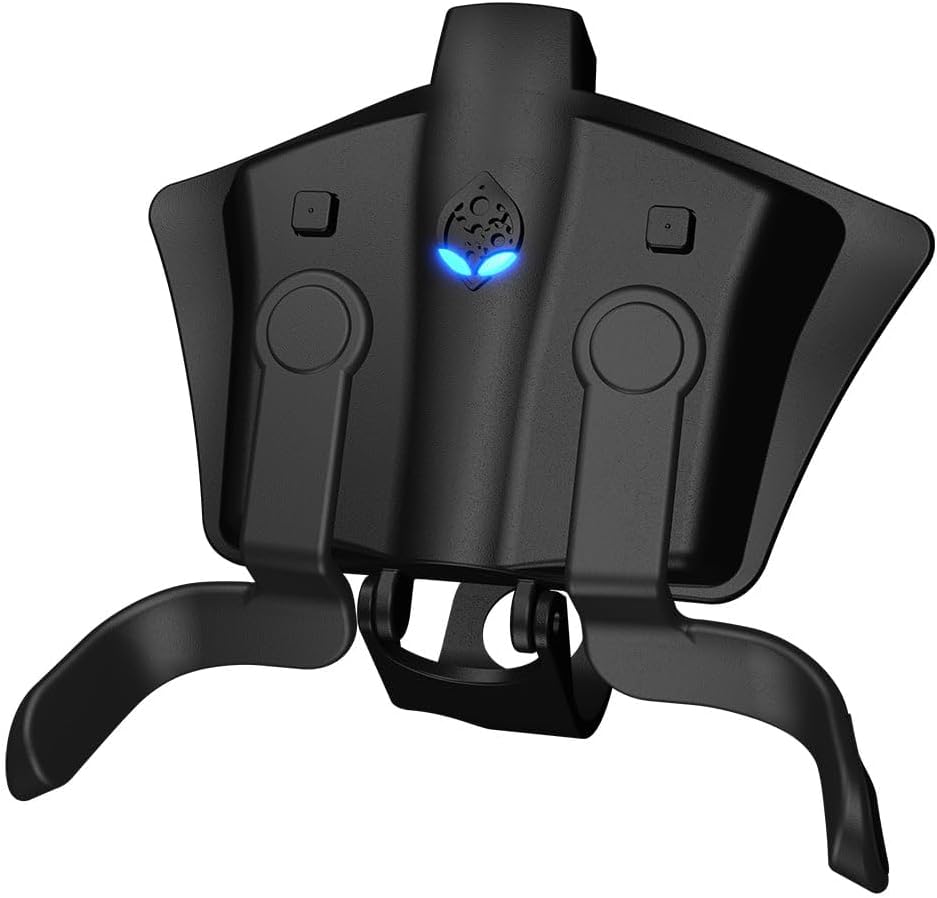
The STRIKEPACK F.P.S. Dominator is a controller adapter that adds advanced gaming functionality to your existing PS4 controller. The adapter allows you to assign buttons while you play and offers the latest shooter mods without permanent controller changes or warranty damage. Integrated controller mods are activated directly from the controller. Hundreds of mod combinations are possible; Rapid Fire, Drop Shot, Turbo 2.0 and many more - ready when you need them!
Box Contains
device; cable; manual
Reviews:
5.0 out of 5 stars It's complicated love and hate relationship
(function() { P.when('cr-A', 'ready').execute(function(A) { if(typeof A.toggleExpanderAriaLabel === 'function') { A.toggleExpanderAriaLabel('review_text_read_more', 'Read more of this review', 'Read less of this review'); } }); })(); .review-text-read-more-expander:focus-visible { outline: 2px solid #2162a1; outline-offset: 2px; border-radius: 5px; } So, iv used the strike pack not for around a year. And we'll.. as much as I hate the #!*%thing.. due to its multiple personalities. I refuse to not use it. And I won't replace because it's very modified personally.~The good.. the bad..This is a savage adapter if your looking for a Pro controller.. the paddles work exceptionally. Can be mapped to any button on the controller. And each paddle can have 2 buttons mapped.The down side is I fillings many if my friend have struggled to get to the point of this as the instructions are really not that clear. But to do this.✧»Mapoing 1 button.°•push the select button in the left or right side of the strike pack for the paddle u want mapping. Keeping hold of the select button press the button u want to map for instance (×) and release both buttons at the same time.✧»mapping two buttons to the paddle.°•Start same process. But instead of releasing both buttons. Keep the select paddle button pushed. Press as normal the first button u want to map - (×) and then press hold the second button u would like to also map, say like (o) .. and then release both the paddle select an (o) at the same time. This should work.✧ you should probably reset the full strike pack and start there mods again. To see if this is the problem with any glitches in games you have.✧Also make sure that your settings around the strike pack are exactly the same to the ones on your console. And in the game.°•For example: "Rumble" if u have the controller vibration off on console but turned on in game an not even sure in strike pack. This can throw the hole communication method off. then acts like it's got multi personality disorder.✧Make sure you connect the strike pack the same way as instructed every time.✧I have seen reviews concerning there head sets and the strike pack. I to also found this problem after a few week. Tho I actually found away to manage it. Still gives a slight buzz noise for any team members playing with me. But not for my self. An it isn't loud enough to bug people. I'll post my steps solving below. also I play CoD MW I'm not sure it would be the same for other games.✧When u turn on PS4 controller with the strike pack connected but not plugged in.✧Go to you consolesettings↬Devices↬Audio Devices.And the connections should say...᨞input device → headset᨞output device → TV or AVamp.᨞Adjust mic lvl - « ıllıllııllıllı » +᨞Headset volume - « ıllıllııllıllı » +᨞Output to headset → All Audio᨞Switch Output to Device Automatically [✓]°✩°Switch Output to Device Automatically!↤this here is always usually turned on [✓]If this is the case. Turn it of. [ ]✧Once u have turned it of. Connect your strike pack 2 console as usual with USB, As u do normally. and icon will pop up in top left corner, 『controller symbol』~And you will be in【tournament mode】•white lights•.✧From there. Switch your strike pack to【Mod Mode】•Blue lights•.» ᨞Hold left select button and press right select button.Then plug your head set into the controller. Here u will the see another pop up notification saying『microphone switched to headset connect controller』✧Once you have done this.Go back tosettings↬Devices↬Audio Devices.And the connections should say...᨞input device → headset᨞output device → TV or AVamp.✧Change the "Output device" to Headset connected controller.✧The proceed with loading your game as usual. This rectified the headset problem for me. Tho when I game. Friends mentioned they could hear aloud buzzing from my mic. To solve this in CoD.✧Againsettings↬Devices↬Audio Devices᨞input device → headset᨞output device → Headset᨞Adjust mic lvl - « ıllıllııllıllı » +᨞Headset volume - « ıllıllııllıllı » +᨞Output to headset → All Audio᨞Switch Output to Device Automatically [ ]✧Go to adjust mic volume. An just switch it off. Pull it down in to too low. As long as you have °mic volume° in game settings turned up. You can still be herd, and that horride buzzing vibrating noise becomes very minimum. ((I like like to turn my •Mic Threshold• to about 2 1/2 on the in-game settings)) So then the buzzing isn't constant.Hope this helps.
5.0 out of 5 stars Potential gamechanger for some...
Well I've had the SPD for over two weeks now and can I say.....I'm impressed.The design of the SPD is well executed. Very light and adds minimal bulk to my PS pro controller. The paddles sit comfortably on the inside of the controller arc and are easily activated using my ring fingers. I'm a massive Destiny geek and have found the remappable buttons to be extremely useful in both PVE and moreso in PVP. I've mapped the weapon-swop (triangle) to the left paddle and slide/crouch/ability (circle) to the right - easily doeable by simply pressing the button above the paddle (on the back of your controller when it's attached) and then just press the controller buttons you want it to map. Easy.The hidden gems of this add-on? The 'mods' - preprogrammed and adjustable functions for each of the buttons on your ps controller when the SPD is attached and powered on. You have to let the SPD know which game you're playing and which controller scheme you use ffirst. Fairly easy to do. Want to turn your scout rifle or hand cannon into a full-auto? Select the right mod and you're good to go. Loads more options available - pulse fire, drop-shot, etc etc. Great if you're into COD.Down sides for some? You MUST use the (admittedly long!) USB cable for the SPD to work. Down side, you're tethered to the PS. Upside? Lag-free button commands. Up to you what you like.Also - my god, the manual.... Can I say is taken me a week to figure out (and remember) how to select your class and then change your mod. The manual does a TERRIBLE job of teaching/showing you how to do this. But once you figure it out its easy to do - three second to turn a mod on and off on the fly. Very useful in PVE, almost as much in PVP. (Just remember if you like using a chargeable weapon like a fusion rifle you WILL have to turn this off!)Finally, with this plugged in it registers on the PS as a headset - so NO audio through your TV, so you have to use a headset! No bother for me but worth highlighting for you lovely lot.Overall? If you're not willing to shell out +£100 for a SCUF or a Razer, but want an advantage, this might just hit the spot for you...
4.0 out of 5 stars Great triggers really bad audio incredibly bad value for money
Let me start with a positive. The paddles on this controller add on are brilliant. Brilliant. I don't think a better position has been found. They make gaming so much better. The bad points. I am on my second one. Not a big deal until you consider I haven't been using them that long. They only come with a three month warranty which I think speaks volumes. After a while they just keep switching off. Mid game. You have to remove the power cable and plug back in. This has just started to happen on my second unit and to be honest I won't buy another at this price. If they were half the cost they are now I would consider it, but not at nearly 50 quid. I think I will save for a scuff which will last longer than one (two, three) of these. Its a shame really. Oh..... And just to add, the audio is horrific. I ended up buying a USB cable for my headset as it was almost useless through this device. Food for thought.
Visit the Collective Minds Store
Strike Pack FPS Dominator for PS4 Controllers
AED35760
Quantity:
Order today to get by 7-14 business days
This item qualifies for free delivery
Imported From: United Kingdom
At BOLO, we work hard to ensure the products you receive are new, genuine, and sourced from reputable suppliers.
BOLO is not an authorized or official retailer for most brands, nor are we affiliated with manufacturers unless specifically stated on a product page. Instead, we source verified sellers, authorized distributors or directly from the manufacturer.
Each product undergoes thorough inspection and verification at our consolidation and fulfilment centers to ensure it meets our strict authenticity and quality standards before being shipped and delivered to you.
If you ever have concerns regarding the authenticity of a product purchased from us, please contact Bolo Support. We will review your inquiry promptly and, if necessary, provide documentation verifying authenticity or offer a suitable resolution.
Your trust is our top priority, and we are committed to maintaining transparency and integrity in every transaction.
All product information, images, descriptions, and reviews originate from the manufacturer or from trusted sellers overseas. BOLO is not affiliated with, endorsed by, or an authorized retailer for most brands listed on our website unless stated otherwise.
While we strive to display accurate information, variations in packaging, labeling, instructions, or formulation may occasionally occur due to regional differences or supplier updates. For detailed or manufacturer-specific information, please contact the brand directly or reach out to BOLO Support for assistance.
Unless otherwise stated, all prices displayed on the product page include applicable taxes and import duties.
BOLO operates in accordance with the laws and regulations of United Arab Emirates. Any items found to be restricted or prohibited for sale within the UAE will be cancelled prior to shipment. We take proactive measures to ensure that only products permitted for sale in United Arab Emirates are listed on our website.
All items are shipped by air, and any products classified as “Dangerous Goods (DG)” under IATA regulations will be removed from the order and cancelled.
All orders are processed manually, and we make every effort to process them promptly once confirmed. Products cancelled due to the above reasons will be permanently removed from listings across the website.
Similar suggestions by Bolo
More from this brand
Similar items from “Controllers”
Share with
Or share with link
https://www.bolo.ae/products/KO01Y8DUKWN
Visit the Collective Minds Store
Strike Pack FPS Dominator for PS4 Controllers

AED35760
Quantity:
Order today to get by 7-14 business days
This item qualifies for free delivery
Imported From: United Kingdom
At BOLO, we work hard to ensure the products you receive are new, genuine, and sourced from reputable suppliers.
BOLO is not an authorized or official retailer for most brands, nor are we affiliated with manufacturers unless specifically stated on a product page. Instead, we source verified sellers, authorized distributors or directly from the manufacturer.
Each product undergoes thorough inspection and verification at our consolidation and fulfilment centers to ensure it meets our strict authenticity and quality standards before being shipped and delivered to you.
If you ever have concerns regarding the authenticity of a product purchased from us, please contact Bolo Support. We will review your inquiry promptly and, if necessary, provide documentation verifying authenticity or offer a suitable resolution.
Your trust is our top priority, and we are committed to maintaining transparency and integrity in every transaction.
All product information, images, descriptions, and reviews originate from the manufacturer or from trusted sellers overseas. BOLO is not affiliated with, endorsed by, or an authorized retailer for most brands listed on our website unless stated otherwise.
While we strive to display accurate information, variations in packaging, labeling, instructions, or formulation may occasionally occur due to regional differences or supplier updates. For detailed or manufacturer-specific information, please contact the brand directly or reach out to BOLO Support for assistance.
Unless otherwise stated, all prices displayed on the product page include applicable taxes and import duties.
BOLO operates in accordance with the laws and regulations of United Arab Emirates. Any items found to be restricted or prohibited for sale within the UAE will be cancelled prior to shipment. We take proactive measures to ensure that only products permitted for sale in United Arab Emirates are listed on our website.
All items are shipped by air, and any products classified as “Dangerous Goods (DG)” under IATA regulations will be removed from the order and cancelled.
All orders are processed manually, and we make every effort to process them promptly once confirmed. Products cancelled due to the above reasons will be permanently removed from listings across the website.
Description:
Troubleshooting: If you're experiencing connectivity issues or the device stops responding, make sure the connection cable is secure and fully inserted.
The STRIKEPACK F.P.S. Dominator is a controller adapter that adds advanced gaming functionality to your existing PS4 controller. The adapter allows you to assign buttons while you play and offers the latest shooter mods without permanent controller changes or warranty damage. Integrated controller mods are activated directly from the controller. Hundreds of mod combinations are possible; Rapid Fire, Drop Shot, Turbo 2.0 and many more - ready when you need them!
Box Contains
device; cable; manual
Reviews:
5.0 out of 5 stars It's complicated love and hate relationship
(function() { P.when('cr-A', 'ready').execute(function(A) { if(typeof A.toggleExpanderAriaLabel === 'function') { A.toggleExpanderAriaLabel('review_text_read_more', 'Read more of this review', 'Read less of this review'); } }); })(); .review-text-read-more-expander:focus-visible { outline: 2px solid #2162a1; outline-offset: 2px; border-radius: 5px; } So, iv used the strike pack not for around a year. And we'll.. as much as I hate the #!*%thing.. due to its multiple personalities. I refuse to not use it. And I won't replace because it's very modified personally.~The good.. the bad..This is a savage adapter if your looking for a Pro controller.. the paddles work exceptionally. Can be mapped to any button on the controller. And each paddle can have 2 buttons mapped.The down side is I fillings many if my friend have struggled to get to the point of this as the instructions are really not that clear. But to do this.✧»Mapoing 1 button.°•push the select button in the left or right side of the strike pack for the paddle u want mapping. Keeping hold of the select button press the button u want to map for instance (×) and release both buttons at the same time.✧»mapping two buttons to the paddle.°•Start same process. But instead of releasing both buttons. Keep the select paddle button pushed. Press as normal the first button u want to map - (×) and then press hold the second button u would like to also map, say like (o) .. and then release both the paddle select an (o) at the same time. This should work.✧ you should probably reset the full strike pack and start there mods again. To see if this is the problem with any glitches in games you have.✧Also make sure that your settings around the strike pack are exactly the same to the ones on your console. And in the game.°•For example: "Rumble" if u have the controller vibration off on console but turned on in game an not even sure in strike pack. This can throw the hole communication method off. then acts like it's got multi personality disorder.✧Make sure you connect the strike pack the same way as instructed every time.✧I have seen reviews concerning there head sets and the strike pack. I to also found this problem after a few week. Tho I actually found away to manage it. Still gives a slight buzz noise for any team members playing with me. But not for my self. An it isn't loud enough to bug people. I'll post my steps solving below. also I play CoD MW I'm not sure it would be the same for other games.✧When u turn on PS4 controller with the strike pack connected but not plugged in.✧Go to you consolesettings↬Devices↬Audio Devices.And the connections should say...᨞input device → headset᨞output device → TV or AVamp.᨞Adjust mic lvl - « ıllıllııllıllı » +᨞Headset volume - « ıllıllııllıllı » +᨞Output to headset → All Audio᨞Switch Output to Device Automatically [✓]°✩°Switch Output to Device Automatically!↤this here is always usually turned on [✓]If this is the case. Turn it of. [ ]✧Once u have turned it of. Connect your strike pack 2 console as usual with USB, As u do normally. and icon will pop up in top left corner, 『controller symbol』~And you will be in【tournament mode】•white lights•.✧From there. Switch your strike pack to【Mod Mode】•Blue lights•.» ᨞Hold left select button and press right select button.Then plug your head set into the controller. Here u will the see another pop up notification saying『microphone switched to headset connect controller』✧Once you have done this.Go back tosettings↬Devices↬Audio Devices.And the connections should say...᨞input device → headset᨞output device → TV or AVamp.✧Change the "Output device" to Headset connected controller.✧The proceed with loading your game as usual. This rectified the headset problem for me. Tho when I game. Friends mentioned they could hear aloud buzzing from my mic. To solve this in CoD.✧Againsettings↬Devices↬Audio Devices᨞input device → headset᨞output device → Headset᨞Adjust mic lvl - « ıllıllııllıllı » +᨞Headset volume - « ıllıllııllıllı » +᨞Output to headset → All Audio᨞Switch Output to Device Automatically [ ]✧Go to adjust mic volume. An just switch it off. Pull it down in to too low. As long as you have °mic volume° in game settings turned up. You can still be herd, and that horride buzzing vibrating noise becomes very minimum. ((I like like to turn my •Mic Threshold• to about 2 1/2 on the in-game settings)) So then the buzzing isn't constant.Hope this helps.
5.0 out of 5 stars Potential gamechanger for some...
Well I've had the SPD for over two weeks now and can I say.....I'm impressed.The design of the SPD is well executed. Very light and adds minimal bulk to my PS pro controller. The paddles sit comfortably on the inside of the controller arc and are easily activated using my ring fingers. I'm a massive Destiny geek and have found the remappable buttons to be extremely useful in both PVE and moreso in PVP. I've mapped the weapon-swop (triangle) to the left paddle and slide/crouch/ability (circle) to the right - easily doeable by simply pressing the button above the paddle (on the back of your controller when it's attached) and then just press the controller buttons you want it to map. Easy.The hidden gems of this add-on? The 'mods' - preprogrammed and adjustable functions for each of the buttons on your ps controller when the SPD is attached and powered on. You have to let the SPD know which game you're playing and which controller scheme you use ffirst. Fairly easy to do. Want to turn your scout rifle or hand cannon into a full-auto? Select the right mod and you're good to go. Loads more options available - pulse fire, drop-shot, etc etc. Great if you're into COD.Down sides for some? You MUST use the (admittedly long!) USB cable for the SPD to work. Down side, you're tethered to the PS. Upside? Lag-free button commands. Up to you what you like.Also - my god, the manual.... Can I say is taken me a week to figure out (and remember) how to select your class and then change your mod. The manual does a TERRIBLE job of teaching/showing you how to do this. But once you figure it out its easy to do - three second to turn a mod on and off on the fly. Very useful in PVE, almost as much in PVP. (Just remember if you like using a chargeable weapon like a fusion rifle you WILL have to turn this off!)Finally, with this plugged in it registers on the PS as a headset - so NO audio through your TV, so you have to use a headset! No bother for me but worth highlighting for you lovely lot.Overall? If you're not willing to shell out +£100 for a SCUF or a Razer, but want an advantage, this might just hit the spot for you...
4.0 out of 5 stars Great triggers really bad audio incredibly bad value for money
Let me start with a positive. The paddles on this controller add on are brilliant. Brilliant. I don't think a better position has been found. They make gaming so much better. The bad points. I am on my second one. Not a big deal until you consider I haven't been using them that long. They only come with a three month warranty which I think speaks volumes. After a while they just keep switching off. Mid game. You have to remove the power cable and plug back in. This has just started to happen on my second unit and to be honest I won't buy another at this price. If they were half the cost they are now I would consider it, but not at nearly 50 quid. I think I will save for a scuff which will last longer than one (two, three) of these. Its a shame really. Oh..... And just to add, the audio is horrific. I ended up buying a USB cable for my headset as it was almost useless through this device. Food for thought.
Similar suggestions by Bolo
More from this brand
Similar items from “Controllers”
Share with
Or share with link
https://www.bolo.ae/products/KO01Y8DUKWN