Description:
Reviews:
5.0 out of 5 stars Simple, cost-effective solution to digitising your LP collection.
(function() { P.when('cr-A', 'ready').execute(function(A) { if(typeof A.toggleExpanderAriaLabel === 'function') { A.toggleExpanderAriaLabel('review_text_read_more', 'Read more of this review', 'Read less of this review'); } }); })(); .review-text-read-more-expander:focus-visible { outline: 2px solid #2162a1; outline-offset: 2px; border-radius: 5px; } This product is so much better than some negative reviews would have you believe. Yes it looks a bit silly having a tiny interface box shaped like a turntable, but it is clear in the description that it is not a real turntable. It connects easily to my iMac, enabling me to record straight from my record deck with no hifi system involved. It has very good gain control to help you get high volume without distortion at the top end. I found I could not load the software from the supplied CD but it was very quick and easy to download and install the latest version from the Ion's website. It is very good that there is the option of either getting the software automatically decide where tracks finish or to let you do it manually - the latter is best for any music with very quiet patches in the middle of a track. In automatic tracking mode it adds an unnecessary blank track at the end of the side but that it easy to delete in iTunes. It numbers tracks from 1 on both sides of an album but it is easy to change the track numbering in iTunes. Some reviewers said you can't change the track titles once entered - rubbish - it is so easy to change them in iTunes.Overall verdict, I'd definitely recommend it to anyone wanting to digitise their LP collection. Great cost effective product.One suggestion for improvement in the next version - please add balance control so you can adjust the balance between right and left channels.
1.0 out of 5 stars Beware things are not all as they appear.
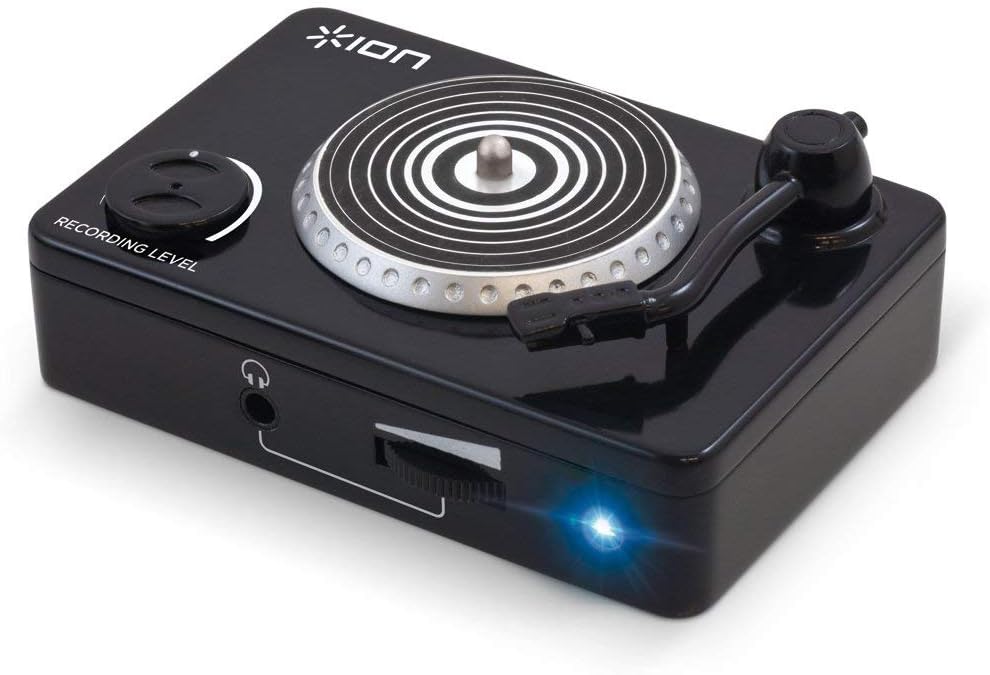
Don't be fooled by the picture,this unit is actually an interface to go between an old turntable and a p.c. I am sure that it is a good product and does the intended job,but not much use without a turntable Like a fool I thought that I had found a cheap solution. alas it is now on its way back to Bolo
4.0 out of 5 stars Decent enough, with a few quirks
First and foremost - this is NOT a turntable. Anyone who expects that for £20 is living in a different world to me.This is a conversion box. It sits between your audio device and computer. And, on the whole, it does a good job. But it has a couple of quirks, and for that reason I can't really give it a full 5 stars (nor am I an out-and-out audiophile, so I can't comment on final quality; I bought this to transfer my wife's and my old vinyl to digital, so that we can play it in the car and so forth, and it does the job well enough for that purpose, at least).Firstly - like any kit, you need to make sure you set it up right. For example, it wants you to select between line and phono input. Pick the wrong one and you may still get sound of a sort - but the quality will be appalling. Pick the right one and fail to set the recording volume correctly, and you'll likely get nothing at all. OK, that's mostly common sense, but it seems to be defeating one or two people, so it can't be ignored. Basically - connect it up; launch the software as far as the screen with the record button; start playing something; turn up the recording volume control on the box until the audio levels at window-right are bouncing up and down nicely but not going over the top. Turn on your computer speakers and make sure that what's coming through is clear - and if it's not, try the other input setting. THEN start your recording-proper.Secondly, and more serious - whilst the supplied software has an automatic "split into tracks" option, it doesn't always do what it says on the tin. Nor does it simply give too many tracks. It took me several failures (including a few when I seemed to end up with nothing more than a single track consisting of one minute of silence), and then a bit of digging on Ion's web site, to realise that, basically, any audio with long, quiet stretches in it - which includes quite a lot of the classical stuff in my collection - isn't going to be correctly processed. In the end I've mostly given up using that option for anything more subtle than, say, a pop album with nice big inter-track gaps, as I often either end up with the wrong number of tracks or even the complete failures alluded to earlier. It's often easier, in the end, to just rip a whole vinyl side as one "track" and then use software such as Audacity (free, and which I can heartily recommend) to split it up. And that gives me an opportunity to clean up things like basic vinyl rumble/noise and the inevitable clicks as I do anyway - which is both great and very easy.With those caveats, though, it's easy-enough to use, and a decent-enough solution for the money.
5.0 out of 5 stars Excellent at converting vinyl
An excellent product - does what its supposed to very well and very good value. Very easy to connect to laptop and turntable and leads are provided. The included software is very easy to use and it automatically adds recorded songs to iTunes. Recommended.
1.0 out of 5 stars Terrible software, hardware is ok
The software refuses to recognise their own device. Until you disable or remove any other audio codecs, average user will be lost!There is then no choice of encoding, meaning a pcm file that windows will not play.I have used it with success but only because I use Audacity as the software.Their proprietary software is utter garbage, no moving recording levels or indication that it’s even recording.2/10
5.0 out of 5 stars Not needed
This for me was a waste of money as all you need do is put a phono preamp between the turntable and computer, suppose a good quality preamp would cost more!
3.0 out of 5 stars Big Disappointment!
One channel stopped working after a day and the software does not work on the latest MacBook Pro operating system Big Sur. Big disappointment!
2.0 out of 5 stars This wasn't what I expected, it did not show ...
This wasn't what I expected, it did not show clearly on the Bolo listing that it required an existing turntable to work. The picture on the listing made it look a large size that would be able to play records but it is actually so small it fits in the palm of my hand.
Excellent little device
(function() { P.when('cr-A', 'ready').execute(function(A) { if(typeof A.toggleExpanderAriaLabel === 'function') { A.toggleExpanderAriaLabel('review_text_read_more', 'Read more of this review', 'Read less of this review'); } }); })(); .review-text-read-more-expander:focus-visible { outline: 2px solid #2162a1; outline-offset: 2px; border-radius: 5px; } Excellent little device. After years of trying unsatisfactory converters it's great to find one that actually does what it says it will. So easy to set up and use too, literally plug and play (on a Mac, anyway, can't answer for Windows). Highly recommended to anyone looking to convert tapes or vinyl to cds.
WOW
This is the best product I have ever purchased. I looked at expensive turntables with recorders built into them and was not impressed by the costumer reviews. I decided to try this as it was very low cost and got a good review. Well I can say that it deserves more than 5 stars because it does everything and does it easily. Just load the software into you computer, then hook the provided red and white RCA cables from your turntable into the converter, then plug the converter into your computer with the provided USB cable.The software walks you through what to do next, I needed to call the support line to get the converter to recognize my turntable (this was fast and easy, the person who helped me spoke English and quickly guided me through setting my laptop within a few minutes), then I simple continued to follow the directions to just begin the recorder and start my turntable, that was it!There is a great feature which lets you visually set the volume recording level to make sure that you do not over amplify and "peak clip" the music, once you set it to a good level it stays there, that's it.This software DOES separate the tracks for you (some of the expensive turntable recorders didn't even do that), and I just let the recorder keep running and flipped the album over to record both sides, which makes not difference converting to mp3s.Once the recording is finished you manually put the album title and track titles on it and push done and it automatically puts the album into your iTunes library.Update: this item became incompatible with I-tunes, therefore I stopped using it. Looks like it’s no longer available to purchase anyway.
pratique et facile
rien a dire très facile a utiliser
Rip
Come rippare da qualsiasi metodo tecnologico analogico in digitale ogni audio, dischi, cd, musicassette, un vero must minuscolo e portatile
普通に録音できました。
レコードのデジタル信号化に利用。付属の録音ソフトは録音は可能だが、iTunesに保存される。iTunesは使用せず、音声の編集もできないので、フリーソフトを使った。使ったフリーソフトがこのオーディオインターフェイスの信号を読み取り、録音できたのは幸運だった。
Visit the ION Store
ION Audio Vinyl Forever | Compact USB Audio Conversion Turntable Adapter Perfect For Turntables, Cassette Decks and CD Players With RCA Inputs, Headphone Output and Independent Volume Control
AED25995
Quantity:
Order today to get by 7-14 business days
This item qualifies for free delivery
Imported From: United Kingdom
At BOLO, we work hard to ensure the products you receive are new, genuine, and sourced from reputable suppliers.
BOLO is not an authorized or official retailer for most brands, nor are we affiliated with manufacturers unless specifically stated on a product page. Instead, we source verified sellers, authorized distributors or directly from the manufacturer.
Each product undergoes thorough inspection and verification at our consolidation and fulfilment centers to ensure it meets our strict authenticity and quality standards before being shipped and delivered to you.
If you ever have concerns regarding the authenticity of a product purchased from us, please contact Bolo Support. We will review your inquiry promptly and, if necessary, provide documentation verifying authenticity or offer a suitable resolution.
Your trust is our top priority, and we are committed to maintaining transparency and integrity in every transaction.
All product information, images, descriptions, and reviews originate from the manufacturer or from trusted sellers overseas. BOLO is not affiliated with, endorsed by, or an authorized retailer for most brands listed on our website unless stated otherwise.
While we strive to display accurate information, variations in packaging, labeling, instructions, or formulation may occasionally occur due to regional differences or supplier updates. For detailed or manufacturer-specific information, please contact the brand directly or reach out to BOLO Support for assistance.
Unless otherwise stated, all prices displayed on the product page include applicable taxes and import duties.
BOLO operates in accordance with the laws and regulations of United Arab Emirates. Any items found to be restricted or prohibited for sale within the UAE will be cancelled prior to shipment. We take proactive measures to ensure that only products permitted for sale in United Arab Emirates are listed on our website.
All items are shipped by air, and any products classified as “Dangerous Goods (DG)” under IATA regulations will be removed from the order and cancelled.
All orders are processed manually, and we make every effort to process them promptly once confirmed. Products cancelled due to the above reasons will be permanently removed from listings across the website.
Similar suggestions by Bolo
More from this brand
Similar items from “Record Players”
Share with
Or share with link
https://www.bolo.ae/products/KO006MMHRLD
Visit the ION Store
ION Audio Vinyl Forever | Compact USB Audio Conversion Turntable Adapter Perfect For Turntables, Cassette Decks and CD Players With RCA Inputs, Headphone Output and Independent Volume Control

AED25995
Quantity:
Order today to get by 7-14 business days
This item qualifies for free delivery
Imported From: United Kingdom
At BOLO, we work hard to ensure the products you receive are new, genuine, and sourced from reputable suppliers.
BOLO is not an authorized or official retailer for most brands, nor are we affiliated with manufacturers unless specifically stated on a product page. Instead, we source verified sellers, authorized distributors or directly from the manufacturer.
Each product undergoes thorough inspection and verification at our consolidation and fulfilment centers to ensure it meets our strict authenticity and quality standards before being shipped and delivered to you.
If you ever have concerns regarding the authenticity of a product purchased from us, please contact Bolo Support. We will review your inquiry promptly and, if necessary, provide documentation verifying authenticity or offer a suitable resolution.
Your trust is our top priority, and we are committed to maintaining transparency and integrity in every transaction.
All product information, images, descriptions, and reviews originate from the manufacturer or from trusted sellers overseas. BOLO is not affiliated with, endorsed by, or an authorized retailer for most brands listed on our website unless stated otherwise.
While we strive to display accurate information, variations in packaging, labeling, instructions, or formulation may occasionally occur due to regional differences or supplier updates. For detailed or manufacturer-specific information, please contact the brand directly or reach out to BOLO Support for assistance.
Unless otherwise stated, all prices displayed on the product page include applicable taxes and import duties.
BOLO operates in accordance with the laws and regulations of United Arab Emirates. Any items found to be restricted or prohibited for sale within the UAE will be cancelled prior to shipment. We take proactive measures to ensure that only products permitted for sale in United Arab Emirates are listed on our website.
All items are shipped by air, and any products classified as “Dangerous Goods (DG)” under IATA regulations will be removed from the order and cancelled.
All orders are processed manually, and we make every effort to process them promptly once confirmed. Products cancelled due to the above reasons will be permanently removed from listings across the website.
Description:
Reviews:
5.0 out of 5 stars Simple, cost-effective solution to digitising your LP collection.
(function() { P.when('cr-A', 'ready').execute(function(A) { if(typeof A.toggleExpanderAriaLabel === 'function') { A.toggleExpanderAriaLabel('review_text_read_more', 'Read more of this review', 'Read less of this review'); } }); })(); .review-text-read-more-expander:focus-visible { outline: 2px solid #2162a1; outline-offset: 2px; border-radius: 5px; } This product is so much better than some negative reviews would have you believe. Yes it looks a bit silly having a tiny interface box shaped like a turntable, but it is clear in the description that it is not a real turntable. It connects easily to my iMac, enabling me to record straight from my record deck with no hifi system involved. It has very good gain control to help you get high volume without distortion at the top end. I found I could not load the software from the supplied CD but it was very quick and easy to download and install the latest version from the Ion's website. It is very good that there is the option of either getting the software automatically decide where tracks finish or to let you do it manually - the latter is best for any music with very quiet patches in the middle of a track. In automatic tracking mode it adds an unnecessary blank track at the end of the side but that it easy to delete in iTunes. It numbers tracks from 1 on both sides of an album but it is easy to change the track numbering in iTunes. Some reviewers said you can't change the track titles once entered - rubbish - it is so easy to change them in iTunes.Overall verdict, I'd definitely recommend it to anyone wanting to digitise their LP collection. Great cost effective product.One suggestion for improvement in the next version - please add balance control so you can adjust the balance between right and left channels.
1.0 out of 5 stars Beware things are not all as they appear.
Don't be fooled by the picture,this unit is actually an interface to go between an old turntable and a p.c. I am sure that it is a good product and does the intended job,but not much use without a turntable Like a fool I thought that I had found a cheap solution. alas it is now on its way back to Bolo
4.0 out of 5 stars Decent enough, with a few quirks
First and foremost - this is NOT a turntable. Anyone who expects that for £20 is living in a different world to me.This is a conversion box. It sits between your audio device and computer. And, on the whole, it does a good job. But it has a couple of quirks, and for that reason I can't really give it a full 5 stars (nor am I an out-and-out audiophile, so I can't comment on final quality; I bought this to transfer my wife's and my old vinyl to digital, so that we can play it in the car and so forth, and it does the job well enough for that purpose, at least).Firstly - like any kit, you need to make sure you set it up right. For example, it wants you to select between line and phono input. Pick the wrong one and you may still get sound of a sort - but the quality will be appalling. Pick the right one and fail to set the recording volume correctly, and you'll likely get nothing at all. OK, that's mostly common sense, but it seems to be defeating one or two people, so it can't be ignored. Basically - connect it up; launch the software as far as the screen with the record button; start playing something; turn up the recording volume control on the box until the audio levels at window-right are bouncing up and down nicely but not going over the top. Turn on your computer speakers and make sure that what's coming through is clear - and if it's not, try the other input setting. THEN start your recording-proper.Secondly, and more serious - whilst the supplied software has an automatic "split into tracks" option, it doesn't always do what it says on the tin. Nor does it simply give too many tracks. It took me several failures (including a few when I seemed to end up with nothing more than a single track consisting of one minute of silence), and then a bit of digging on Ion's web site, to realise that, basically, any audio with long, quiet stretches in it - which includes quite a lot of the classical stuff in my collection - isn't going to be correctly processed. In the end I've mostly given up using that option for anything more subtle than, say, a pop album with nice big inter-track gaps, as I often either end up with the wrong number of tracks or even the complete failures alluded to earlier. It's often easier, in the end, to just rip a whole vinyl side as one "track" and then use software such as Audacity (free, and which I can heartily recommend) to split it up. And that gives me an opportunity to clean up things like basic vinyl rumble/noise and the inevitable clicks as I do anyway - which is both great and very easy.With those caveats, though, it's easy-enough to use, and a decent-enough solution for the money.
5.0 out of 5 stars Excellent at converting vinyl
An excellent product - does what its supposed to very well and very good value. Very easy to connect to laptop and turntable and leads are provided. The included software is very easy to use and it automatically adds recorded songs to iTunes. Recommended.
1.0 out of 5 stars Terrible software, hardware is ok
The software refuses to recognise their own device. Until you disable or remove any other audio codecs, average user will be lost!There is then no choice of encoding, meaning a pcm file that windows will not play.I have used it with success but only because I use Audacity as the software.Their proprietary software is utter garbage, no moving recording levels or indication that it’s even recording.2/10
5.0 out of 5 stars Not needed
This for me was a waste of money as all you need do is put a phono preamp between the turntable and computer, suppose a good quality preamp would cost more!
3.0 out of 5 stars Big Disappointment!
One channel stopped working after a day and the software does not work on the latest MacBook Pro operating system Big Sur. Big disappointment!
2.0 out of 5 stars This wasn't what I expected, it did not show ...
This wasn't what I expected, it did not show clearly on the Bolo listing that it required an existing turntable to work. The picture on the listing made it look a large size that would be able to play records but it is actually so small it fits in the palm of my hand.
Excellent little device
(function() { P.when('cr-A', 'ready').execute(function(A) { if(typeof A.toggleExpanderAriaLabel === 'function') { A.toggleExpanderAriaLabel('review_text_read_more', 'Read more of this review', 'Read less of this review'); } }); })(); .review-text-read-more-expander:focus-visible { outline: 2px solid #2162a1; outline-offset: 2px; border-radius: 5px; } Excellent little device. After years of trying unsatisfactory converters it's great to find one that actually does what it says it will. So easy to set up and use too, literally plug and play (on a Mac, anyway, can't answer for Windows). Highly recommended to anyone looking to convert tapes or vinyl to cds.
WOW
This is the best product I have ever purchased. I looked at expensive turntables with recorders built into them and was not impressed by the costumer reviews. I decided to try this as it was very low cost and got a good review. Well I can say that it deserves more than 5 stars because it does everything and does it easily. Just load the software into you computer, then hook the provided red and white RCA cables from your turntable into the converter, then plug the converter into your computer with the provided USB cable.The software walks you through what to do next, I needed to call the support line to get the converter to recognize my turntable (this was fast and easy, the person who helped me spoke English and quickly guided me through setting my laptop within a few minutes), then I simple continued to follow the directions to just begin the recorder and start my turntable, that was it!There is a great feature which lets you visually set the volume recording level to make sure that you do not over amplify and "peak clip" the music, once you set it to a good level it stays there, that's it.This software DOES separate the tracks for you (some of the expensive turntable recorders didn't even do that), and I just let the recorder keep running and flipped the album over to record both sides, which makes not difference converting to mp3s.Once the recording is finished you manually put the album title and track titles on it and push done and it automatically puts the album into your iTunes library.Update: this item became incompatible with I-tunes, therefore I stopped using it. Looks like it’s no longer available to purchase anyway.
pratique et facile
rien a dire très facile a utiliser
Rip
Come rippare da qualsiasi metodo tecnologico analogico in digitale ogni audio, dischi, cd, musicassette, un vero must minuscolo e portatile
普通に録音できました。
レコードのデジタル信号化に利用。付属の録音ソフトは録音は可能だが、iTunesに保存される。iTunesは使用せず、音声の編集もできないので、フリーソフトを使った。使ったフリーソフトがこのオーディオインターフェイスの信号を読み取り、録音できたのは幸運だった。
Similar suggestions by Bolo
More from this brand
Similar items from “Record Players”
Share with
Or share with link
https://www.bolo.ae/products/KO006MMHRLD