Description:
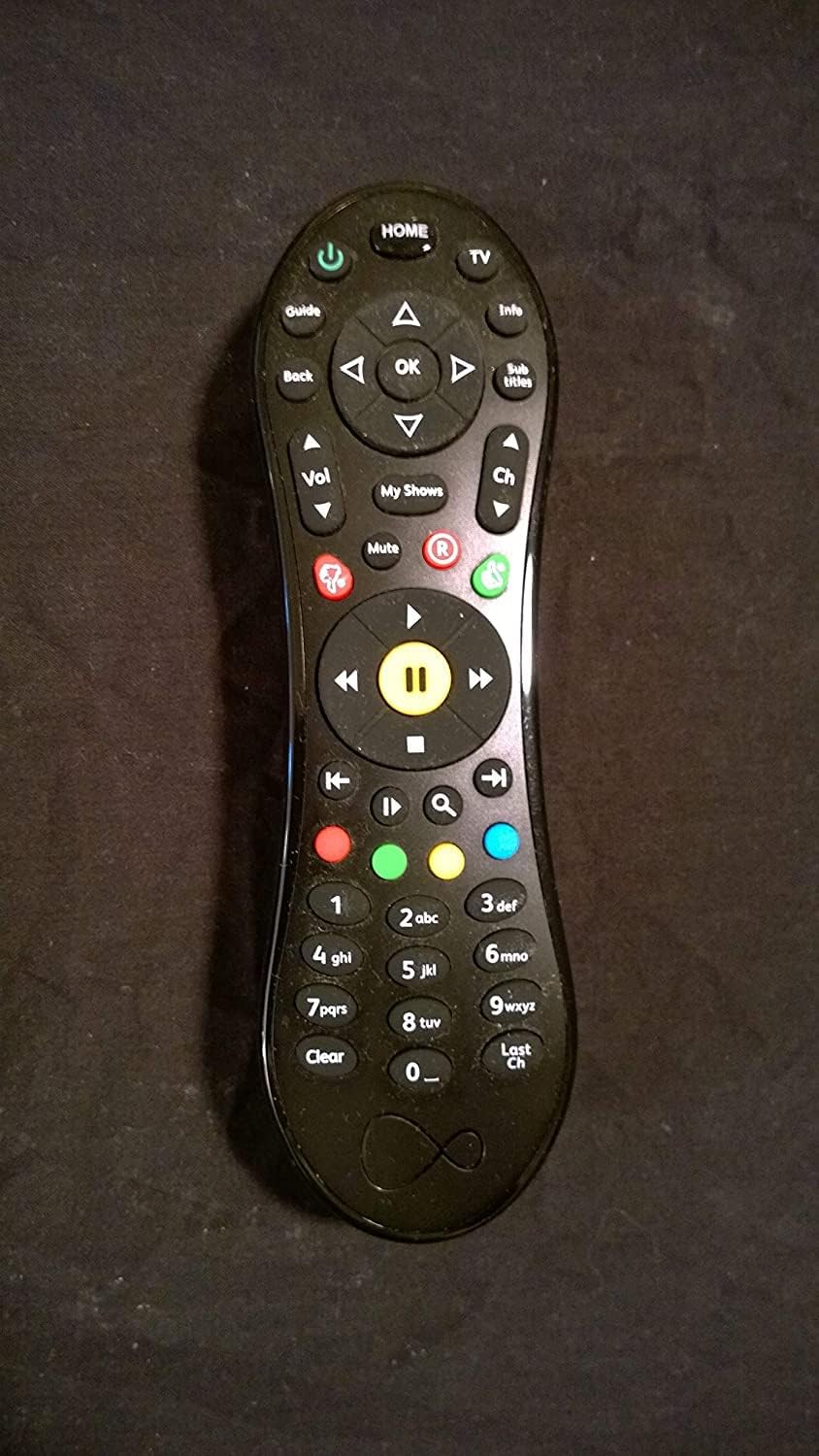
this type 13 virgin media V6 remote control V6 program remote to control tv 1.Turn on Tv and V6 tivo * The remote will automatically work with the Virgin box it came with o this method will help you connect your remote to your TV so you can change the TV setting such a the sound level. 2. Pre the Home button on your remote. You'll find thisat the top of your remote. 3.Navigate to Help & etting and pre OK on your remote. You'll want to ue the directional pad to navigate down the menu on the creen then pre the circular button that ay \OK\ in the center of the directional pad. 4.Navigate to Help and pre OK. \Help\ hould automatically be elected o you hould jut have to pre \Ok\ to continue. 5.Navigate to Program Your Remote and pre OK. You'll ee thisat the top of your creen; you hould ue the up arrow in your directional pad to navigate to it. 6.elect Ye et up my Virgin TV remote now and pre OK. The model of your TV hould be automatically detected and a code will diplay on the creen. 7.Pre and hold the TV and Clear button together. You'll ee the TV button in the top right corner of the remote and the Clear button in the bottom left corner. * The LED light at the top of your remote will flah green twice and you can releae the TV and Clear button. 8.Enter the code on your remote. You'll need to pre the button on the remote that you ee diplayed on your TV. * The LED light at the top of your remote hould flah green twice again. * Tet that thisworked by preing the Volume Up and Volume Down button. If the volume on your TV change you've uccefully connected your remote to your TV. If not you'll need to kip to the method to manually connect your remote to your TV. 9.elect Ye that worked! and pre OK. If preing the volume button on your remote worked then you hould alo be able to turn off the TV with your remote and can kip the ret of thisarticle
Details:
Visit the Virgin Media Store
Virgin Media Type 13 Remote for TiVo
AED14766
Quantity:
Order today to get by 7-14 business days
Delivery fee of AED 20. Free for orders above AED 200.
'%3e%3crect%20x='0.599609'%20width='22.4'%20height='16'%20fill='%230A17A7'/%3e%3cpath%20fill-rule='evenodd'%20clip-rule='evenodd'%20d='M-0.426196%20-1.53223L9.1335%204.91587V-1.06506H14.4668V4.91648L24.0263%20-1.53147L25.2193%200.237148L17.6615%205.33494H23.0002V10.6683H17.6618L25.2187%2015.7655L24.0258%2017.5341L14.4668%2011.0865V17.0683H9.1335V11.0871L-0.425634%2017.5348L-1.61858%2015.7662L5.93947%2010.6683H0.600172V5.33494H5.93977L-1.61914%200.236387L-0.426196%20-1.53223Z'%20fill='white'/%3e%3cpath%20d='M15.5332%205.06615L25.6655%20-1.59961'%20stroke='%23DB1F35'%20stroke-width='0.533333'%20stroke-linecap='round'/%3e%3cpath%20d='M16.6094%2010.9578L25.6924%2017.0801'%20stroke='%23DB1F35'%20stroke-width='0.533333'%20stroke-linecap='round'/%3e%3cpath%20d='M7.00176%205.04727L-2.47266%20-1.33789'%20stroke='%23DB1F35'%20stroke-width='0.533333'%20stroke-linecap='round'/%3e%3cpath%20d='M8.02936%2010.8842L-2.47266%2017.8486'%20stroke='%23DB1F35'%20stroke-width='0.533333'%20stroke-linecap='round'/%3e%3cpath%20fill-rule='evenodd'%20clip-rule='evenodd'%20d='M0.599609%209.6H10.1996V16H13.3996V9.6H22.9996V6.4H13.3996V0H10.1996V6.4H0.599609V9.6Z'%20fill='%23E6273E'/%3e%3c/g%3e%3c/svg%3e) Imported From: United Kingdom
Imported From: United Kingdom
At BOLO, we work hard to ensure the products you receive are new, genuine, and sourced from reputable suppliers.
Every product in the BOLO catalogue is sourced through our Verified Global Supply Network of verified sellers, authorized distributors or directly from the manufacturer.
Each product undergoes thorough inspection and verification at our consolidation and fulfilment centers to ensure it meets our strict authenticity and quality standards before being shipped and delivered to you.
If you ever have concerns regarding the authenticity of a product purchased from us, please contact Bolo Support. We will review your inquiry promptly and, if necessary, provide documentation verifying authenticity or offer a suitable resolution.
Your trust is our top priority, and we are committed to maintaining transparency and integrity in every transaction.
While we strive to display accurate information, variations in packaging, labeling, instructions, or formulation may occasionally occur due to regional differences or supplier updates. For detailed or manufacturer-specific information, please contact the brand directly or reach out to BOLO Support for assistance.
Unless otherwise stated, all prices displayed on the product page include applicable taxes and import duties.
BOLO operates in accordance with the laws and regulations of United Arab Emirates. Any items found to be restricted or prohibited for sale within the United Arab Emirates will be cancelled prior to shipment. We take proactive measures to ensure that only products permitted for sale in United Arab Emirates are listed on our website.
All items are shipped by air, and any products classified as “Dangerous Goods (DG)” under IATA regulations will be removed from the order and cancelled.
All orders are processed manually, and we make every effort to process them promptly once confirmed. Products cancelled due to the above reasons will be permanently removed from listings across the website.
More from this brand
Similar items from “Remote Controls”
Share with
Or share with link
https://www.bolo.ae/products/KO005SPATUJ
Visit the Virgin Media Store
Virgin Media Type 13 Remote for TiVo
AED14766
Quantity:
Order today to get by 7-14 business days
Delivery fee of AED 20. Free for orders above AED 200.
Imported From: United Kingdom
At BOLO, we work hard to ensure the products you receive are new, genuine, and sourced from reputable suppliers.
Every product in the BOLO catalogue is sourced through our Verified Global Supply Network of verified sellers, authorized distributors or directly from the manufacturer.
Each product undergoes thorough inspection and verification at our consolidation and fulfilment centers to ensure it meets our strict authenticity and quality standards before being shipped and delivered to you.
If you ever have concerns regarding the authenticity of a product purchased from us, please contact Bolo Support. We will review your inquiry promptly and, if necessary, provide documentation verifying authenticity or offer a suitable resolution.
Your trust is our top priority, and we are committed to maintaining transparency and integrity in every transaction.
While we strive to display accurate information, variations in packaging, labeling, instructions, or formulation may occasionally occur due to regional differences or supplier updates. For detailed or manufacturer-specific information, please contact the brand directly or reach out to BOLO Support for assistance.
Unless otherwise stated, all prices displayed on the product page include applicable taxes and import duties.
BOLO operates in accordance with the laws and regulations of United Arab Emirates. Any items found to be restricted or prohibited for sale within the United Arab Emirates will be cancelled prior to shipment. We take proactive measures to ensure that only products permitted for sale in United Arab Emirates are listed on our website.
All items are shipped by air, and any products classified as “Dangerous Goods (DG)” under IATA regulations will be removed from the order and cancelled.
All orders are processed manually, and we make every effort to process them promptly once confirmed. Products cancelled due to the above reasons will be permanently removed from listings across the website.
Description:
this type 13 virgin media V6 remote control V6 program remote to control tv 1.Turn on Tv and V6 tivo * The remote will automatically work with the Virgin box it came with o this method will help you connect your remote to your TV so you can change the TV setting such a the sound level. 2. Pre the Home button on your remote. You'll find thisat the top of your remote. 3.Navigate to Help & etting and pre OK on your remote. You'll want to ue the directional pad to navigate down the menu on the creen then pre the circular button that ay \OK\ in the center of the directional pad. 4.Navigate to Help and pre OK. \Help\ hould automatically be elected o you hould jut have to pre \Ok\ to continue. 5.Navigate to Program Your Remote and pre OK. You'll ee thisat the top of your creen; you hould ue the up arrow in your directional pad to navigate to it. 6.elect Ye et up my Virgin TV remote now and pre OK. The model of your TV hould be automatically detected and a code will diplay on the creen. 7.Pre and hold the TV and Clear button together. You'll ee the TV button in the top right corner of the remote and the Clear button in the bottom left corner. * The LED light at the top of your remote will flah green twice and you can releae the TV and Clear button. 8.Enter the code on your remote. You'll need to pre the button on the remote that you ee diplayed on your TV. * The LED light at the top of your remote hould flah green twice again. * Tet that thisworked by preing the Volume Up and Volume Down button. If the volume on your TV change you've uccefully connected your remote to your TV. If not you'll need to kip to the method to manually connect your remote to your TV. 9.elect Ye that worked! and pre OK. If preing the volume button on your remote worked then you hould alo be able to turn off the TV with your remote and can kip the ret of thisarticle
Details:
More from this brand
Similar items from “Remote Controls”
Share with
Or share with link
https://www.bolo.ae/products/KO005SPATUJ