Description:
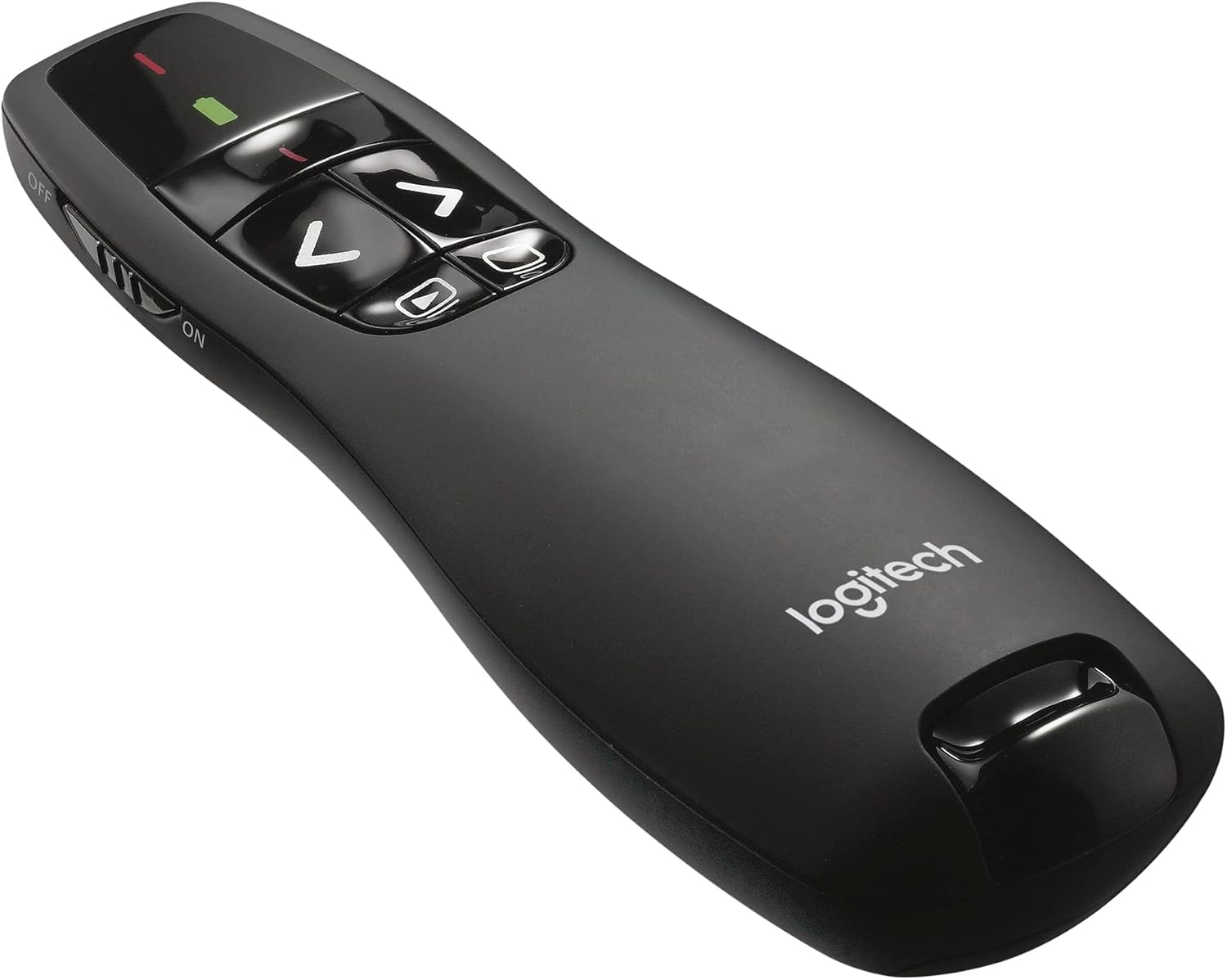
Giving a presentation in front of colleagues, employees or peers is now made easier and more informative with a durable presentation remote from Logitech. Having the flexibility to access your PowerPoint or other software with an embedded laser pointer will truly take your presentations to another level. The Logitech presentation clicker provides intuitive slideshow control and is also built to last - the durable construction provides extra strength in the event of an accidental drop. It’s lightweight, making longer presentations a breeze, plus it features a red laser pointer which allows the presenter to give crystal-clear explanations efficiently.The Logitech wireless presentation clicker will boost your confidence in front of an audience. The intuitive controls and red laser pointer makes any presentation easier, even in the darkest auditorium. The 15m range and battery indicator will help you personalise your presentation and give a relaxed delivery. Having the ability to connect with the audience through extra-range functioning improves your ability to sell your presentation. The R400 is also extremely easy to connect and set up: simply plug the receiver into a USB port and you’re ready to go. This wireless presentation clicker requires no software downloads or other setup procedures. Buttons are easy to find by touch and the smooth contours feel ideal in your hand. You’ll be in control from the first slide to the last.
Legal Disclaimer
Product is sourced and shipped from the European Economic Area (EEA). Product is genuine original from manufacturer authorized distributors.
Reviews:
5.0 out of 5 stars Plug and play.
This little pointer worked perfectly for PowerPoint on a Windows PC from which I was providing a training workshop. The in-build laser point is nice and bright, and the product is nicely sized to fit in the hand while ergonomically shaped for easy access to the buttons while being gripped. A few seconds delay after plugging in the USB dongle part and the remote control spring to life without having to install any additional software or drivers.Battery life has been great, and I haven't had to change the batteries even after a full business week of usage. A valuable addition to my laptop bag.
5.0 out of 5 stars It worked straight out of the box on an Ubuntu Linux laptop.
Excellent product. It worked straight out of the box on an Ubuntu Linux laptop.There was one problem, which got quickly solved by the Logitech support team: the video on Bolo shows the USB receiver having a squarish shape, but when I told support it was missing, it turned out to be long pen drive shape fitting discretely inside the pointer!
4.0 out of 5 stars Very good value. Works well.
Easy to use (I use a Macbook Air) and the laser pointer is fairly strong. It arrived very quickly andthe price is excellent for the quality. Small and easy to handle. I do not use powerpoint so no idea about that.But for Mac users: it works with Keynote and .pdf and Latex slides.For .pdf slides, you need to use Adobe Reader (it will not work with Apple's Previewer). For those whouse TeXShop (for LateX slides), I recommend directly projecting the LateX previewer, using full screensetting (rather than separately opening the .pdf in Adobe Reader).
5.0 out of 5 stars One of the best tool
Everything works like a charm with this tiny tool. Silky an delicate, it offers you a great feeling and the sens of comfort.I saw a few "two stars" reviews and I would like to mention that there is no button on the back side. All the buttons are on the top. The "on - off" switch is on the left side, with no inconvenience in using.It pairs in seconds with the computer and all the commends are sent and effective with no delay.Some things to be mentioned:- there is no hyperlink control. If your presentation contain hyperlinks, then stay closer to your computer.- Using black screen is quite useful. Remember to use only the "black screen" button for switching from black to full screen. If you will use the "play" button and you will press it twice by mistake, you will be out of full screen mode, and your PP will restart from the first slide.- The LASER beam is great and useful. In my humble opinion, it could be a little bit stronger (the red point is very tiny and does not shine so well if the video projector is powerful)- The range of this device is more than enough to walk in front of your audience and to let your body speak.Overall conclusion: Logitech R400 is a great tool, extremely well built, which gives you confidence in sustaining you presentations. Knowing the minor details mentioned above, you can choose this or a more expensive model (which can have the same habit)For me this one is more than enough.
5.0 out of 5 stars Easy to Use
Clicker is very easy to use and connects seamlessly to any computer. Laser is excellent for drawing attention to certain parts of a presentation. Would highly recommend.
5.0 out of 5 stars It's worth the price
I've had quite a few whiteboard clickers, as a teacher. I've generally bought the cheaper ones, but you really get what you pay for - they fell apart, without fail, before too long. Some other brands also require you to install software before you can use some of the features which was incredibly annoying and simply not possible on some work-managed laptops.This has none of the issues. You plug in the USB stick and it just works. The USB stick isn't small, but it's not the end of the world as I just leave it plugged into an extension. There's easy storage of the USB stick in the device itself if you need to travel. It's soft to the touch and just feels really premium, to be honest. There's a laser (not the most powerful laser ever but it works!), a button to start the slideshow (works with PowerPoint but I can't comment on other software), a button to black out the screen (again perfect with PowerPoint and I use this LOTS in lessons to then free-write), and forward/backwards buttons (which work generically, including with Google Slides).You get what you pay for. This is worth the price.
5.0 out of 5 stars Great product
Good quality
5.0 out of 5 stars Brilliant for every presenter
This is a vital tool in my kit bag. When I'm presenting, I like to walk around and interact with my "audience" - so the ability to flip through slides without walking back to the laptop is vital.Having used other PowerPoint remotes, this one is without a doubt the very best. It's very quick and easy to install - just insert the USB receiver dongle - ideal when the slides are on someone else's machine (PC or Mac).Then the controls fit perfectly in your hand, allowing you to move back and forth seamlessly, without needing to look - the shaped buttons mean you can feel exactly where you push. Extra buttons to start/stop the slide show and blank the screen. Plus a laser pointer for when you really want to bore people by pointing out too much detail on your slides.The only way it could be improved would be to use the Logitech unifying receiver which I already have for my mouse and keyboard. If Logitech were to bring out a version with that, I'd upgrade right away.
Super Nöjd
Pesic som på beskrivningen super nöjd+++++
Great device
Great device. I use when teaching or presenting with a PowerPoint on my lap top. I have full classroom range of use with the device. A must have for teachers or presenters.
Perfetto: nulla di più e nulla di meno delle aspettative
L'ho trovato a 26€, cioè ad un prezzo inferiore rispetto a quello di listino.Penso che questo prezzo sia adatto alla qualità che ho ricevuto: il puntatore è leggero, maneggevole e, soprattutto, ergonomico.Ho provato altri puntatori, quest'altri più simili ad una penna che non ad un telecomando, ma questo Logitech li batte tutti quanto a maneggevolezza e facilità d'uso.Possedendolo solo da poche ore, non posso esprimermi sulla sua vita utile.Se ci fossero novità, aggiornerò questa recensione.Non fa nulla di più e nulla di meno di quanto mi aspettassi: tutto sommato questo telecomando è una tastiera ad infrarossi con 4 tasti e un puntatore laser rosso.Uno di questi tasti permette di oscurare completamente lo schermo/proiettore, il che è utile per gestire l'attenzione dell'audience.La plastica esterna dà una piacevole sensazione di gomma nelle mani e impedisce che il puntatore scivoli.Detto questo, non so se il prezzo di listino (attorno ai 45-50 euro) sia giustificato: la qualità è ottima e la fattura è affidabile, ma si trovano puntatori a 15 euro che sostanzialmente fanno le stesse cose, pur presentando qualità costruttive diverse.Se lo trovate a 20 euro, acquistatelo ad occhi chiusi.Ma a prezzi maggiori, forse volete valutare altre opzioni.
Très bonne zapette
Très bonne prise en main. Elle se connecte facilement et use très peu de pile. Je l’ai utilisé pour une présentation de PowerPoint et le petit laser est très pratique pour pointer des infos à distance.Je recommande vivement
Perfect for school
As a teacher I sometimes have to use PowerPoints and this works so well.
Visit the Logitech Store
Logitech R400 Wireless Presentation Remote, 2.4 GHz, USB-Receiver, Red Laser Pointer, 15-Meter Operating Range, 6 Buttons, Intuitive Slideshow Control, Battery Indicator, PC - Black
AED17036
Quantity:
Order today to get by 7-14 business days
Delivery fee of AED 20. Free for orders above AED 200.
Imported From: United Kingdom
At BOLO, we work hard to ensure the products you receive are new, genuine, and sourced from reputable suppliers.
BOLO is not an authorized or official retailer for most brands, nor are we affiliated with manufacturers unless specifically stated on a product page. Instead, we source verified sellers, authorized distributors or directly from the manufacturer.
Each product undergoes thorough inspection and verification at our consolidation and fulfilment centers to ensure it meets our strict authenticity and quality standards before being shipped and delivered to you.
If you ever have concerns regarding the authenticity of a product purchased from us, please contact Bolo Support. We will review your inquiry promptly and, if necessary, provide documentation verifying authenticity or offer a suitable resolution.
Your trust is our top priority, and we are committed to maintaining transparency and integrity in every transaction.
All product information, images, descriptions, and reviews originate from the manufacturer or from trusted sellers overseas. BOLO is not affiliated with, endorsed by, or an authorized retailer for most brands listed on our website unless stated otherwise.
While we strive to display accurate information, variations in packaging, labeling, instructions, or formulation may occasionally occur due to regional differences or supplier updates. For detailed or manufacturer-specific information, please contact the brand directly or reach out to BOLO Support for assistance.
Unless otherwise stated, all prices displayed on the product page include applicable taxes and import duties.
BOLO operates in accordance with the laws and regulations of United Arab Emirates. Any items found to be restricted or prohibited for sale within the UAE will be cancelled prior to shipment. We take proactive measures to ensure that only products permitted for sale in United Arab Emirates are listed on our website.
All items are shipped by air, and any products classified as “Dangerous Goods (DG)” under IATA regulations will be removed from the order and cancelled.
All orders are processed manually, and we make every effort to process them promptly once confirmed. Products cancelled due to the above reasons will be permanently removed from listings across the website.
Similar suggestions by Bolo
More from this brand
Similar items from “Presentation Remotes”
Share with
Or share with link
https://www.bolo.ae/products/KO002Y3GFYD
Visit the Logitech Store
Logitech R400 Wireless Presentation Remote, 2.4 GHz, USB-Receiver, Red Laser Pointer, 15-Meter Operating Range, 6 Buttons, Intuitive Slideshow Control, Battery Indicator, PC - Black

AED17036
Quantity:
Order today to get by 7-14 business days
Delivery fee of AED 20. Free for orders above AED 200.
Imported From: United Kingdom
At BOLO, we work hard to ensure the products you receive are new, genuine, and sourced from reputable suppliers.
BOLO is not an authorized or official retailer for most brands, nor are we affiliated with manufacturers unless specifically stated on a product page. Instead, we source verified sellers, authorized distributors or directly from the manufacturer.
Each product undergoes thorough inspection and verification at our consolidation and fulfilment centers to ensure it meets our strict authenticity and quality standards before being shipped and delivered to you.
If you ever have concerns regarding the authenticity of a product purchased from us, please contact Bolo Support. We will review your inquiry promptly and, if necessary, provide documentation verifying authenticity or offer a suitable resolution.
Your trust is our top priority, and we are committed to maintaining transparency and integrity in every transaction.
All product information, images, descriptions, and reviews originate from the manufacturer or from trusted sellers overseas. BOLO is not affiliated with, endorsed by, or an authorized retailer for most brands listed on our website unless stated otherwise.
While we strive to display accurate information, variations in packaging, labeling, instructions, or formulation may occasionally occur due to regional differences or supplier updates. For detailed or manufacturer-specific information, please contact the brand directly or reach out to BOLO Support for assistance.
Unless otherwise stated, all prices displayed on the product page include applicable taxes and import duties.
BOLO operates in accordance with the laws and regulations of United Arab Emirates. Any items found to be restricted or prohibited for sale within the UAE will be cancelled prior to shipment. We take proactive measures to ensure that only products permitted for sale in United Arab Emirates are listed on our website.
All items are shipped by air, and any products classified as “Dangerous Goods (DG)” under IATA regulations will be removed from the order and cancelled.
All orders are processed manually, and we make every effort to process them promptly once confirmed. Products cancelled due to the above reasons will be permanently removed from listings across the website.
Description:
Giving a presentation in front of colleagues, employees or peers is now made easier and more informative with a durable presentation remote from Logitech. Having the flexibility to access your PowerPoint or other software with an embedded laser pointer will truly take your presentations to another level. The Logitech presentation clicker provides intuitive slideshow control and is also built to last - the durable construction provides extra strength in the event of an accidental drop. It’s lightweight, making longer presentations a breeze, plus it features a red laser pointer which allows the presenter to give crystal-clear explanations efficiently.The Logitech wireless presentation clicker will boost your confidence in front of an audience. The intuitive controls and red laser pointer makes any presentation easier, even in the darkest auditorium. The 15m range and battery indicator will help you personalise your presentation and give a relaxed delivery. Having the ability to connect with the audience through extra-range functioning improves your ability to sell your presentation. The R400 is also extremely easy to connect and set up: simply plug the receiver into a USB port and you’re ready to go. This wireless presentation clicker requires no software downloads or other setup procedures. Buttons are easy to find by touch and the smooth contours feel ideal in your hand. You’ll be in control from the first slide to the last.
Legal Disclaimer
Product is sourced and shipped from the European Economic Area (EEA). Product is genuine original from manufacturer authorized distributors.
Reviews:
5.0 out of 5 stars Plug and play.
This little pointer worked perfectly for PowerPoint on a Windows PC from which I was providing a training workshop. The in-build laser point is nice and bright, and the product is nicely sized to fit in the hand while ergonomically shaped for easy access to the buttons while being gripped. A few seconds delay after plugging in the USB dongle part and the remote control spring to life without having to install any additional software or drivers.Battery life has been great, and I haven't had to change the batteries even after a full business week of usage. A valuable addition to my laptop bag.
5.0 out of 5 stars It worked straight out of the box on an Ubuntu Linux laptop.
Excellent product. It worked straight out of the box on an Ubuntu Linux laptop.There was one problem, which got quickly solved by the Logitech support team: the video on Bolo shows the USB receiver having a squarish shape, but when I told support it was missing, it turned out to be long pen drive shape fitting discretely inside the pointer!
4.0 out of 5 stars Very good value. Works well.
Easy to use (I use a Macbook Air) and the laser pointer is fairly strong. It arrived very quickly andthe price is excellent for the quality. Small and easy to handle. I do not use powerpoint so no idea about that.But for Mac users: it works with Keynote and .pdf and Latex slides.For .pdf slides, you need to use Adobe Reader (it will not work with Apple's Previewer). For those whouse TeXShop (for LateX slides), I recommend directly projecting the LateX previewer, using full screensetting (rather than separately opening the .pdf in Adobe Reader).
5.0 out of 5 stars One of the best tool
Everything works like a charm with this tiny tool. Silky an delicate, it offers you a great feeling and the sens of comfort.I saw a few "two stars" reviews and I would like to mention that there is no button on the back side. All the buttons are on the top. The "on - off" switch is on the left side, with no inconvenience in using.It pairs in seconds with the computer and all the commends are sent and effective with no delay.Some things to be mentioned:- there is no hyperlink control. If your presentation contain hyperlinks, then stay closer to your computer.- Using black screen is quite useful. Remember to use only the "black screen" button for switching from black to full screen. If you will use the "play" button and you will press it twice by mistake, you will be out of full screen mode, and your PP will restart from the first slide.- The LASER beam is great and useful. In my humble opinion, it could be a little bit stronger (the red point is very tiny and does not shine so well if the video projector is powerful)- The range of this device is more than enough to walk in front of your audience and to let your body speak.Overall conclusion: Logitech R400 is a great tool, extremely well built, which gives you confidence in sustaining you presentations. Knowing the minor details mentioned above, you can choose this or a more expensive model (which can have the same habit)For me this one is more than enough.
5.0 out of 5 stars Easy to Use
Clicker is very easy to use and connects seamlessly to any computer. Laser is excellent for drawing attention to certain parts of a presentation. Would highly recommend.
5.0 out of 5 stars It's worth the price
I've had quite a few whiteboard clickers, as a teacher. I've generally bought the cheaper ones, but you really get what you pay for - they fell apart, without fail, before too long. Some other brands also require you to install software before you can use some of the features which was incredibly annoying and simply not possible on some work-managed laptops.This has none of the issues. You plug in the USB stick and it just works. The USB stick isn't small, but it's not the end of the world as I just leave it plugged into an extension. There's easy storage of the USB stick in the device itself if you need to travel. It's soft to the touch and just feels really premium, to be honest. There's a laser (not the most powerful laser ever but it works!), a button to start the slideshow (works with PowerPoint but I can't comment on other software), a button to black out the screen (again perfect with PowerPoint and I use this LOTS in lessons to then free-write), and forward/backwards buttons (which work generically, including with Google Slides).You get what you pay for. This is worth the price.
5.0 out of 5 stars Great product
Good quality
5.0 out of 5 stars Brilliant for every presenter
This is a vital tool in my kit bag. When I'm presenting, I like to walk around and interact with my "audience" - so the ability to flip through slides without walking back to the laptop is vital.Having used other PowerPoint remotes, this one is without a doubt the very best. It's very quick and easy to install - just insert the USB receiver dongle - ideal when the slides are on someone else's machine (PC or Mac).Then the controls fit perfectly in your hand, allowing you to move back and forth seamlessly, without needing to look - the shaped buttons mean you can feel exactly where you push. Extra buttons to start/stop the slide show and blank the screen. Plus a laser pointer for when you really want to bore people by pointing out too much detail on your slides.The only way it could be improved would be to use the Logitech unifying receiver which I already have for my mouse and keyboard. If Logitech were to bring out a version with that, I'd upgrade right away.
Super Nöjd
Pesic som på beskrivningen super nöjd+++++
Great device
Great device. I use when teaching or presenting with a PowerPoint on my lap top. I have full classroom range of use with the device. A must have for teachers or presenters.
Perfetto: nulla di più e nulla di meno delle aspettative
L'ho trovato a 26€, cioè ad un prezzo inferiore rispetto a quello di listino.Penso che questo prezzo sia adatto alla qualità che ho ricevuto: il puntatore è leggero, maneggevole e, soprattutto, ergonomico.Ho provato altri puntatori, quest'altri più simili ad una penna che non ad un telecomando, ma questo Logitech li batte tutti quanto a maneggevolezza e facilità d'uso.Possedendolo solo da poche ore, non posso esprimermi sulla sua vita utile.Se ci fossero novità, aggiornerò questa recensione.Non fa nulla di più e nulla di meno di quanto mi aspettassi: tutto sommato questo telecomando è una tastiera ad infrarossi con 4 tasti e un puntatore laser rosso.Uno di questi tasti permette di oscurare completamente lo schermo/proiettore, il che è utile per gestire l'attenzione dell'audience.La plastica esterna dà una piacevole sensazione di gomma nelle mani e impedisce che il puntatore scivoli.Detto questo, non so se il prezzo di listino (attorno ai 45-50 euro) sia giustificato: la qualità è ottima e la fattura è affidabile, ma si trovano puntatori a 15 euro che sostanzialmente fanno le stesse cose, pur presentando qualità costruttive diverse.Se lo trovate a 20 euro, acquistatelo ad occhi chiusi.Ma a prezzi maggiori, forse volete valutare altre opzioni.
Très bonne zapette
Très bonne prise en main. Elle se connecte facilement et use très peu de pile. Je l’ai utilisé pour une présentation de PowerPoint et le petit laser est très pratique pour pointer des infos à distance.Je recommande vivement
Perfect for school
As a teacher I sometimes have to use PowerPoints and this works so well.
Similar suggestions by Bolo
More from this brand
Similar items from “Presentation Remotes”
Share with
Or share with link
https://www.bolo.ae/products/KO002Y3GFYD